


Clear tools and reasoning
Agent can only call app actions you explicitly connected - no hidden tool list, no surprise API calls.


WEXTL® AI Agent node [1] lets you build autonomous agents on the same visual canvas with your apps. Integrate 1,300+ apps [2] with AI - use them as tools agent can call. Platform supports Memory and Knowledge hubs, and outputs of AI Agent node can be gated with regular Condition, Merge or Filter nodes [3].
WEXTL® turns AI agents into transparent, accountable systems — every tool call and decision the agent makes is logged and visible on the run history [4], easy to audit and easy to manage.

Video slide shows how AI Agent node is used on WEXTL® canvas.
Agent can only call app actions you explicitly connected - no hidden tool list, no surprise API calls.
Templated memory keys reuse context per customer or per ticket automatically without cross-tenant leaks.
Knowledge hub gives to AI agent node a search tool over your docs - no separate retrieval pipeline to build.
Filter node on agent output - move further safe cases only. The rest can be given to Human in the Loop node [6].
There are only 3 main steps to create an AI agent [1]. Under 10 minutes [4] setup - from picking a trigger to a live agentic automation that operates per your guardrails, calls correct tools, and keeps context of its previous runs.
Choose how the workflow starts - with webhook [3], app event, or scheduled [5] trigger. The trigger runs and resolves data before the AI agent node [1] step receives an input, so AI always operate on real, validated inputs.
Select the AI model to use and wire credential, then connect apps to the Tools hub - so AI agent can call them [4]. Use Memory or Knowledge hubs to give it context during execution.
Add a Condition or Merge node after the agent - route the safe path straight to eg. Slack or Gmail, and everything uncertain waits for a human review. Same visible decision logic [3] as the rest of the builder.
Every tool the AI Agent [1] can call has to be explicitly attached to it via tools hub. There is no hidden tools list [4] - the AI model uses only what workflow builder instructed - so automator always in control.
WEXTL® AI agent node loops until done - it automatically calls necessary tools, sends outputs to model for evaluation and response. Each step agent does can be visually traced on the workflow canvas [7].
Knowledge and Memory [1] are used to give AI the context of the conversation. Memory key is the way to keep conversations with exact customer IDs - to prevent any context leaking from one customer flow to another. Even though Memory and Knowledge are not required to be attached to AI Agent node, it is a common practice [4] to use them.
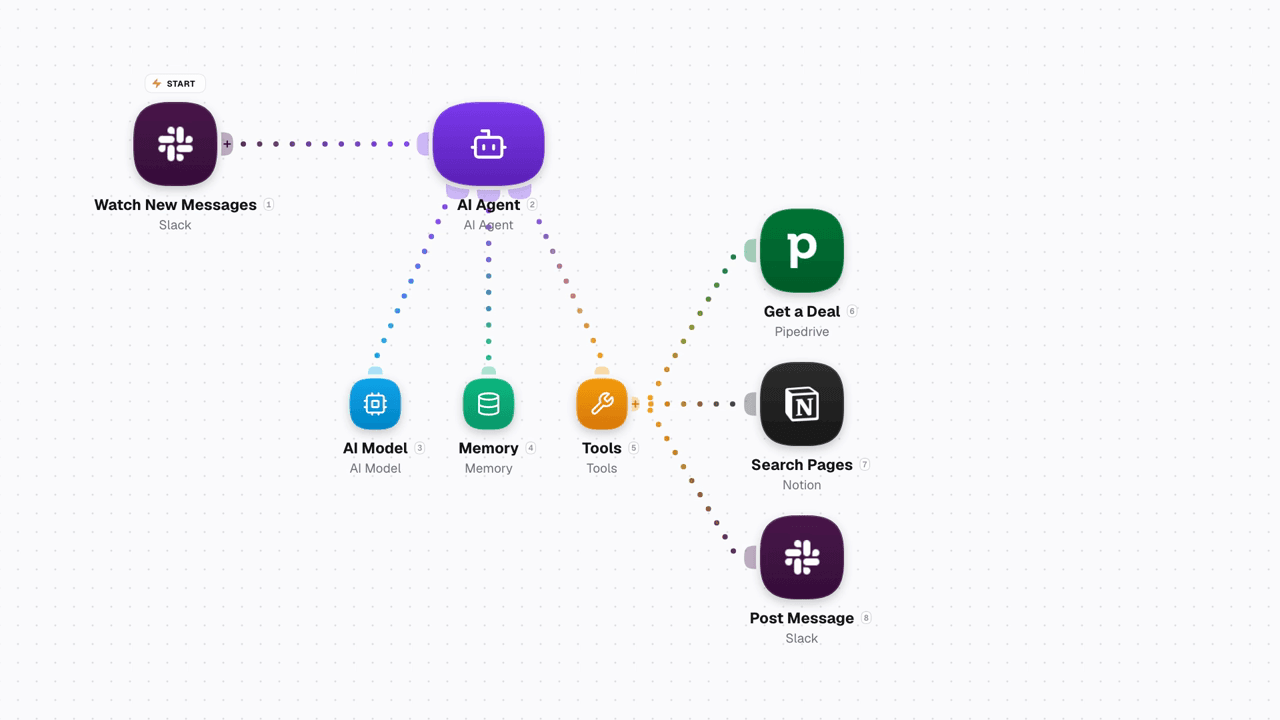
Video shows an AI Agent answering a Slack question by calling only its attached tools, Pipedrive, Notion and Slack, on WEXTL®.
Select an AI Memory tool to set a persistent or per-run scope, retention strategy, and rolling window size - same param panel as any other node [3] has. Memory key can be set from incoming node, eg. {{trigger.user_id}} - this will allow AI agent bucket messages per user ID [4]. Blank memory key still stores a conversation, but mixes the context of it with every new run.
Context is managed by Knowledge tool that can use your text data to answer user questions - no guessing, safely relying on provided knowledge. AI agent calls knowledge itself, automatically - no explicit prompt needed. When building automation, you just need to connect Knowledge to AI Agent and provide information if you want AI rely on for providing responses.
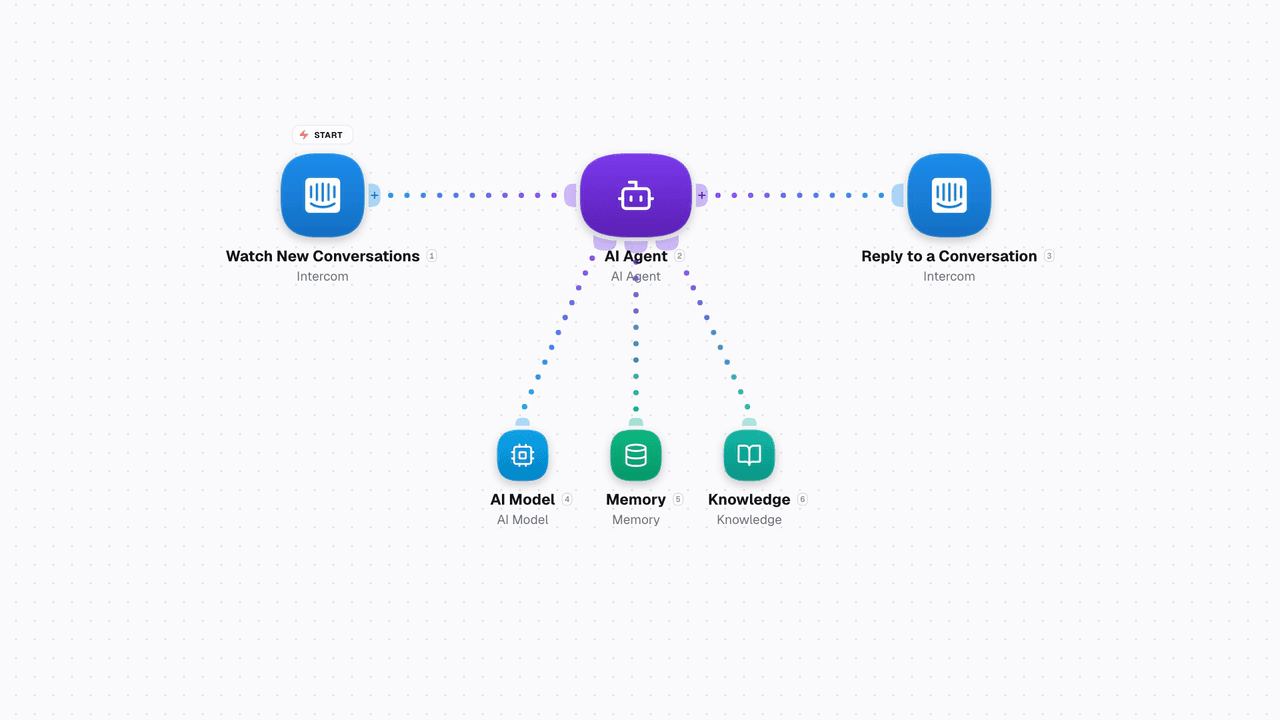
Video shows AI Agent Memory keyed by user ID, keeping each customer's history separate, and Knowledge answering from your own text on WEXTL®.
List of resources used for writing this documentation page on WEXTL®. Follow a citation to jump straight to the source.


