


Connect your tool server
Connect to an MCP endpoint instead of API - approved tools only, no code required.


WEXTL® supports Model Context Protocol (MCP) servers [1] as tool sources for AI Agent [2] nodes. Bring your own MCP endpoint - vendor-hosted or self-run - and expose only tools you approve for the agent to call. Sits alongside 1,300+ regular app integrations [3] as another way to give an agent capabilities.
Every MCP tool call is visible in the run history [4] - the tool invoked, its parameters, and its return value - just like any other native workflow node, no separate logs to investigate.

Video slide shows an AI Agent calling MCP tools on WEXTL® canvas.
Designed for teams that need extra capabilities for agents - to reach internal or external systems using Model Context Protocol. Here are 4 design points customers love [5] about WEXTL MCP® client support.
Connect to an MCP endpoint instead of API - approved tools only, no code required.
MCP integrates with AI Agent node like the model - not a hidden plugin panel in another product.
Internal MCP tools and regular app nodes share one workflow run and one audit trail.
Select tools that AI will see, then branch on high-impact calls for human review before they fire.
Only 3 main steps to follow - and AI Agent [2] will have access to MCP tools. Under 10 minutes [5] for the whole setup - from pointing at a MCP endpoint to a live agent calling approved tools inside your MCP automation workflow.
Select from available list of supported MCP servers or use the server URL from your vendor. WEXTL retrieves tools list from it and shows exactly the tools it advertises [1] - nothing is exposed to the AI Agent [2] without your approval.
Pick the tools you want the agent to expose. Only approved tools are visible to the agent node [4] - the rest are invisible.
Select tools that AI Agent will be able to call.
Add a Condition or Merge node after the agent to gate high-impact tool calls with Human in the Loop [6] review. Each MCP tool call is logged on run history [4] with parameters and return values.
MCP tools have the same audit trail as regular app steps [4]. When the AI Agent [2] calls an MCP tool, the run and its result are stored inside the workflow history - same as it is logged for regular nodes.
On the canvas [7], automator sees the MCP node always connected to the AI agent node. Same drag and drop experience as with any other native app integration. And there is no limit on how many MCP nodes can be connected to AI Agent.
WEXTL® apps catalog [3] lists native app connectors that WEXTL builds and maintains, including the auth flow. For the MCP server - customers can bring their own [1] - vendor-hosted, or select from the list of available MCP servers that WEXTL supports natively.
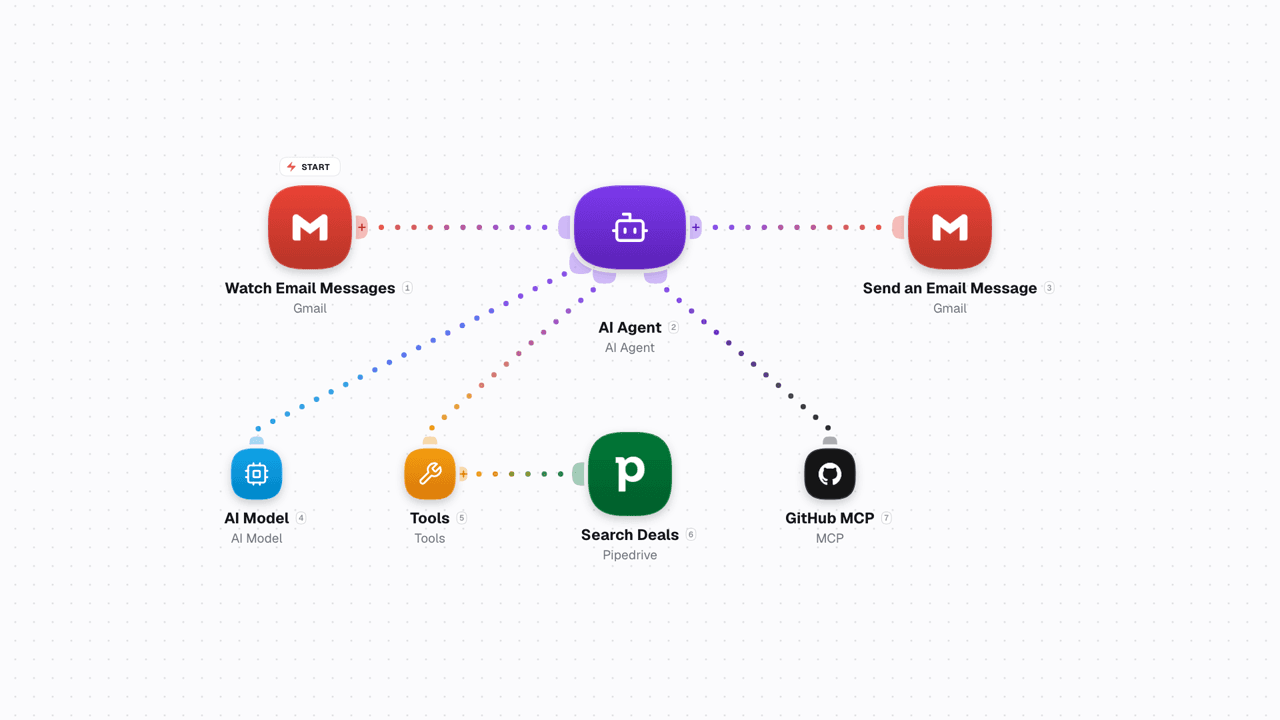
Video shows MCP node connected to AI Agent alongside app nodes on WEXTL®.
From list of available tools of your MCP endpoint select only ones that you want to let AI to call [5]. The general recommendation here - use minimal permissions that AI agent needs to perform the task with success.
Connect MCP agents to Condition, Merge and Human in the Loop nodes [6] - to have controls over outputs from the agent. For desctructive actions - you can approve tool calls manually.
Every tool call from MCP is logged inside run history [7]. Hidden bypasses are not possible and not part of the design [5].

MCP tool picker with allow-list and deny-list options on WEXTL®.
Any app in WEXTL® Apps Library [3] can act in the same workflow run as your MCP tool calls - one canvas, one audit trail, no context handed off to a separate product.
List of resources used for writing this documentation page on WEXTL®. Follow a citation to jump straight to the source.


