


Requirements
Canopy requires an active account and OAuth client credentials, granted by signing in with your account to connect — both are set up on its own site.[3]
Get your Canopy credentials
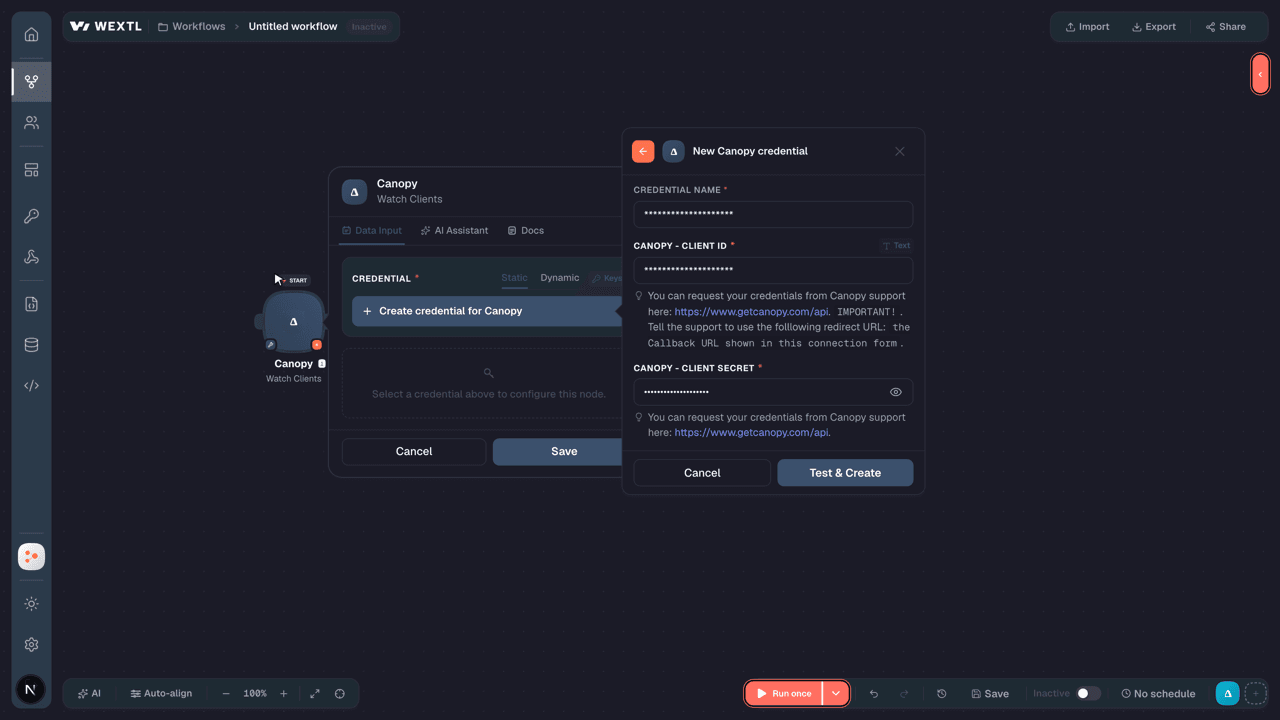
You’ll be redirected to sign in and approve access — your password is never shared with WEXTL.
- Client IDtextRequired
You can request your credentials from Canopy support here: https://www.getcanopy.com/api.
[1]IMPORTANT!. Tell the support to use the folllowing redirect URL:the Callback URL shown in this connection form. - Client SecretpasswordRequired
You can request your credentials from Canopy support here: https://www.getcanopy.com/api.
[1]
Connect Canopy in WEXTL
- Log in to your WEXTL account, add the Canopy node module to your workflow, and click Create new credential.
- Optional: In the Credential name field, enter a name for the credential.
- Enter the authentication credentials you copied from your Canopy account, or follow the on-screen instructions to create the credential.
- If prompted, authenticate your account and confirm access.
- If you want to make changes to your credential in the future, follow the steps in Manage credentials →

Notes
Credentials are org-scoped; share them with teammates from the Credentials picker on any of its nodes.For detailed information on connecting an application, see Connect an application →
Canopy node modules
The list below is a reference of every Canopy node module the integration supports. You will be able to pick any of them on the workflow canvas while building automations.
Browse every Canopy node module below — each one opens to show its input parameters, outputs, and connection requirements.
Watch ClientsTrigger
| Field | Type |
|---|---|
| External ID | text |
| ID | text |
| Is business | boolean |
| Name | text |
| Type | text |
Watch Updated ClientsTrigger
| Field | Type |
|---|---|
| External ID | text |
| ID | text |
| Is business | boolean |
| Name | text |
| Type | text |
Get a ClientAction
| Field | Type |
|---|---|
Client IDRequired | text |
| Field | Type |
|---|---|
| Addresses | array |
| Archived at | text |
| Birthdate | text |
| Client since | text |
| Contact owner ID | text |
| Contact sources | array |
| Created at | text |
| Custom fields | array |
| Deleted at | text |
| Emails | array |
| Employer name | text |
| External ID | text |
| Filing status | text |
| First name | text |
| ID | text |
| Is active | boolean |
| Is archived | boolean |
| Is business | boolean |
| Is deleted | boolean |
| Last name | text |
Get Custom FieldsAction
| Field | Type |
|---|---|
| Custom fields | array |
List ClientsSearch
Search ClientsSearch
Create a ClientAction
| Field | Type |
|---|---|
First NameRequired | text |
Last NameRequired | text |
| Middle Name | text |
| Birthdate | date |
| Employer Name | text |
| Filing Status | text |
| Occupation | text |
| Display Name | text |
| Tax Identification Number (TIN) | text |
| Client Since | date |
| Is Archived | boolean |
| Is Active | boolean |
| Is Business | boolean |
| External ID | text |
| Notes | text |
| Emails | array |
| Type | text |
| Is Primary | boolean |
| Email Address | |
| Phones | array |
| Type | text |
| Is Primary | boolean |
| Phone Number | text |
| Extension | text |
| Addresses | array |
| Is Primary | boolean |
| Type | text |
| Region | text |
| Country | text |
| City/Locality | text |
| Address Line 1 | text |
| Address Line 2 | text |
| Postal Code | text |
| Custom Fields | array |
| Field ID | choice |
| Linked Clients | array |
| Client ID | text |
| Client Name | text |
| Relationship Type | text |
| Field | Type |
|---|---|
| Addresses | array |
| Archived at | text |
| Birthdate | text |
| Client since | text |
| Contact owner ID | text |
| Contact sources | array |
| Created at | text |
| Custom fields | array |
| Deleted at | text |
| Emails | array |
| Employer name | text |
| External ID | text |
| Filing status | text |
| First name | text |
| ID | text |
| Is active | boolean |
| Is archived | boolean |
| Is business | boolean |
| Is deleted | boolean |
| Last name | text |
Delete a ClientAction
| Field | Type |
|---|---|
Client IDRequired | text |
Make an API Calluniversal
Update a ClientAction
| Field | Type |
|---|---|
Client IDRequired | text |
| First Name | text |
| Middle Name | text |
| Last Name | text |
| Birthdate | date |
| Employer Name | text |
| Filing Status | text |
| Occupation | text |
| Display Name | text |
| Tax Identification Number (TIN) | text |
| Client Since | date |
| Is Archived | boolean |
| Is Active | boolean |
| Is Business | boolean |
| External ID | text |
| Notes | text |
| Emails | array |
| Type | text |
| Is Primary | boolean |
| Email Address | |
| Phones | array |
| Type | text |
| Is Primary | boolean |
| Phone Number | text |
| Extension | text |
| Addresses | array |
| Is Primary | boolean |
| Type | text |
| Region | text |
| Country | text |
| City/Locality | text |
| Address Line 1 | text |
| Address Line 2 | text |
| Postal Code | text |
| Custom Fields | array |
| Field ID | choice |
| Field | Type |
|---|---|
| Client ID | text |
| Addresses | array |
| Archived at | text |
| Birthdate | text |
| Client since | text |
| Contact owner ID | text |
| Contact sources | array |
| Created at | text |
| Custom fields | array |
| Deleted at | text |
| Emails | array |
| Employer name | text |
| External ID | text |
| Filing status | text |
| First name | text |
| ID | text |
| Is active | boolean |
| Is archived | boolean |
| Is business | boolean |
| Is deleted | boolean |
Templates
Look for Canopy templates in the WEXTL template library.
Browse templates →Explore alternative apps
- Wolters Kluwer[2]Professional information services for legal, tax, and compliance workflows.
- SymmetryPayroll tax compliance platform for calculating withholdings, managing I-9/E-Verify submissions, and handling federal, state, and local tax forms.
- NinjaOneRemote monitoring and management (RMM) platform for MSPs — devices, organizations, alerts, policies, patching, ticketing, billing, documents, and asset management.
- StravaConnect Strava activities, athletes, segments, and routes to your workflows.
- ZoyaShariah compliance screening platform for stocks and ETFs, enabling halal investing decisions based on Islamic finance principles.


References
- WEXTL® Canopy Source Code connector implementation.
- Our users use cases and automations.
- Official API Documentation for Canopy.
- WEXTL® visual workflow builder data.
Last updated: Jul 23, 2026 22:38