


Requirements
Connecting Dito takes an active account plus OAuth client credentials, granted by signing in with your account — no other setup is required.[3]
Get your Dito credentials
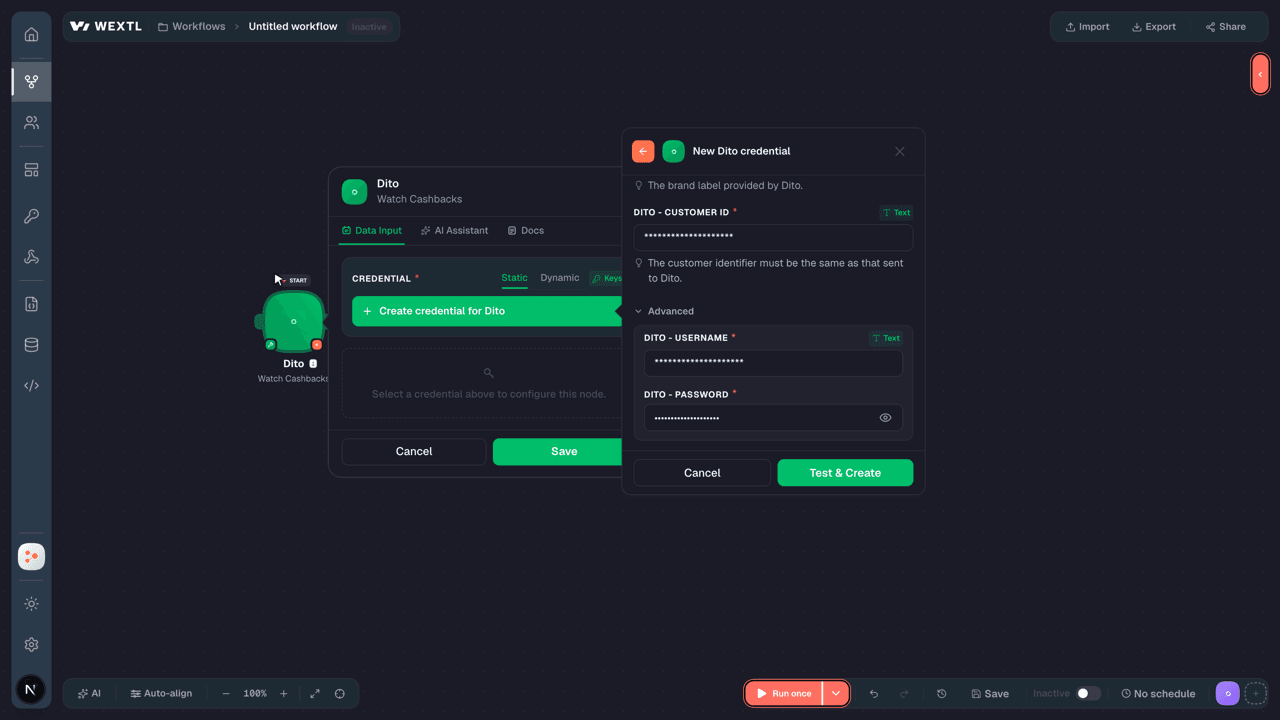
Connect Dito in WEXTL
- Log in to your WEXTL account, add the Dito node module to your workflow, and click Create new credential.
- Optional: In the Credential name field, enter a name for the credential.
- Enter the authentication credentials you copied from your Dito account, or follow the on-screen instructions to create the credential.
- If prompted, authenticate your account and confirm access.
- If you want to make changes to your credential in the future, follow the steps in Manage credentials →

Notes
Credentials are org-scoped; share them with teammates from the Credentials picker on any of its nodes.For detailed information on connecting an application, see Connect an application →
Dito node modules
The list below is a reference of every Dito node module the integration supports. You will be able to pick any of them on the workflow canvas while building automations.
Expand any Dito node module below to see exactly what it takes in, what it returns, and what connection it needs.
Watch CashbacksTrigger
Output fields[3]
| Field | Type |
|---|---|
| User ID | number |
| Email address | |
| Name | text |
| Date created | date |
Get Cashback BalanceAction
List CashbacksSearch
Simulate a Cashback RedemptionSearch
Input fields[3]
| Field | Type |
|---|---|
Order ValueRequired | text |
| Store ID | text |
| Seller ID | text |
| Source | text |
| Order Voucher | text |
| Seller Voucher | text |
| Order Discount | text |
| Products | array |
| Limit | number |
Output fields[3]
| Field | Type |
|---|---|
| Reward | object |
| ID | number |
| Due date | date |
| Value | number |
| Rate | number |
| Status | text |
| Available at | date |
| Created at | date |
| Balance | number |
| Canceled at | date |
| Campaign | object |
| ID | number |
| Name | text |
| Description | text |
| Cashback value | number |
Cancel or Reverse CashbacksAction
Commit CashbackAction
Input fields[3]
| Field | Type |
|---|---|
Lock TokenRequired | text |
Value UsedRequired | text |
Order IDRequired | text |
| Custom Data | array |
Create a Cashback Redemption IntentionAction
Make an API Calluniversal
Rollback a CashbackAction
Input fields[3]
| Field | Type |
|---|---|
| Lock Token | text |
Templates
Look for Dito templates in the WEXTL template library.
Browse templates →Explore alternative apps
- Brandwatch[2]Consumer intelligence and social listening platform for brand monitoring, insights, and research.
- AkeneoProduct information management (PIM) for enriching and distributing catalog data.
- AWeberEmail marketing — lists, subscribers, campaigns, and broadcasts.
- beehiivPublish newsletters and manage subscribers in beehiiv.
- BrandfetchLook up company logos, colors, fonts, and firmographic data with Brandfetch.


References
- WEXTL® Dito Source Code connector implementation.
- Our users use cases and automations.
- Official API Documentation for Dito.
- WEXTL® visual workflow builder data.
Last updated: Jul 23, 2026 22:39