


Requirements
To use Fynk on WEXTL you need an active account and an API access token from your account settings.[3]
Get your Fynk credentials
- API KeypasswordRequired
Go to the API settings page and click the
[1]Create Tokenbutton.
Connect Fynk in WEXTL
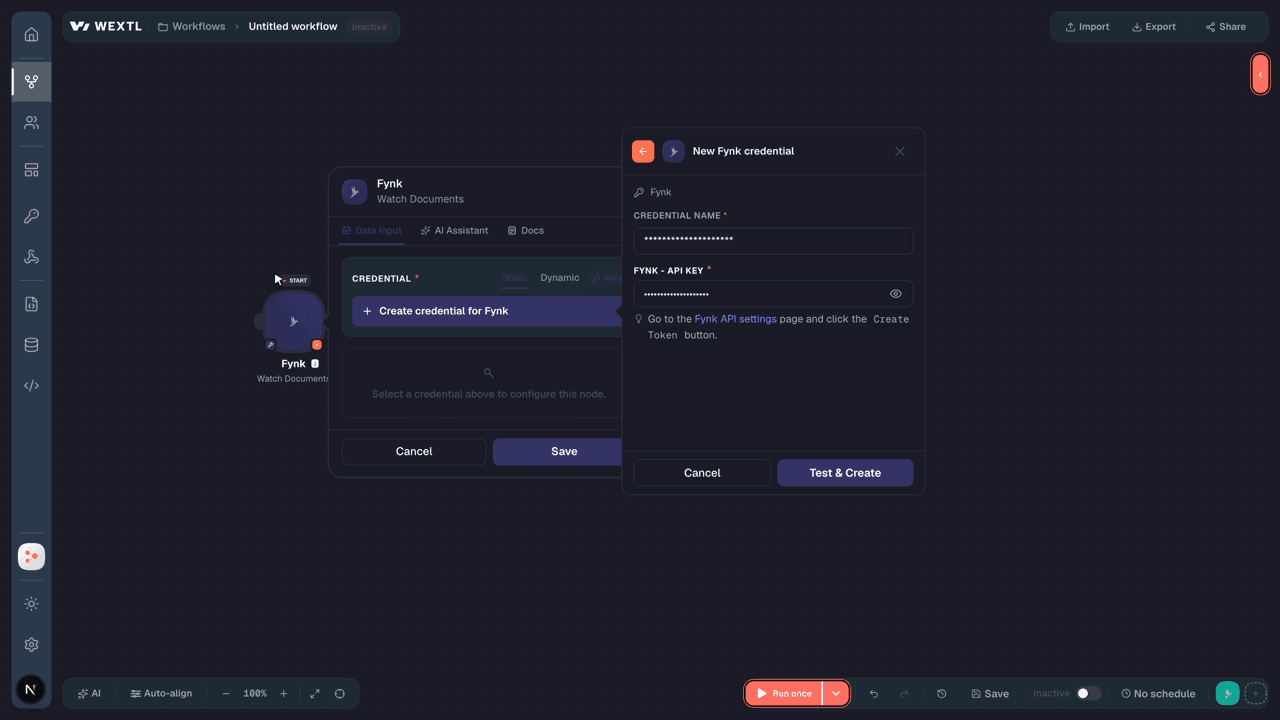
- Log in to your WEXTL account, add the Fynk node module to your workflow, and click Create new credential.
- Optional: In the Credential name field, enter a name for the credential.
- Enter the authentication credentials you copied from your Fynk account, or follow the on-screen instructions to create the credential.
- If prompted, authenticate your account and confirm access.
- If you want to make changes to your credential in the future, follow the steps in Manage credentials →

Notes
Credentials are org-scoped; share them with teammates from the Credentials picker on any of its nodes.For detailed information on connecting an application, see Connect an application →
Fynk node modules
The list below is a reference of every Fynk node module the integration supports. You will be able to pick any of them on the workflow canvas while building automations.
Open any Fynk node module below to inspect its input parameters, outputs, and connection requirements.
Watch DocumentsTrigger
Output fields[3]
| Field | Type |
|---|---|
| UUID | text |
| Name | text |
| Document type | text |
| Origin | text |
| Stage | text |
| Locale | text |
| Template UUID | text |
| Created at | date |
| Updated at | date |
| Archived at | date |
| Parties | array |
| Links | object |
| Show | text |
| Latest revision PDF | text |
| Latest revision PDF download | text |
Get a DocumentAction
List Document Metadata ValuesSearch
Input fields[3]
| Field | Type |
|---|---|
Document IDRequired | choice |
| Limit | number |
Output fields[3]
| Field | Type |
|---|---|
| UUID | text |
| Metadata | object |
| UUID | text |
| Type | text |
| Value type | text |
| Name | text |
| Display name | text |
| Settings | object |
| Select values | array |
| Always exists | boolean |
| Description | text |
| Reference dynamic field UUID | text |
| Value source | text |
| Value | text |
| Value currency monthly | text |
| Value currency yearly | text |
| Computed status | text |
| Computed value | text |
| Is attached | boolean |
| Computed at | date |
List Document PartiesSearch
List Document SignatoriesSearch
Search DocumentsSearch
Input fields[3]
| Field | Type |
|---|---|
| Archived | choice |
| Document Users | text |
| Excluded Tags | text |
| Expired | choice |
| Origins | text |
| Query | text |
| Stages | text |
| Tag AND | choice |
| Tags | text |
| Team Unassigned | choice |
| Teams | text |
| Templates | text |
| Sort By | choice |
| Sort Direction | choice |
| Limit | number |
Output fields[3]
| Field | Type |
|---|---|
| UUID | text |
| Name | text |
| Document type | text |
| Origin | text |
| Stage | text |
| Locale | text |
| Template UUID | text |
| Created at | date |
| Updated at | date |
| Archived at | date |
| Parties | array |
| Links | object |
| Show | text |
| Latest revision PDF | text |
| Latest revision PDF download | text |
Add a Document Metadata ValueAction
Input fields[3]
| Field | Type |
|---|---|
Document IDRequired | choice |
| Value | text |
Add a Document PartyAction
Input fields[3]
| Field | Type |
|---|---|
Document IDRequired | choice |
ReferenceRequired | text |
| Account Party UUID | text |
| Entity Type | choice |
| Entity Name | text |
| Address | text |
| Scope | choice |
Output fields[3]
| Field | Type |
|---|---|
| UUID | text |
| Reference | text |
| Entity type | text |
| Entity name | text |
| Address | text |
| Scope | text |
| Is internal party | boolean |
| Is ready for signing | boolean |
| Ready for signing at | text |
| Created at | date |
| Updated at | date |
| Signatories | array |
Add a Document SignatoryAction
Create a Document from a TemplateAction
Input fields[3]
| Field | Type |
|---|---|
Template UUIDRequired | text |
| Document Name | text |
| Owner Emails | array |
| Owner Email |
Output fields[3]
| Field | Type |
|---|---|
| UUID | text |
| Name | text |
| Document type | text |
| Signature type | text |
| Sequential signing | boolean |
| Origin | text |
| Stage | text |
| Locale | text |
| Template UUID | text |
| External signatory invitation message | text |
| Created at | date |
| Updated at | date |
| Archived at | date |
| Parties | array |
| Teams | array |
| Signatories | array |
| Dynamic fields | array |
| Metadata values | array |
| Tags | array |
Create a Document from an Uploaded PDFAction
Input fields[3]
| Field | Type |
|---|---|
File Upload UUIDRequired | text |
File NameRequired | text |
Initial StageRequired | choice |
| Document Name | text |
| Template UUID | choice |
| Document Type | choice |
| Account Party UUID | text |
| AI Analysis Auto Apply | boolean |
| Owner Emails | array |
| Owner Email | |
| Team UUIDs | array |
| Team UUID | text |
| Tag UUIDs | array |
| Tag UUID | choice |
Output fields[3]
| Field | Type |
|---|---|
| UUID | text |
| Name | text |
| Document type | text |
| Signature type | text |
| Sequential signing | boolean |
| Origin | text |
| Stage | text |
| Locale | text |
| Template UUID | text |
| External signatory invitation message | text |
| Created at | date |
| Updated at | date |
| Archived at | date |
| Parties | array |
| Teams | array |
| Signatories | array |
| Dynamic fields | array |
| Metadata values | array |
| Tags | array |
Delete a Document MetadataAction
Input fields[3]
| Field | Type |
|---|---|
Document IDRequired | choice |
Delete a Document SignatoryAction
Input fields[3]
| Field | Type |
|---|---|
Document IDRequired | choice |
Download a DocumentAction
Make an API Calluniversal
Move a Document to a Review StageAction
Move a Document to a Signing StageAction
Input fields[3]
| Field | Type |
|---|---|
Document IDRequired | choice |
| Signature Type | choice |
| Sequential Signing | boolean |
| Message | text |
Output fields[3]
| Field | Type |
|---|---|
| UUID | text |
| Name | text |
| Document type | text |
| Origin | text |
| Stage | text |
| Locale | text |
| Template UUID | text |
| Created at | date |
| Updated at | date |
| Archived at | date |
| Parties | array |
| Links | object |
| Show | text |
| Latest revision PDF | text |
| Latest revision PDF download | text |
Update a DocumentAction
Input fields[3]
| Field | Type |
|---|---|
Document IDRequired | choice |
| Document Name | text |
| Sequential Signing | boolean |
| Signature Type | choice |
| External Signatory Invitation Message | text |
Output fields[3]
| Field | Type |
|---|---|
| UUID | text |
| Name | text |
| Document type | text |
| Origin | text |
| Stage | text |
| Locale | text |
| Template UUID | text |
| Created at | date |
| Updated at | date |
| Archived at | date |
| Parties | array |
| Links | object |
| Show | text |
| Latest revision PDF | text |
| Latest revision PDF download | text |
Update a Document Dynamic FieldAction
Input fields[3]
| Field | Type |
|---|---|
Document IDRequired | choice |
| Value | text |
Output fields[3]
| Field | Type |
|---|---|
| UUID | text |
| Type | text |
| Name | text |
| Scope | text |
| Settings | object |
| Currencies | array |
| Autofill type | text |
| Format | object |
| Decimals | number |
| Decimal separator | text |
| Thousands separator | text |
| Select values | array |
| Is mandatory | boolean |
| Question | text |
| Question external | text |
| Value | text |
| Order | number |
Update a Document PartyAction
Input fields[3]
| Field | Type |
|---|---|
Document IDRequired | choice |
| Reference | text |
| Entity Type | choice |
| Entity Name | text |
| Address | text |
| Scope | choice |
Output fields[3]
| Field | Type |
|---|---|
| UUID | text |
| Reference | text |
| Entity type | text |
| Entity name | text |
| Address | text |
| Scope | text |
| Is internal party | boolean |
| Is ready for signing | boolean |
| Ready for signing at | text |
| Created at | date |
| Updated at | date |
| Signatories | array |
Update a Document SignatoryAction
Templates
Look for Fynk templates in the WEXTL template library.
Browse templates →Explore alternative apps
- Azure Storage[2]Manage containers and blobs in Azure Blob Storage.
- AWS LambdaServerless compute that runs your code without managing servers.
- AssemblyAISpeech AI APIs for transcription, understanding, and voice-powered applications.
- AdafruitAdafruit IO cloud for IoT feeds, groups, and device data streams.
- ClerkAuthentication and user management with sign-in, sign-up, and MFA.


References
- WEXTL® Fynk Source Code connector implementation.
- Our users use cases and automations.
- Official API Documentation for Fynk.
- WEXTL® visual workflow builder data.
Last updated: Jul 24, 2026 18:11