


Requirements
To use Gladia on WEXTL you need an active account and an API access token from your account settings.[3]
Get your Gladia credentials
- API KeypasswordRequired
On Gladia website go to the API keys section to grab your API Key.
[1]
Connect Gladia in WEXTL
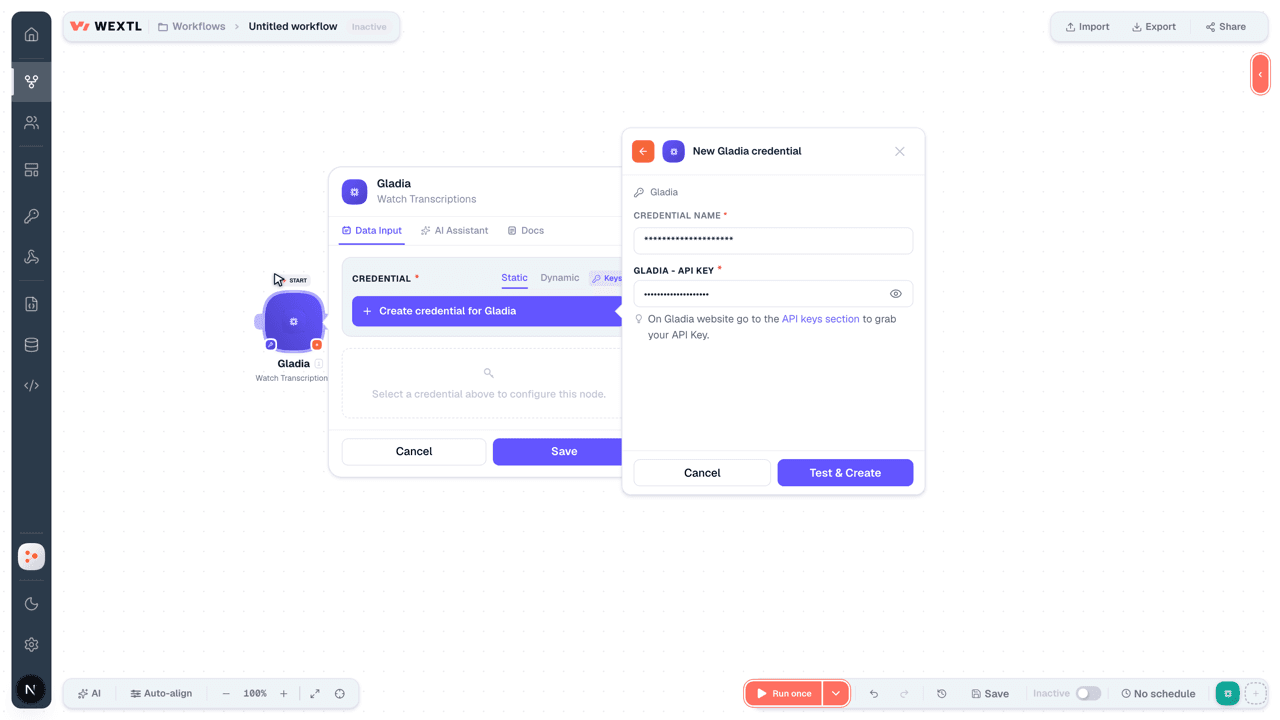
- Log in to your WEXTL account, add the Gladia node module to your workflow, and click Create new credential.
- Optional: In the Credential name field, enter a name for the credential.
- Enter the authentication credentials you copied from your Gladia account, or follow the on-screen instructions to create the credential.
- If prompted, authenticate your account and confirm access.
- If you want to make changes to your credential in the future, follow the steps in Manage credentials →
Notes
Credentials are org-scoped; share them with teammates from the Credentials picker on any of its nodes.For detailed information on connecting an application, see Connect an application →
Gladia node modules
The list below is a reference of every Gladia node module the integration supports. You will be able to pick any of them on the workflow canvas while building automations.
Open any Gladia node module below to inspect its input parameters, outputs, and connection requirements.
Watch TranscriptionsTrigger
Output fields[3]
| Field | Type |
|---|---|
| ID | text |
| Request ID | text |
| Version | number |
| Status | text |
| Created at | date |
| Completed at | date |
| Custom metadata | object |
| Error code | number |
| Kind | text |
| File | object |
| ID | text |
| Filename | text |
| Source | text |
| Audio duration | number |
| Number of channels | number |
| Request params | object |
| Context prompt | text |
| Custom vocabulary | boolean |
| Custom vocabulary config | object |
| Detect language | boolean |
| Enable code switching | boolean |
| Code switching config | object |
| Language | text |
| Callback URL | text |
| Callback | boolean |
| Callback config | object |
| Result | object |
| Metadata | object |
| Transcription | object |
| Translation | object |
| Summarization | object |
| Moderation | object |
| Named entity recognition | object |
| Name consistency | object |
| Speaker reidentification | object |
| Structured data extraction | object |
| Sentiment analysis | object |
Get a Transcription Audio FileAction
Get a Transcription ResultAction
Input fields[3]
| Field | Type |
|---|---|
Transcription IDRequired | choice |
Output fields[3]
| Field | Type |
|---|---|
| ID | text |
| Request ID | text |
| Version | number |
| Status | text |
| Created at | date |
| Completed at | date |
| Custom metadata | object |
| Error code | number |
| Kind | text |
| File | object |
| ID | text |
| Filename | text |
| Source | text |
| Audio duration | number |
| Number of channels | number |
| Request params | object |
| Context prompt | text |
| Custom vocabulary | boolean |
| Custom vocabulary config | object |
| Detect language | boolean |
| Enable code switching | boolean |
| Code switching config | object |
| Language | text |
| Callback URL | text |
| Callback | boolean |
| Callback config | object |
| Result | object |
| Metadata | object |
| Transcription | object |
| Translation | object |
| Summarization | object |
| Moderation | object |
| Named entity recognition | object |
| Name consistency | object |
| Speaker reidentification | object |
| Structured data extraction | object |
| Sentiment analysis | object |
List TranscriptionsSearch
Input fields[3]
| Field | Type |
|---|---|
| Date | date |
| Before Date | date |
| After Date | date |
| Status | array |
| Custom Metadata | object |
Key NameRequired | text |
ValueRequired | text |
| Limit | number |
Output fields[3]
| Field | Type |
|---|---|
| ID | text |
| Request ID | text |
| Version | number |
| Status | text |
| Created at | date |
| Completed at | date |
| Custom metadata | object |
| Error code | number |
| Kind | text |
| File | object |
| ID | text |
| Filename | text |
| Source | text |
| Audio duration | number |
| Number of channels | number |
| Request params | object |
| Context prompt | text |
| Custom vocabulary | boolean |
| Custom vocabulary config | object |
| Detect language | boolean |
| Enable code switching | boolean |
| Code switching config | object |
| Language | text |
| Callback URL | text |
| Callback | boolean |
| Callback config | object |
| Result | object |
| Metadata | object |
| Transcription | object |
| Translation | object |
| Summarization | object |
| Moderation | object |
| Named entity recognition | object |
| Name consistency | object |
| Speaker reidentification | object |
| Structured data extraction | object |
| Sentiment analysis | object |
Create a TranscriptionAction
Input fields[3]
| Field | Type |
|---|---|
Audio URLRequired | url |
| Custom Vocabulary | boolean |
| Callback | boolean |
| Subtitles | boolean |
| Diarization | boolean |
| Translation | boolean |
| Summarization | boolean |
| Moderation | boolean |
| Named Entity Recognition | boolean |
| Chapterization | boolean |
| Names Consistency | boolean |
| Custom Spelling | boolean |
| Custom Spelling Config | array |
WordRequired | text |
Spelling ValueRequired | array |
| Structured Data Extraction | boolean |
| Structured Data Extraction Config | object |
ClassesRequired | array |
| Sentiment Analysis | boolean |
| Audio to LLM | boolean |
| Audio to LLM Config | object |
PromptsRequired | array |
| Custom Metadata | array |
Key NameRequired | text |
ValueRequired | text |
| Sentences | boolean |
3other input fields
Output fields[3]
| Field | Type |
|---|---|
| ID | text |
| Result URL | url |
Delete a TranscriptionAction
Input fields[3]
| Field | Type |
|---|---|
Transcription IDRequired | choice |
Make an API Calluniversal
Templates
Look for Gladia templates in the WEXTL template library.
Browse templates →Explore alternative apps
- Adafruit[2]Adafruit IO cloud for IoT feeds, groups, and device data streams.
- AssemblyAISpeech AI APIs for transcription, understanding, and voice-powered applications.
- Azure StorageManage containers and blobs in Azure Blob Storage.
- ClerkAuthentication and user management with sign-in, sign-up, and MFA.
- AWS LambdaServerless compute that runs your code without managing servers.


References
- WEXTL® Gladia Source Code connector implementation.
- Our users use cases and automations.
- Official API Documentation for Gladia.
- WEXTL® visual workflow builder data.
Last updated: Jul 24, 2026 18:11