


Requirements
Google Sheets requires an active account and OAuth client credentials, granted by signing in with your account to connect — both are set up on its own site.[3]
Get your Google Sheets credentials
You’ll be redirected to sign in and approve access — your password is never shared with WEXTL.
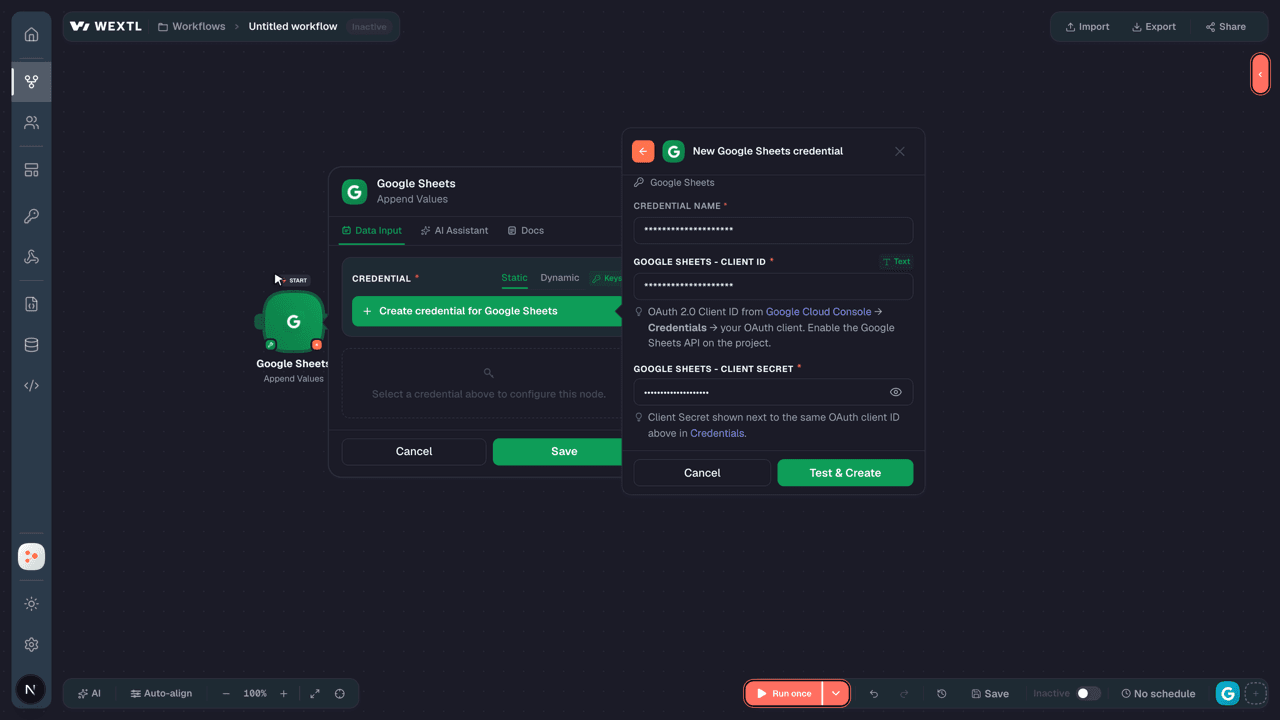
- Client IDtext
Optional. Your own OAuth 2.0 Client ID from Google Cloud Console. Leave empty to use the platform app. Enable the API on the project.
[1] - Client Secretpassword
Optional. Client Secret for the same OAuth client. Leave empty to use the platform app.
[1] - Additional Scopesarray
Optional. Extra Google OAuth scopes to request on top of the default ones, one full scope URL per item (for example https://www.googleapis.com/auth/drive). Duplicates of the default scopes are ignored. Use this with your own Client ID, and enable the same scopes on its OAuth consent screen.
[1]
Connect Google Sheets in WEXTL
- Log in to your WEXTL account, add the Google Sheets node module to your workflow, and click Create new credential.
- Optional: In the Credential name field, enter a name for the credential.
- Enter the authentication credentials you copied from your Google Sheets account, or follow the on-screen instructions to create the credential.
- If prompted, authenticate your account and confirm access.
- If you want to make changes to your credential in the future, follow the steps in Manage credentials →

Notes
Credentials are org-scoped; share them with teammates from the Credentials picker on any of its nodes.For detailed information on connecting an application, see Connect an application →
Google Sheets node modules
The list below is a reference of every Google Sheets node module the integration supports. You will be able to pick any of them on the workflow canvas while building automations.
Browse every Google Sheets node module below — each one opens to show its input parameters, outputs, and connection requirements.
Watch New RowsTrigger
| Field | Type |
|---|---|
| Row Number | number |
| Spreadsheet ID | text |
| Sheet | text |
| Values | array |
Get Developer MetadataAction
Get SpreadsheetAction
Get Spreadsheet by Data FilterAction
Get ValuesAction
Search Developer MetadataAction
Append a RowAction
| Field | Type |
|---|---|
SpreadsheetRequired | choice |
SheetRequired | choice |
Value Input OptionRequired | choice |
| Insert Data Option | choice |
| Field | Type |
|---|---|
| Spreadsheet ID | text |
| Table Range | text |
| Updates | object |
| Spreadsheet ID | text |
| Updated Range | text |
| Updated Rows | number |
| Updated Columns | number |
| Updated Cells | number |
| Updated Data | object |
Append Multiple RowsAction
| Field | Type |
|---|---|
SpreadsheetRequired | choice |
SheetRequired | choice |
| Rows | array |
Value Input OptionRequired | choice |
| Insert Data Option | choice |
| Field | Type |
|---|---|
| Spreadsheet ID | text |
| Table Range | text |
| Updates | object |
| Spreadsheet ID | text |
| Updated Range | text |
| Updated Rows | number |
| Updated Columns | number |
| Updated Cells | number |
| Updated Data | object |
Append ValuesAction
| Field | Type |
|---|---|
Choose a MethodRequired | choice |
| Major Dimension | choice |
| Values | array |
| Row | array |
Value Input OptionRequired | choice |
| Insert Data Option | choice |
| Include Values In Response | boolean |
| Response Value Render Option | choice |
| Response Date Time Render Option | choice |
| Field | Type |
|---|---|
| Spreadsheet ID | text |
| Table Range | text |
| Updates | object |
| Spreadsheet ID | text |
| Updated Range | text |
| Updated Rows | number |
| Updated Columns | number |
| Updated Cells | number |
| Updated Data | object |
Batch Clear ValuesAction
Batch Clear Values by Data FilterAction
Batch Get ValuesAction
Batch Get Values by Data FilterAction
Batch Update SpreadsheetAction
Batch Update ValuesAction
| Field | Type |
|---|---|
Choose a MethodRequired | choice |
Value Input OptionRequired | choice |
DataRequired | array |
| Include Values In Response | boolean |
| Response Value Render Option | choice |
| Response Date Time Render Option | choice |
| Field | Type |
|---|---|
| Spreadsheet ID | text |
| Total Updated Rows | number |
| Total Updated Columns | number |
| Total Updated Cells | number |
| Total Updated Sheets | number |
| Responses | array |
| Spreadsheet ID | text |
| Updated Range | text |
| Updated Rows | number |
| Updated Columns | number |
| Updated Cells | number |
Batch Update Values by Data FilterAction
| Field | Type |
|---|---|
Choose a MethodRequired | choice |
Value Input OptionRequired | choice |
DataRequired | array |
| Include Values In Response | boolean |
| Response Value Render Option | choice |
| Response Date Time Render Option | choice |
| Field | Type |
|---|---|
| Spreadsheet ID | text |
| Total Updated Rows | number |
| Total Updated Columns | number |
| Total Updated Cells | number |
| Total Updated Sheets | number |
| Responses | array |
| Updated Range | text |
| Updated Rows | number |
| Updated Columns | number |
| Updated Cells | number |
| Data Filter | object |
Clear ValuesAction
Copy Sheet toAction
Create SpreadsheetAction
Make an Api Calluniversal
Update ValuesAction
| Field | Type |
|---|---|
Choose a MethodRequired | choice |
| Major Dimension | choice |
| Values | array |
| Row | array |
Value Input OptionRequired | choice |
| Include Values In Response | boolean |
| Response Value Render Option | choice |
| Response Date Time Render Option | choice |
| Field | Type |
|---|---|
| Spreadsheet ID | text |
| Updated Range | text |
| Updated Rows | number |
| Updated Columns | number |
| Updated Cells | number |
| Updated Data | object |
| Range | text |
| Major Dimension | text |
| Values | array |
Templates
Look for Google Sheets templates in the WEXTL template library.
Browse templates →Explore alternative apps
- Bitwarden[2]Manage organization members, groups, collections, and policies in Bitwarden.
- BoxStore, share, and automate files and folders in Box.
- BitbucketBitbucket Cloud REST 2.0 — repositories, pull requests, pipelines, commits, and webhooks.
- AdafruitAdafruit IO cloud for IoT feeds, groups, and device data streams.
- Azure StorageManage containers and blobs in Azure Blob Storage.


References
- WEXTL® Google Sheets Source Code connector implementation.
- Our users use cases and automations.
- Official API Documentation for Google Sheets.
- WEXTL® visual workflow builder data.
Last updated: Jul 22, 2026 23:18