


Requirements
Forager requires an active account and an API access token from your account settings to connect — both are set up on its own site.[3]
Get your Forager credentials
- API KeypasswordRequired
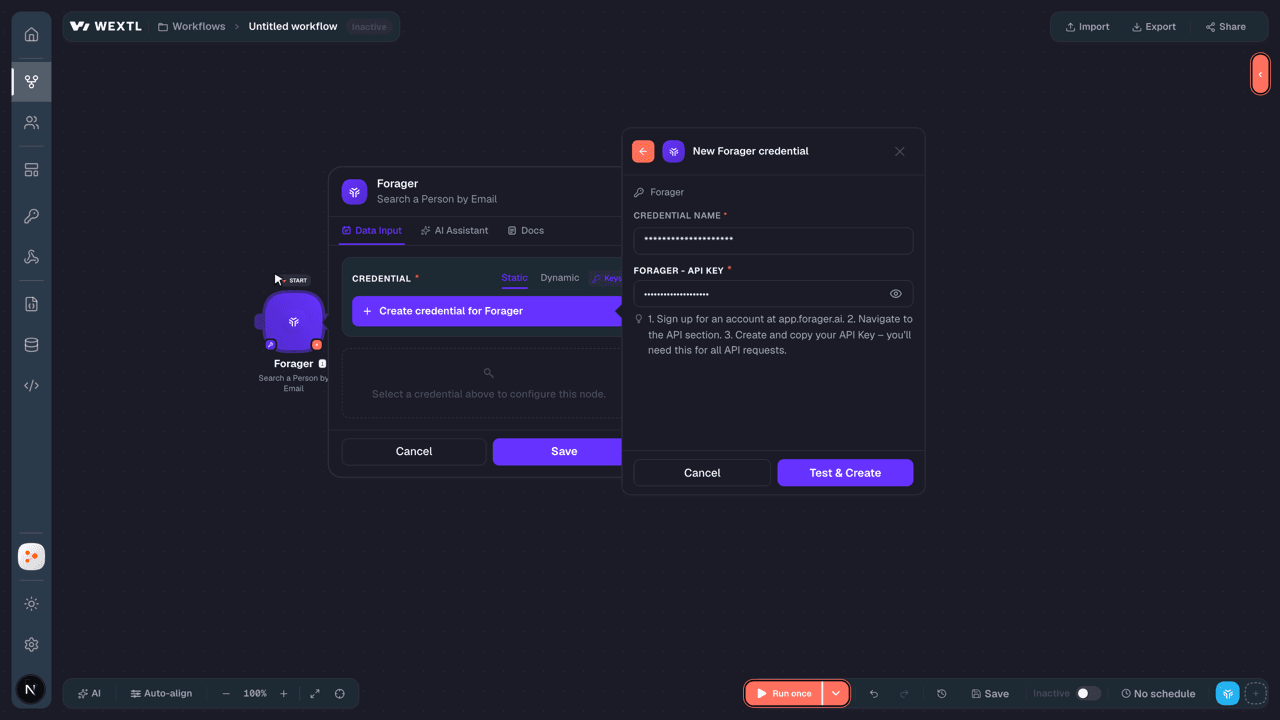
- Sign up for an account at app.forager.ai. 2. Navigate to the API section. 3. Create and copy your API Key – you’ll need this for all API requests.
Connect Forager in WEXTL
- Log in to your WEXTL account, add the Forager node module to your workflow, and click Create new credential.
- Optional: In the Credential name field, enter a name for the credential.
- Enter the authentication credentials you copied from your Forager account, or follow the on-screen instructions to create the credential.
- If prompted, authenticate your account and confirm access.
- If you want to make changes to your credential in the future, follow the steps in Manage credentials →

Notes
Credentials are org-scoped; share them with teammates from the Credentials picker on any of its nodes.For detailed information on connecting an application, see Connect an application →
Forager node modules
The list below is a reference of every Forager node module the integration supports. You will be able to pick any of them on the workflow canvas while building automations.
Browse every Forager node module below — each one opens to show its input parameters, outputs, and connection requirements.
Get Work EmailSearch
Lookup Personal EmailsSearch
Lookup Phone NumbersSearch
Search a Person by EmailAction
Input fields[3]
| Field | Type |
|---|---|
Account IDRequired | choice |
EmailRequired | |
| Limit | number |
Output fields[3]
| Field | Type |
|---|---|
| ID | number |
| Full name | text |
| First name | text |
| Last name | text |
| Photo | text |
| Gender | text |
| Headline | text |
| Description | text |
| Skills | array |
| Location | object |
| ID | number |
| Name | text |
| Osm locations | array |
| Linkedin info | object |
| Public identifier | text |
| Industry | object |
| Public profile URL | text |
| Roles | array |
| Educations | array |
| Certifications | array |
| Courses | array |
| Honors | array |
| Languages | array |
| Organizations | array |
| Patents | array |
| Publications | array |
3other output fields
Search Job Post EventsSearch
Input fields[3]
| Field | Type |
|---|---|
Account IDRequired | choice |
Job SourceRequired | choice |
| Date Featured Start | date |
| Date Featured End | date |
| Organization IDs | array |
| Organization ID | number |
| Title | text |
| Description | text |
| Is Remote | boolean |
| Is Active | boolean |
| Locations | array |
| Location ID | number |
| Locations Exclude | array |
| Location ID | number |
| Limit | number |
Output fields[3]
| Field | Type |
|---|---|
| ID | number |
| Source | text |
| Date featured | text |
| Organization | object |
| ID | number |
| Name | text |
| Domain | text |
| Linkedin info | object |
| Source ID | text |
| URL | text |
| Title | text |
| Description | text |
| Is remote | boolean |
| Location | object |
| ID | number |
| Name | text |
| Osm locations | array |
| Is active | boolean |
Search OrganizationsSearch
Input fields[3]
| Field | Type |
|---|---|
Account IDRequired | choice |
| Organization IDs | array |
| Organization ID | number |
| Description | text |
| Locations | array |
| Location ID | number |
| Industries | array |
| Industry ID | number |
| Industries Exclude | array |
| Industry Exclude ID | number |
| Keywords | array |
| Keyword ID | number |
| Employees Start | number |
| Employees End | number |
| Founded Date Start | date |
| Founded Date End | date |
| Revenue Start | number |
| Revenue End | number |
| Domains | array |
| Domain | text |
| Domain Rank Start | number |
| Domain Rank End | number |
| Domain Traffic Start | number |
| Domain Traffic End | number |
| Web Technologies | array |
| Web Technology ID | number |
| LinkedIn Public Identifiers | array |
| LinkedIn Public Identifier | text |
18other input fields
Output fields[3]
| Field | Type |
|---|---|
| ID | number |
| Name | text |
| Legal name | text |
| Website | text |
| Domain | text |
| Domain rank | number |
| Logo | text |
| Description | text |
| Founded date | text |
| Operating status | text |
| Employees range | text |
| Employees amount | number |
| Keywords | array |
| Location | object |
| ID | number |
| Name | text |
| Osm locations | array |
| Finance info | object |
| Revenue | number |
| Linkedin info | object |
| Public identifier | text |
| Industry | object |
| Public profile URL | text |
| Addresses | array |
| Date updated | text |
| Found simple events | array |
| Found funding events | array |
1other output field
Search Website DetailsAction
Lookup a Person by PhoneAction
Input fields[3]
| Field | Type |
|---|---|
Account IDRequired | choice |
Phone NumberRequired | text |
| Limit | number |
Output fields[3]
| Field | Type |
|---|---|
| ID | number |
| Full name | text |
| First name | text |
| Last name | text |
| Photo | text |
| Gender | text |
| Headline | text |
| Description | text |
| Skills | array |
| Location | object |
| ID | number |
| Name | text |
| Osm locations | array |
| Linkedin info | object |
| Public identifier | text |
| Industry | object |
| Public profile URL | text |
| Roles | array |
| Educations | array |
| Certifications | array |
| Courses | array |
| Honors | array |
| Languages | array |
| Organizations | array |
| Patents | array |
| Publications | array |
3other output fields
Templates
Look for Forager templates in the WEXTL template library.
Browse templates →Explore alternative apps
- AmpleMarket[2]Sales engagement platform for prospecting, sequencing, and outreach.
- Better ProposalsOnline proposal software for creating, sending, tracking, and signing sales proposals.
- DropcontactB2B contact enrichment that verifies emails and completes company, role, and legal-entity data.
- ClearbitEnrich people and companies, and autocomplete company names, with Clearbit.
- D7 Lead FinderLead generation tool for discovering local business contacts and sales prospect lists.


References
- WEXTL® Forager Source Code connector implementation.
- Our users use cases and automations.
- Official API Documentation for Forager.
- WEXTL® visual workflow builder data.
Last updated: Jul 24, 2026 18:11