


Requirements
Google Firestore requires an active account and OAuth client credentials, granted by signing in with your account to connect — both are set up on its own site.[3]
Get your Google Firestore credentials
You’ll be redirected to sign in and approve access — your password is never shared with WEXTL.
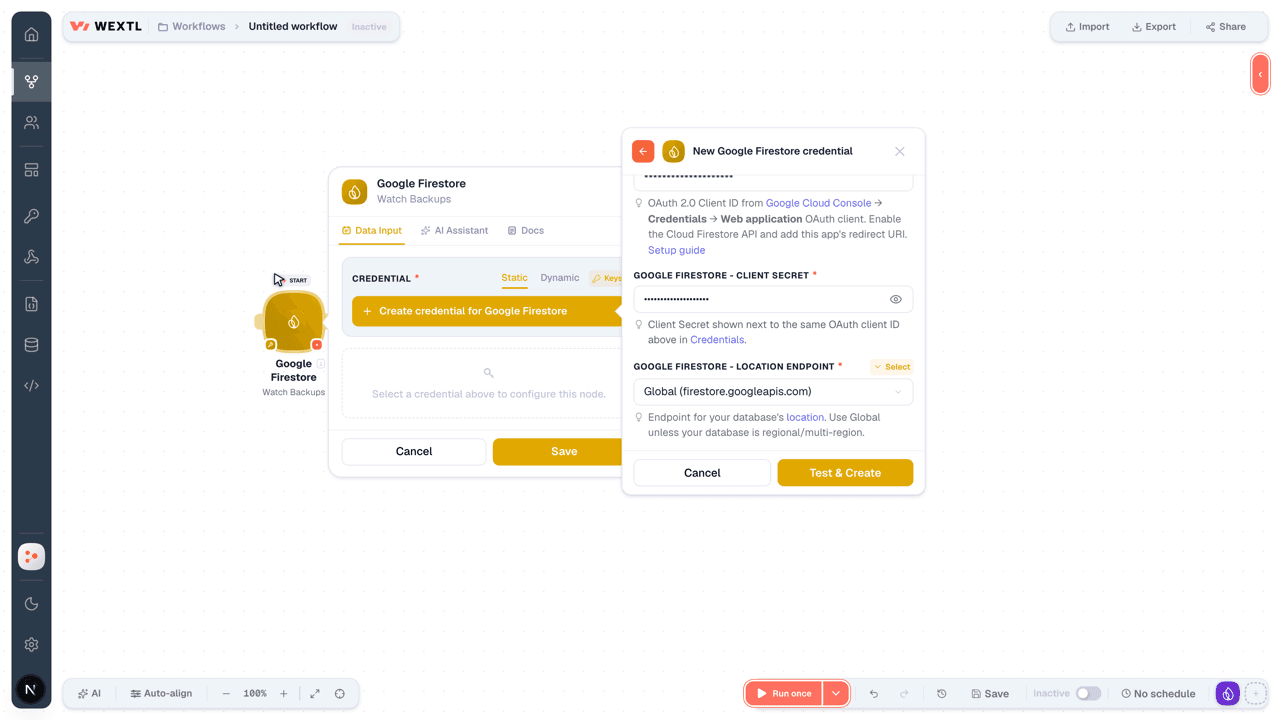
- Client IDtextRequired
OAuth 2.0 Client ID from Google Cloud Console → Credentials → Web application OAuth client. Enable the Cloud Firestore API and add this app's redirect URI. Setup guide
[1] - Client SecretpasswordRequired
Client Secret shown next to the same OAuth client ID above in Credentials.
[1] - Location EndpointselectRequired
- Additional Scopesarray
Optional. Extra Google OAuth scopes to request on top of the default ones, one full scope URL per item (for example https://www.googleapis.com/auth/drive). Duplicates of the default scopes are ignored. Use this with your own Client ID, and enable the same scopes on its OAuth consent screen.
[1]
Connect Google Firestore in WEXTL
- Log in to your WEXTL account, add the Google Firestore node module to your workflow, and click Create new credential.
- Optional: In the Credential name field, enter a name for the credential.
- Enter the authentication credentials you copied from your Google Firestore account, or follow the on-screen instructions to create the credential.
- If prompted, authenticate your account and confirm access.
- If you want to make changes to your credential in the future, follow the steps in Manage credentials →
Notes
Credentials are org-scoped; share them with teammates from the Credentials picker on any of its nodes.For detailed information on connecting an application, see Connect an application →
Google Firestore node modules
The list below is a reference of every Google Firestore node module the integration supports. You will be able to pick any of them on the workflow canvas while building automations.
Browse every Google Firestore node module below — each one opens to show its input parameters, outputs, and connection requirements.
Watch Backup SchedulesTrigger
| Field | Type |
|---|---|
| Create Time | date |
| Name | text |
| Daily Recurrence | object |
| Weekly Recurrence | object |
| Day | text |
| Update Time | date |
| Retention | text |
Watch BackupsTrigger
| Field | Type |
|---|---|
| Stats | object |
| Size Bytes | text |
| Index Count | text |
| Document Count | text |
| Database UID | text |
| Database | text |
| Expire Time | date |
| State | text |
| Name | text |
| Snapshot Time | date |
Watch DatabasesTrigger
| Field | Type |
|---|---|
| App Engine Integration Mode | text |
| Create Time | date |
| UID | text |
| Previous ID | text |
| Version Retention Period | text |
| CMEK Config | object |
| Kms Key Name | text |
| Active Key Version | array |
| Tags | object |
| Name | text |
| Point In Time Recovery Enablement | text |
| Concurrency Mode | text |
| Key Prefix | text |
| Location ID | text |
| Delete Protection State | text |
| Etag | text |
| Type | text |
| Update Time | date |
| Realtime Updates Mode | text |
| Delete Time | date |
| Earliest Version Time | date |
| Free Tier | boolean |
Watch DocumentsTrigger
| Field | Type |
|---|---|
| Name | text |
| Fields | object |
| Create Time | date |
| Update Time | date |
Watch User CredsTrigger
| Field | Type |
|---|---|
| State | text |
| Name | text |
| Create Time | date |
| Secure Password | text |
| Update Time | date |
| Resource Identity | object |
| Principal | text |
Batch Get DocumentsSearch
| Field | Type |
|---|---|
ProjectRequired | text |
DatabaseRequired | choice |
DocumentsRequired | array |
| Document Name | text |
| Field Mask | array |
| Field Path | text |
| Transaction | text |
| New Transaction | object |
| Read Time | text |
| Limit | number |
| Field | Type |
|---|---|
| Found | object |
| Name | text |
| Fields | object |
| Create Time | date |
| Update Time | date |
| Missing | text |
| Transaction | text |
| Read Time | date |
Execute PipelineSearch
Get BackupAction
Get Backup ScheduleAction
Get DatabaseAction
| Field | Type |
|---|---|
DatabaseRequired | choice |
| Field | Type |
|---|---|
| App Engine Integration Mode | text |
| Create Time | date |
| UID | text |
| Previous ID | text |
| Version Retention Period | text |
| CMEK Config | object |
| Kms Key Name | text |
| Active Key Version | array |
| Tags | object |
| Name | text |
| Point In Time Recovery Enablement | text |
| Concurrency Mode | text |
| Key Prefix | text |
| Location ID | text |
| Delete Protection State | text |
| Etag | text |
| Type | text |
| Update Time | date |
| Realtime Updates Mode | text |
| Delete Time | date |
| Earliest Version Time | date |
| Free Tier | boolean |
Get DocumentAction
Get FieldAction
Get IndexAction
Get LocationAction
Get OperationAction
Get User CredsAction
List Backup SchedulesSearch
List BackupsSearch
List Collection IdsSearch
List DatabasesSearch
| Field | Type |
|---|---|
ProjectRequired | text |
| Limit | number |
| Field | Type |
|---|---|
| App Engine Integration Mode | text |
| Create Time | date |
| UID | text |
| Previous ID | text |
| Version Retention Period | text |
| CMEK Config | object |
| Kms Key Name | text |
| Active Key Version | array |
| Tags | object |
| Name | text |
| Point In Time Recovery Enablement | text |
| Concurrency Mode | text |
| Key Prefix | text |
| Location ID | text |
| Delete Protection State | text |
| Etag | text |
| Type | text |
| Update Time | date |
| Realtime Updates Mode | text |
| Delete Time | date |
| Earliest Version Time | date |
| Free Tier | boolean |
List DocumentsSearch
List FieldsSearch
List IndexesSearch
List LocationsSearch
List OperationsSearch
List User CredsSearch
Partition QuerySearch
Run Aggregation QuerySearch
Run QuerySearch
| Field | Type |
|---|---|
ProjectRequired | text |
DatabaseRequired | choice |
Structured QueryRequired | object |
| Explain Options | object |
| Transaction | text |
| New Transaction | object |
| Read Time | text |
| Limit | number |
| Field | Type |
|---|---|
| Document | object |
| Name | text |
| Fields | object |
| Create Time | date |
| Update Time | date |
| Read Time | date |
| Skipped Results | number |
| Transaction | text |
| Done | boolean |
| Explain Metrics | object |
Batch WriteAction
Begin TransactionAction
Bulk Delete DocumentsAction
Cancel OperationAction
| Field | Type |
|---|---|
OperationRequired | choice |
Clone DatabaseAction
CommitAction
Create Backup ScheduleAction
Create DatabaseAction
| Field | Type |
|---|---|
ProjectRequired | text |
Database IDRequired | text |
| App Engine Integration Mode | text |
| CMEK Config | object |
| Tags | object |
| Point In Time Recovery Enablement | text |
| Concurrency Mode | text |
| Location ID | text |
| Delete Protection State | text |
| Type | text |
| Realtime Updates Mode | text |
| Database Edition | text |
| Firestore Data Access Mode | text |
| Mongodb Compatible Data Access Mode | text |
| Field | Type |
|---|---|
| Done | boolean |
| Name | text |
| Response | object |
| Metadata | object |
| Error | object |
| Code | number |
| Message | text |
| Details | array |
Create DocumentAction
Create User CredsAction
Delete BackupAction
| Field | Type |
|---|---|
BackupRequired | choice |
Delete Backup ScheduleAction
| Field | Type |
|---|---|
Backup ScheduleRequired | choice |
Delete DatabaseAction
Delete DocumentAction
| Field | Type |
|---|---|
DocumentRequired | choice |
| Current Document Exists | boolean |
| Current Document Update Time | text |
Delete IndexAction
| Field | Type |
|---|---|
IndexRequired | choice |
Delete OperationAction
| Field | Type |
|---|---|
OperationRequired | choice |
Delete User CredsAction
| Field | Type |
|---|---|
User CredsRequired | choice |
Disable User CredsAction
Enable User CredsAction
Export DocumentsAction
Import DocumentsAction
Reset User Creds PasswordAction
Restore DatabaseAction
RollbackAction
| Field | Type |
|---|---|
ProjectRequired | text |
DatabaseRequired | choice |
TransactionRequired | text |
Update Backup ScheduleAction
Update DatabaseAction
| Field | Type |
|---|---|
DatabaseRequired | choice |
| Update Mask | text |
| App Engine Integration Mode | text |
| CMEK Config | object |
| Tags | object |
| Point In Time Recovery Enablement | text |
| Concurrency Mode | text |
| Location ID | text |
| Delete Protection State | text |
| Type | text |
| Realtime Updates Mode | text |
| Database Edition | text |
| Firestore Data Access Mode | text |
| Mongodb Compatible Data Access Mode | text |
| Field | Type |
|---|---|
| Done | boolean |
| Name | text |
| Response | object |
| Metadata | object |
| Error | object |
| Code | number |
| Message | text |
| Details | array |
Update DocumentAction
Templates
Look for Google Firestore templates in the WEXTL template library.
Browse templates →Explore alternative apps
- Google BigQuery[2]Query and manage Google BigQuery datasets, tables, jobs, and routines — run SQL and stream rows.
- FirebaseRealtime Database JSON paths and Firebase Auth user admin — read, write, query, and manage users.
- FileMakerRead and write records in FileMaker databases hosted on FileMaker Server or FileMaker Cloud, run scripts, and inspect layout metadata.
- AirtableSpreadsheet-database hybrid for structured collaborative data.
- MilvusOpen-source vector database for storing and searching embedding data at scale.


References
- WEXTL® Google Firestore Source Code connector implementation.
- Our users use cases and automations.
- Official API Documentation for Google Firestore.
- WEXTL® visual workflow builder data.
Last updated: Jul 22, 2026 23:18