


Requirements
Before you set up the credential, make sure you have an active Keywords AI account and an API access token from your account settings ready.[3]
Get your Keywords AI credentials
- API KeypasswordRequired
Go to the API keys page and click the Create new key button.
[1]
Connect Keywords AI in WEXTL
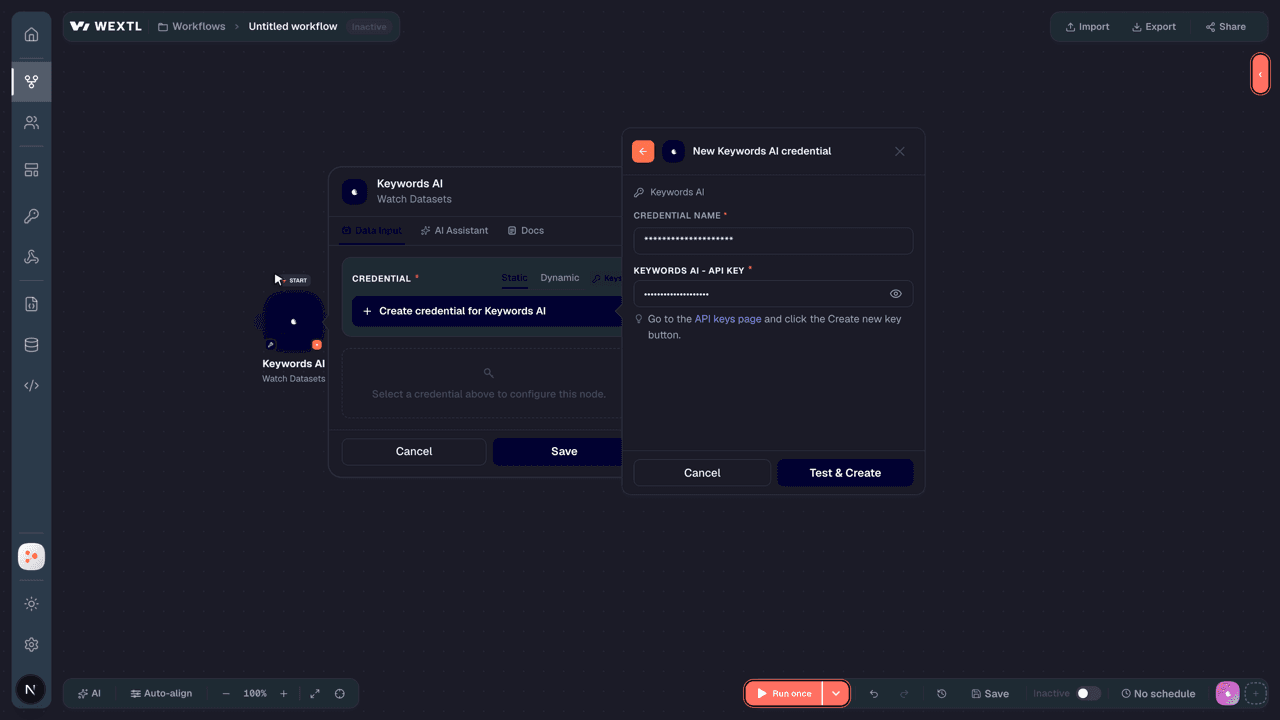
- Log in to your WEXTL account, add the Keywords AI node module to your workflow, and click Create new credential.
- Optional: In the Credential name field, enter a name for the credential.
- Enter the authentication credentials you copied from your Keywords AI account, or follow the on-screen instructions to create the credential.
- If prompted, authenticate your account and confirm access.
- If you want to make changes to your credential in the future, follow the steps in Manage credentials →

Notes
Credentials are org-scoped; share them with teammates from the Credentials picker on any of its nodes.For detailed information on connecting an application, see Connect an application →
Keywords AI node modules
The list below is a reference of every Keywords AI node module the integration supports. You will be able to pick any of them on the workflow canvas while building automations.
Each Keywords AI node module below opens to reveal its input parameters, outputs, and connection requirements.
Watch DatasetsTrigger
| Field | Type |
|---|---|
| ID | text |
| Organization ID | number |
| Updated by | object |
| First name | text |
| Last name | text |
| text | |
| Log count | number |
| Name | text |
| Log ids | array |
| Description | text |
| Type | text |
| Status | text |
| Created at | date |
| Updated at | date |
| Completed annotation count | number |
| Running status | text |
| Running progress | number |
Get a CustomerAction
| Field | Type |
|---|---|
Customer IDRequired | choice |
| Field | Type |
|---|---|
| ID | number |
| Customer identifier | text |
| Unique organization ID | text |
| text | |
| Name | text |
| Environment | text |
| Organization | number |
| Period budget | number |
| Budget duration | text |
| Total period usage | number |
| Period start | text |
| Period end | text |
| Total budget | text |
| Total usage | number |
| Total requests | number |
| Total prompt tokens | number |
| Total completion tokens | number |
| Total tokens | number |
| Total cache hits | number |
| Average latency | number |
Get an ExperimentAction
List CustomersSearch
| Field | Type |
|---|---|
| Sort By | choice |
| Limit | number |
| Field | Type |
|---|---|
| ID | text |
| Unique organization ID | text |
| Customer identifier | text |
| Environment | text |
| Name | text |
| First seen | text |
| Last active timeframe | text |
| Active days | number |
| Number of requests | number |
| Total tokens | number |
| Total cost | number |
| Average latency | number |
| Average ttft | number |
List DatasetsSearch
| Field | Type |
|---|---|
| Limit | number |
| Field | Type |
|---|---|
| ID | text |
| Organization ID | number |
| Updated by | object |
| First name | text |
| Last name | text |
| text | |
| Log count | number |
| Name | text |
| Log ids | array |
| Description | text |
| Type | text |
| Status | text |
| Created at | date |
| Updated at | date |
| Completed annotation count | number |
| Running status | text |
| Running progress | number |
List ExperimentsSearch
List PromptsSearch
Search ThreadsSearch
Create a Chat CompletionAction
| Field | Type |
|---|---|
MessagesRequired | array |
ModelRequired | text |
| Response Type | choice |
| Tools | array |
| Tool Choice | object |
| Type | text |
| Function | object |
| Frequency Penalty | number |
| Max Tokens | number |
| Temperature | number |
| Number of Completions | number |
| Log Probabilities | boolean |
| Echo | boolean |
| Stop Sequence | array |
| Presence Penalty | number |
| Response Format | object |
Format TypeRequired | choice |
| Parallel Tool Calls | boolean |
| Cache Enabled | boolean |
| Cache TTL | number |
| Cache Options | object |
| Cache by Customer | boolean |
| Prompt | object |
Prompt IDRequired | choice |
| Variables | array |
| Version | text |
| Echo | boolean |
| Override | boolean |
| Override Parameters | array |
| Retry Parameters | object |
Retry EnabledRequired | boolean |
| Number of Retries | number |
| Retry After | number |
| Field | Type |
|---|---|
| ID | text |
| Object | text |
| Created | number |
| Model | text |
| Choices | array |
| Usage | object |
| Completion tokens | number |
| Prompt tokens | number |
| Total tokens | number |
| Completion tokens details | object |
| Prompt tokens details | object |
| Cache creation input tokens | number |
| Cache read input tokens | number |
Create a PromptAction
Create an ExperimentAction
Delete a CustomerAction
| Field | Type |
|---|---|
Customer IDRequired | choice |
Delete a PromptAction
| Field | Type |
|---|---|
Prompt IDRequired | choice |
Delete an ExperimentAction
| Field | Type |
|---|---|
Experiment IDRequired | choice |
Make an API Calluniversal
Update a CustomerAction
| Field | Type |
|---|---|
Customer IDRequired | choice |
| Name | text |
| Metadata | array |
KeyRequired | text |
| Value | text |
| Period Budget | number |
| Budget Duration | choice |
| Total Budget | number |
| Markup Percentage | number |
| Field | Type |
|---|---|
| ID | number |
| Customer identifier | text |
| Unique organization ID | text |
| text | |
| Name | text |
| Environment | text |
| Organization | number |
| Period budget | number |
| Budget duration | text |
| Total period usage | number |
| Period start | text |
| Period end | text |
| Total budget | text |
| Total usage | number |
| Total requests | number |
| Total prompt tokens | number |
| Total completion tokens | number |
| Total tokens | number |
| Total cache hits | number |
| Average latency | number |
Templates
Look for Keywords AI templates in the WEXTL template library.
Browse templates →Explore alternative apps
- Alibaba Cloud (Qwen)[2]Alibaba Cloud's Model Studio platform for Qwen language, vision, and media models.
- AgentXHosted AI agents — start conversations, send messages, and read traces.
- AirtopRun cloud browser sessions and extract or interact with web pages using Airtop.
- AmberscriptAutomated and human-verified subtitles and transcripts across 39 languages.
- AWS TranscribeTranscribe audio and video files and manage custom vocabularies with Amazon Transcribe.


References
- WEXTL® Keywords AI Source Code connector implementation.
- Our users use cases and automations.
- Official API Documentation for Keywords AI.
- WEXTL® visual workflow builder data.
Last updated: Jul 24, 2026 18:11