Mintsoft icon

Mintsoft Integration

Warehouse management platform for 3PL fulfillment, inventory, orders, and stock operations. Sync Mintsoft invoices, payments, and financial records with CRM, billing, and operations tools. When Watch ASNs arrives, automatically continue with Download an Order Document or Get a Batch.
3-day trialCancel anytimeUp to 10 minutes quick set up
  • GDPR
  • Data Encryption
  • 2FA
  • Local Data Region

Supported triggers and actions for Mintsoft integration

Triggers can detect changes in Mintsoft and run actions that can create, search or modify data inside Mintsoft automatically [3] — exactly how you set them.

  • Mintsoft icon
    Watch ASNsTriggers when an ASN is created or updated.
  • Mintsoft icon
    Watch BatchesTriggers when a new batch is created.
  • Mintsoft icon
    Watch InvoicesTriggers when a new invoice is created or updated.
  • Mintsoft icon
    Watch OrdersTriggers when a new order is placed.
  • Mintsoft icon
    Watch ProductsTriggers when a new product is added or an existing product is updated.
  • Mintsoft icon
    Watch ReturnsTriggers when a new return is created.
  • Mintsoft icon
    Watch Shipment Tracking EventsTriggers when a new tracking event is recorded for an order shipment.
  • Mintsoft icon
    Watch Stock Level ChangesTriggers when the stock level of a product changes.
  • Mintsoft icon
    Watch Warehouse TransfersTriggers when a warehouse transfer is created or updated.
  • Mintsoft icon
    Download an Order DocumentDownloads the content of an order document as base64 data.
  • Mintsoft icon
    Get a BatchReturns the orders that make up a batch.
  • Mintsoft icon
    Get a BundleRetrieves a bundle and the products it is made of.
  • Mintsoft icon
    Get a Courier Despatch ReportRetrieves a report of parcels despatched by courier between two dates.
  • Mintsoft icon
    Get a Courier ServiceReturns a single courier service.
  • Mintsoft icon
    Get a ProductRetrieves a product by ID.
  • Mintsoft icon
    Get a Product Pre-Order BreakdownRetrieves the pre-order breakdown of a product in one warehouse.
  • Mintsoft icon
    Get a Product Pre-Order Breakdown (All Warehouses)Retrieves the pre-order breakdown of a product in every warehouse.
  • Mintsoft icon
    Get a Product Usage ReportRetrieves stock flow data, optionally filtered by warehouse, client, product, flow type, date range and search text.
  • Mintsoft icon
    Get a Products in Location ReportRetrieves which products are held in which warehouse locations, optionally filtered by warehouse, client and location type.
  • Mintsoft icon
    Get a ReturnRetrieves the details of a return.

How to integrate Mintsoft in automation workflow?

3 simple steps to make your Mintsoft connected with other apps in automation workflows on WEXTL. Up to 10 minutes integration set up.

How Mintsoft connects and integrates with WEXTL

Save and approve your credentials once — WEXTL® stores authorization information encrypted and reuses the authentication whenever Mintsoft app is called in workflows. That allows your finance automations to run without your attention, per defined schedule [7]. Explore documentation [6] for a detailed list of fields that Mintsoft supports.

The following table illustrates what fields Mintsoft integration require during authorization flow inside our workflow builder [4].

Video slide demonstrates how Mintsoft is connected in WEXTL builder.

Video slide demonstrates how Mintsoft is connected in WEXTL builder [4].

FieldTypeHelp
Usernametext—
Passwordpassword—

Connect Mintsoft to popular apps on WEXTL

Enter a name of the other app you want to sync with Mintsoft below. Click on selected app to explore integration options with Mintsoft. If the app you search for is not available in WEXTL yet, you can use HTTP node [10] instead to integrate it directly.

Example automation with Mintsoft integration

Select Watch Orders trigger from Mintsoft - this will be a starting point in your automation. Whenever event happens in Mintsoft, workflow will start [7] from Watch Orders node.

Search for Add an Order Comment, connect it as the next step of integration sequence. You can use filters between Watch Orders and Add an Order Comment, so only important data pass from Watch Orders to the next step. WEXTL gives you full control over the process of Mintsoft automation. All parts of workflow are visible on the canvas [4].

Mintsoft on WEXTL has 178 modules for building finance automations. Explore Mintsoft documentation for more.
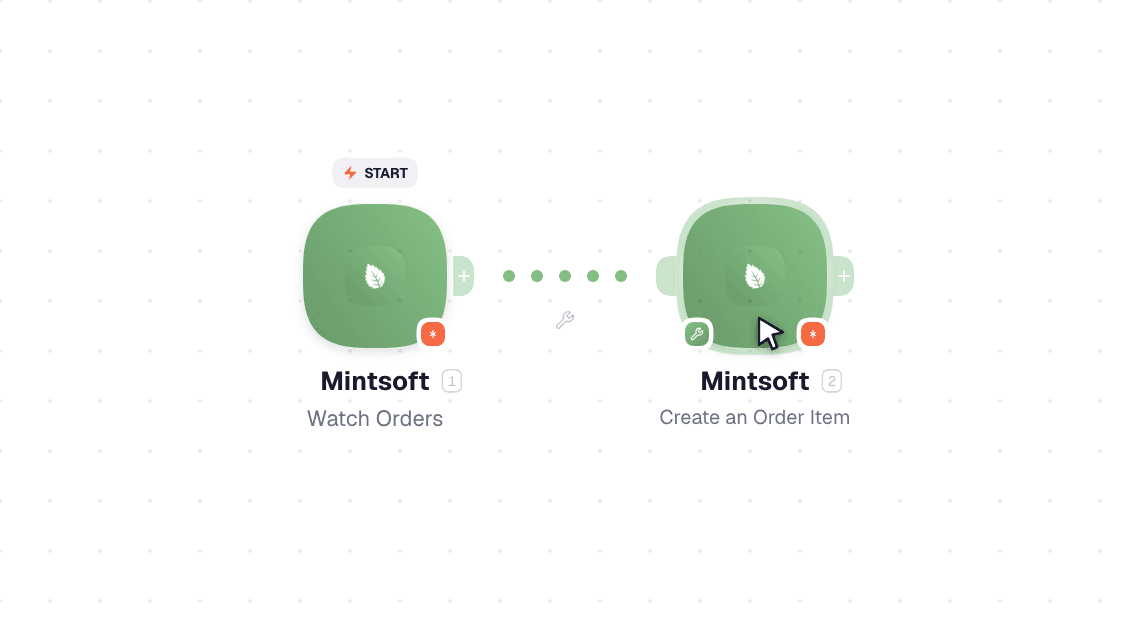
Video slide demonstrates how Watch Orders and Add an Order Comment nodes are used in Mintsoft workflow.

Video slide demonstrates how Watch Orders and Add an Order Comment [6] nodes are used in Mintsoft workflow.

Frequently asked questions

Common questions about automating Mintsoft in your workflows.

Try Mintsoft on WEXTL®

Claim your 3-day trial to build Mintsoft integrations and access every WEXTL® feature.

Cancel anytime.

References

List of sources used to gather information about the Mintsoft integration.

  1. Mintsoft integration source code, module specs and credentials implementation.
  2. Internal Mintsoft integration documentation, structured input and output parameters, scopes, and authentication methods.
  3. Official Mintsoft vendor API documentation — used to verify field meanings, authentication flows, and anything our own specs don't fully capture.
  4. WEXTL® Visual Workflow Builder, anonymized data from our technical support team.
  5. WEXTL® Apps Library
  6. WEXTL® Mintsoft App Documentation
  7. WEXTL® Workflow Scheduler
  8. WEXTL® HTTP node documentation