Monday.com icon

Monday.com Integration

Work management platform for planning, tracking, and collaborating on projects across teams. Sync Monday.com tasks, statuses, and assignees with chat, CRM, and documentation tools. When Watch Boards fires, automatically continue with Activate Users or Add Users to Team.
3-day trialCancel anytimeUp to 10 minutes quick set up
  • GDPR
  • Data Encryption
  • 2FA
  • Local Data Region

Supported triggers and actions for Monday.com integration

Triggers can detect changes in Monday.com and run actions that can create, search or modify data inside Monday.com automatically [3] — exactly how you set them.

  • Monday.com icon
    Watch BoardsTriggers when a new board is created or an existing board is updated in the account.
  • Monday.com icon
    Watch DocumentsTriggers when a document is created or modified in the account.
  • Monday.com icon
    Watch EventsTriggers instantly via webhook when a subscribed event occurs on a monday.com board.
  • Monday.com icon
    Watch ItemsTriggers when an item is created, updated, or deleted on a board.
  • Monday.com icon
    Watch UpdatesTriggers when an update (comment) is posted or edited on any item in the account.
  • Monday.com icon
    Watch UsersTriggers when a user is created, updated, activated, or deactivated in the account.
  • Monday.com icon
    Watch WorkspacesTriggers when a workspace is created or updated in the account.
  • Monday.com icon
    Activate UsersReactivates one or more previously deactivated users, restoring their access to the account.
  • Monday.com icon
    Add Users to TeamAdds one or more users as members of an existing team.
  • Monday.com icon
    Assign Team OwnersGrants team-owner permissions to one or more users within a team.
  • Monday.com icon
    Deactivate UsersDeactivate one or more users, revoking their access to the account without permanently deleting their data.
  • Monday.com icon
    Get a PlanRetrieves the current subscription plan details for the account.
  • Monday.com icon
    Get Current User (Me)Retrieves the profile of the currently authenticated user.
  • Monday.com icon
    Get Current User AccountRetrieves the account details of the currently authenticated user.
  • Monday.com icon
    Get Query ComplexityReturns the remaining API query complexity budget for the current minute.
  • Monday.com icon
    Invite UsersSend invitations to one or more email addresses to join the monday.com account, assigning them a product and role on join.
  • Monday.com icon
    List Account RolesRetrieves all account-level roles available for assignment to users.
  • Monday.com icon
    List App SubscriptionsRetrieves all active app subscriptions for the currently authenticated app.
  • Monday.com icon
    List AssetsRetrieves all file assets uploaded to the account, optionally filtered by IDs.
  • Monday.com icon
    List Audit LogsRetrieves a paginated list of account audit log entries with optional event-type filters.

How to integrate Monday.com in automation workflow?

3 simple steps to make your Monday.com connected with other apps in automation workflows on WEXTL. Up to 10 minutes integration set up.

How Monday.com connects and integrates with WEXTL

Save and approve your credentials once — WEXTL® stores authorization information encrypted and reuses the authentication whenever Monday.com app is called in workflows. That allows your project management automations to run without your attention, per defined schedule [7]. Explore documentation [6] for a detailed list of fields that Monday.com supports.

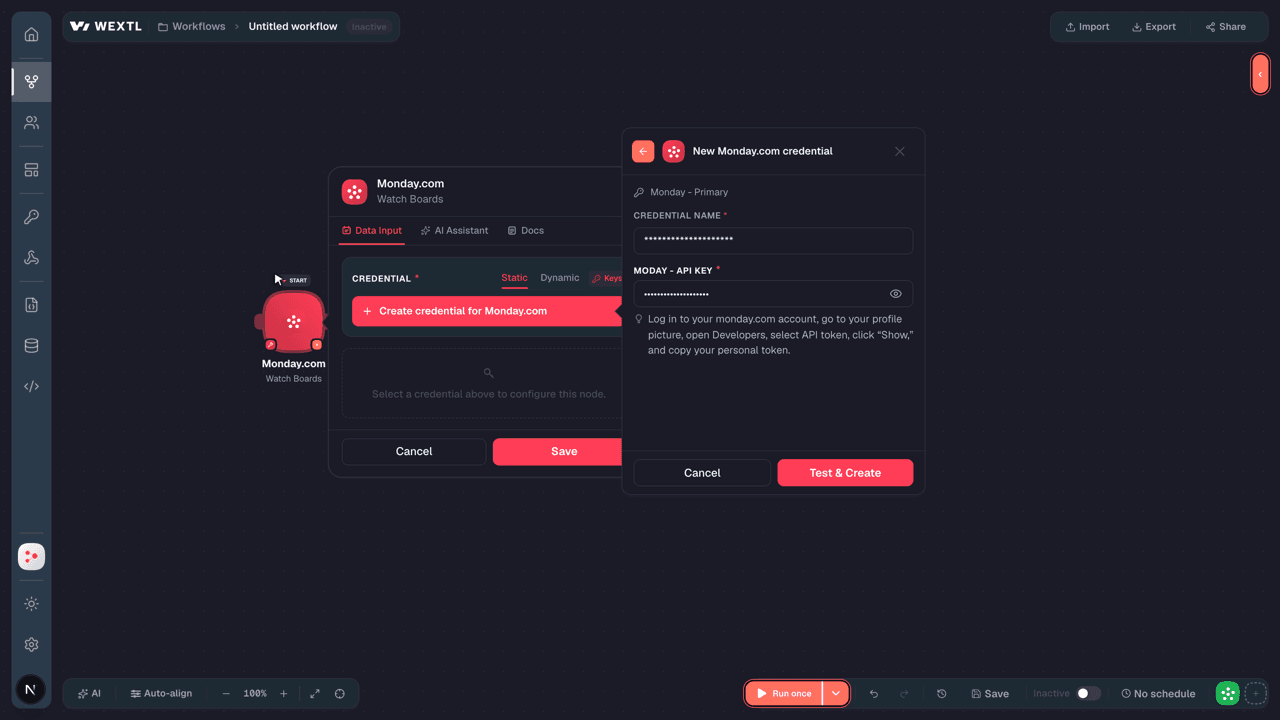
The following table illustrates what fields Monday.com integration require during authorization flow inside our workflow builder [4].

Video slide demonstrates how Monday.com is connected in WEXTL builder.

Video slide demonstrates how Monday.com is connected in WEXTL builder [4].

FieldTypeHelp
Moday - API KeyRequired
password

Log in to your account, go to your profile picture, open Developers, select API token, click “Show,” and copy your personal token.

Connect Monday.com to popular apps on WEXTL

Enter a name of the other app you want to sync with Monday.com below. Click on selected app to explore integration options with Monday.com. If the app you search for is not available in WEXTL yet, you can use HTTP node [10] instead to integrate it directly.

Example automation with Monday.com integration

Select Watch Users trigger from Monday.com - this will be a starting point in your automation. Whenever event happens in Monday.com, workflow will start [7] from Watch Users node.

Search for Add Users to Board, connect it as the next step of integration sequence. You can use filters between Watch Users and Add Users to Board, so only important data pass from Watch Users to the next step. WEXTL gives you full control over the process of Monday.com automation. All parts of workflow are visible on the canvas [4].

Monday.com on WEXTL has 111 modules for building project management automations. Explore Monday.com documentation for more.

Video slide demonstrates how Watch Users and Add Users to Board nodes are used in Monday.com workflow.

Video slide demonstrates how Watch Users and Add Users to Board [6] nodes are used in Monday.com workflow.

Frequently asked questions

Common questions about automating Monday.com in your workflows.

Try Monday.com on WEXTL®

Claim your 3-day trial to build Monday.com integrations and access every WEXTL® feature.

Cancel anytime.

References

List of sources used to gather information about the Monday.com integration.

  1. Monday.com integration source code, module specs and credentials implementation.
  2. Internal Monday.com integration documentation, structured input and output parameters, scopes, and authentication methods.
  3. Official Monday.com vendor API documentation — used to verify field meanings, authentication flows, and anything our own specs don't fully capture.
  4. WEXTL® Visual Workflow Builder, anonymized data from our technical support team.
  5. WEXTL® Apps Library
  6. WEXTL® Monday.com App Documentation
  7. WEXTL® Workflow Scheduler
  8. WEXTL® HTTP node documentation