


Requirements
Connecting Candis takes an active account plus OAuth client credentials, granted by signing in with your account — no other setup is required.[3]
Get your Candis credentials
You’ll be redirected to sign in and approve access — your password is never shared with WEXTL.
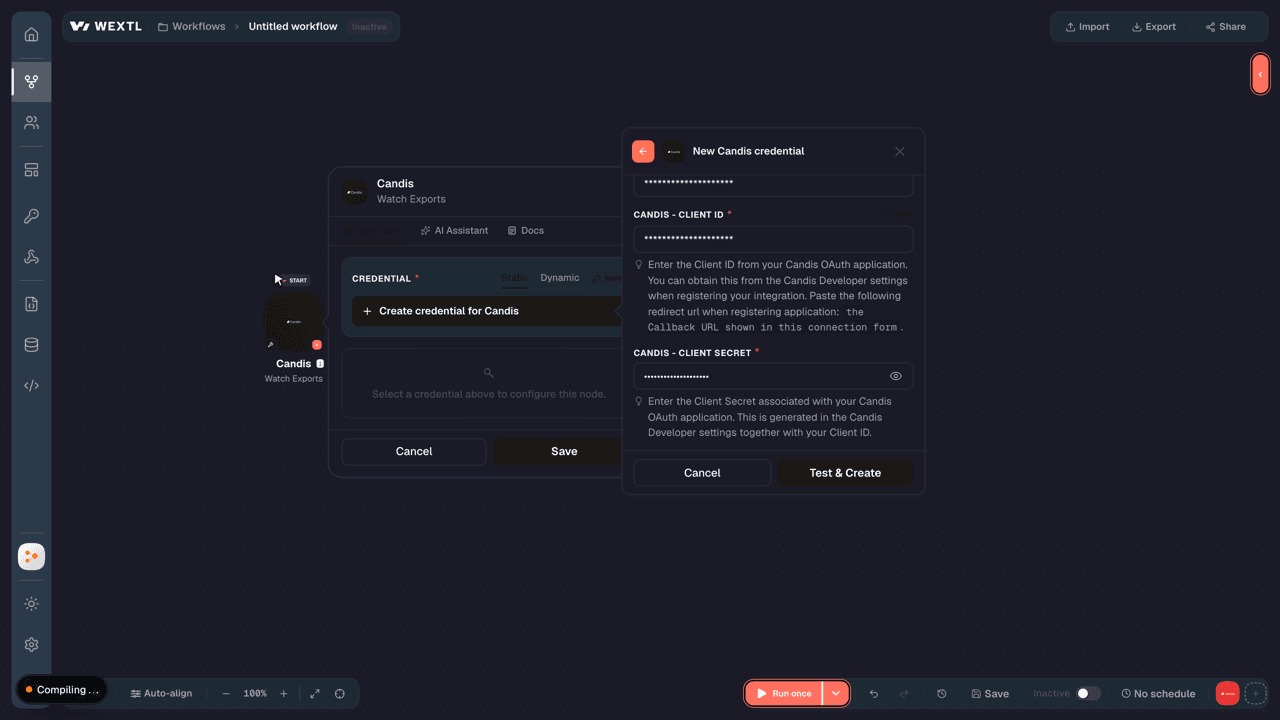
- Client IDtextRequired
Enter the Client ID from your OAuth application. You can obtain this from the Developer settings when registering your integration. Paste the following redirect url when registering application:
[1]the Callback URL shown in this connection form. - Client SecretpasswordRequired
Enter the Client Secret associated with your OAuth application. This is generated in the Developer settings together with your Client ID.
[1]
Connect Candis in WEXTL
- Log in to your WEXTL account, add the Candis node module to your workflow, and click Create new credential.
- Optional: In the Credential name field, enter a name for the credential.
- Enter the authentication credentials you copied from your Candis account, or follow the on-screen instructions to create the credential.
- If prompted, authenticate your account and confirm access.
- If you want to make changes to your credential in the future, follow the steps in Manage credentials →

Notes
Credentials are org-scoped; share them with teammates from the Credentials picker on any of its nodes.For detailed information on connecting an application, see Connect an application →
Candis node modules
The list below is a reference of every Candis node module the integration supports. You will be able to pick any of them on the workflow canvas while building automations.
Expand any Candis node module below to see exactly what it takes in, what it returns, and what connection it needs.
Watch ExportsTrigger
| Field | Type |
|---|---|
| User ID | number |
| Email address | |
| Name | text |
| Date created | date |
Watch InvoicesTrigger
| Field | Type |
|---|---|
| Invoice ID | text |
| Organization ID | text |
| Status | text |
| Created at | date |
| Updated at | date |
| Requested at | text |
| Approved at | date |
| Amount | object |
| Value | number |
| Currency code | text |
| Automatic payment | boolean |
| Bank account | object |
| Iban | text |
| Swift code | text |
| Bookings | array |
| Category | object |
| Document type | text |
| Contact | object |
| Name | text |
| Account payable number | text |
| Account receivable number | text |
| Delivery date | text |
| Invoice date | text |
| Invoice ID | text |
| Payment | object |
| Method | text |
| Paid at | text |
| Purchase order number | text |
| Archive URL | url |
Watch ReimbursementsTrigger
| Field | Type |
|---|---|
| Reimbursement ID | text |
| Status | text |
| Created at | date |
| Updated at | date |
| Title | text |
| Total amount | number |
| Reimbursement case | object |
| ID | text |
| Title | text |
| Submitted for review at | text |
| Contact | object |
| Name | text |
| Accounts payable number | text |
| Payment info | object |
| Bookings | array |
| Invoice number | text |
| Expense date | date |
| Type | text |
| Location | text |
| Internal guests | array |
| External guests | array |
| Tip amount | number |
| Receipt amount | number |
Get an ExportAction
Get Export PostingsAction
| Field | Type |
|---|---|
Organization IDRequired | choice |
Export IDRequired | text |
| Maximum Results | number |
| Field | Type |
|---|---|
| ID | text |
| Entity guid | text |
| Status | text |
| Amount | object |
| Value | number |
| Currency code | text |
| Contact | object |
| Accounts payable number | text |
| Accounts receivable number | text |
| Name | text |
| Invoice ID | text |
| Invoice date | text |
| Purchase order | object |
| Order number | text |
| Files | array |
| URL | text |
| Accounting area | object |
| Name | text |
| Description | text |
| Delivery date | text |
| Invoice format | text |
| Due date | text |
| Payment condition | object |
| Name | text |
| Discount percentage | number |
| Discount payment date | text |
| Document type | text |
| Split postings | array |
| Type | text |
List ExportsSearch
List InvoicesSearch
| Field | Type |
|---|---|
Organization IDRequired | choice |
| Status | choice |
| Invoice Date From | date |
| Invoice Date To | date |
| Updated Date From | date |
| Updated Date To | date |
| Maximum Number of Invoices to Return | number |
| Field | Type |
|---|---|
| Invoice ID | text |
| Organization ID | text |
| Status | text |
| Created at | date |
| Updated at | date |
| Requested at | text |
| Approved at | date |
| Amount | object |
| Value | number |
| Currency code | text |
| Automatic payment | boolean |
| Bank account | object |
| Iban | text |
| Swift code | text |
| Bookings | array |
| Category | object |
| Document type | text |
| Contact | object |
| Name | text |
| Account payable number | text |
| Account receivable number | text |
| Delivery date | text |
| Invoice date | text |
| Invoice ID | text |
| Payment | object |
| Method | text |
| Paid at | text |
| Purchase order number | text |
| Archive URL | url |
List OrganizationsSearch
List ReimbursementsSearch
| Field | Type |
|---|---|
Organization IDRequired | choice |
| Status | choice |
| Type | choice |
| Sort Field | choice |
| Sort Direction | choice |
| Reimbursement Date From | date |
| Reimbursement Date To | date |
| Updated From | date |
| Updated To | date |
| Maximum Number of Items to Return | number |
| Field | Type |
|---|---|
| Reimbursement ID | text |
| Status | text |
| Created at | date |
| Updated at | date |
| Title | text |
| Total amount | number |
| Reimbursement case | object |
| ID | text |
| Title | text |
| Submitted for review at | text |
| Contact | object |
| Name | text |
| Accounts payable number | text |
| Payment info | object |
| Bookings | array |
| Invoice number | text |
| Expense date | date |
| Type | text |
| Location | text |
| Internal guests | array |
| External guests | array |
| Tip amount | number |
| Receipt amount | number |
Create a ContactAction
| Field | Type |
|---|---|
Organization IDRequired | choice |
ContactsRequired | array |
Contact TypeRequired | choice |
| Accounts Receivable Number | text |
| Accounts Payable Number | text |
Contact NameRequired | text |
| VAT ID | text |
| Tax Number | text |
| Payment Type | choice |
| IBAN | text |
| BIC / SWIFT | text |
| Payment Condition Name | text |
| Field | Type |
|---|---|
| Process ID | text |
Create a Cost DimensionAction
Create a General Ledger AccountAction
Create a Goods ReceiptAction
| Field | Type |
|---|---|
Organization IDRequired | choice |
Goods ReceiptsRequired | array |
Receipt NumberRequired | text |
Total AmountRequired | object |
Document DateRequired | date |
Posting DateRequired | date |
Due DateRequired | date |
Accounts Payable NumberRequired | text |
Contact NameRequired | text |
Goods Receipt TypeRequired | choice |
Receipt StatusRequired | choice |
| Vendor Reference Number | text |
| Field | Type |
|---|---|
| Process ID | text |
Create a Tax CodeAction
Create Additional Delivery CostsAction
| Field | Type |
|---|---|
Organization IDRequired | choice |
Additional Delivery CostsRequired | array |
Cost CodeRequired | text |
DescriptionRequired | text |
| Additional Description | text |
| General Ledger Account | text |
| Tax Code | text |
| Cost Center | text |
| Cost Object | text |
| Custom Cost Dimension | text |
| Project Code | text |
ERP DataRequired | object |
| Field | Type |
|---|---|
| Process ID | text |
Create an ExportAction
Create Payment ConditionsAction
Create Purchase OrdersAction
| Field | Type |
|---|---|
Organization IDRequired | choice |
Purchase OrdersRequired | array |
Order NumberRequired | text |
Total AmountRequired | object |
Document DateRequired | date |
Posting DateRequired | date |
Due DateRequired | date |
Accounts Payable NumberRequired | text |
Contact NameRequired | text |
Purchase Order TypeRequired | choice |
StatusRequired | choice |
| Vendor Reference Number | text |
| Field | Type |
|---|---|
| Process ID | text |
Download a FileAction
Make an API Calluniversal
Update a ContactAction
| Field | Type |
|---|---|
Organization IDRequired | choice |
ContactsRequired | array |
Contact TypeRequired | choice |
| Accounts Receivable Number | text |
| Accounts Payable Number | text |
Contact NameRequired | text |
| VAT ID | text |
| Tax Number | text |
| Payment Type | choice |
| IBAN | text |
| BIC / SWIFT | text |
| Payment Condition Name | text |
| Field | Type |
|---|---|
| Process ID | text |
Update a Cost DimensionAction
Update a General Ledger AccountAction
| Field | Type |
|---|---|
Organization IDRequired | choice |
General Ledger AccountsRequired | array |
Account CodeRequired | text |
| Account Name | text |
| Archived | boolean |
Update a Goods ReceiptAction
| Field | Type |
|---|---|
Organization IDRequired | choice |
Goods ReceiptsRequired | array |
Receipt NumberRequired | text |
Total AmountRequired | object |
Document DateRequired | date |
Posting DateRequired | date |
Due DateRequired | date |
Accounts Payable NumberRequired | text |
Contact NameRequired | text |
Goods Receipt TypeRequired | choice |
Receipt StatusRequired | choice |
| Vendor Reference Number | text |
| Field | Type |
|---|---|
| Process ID | text |
Update a Tax CodeAction
Update Additional Delivery CostsAction
| Field | Type |
|---|---|
Organization IDRequired | choice |
Additional Delivery CostsRequired | array |
Cost CodeRequired | text |
DescriptionRequired | text |
| Additional Description | text |
| General Ledger Account | text |
| Tax Code | text |
| Cost Center | text |
| Cost Object | text |
| Custom Cost Dimension | text |
| Project Code | text |
ERP DataRequired | object |
| Field | Type |
|---|---|
| Process ID | text |
Update an InvoiceAction
| Field | Type |
|---|---|
Organization IDRequired | choice |
Invoice IDRequired | text |
Payment InformationRequired | object |
Is PaidRequired | boolean |
| Paid At | date |
Update Payment ConditionAction
Update Purchase OrderAction
| Field | Type |
|---|---|
Organization IDRequired | choice |
Purchase OrdersRequired | array |
Order NumberRequired | text |
Total AmountRequired | object |
Document DateRequired | date |
Posting DateRequired | date |
Due DateRequired | date |
Accounts Payable NumberRequired | text |
Contact NameRequired | text |
Purchase Order TypeRequired | choice |
StatusRequired | choice |
| Vendor Reference Number | text |
| Field | Type |
|---|---|
| Process ID | text |
Templates
Look for Candis templates in the WEXTL template library.
Browse templates →Explore alternative apps
- Bill[2]Accounts-payable and receivable — manage bills, invoices, vendors, and payments.
- BlingBrazilian ERP and ecommerce back-office platform for invoices, inventory, orders, and contacts.
- bexioBusiness software for small businesses and startups.
- BilltrustB2B accounts receivable and payment automation platform for invoices, collections, and cash application.
- BillogramDigital invoicing and billing platform that sends invoices and collects payments from customers.


References
- WEXTL® Candis Source Code connector implementation.
- Our users use cases and automations.
- Official API Documentation for Candis.
- WEXTL® visual workflow builder data.
Last updated: Jul 23, 2026 22:38