


Requirements
Connecting Billtrust takes an active account plus an API access token from your account settings — no other setup is required.[3]
Get your Billtrust credentials
Connect Billtrust in WEXTL
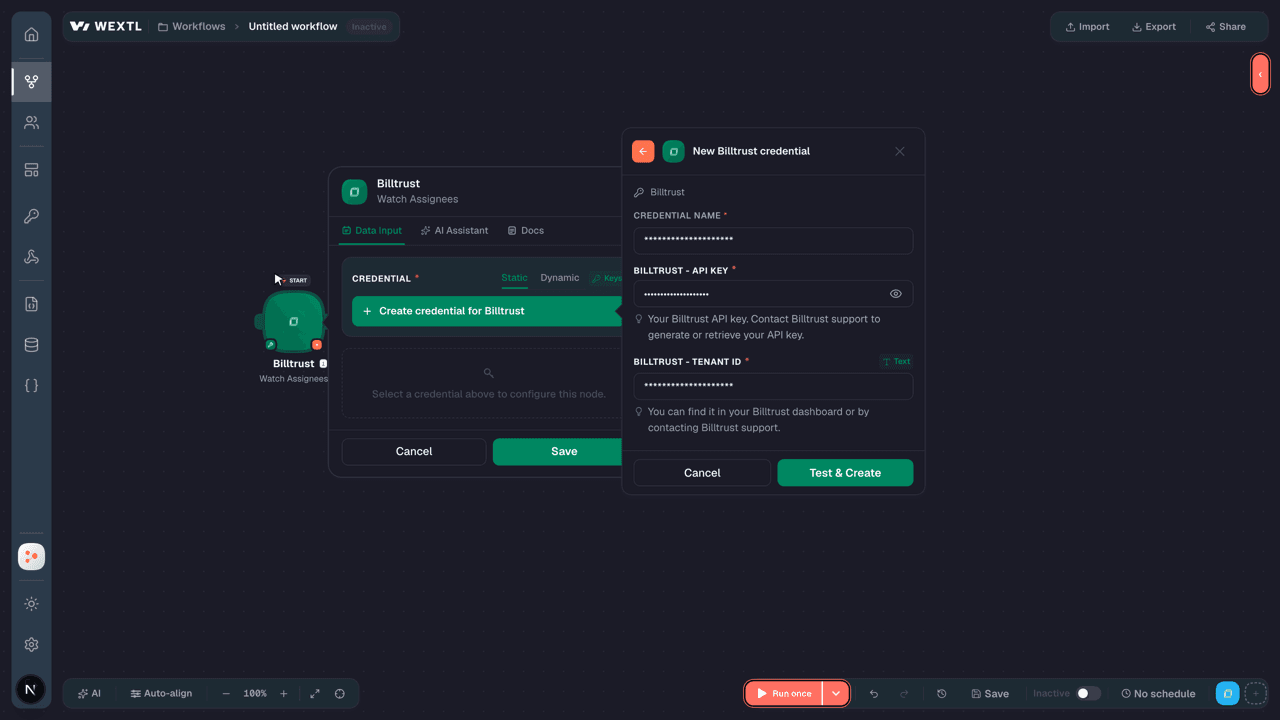
- Log in to your WEXTL account, add the Billtrust node module to your workflow, and click Create new credential.
- Optional: In the Credential name field, enter a name for the credential.
- Enter the authentication credentials you copied from your Billtrust account, or follow the on-screen instructions to create the credential.
- If prompted, authenticate your account and confirm access.
- If you want to make changes to your credential in the future, follow the steps in Manage credentials →

Notes
Credentials are org-scoped; share them with teammates from the Credentials picker on any of its nodes.For detailed information on connecting an application, see Connect an application →
Billtrust node modules
The list below is a reference of every Billtrust node module the integration supports. You will be able to pick any of them on the workflow canvas while building automations.
Expand any Billtrust node module below to see exactly what it takes in, what it returns, and what connection it needs.
Watch AssigneesTrigger
Output fields[3]
| Field | Type |
|---|---|
| ID | text |
| Create user | text |
| Create date | date |
| Update user | text |
| Update date | date |
| Assignee ID | text |
| Department ID | text |
| Active | boolean |
| Tenant ID | text |
| User ID | text |
| All updates | boolean |
| Daily digest | boolean |
| Person | object |
| First name | text |
| Last name | text |
| Office phone | text |
| Cell phone | text |
| Fax | text |
| Title | text |
| Address | object |
| Language | text |
| Timezone | time |
Watch AttachmentsTrigger
Output fields[3]
| Field | Type |
|---|---|
| Tenant ID | text |
| Attachment ID | text |
| Dispute ID | text |
| File name | text |
| Download URL | url |
| Upload ID | text |
| Status | text |
| Visibility | text |
| Attachment s3key | text |
| Failure reasons | array |
| Create user | text |
| Create date | date |
| Update user | text |
| Update date | date |
Watch CategoriesTrigger
Output fields[3]
| Field | Type |
|---|---|
| Category ID | text |
| Tenant ID | text |
| Code | text |
| Description | text |
| Default internal reason ID | text |
| Default internal reason code | text |
| Default external reason ID | text |
| Default external reason code | text |
| Create user | text |
| Create date | date |
| Update user | text |
| Update date | date |
Watch DepartmentsTrigger
Output fields[3]
| Field | Type |
|---|---|
| Department ID | text |
| Tenant ID | text |
| Code | text |
| Description | text |
| Create user | text |
| Create date | date |
| Update user | text |
| Update date | date |
Watch Dispute NotesTrigger
Output fields[3]
| Field | Type |
|---|---|
| Dispute note ID | text |
| Tenant ID | text |
| Dispute ID | text |
| Content | text |
| Visibility | text |
| Create user | text |
| Create date | date |
| Update user | text |
| Update date | date |
Watch DisputesTrigger
Output fields[3]
| Field | Type |
|---|---|
| Dispute ID | text |
| Dispute code | text |
| Tenant ID | text |
| Category ID | text |
| Category name | text |
| External reason category ID | text |
| External reason category name | text |
| Reason ID | text |
| Reason name | text |
| External reason ID | text |
| External reason name | text |
| Assignee ID | text |
| Assignee name | text |
| Department ID | text |
| Department name | text |
| Status | number |
| Amount | number |
16other output fields
Watch ReasonsTrigger
Output fields[3]
| Field | Type |
|---|---|
| Reason ID | text |
| Tenant ID | text |
| Code | text |
| Description | text |
| Active | boolean |
| Category ID | text |
| Visibility | text |
| Create user | text |
| Create date | date |
| Update user | text |
| Update date | date |
Watch ResolutionsTrigger
Output fields[3]
| Field | Type |
|---|---|
| Resolution ID | text |
| Tenant ID | text |
| Code | text |
| Description | text |
| Active | boolean |
| Is valid | boolean |
| Apply when invoice closed | boolean |
| Create user | text |
| Create date | date |
| Update user | text |
| Update date | date |
Watch UsersTrigger
Output fields[3]
| Field | Type |
|---|---|
| User ID | text |
| First name | text |
| Last name | text |
| Default language | text |
| Status | text |
| Role | text |
| Tenant ids | array |
| Group ids | array |
| Last login | date |
| Last access token source | text |
| Created date | date |
| Time zone | time |
| Time zone date format | text |
| Time zone time format | text |
| Time zone date time delimiter | text |
| Default tenant ID | text |
2other output fields
Get a Category by CodeAction
Input fields[3]
| Field | Type |
|---|---|
Category CodeRequired | text |
Output fields[3]
| Field | Type |
|---|---|
| Category ID | text |
| Tenant ID | text |
| Code | text |
| Description | text |
| Default internal reason ID | text |
| Default internal reason code | text |
| Default external reason ID | text |
| Default external reason code | text |
| Create user | text |
| Create date | date |
| Update user | text |
| Update date | date |
Get a Company ScoreAction
Get a Credit ApplicationAction
Input fields[3]
| Field | Type |
|---|---|
Application IDRequired | choice |
Output fields[3]
| Field | Type |
|---|---|
| Application ID | text |
| Application date | date |
| Application status | object |
| Title | text |
| Status date | text |
| Type | text |
| Application form | object |
| Form ID | text |
| Form name | text |
| Form type | array |
| Business unit ID list | array |
| Business units ids | array |
| Company | object |
| Company ID | number |
| Head company ID | number |
| Selected company ID | text |
| Name | text |
| Address | object |
| Phone | array |
| Company score | object |
| Assigned credit line | number |
| Dibs | number |
| Dibs confidence | number |
| Fibs | number |
| Fibs confidence | number |
| Calculated credit line | number |
| Contact | object |
| First name | text |
| Last name | text |
| text | |
| Applicant access date | text |
| Trade references | array |
| Bank references | array |
| Application users | array |
| Applicant submit date | text |
| Last reminder date | text |
| Last activity date | text |
Get a DepartmentAction
Get a DisputeAction
Input fields[3]
| Field | Type |
|---|---|
DisputeRequired | choice |
Output fields[3]
| Field | Type |
|---|---|
| Dispute ID | text |
| Dispute code | text |
| Tenant ID | text |
| Category ID | text |
| Category name | text |
| External reason category ID | text |
| External reason category name | text |
| Reason ID | text |
| Reason name | text |
| External reason ID | text |
| External reason name | text |
| Assignee ID | text |
| Assignee name | text |
| Department ID | text |
| Department name | text |
| Status | number |
| Amount | number |
16other output fields
Get a Dispute Note by IDAction
Get a ReasonAction
Get a ResolutionAction
Get a Signed Credit ApplicationAction
Get a Subcharging Buyer AccountAction
Output fields[3]
| Field | Type |
|---|---|
| Status | text |
| Correlation ID | text |
| Errors | array |
| Restriction type | text |
| Buyer accounts | array |
Get an Assignee by EmailAction
Input fields[3]
| Field | Type |
|---|---|
Assignee EmailRequired |
Output fields[3]
| Field | Type |
|---|---|
| ID | text |
| Create user | text |
| Create date | date |
| Update user | text |
| Update date | date |
| Assignee ID | text |
| Department ID | text |
| Active | boolean |
| Tenant ID | text |
| User ID | text |
| All updates | boolean |
| Daily digest | boolean |
| Person | object |
| First name | text |
| Last name | text |
| Office phone | text |
| Cell phone | text |
| Fax | text |
| Title | text |
| Address | object |
| Language | text |
| Timezone | time |
Get an AttachmentAction
Get Business UnitsSearch
Get Buyer Account CardAction
Output fields[3]
| Field | Type |
|---|---|
| Status | text |
| Correlation ID | text |
| Errors | array |
| Restriction type | text |
| Buyer accounts | array |
| Override restriction | boolean |
Get Dispute Audit LogSearch
Get Dispute by IDsSearch
Get Notification SettingsAction
Output fields[3]
| Field | Type |
|---|---|
| ID | text |
| Tenant ID | text |
| Allow daily digest | boolean |
| Time zone | text |
| Time | text |
| Allow all updates | boolean |
| Create user | text |
| Create date | date |
| Update user | text |
| Update date | date |
List All Notes for Credit ApplicationSearch
List AssigneesSearch
Input fields[3]
| Field | Type |
|---|---|
| Department | choice |
| Limit | number |
Output fields[3]
| Field | Type |
|---|---|
| ID | text |
| Create user | text |
| Create date | date |
| Update user | text |
| Update date | date |
| Assignee ID | text |
| Department ID | text |
| Active | boolean |
| Tenant ID | text |
| User ID | text |
| All updates | boolean |
| Daily digest | boolean |
| Person | object |
| First name | text |
| Last name | text |
| Office phone | text |
| Cell phone | text |
| Fax | text |
| Title | text |
| Address | object |
| Language | text |
| Timezone | time |
List AttachmentsSearch
List CategoriesSearch
List Credit ApplicationsSearch
Input fields[3]
| Field | Type |
|---|---|
Activity TypeRequired | choice |
Start DateRequired | date |
End DateRequired | date |
| Application Status Types | array |
| Status | text |
| Limit | number |
Output fields[3]
| Field | Type |
|---|---|
| Application ID | text |
| Application date | text |
| Application status | object |
| Type | text |
| Status date | text |
| Title | text |
| Business unit ID list | array |
| Company | object |
| Company ID | number |
| Name | text |
| Dba | text |
| Address | object |
| Contact | object |
| First name | text |
| Last name | text |
| Auto decisioned | boolean |
| Applicant submit date | text |
| References | object |
| Bank reference submit count | text |
| Bank reference requested count | text |
| Trade reference submit count | text |
| Trade ref reference requested count | text |
| Last activity date | text |
List DepartmentsSearch
List DisputesSearch
Input fields[3]
| Field | Type |
|---|---|
| Reason Name | text |
| Department Name | text |
| Category Name | text |
| Status | choice |
| Assignee | choice |
| Department | choice |
| Document Number | text |
| Account Number | text |
| Sort | text |
| Limit | number |
Output fields[3]
| Field | Type |
|---|---|
| Dispute ID | text |
| Dispute code | text |
| Tenant ID | text |
| Category ID | text |
| Category name | text |
| External reason category ID | text |
| External reason category name | text |
| Reason ID | text |
| Reason name | text |
| External reason ID | text |
| External reason name | text |
| Assignee ID | text |
| Assignee name | text |
| Department ID | text |
| Department name | text |
| Status | number |
| Amount | number |
16other output fields
List Documents for Credit ApplicationSearch
List NotesSearch
List ReasonsSearch
List Reasons by CategorySearch
List ResolutionsSearch
List UsersSearch
Input fields[3]
| Field | Type |
|---|---|
| Limit | number |
Output fields[3]
| Field | Type |
|---|---|
| User ID | text |
| First name | text |
| Last name | text |
| Default language | text |
| Status | text |
| Role | text |
| Tenant ids | array |
| Group ids | array |
| Last login | date |
| Last access token source | text |
| Created date | date |
| Time zone | time |
| Time zone date format | text |
| Time zone time format | text |
| Time zone date time delimiter | text |
| Default tenant ID | text |
2other output fields
Retrieve DisputesSearch
Input fields[3]
| Field | Type |
|---|---|
Account NumberRequired | text |
Document NumbersRequired | array |
| Document Number | text |
| Status | choice |
| Limit | number |
Output fields[3]
| Field | Type |
|---|---|
| Dispute ID | text |
| Dispute code | text |
| Tenant ID | text |
| Category ID | text |
| Category name | text |
| External reason category ID | text |
| External reason category name | text |
| Reason ID | text |
| Reason name | text |
| External reason ID | text |
| External reason name | text |
| Assignee ID | text |
| Assignee name | text |
| Department ID | text |
| Department name | text |
| Status | number |
| Amount | number |
15other output fields
Create a CategoryAction
Input fields[3]
| Field | Type |
|---|---|
CodeRequired | text |
DescriptionRequired | text |
| Default Internal Reason | choice |
| Default External Reason | choice |
Output fields[3]
| Field | Type |
|---|---|
| Category ID | text |
| Tenant ID | text |
| Code | text |
| Description | text |
| Default internal reason ID | text |
| Default internal reason code | text |
| Default external reason ID | text |
| Default external reason code | text |
| Create user | text |
| Create date | date |
| Update user | text |
| Update date | date |
Create a DepartmentAction
Create a DisputeAction
Input fields[3]
| Field | Type |
|---|---|
AmountRequired | number |
Account NumberRequired | text |
Document NumberRequired | text |
| Reason Code | text |
| Reason | choice |
| External Reason Code | text |
| External Reason ID | choice |
| Assignee | choice |
| PO Number | text |
Output fields[3]
| Field | Type |
|---|---|
| Dispute ID | text |
| Dispute code | text |
| Tenant ID | text |
| Category ID | text |
| Category name | text |
| External reason category ID | text |
| External reason category name | text |
| Reason ID | text |
| Reason name | text |
| External reason ID | text |
| External reason name | text |
| Assignee ID | text |
| Assignee name | text |
| Department ID | text |
| Department name | text |
| Status | number |
| Amount | number |
16other output fields
Create a Dispute NoteAction
Create a ReasonAction
Input fields[3]
| Field | Type |
|---|---|
CodeRequired | text |
DescriptionRequired | text |
| Active | boolean |
| Category | choice |
| Category Code | text |
VisibilityRequired | choice |
Output fields[3]
| Field | Type |
|---|---|
| Reason ID | text |
| Tenant ID | text |
| Code | text |
| Description | text |
| Active | boolean |
| Category ID | text |
| Visibility | text |
| Create user | text |
| Create date | date |
| Update user | text |
| Update date | date |
Create a ResolutionAction
Input fields[3]
| Field | Type |
|---|---|
CodeRequired | text |
DescriptionRequired | text |
| Active | boolean |
| Is Valid | boolean |
| Apply When Invoice Closed | boolean |
Output fields[3]
| Field | Type |
|---|---|
| Resolution ID | text |
| Tenant ID | text |
| Code | text |
| Description | text |
| Active | boolean |
| Is valid | boolean |
| Apply when invoice closed | boolean |
| Create user | text |
| Create date | date |
| Update user | text |
| Update date | date |
Create an AssigneeAction
Input fields[3]
| Field | Type |
|---|---|
DepartmentRequired | choice |
| Department Code | text |
| Active | boolean |
| Platform User | choice |
| All Updates | boolean |
| Daily Digest | boolean |
PersonRequired | object |
First NameRequired | text |
Last NameRequired | text |
EmailRequired | |
| Office Phone | text |
| Cell Phone | text |
| Fax | text |
| Title | text |
| Address | object |
| Language | text |
| Time Zone | time |
Output fields[3]
| Field | Type |
|---|---|
| ID | text |
| Create user | text |
| Create date | date |
| Update user | text |
| Update date | date |
| Assignee ID | text |
| Department ID | text |
| Active | boolean |
| Tenant ID | text |
| User ID | text |
| All updates | boolean |
| Daily digest | boolean |
| Person | object |
| First name | text |
| Last name | text |
| Office phone | text |
| Cell phone | text |
| Fax | text |
| Title | text |
| Address | object |
| Language | text |
| Timezone | time |
Delete a Buyer Account CardAction
Delete a CategoryAction
Input fields[3]
| Field | Type |
|---|---|
Category CodeRequired | text |
Delete a DepartmentAction
Input fields[3]
| Field | Type |
|---|---|
DepartmentRequired | choice |
Delete a Department by CodeAction
Input fields[3]
| Field | Type |
|---|---|
Department CodeRequired | text |
Delete a DisputeAction
Input fields[3]
| Field | Type |
|---|---|
DisputeRequired | choice |
Delete a Dispute NoteAction
Input fields[3]
| Field | Type |
|---|---|
DisputeRequired | choice |
Delete a ReasonAction
Input fields[3]
| Field | Type |
|---|---|
Category CodeRequired | text |
Reason CodeRequired | text |
Delete a ResolutionAction
Input fields[3]
| Field | Type |
|---|---|
ResolutionRequired | choice |
Delete a Resolution by CodeAction
Input fields[3]
| Field | Type |
|---|---|
Resolution CodeRequired | text |
Delete a Surcharging Buyer AccountAction
Delete an AssigneeAction
Input fields[3]
| Field | Type |
|---|---|
AssigneeRequired | choice |
Delete an Assignee by EmailAction
Input fields[3]
| Field | Type |
|---|---|
Department CodeRequired | text |
Assignee EmailRequired |
Delete an AttachmentAction
Input fields[3]
| Field | Type |
|---|---|
DisputeRequired | choice |
Generate a Presigned Upload URLAction
Make an API Calluniversal
Update a Buyer Account CardAction
Update a CategoryAction
Input fields[3]
| Field | Type |
|---|---|
CategoryRequired | choice |
DescriptionRequired | text |
| Default Internal Reason | choice |
| Default External Reason | choice |
Output fields[3]
| Field | Type |
|---|---|
| Category ID | text |
| Tenant ID | text |
| Code | text |
| Description | text |
| Default internal reason ID | text |
| Default internal reason code | text |
| Default external reason ID | text |
| Default external reason code | text |
| Create user | text |
| Create date | date |
| Update user | text |
| Update date | date |
Update a DepartmentAction
Update a DisputeAction
Input fields[3]
| Field | Type |
|---|---|
DisputeRequired | choice |
| Amount | number |
| Reason | choice |
| Reason Code | text |
| External Reason ID | text |
| External Reason Code | text |
| Assignee | choice |
| Assignee Email | |
| PO Number | text |
Output fields[3]
| Field | Type |
|---|---|
| Dispute ID | text |
| Dispute code | text |
| Tenant ID | text |
| Category ID | text |
| Category name | text |
| External reason category ID | text |
| External reason category name | text |
| Reason ID | text |
| Reason name | text |
| External reason ID | text |
| External reason name | text |
| Assignee ID | text |
| Assignee name | text |
| Department ID | text |
| Department name | text |
| Status | number |
| Amount | number |
15other output fields
Update a Dispute NoteAction
Update a ReasonAction
Input fields[3]
| Field | Type |
|---|---|
ReasonRequired | choice |
DescriptionRequired | text |
| Active | boolean |
| Category | choice |
| Category Code | text |
| Visibility | choice |
Update a ResolutionAction
Input fields[3]
| Field | Type |
|---|---|
ResolutionRequired | choice |
DescriptionRequired | text |
| Active | boolean |
| Is Valid | boolean |
| Apply When Invoice Closed | boolean |
Update a Subcharging Buyer AccountAction
Update an AssigneeAction
Input fields[3]
| Field | Type |
|---|---|
Assignee EmailRequired | |
DepartmentRequired | choice |
| Department Code | text |
| Active | boolean |
| Platform User | choice |
| All Updates | boolean |
| Daily Digest | boolean |
| Person | object |
First NameRequired | text |
Last NameRequired | text |
EmailRequired | |
| Office Phone | text |
| Cell Phone | text |
| Fax | text |
| Title | text |
| Address | object |
| Language | text |
| Time Zone | time |
Output fields[3]
| Field | Type |
|---|---|
| ID | text |
| Create user | text |
| Create date | date |
| Update user | text |
| Update date | date |
| Assignee ID | text |
| Department ID | text |
| Active | boolean |
| Tenant ID | text |
| User ID | text |
| All updates | boolean |
| Daily digest | boolean |
| Person | object |
| First name | text |
| Last name | text |
| Office phone | text |
| Cell phone | text |
| Fax | text |
| Title | text |
| Address | object |
| Language | text |
| Timezone | time |
Update Notification SettingsAction
Input fields[3]
| Field | Type |
|---|---|
| Allow Daily Digest | boolean |
| Time Zone | time |
| Time | date |
| Allow All Updates | boolean |
Templates
Look for Billtrust templates in the WEXTL template library.
Browse templates →Explore alternative apps
- Checkout[2]Global payment platform for accepting cards, wallets, and alternative payment methods.
- BillogramDigital invoicing and billing platform that sends invoices and collects payments from customers.
- BillingoHungarian online invoicing and billing platform for creating invoices, tracking payments, and managing customers.
- BlueSnapGlobal payment gateway for accepting cards, local payment methods, and managing subscriptions.
- CapiumCloud accounting and practice management platform for accountants, covering invoicing, expenses, payments, and client communications.


References
- WEXTL® Billtrust Source Code connector implementation.
- Our users use cases and automations.
- Official API Documentation for Billtrust.
- WEXTL® visual workflow builder data.
Last updated: Jul 23, 2026 22:38