


Requirements
Connecting Leadfeeder takes an active account plus an API access token from your account settings — no other setup is required.[3]
Get your Leadfeeder credentials
- API KeypasswordRequired
You can generate your unique authentication token at API settings.
[1]
Connect Leadfeeder in WEXTL
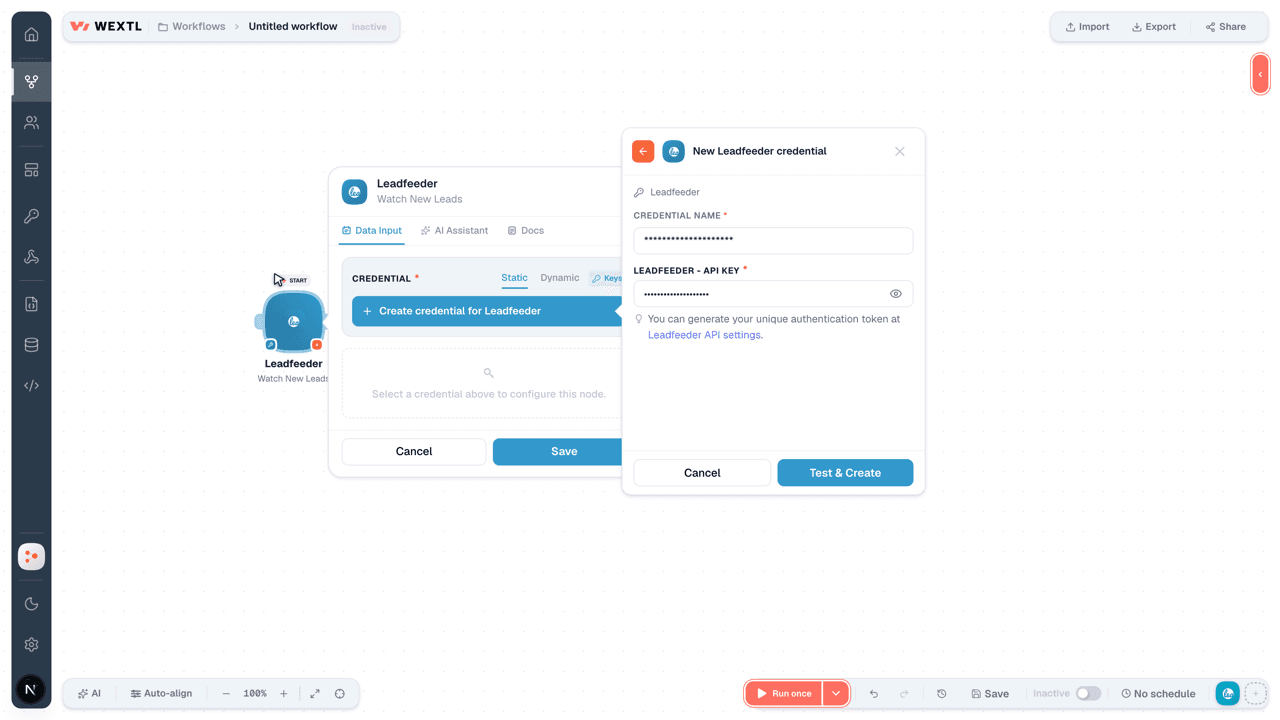
- Log in to your WEXTL account, add the Leadfeeder node module to your workflow, and click Create new credential.
- Optional: In the Credential name field, enter a name for the credential.
- Enter the authentication credentials you copied from your Leadfeeder account, or follow the on-screen instructions to create the credential.
- If prompted, authenticate your account and confirm access.
- If you want to make changes to your credential in the future, follow the steps in Manage credentials →

Notes
Credentials are org-scoped; share them with teammates from the Credentials picker on any of its nodes.For detailed information on connecting an application, see Connect an application →
Leadfeeder node modules
The list below is a reference of every Leadfeeder node module the integration supports. You will be able to pick any of them on the workflow canvas while building automations.
Expand any Leadfeeder node module below to see exactly what it takes in, what it returns, and what connection it needs.
Watch New LeadsTrigger
| Field | Type |
|---|---|
| ID | text |
| Type | text |
| Attributes | object |
| Name | text |
| Industry | text |
| Industries | array |
| First Visit Date | text |
| Status | text |
| Last Visit Date | text |
| Website URL | url |
| Phone | text |
| Linkedin URL | url |
| Twitter Handle | text |
| Relationships | object |
| Location | object |
Watch VisitsTrigger
| Field | Type |
|---|---|
| ID | text |
| Type | text |
| Attributes | object |
| Name | text |
| Industry | text |
| Industries | array |
| First Visit Date | text |
| Status | text |
| Last Visit Date | text |
| Website URL | url |
| Phone | text |
| Linkedin URL | url |
| Twitter Handle | text |
| Relationships | object |
| Location | object |
Get a Custom FeedAction
Get a LeadAction
Get a Website Tracking ScriptAction
Get an AccountAction
Get Export DetailsAction
List AccountsSearch
List Custom FeedsSearch
Search Lead VisitsSearch
| Field | Type |
|---|---|
Account IDRequired | choice |
Lead IDRequired | text |
Start DateRequired | date |
End DateRequired | date |
| Limit | number |
| Field | Type |
|---|---|
| ID | text |
| Type | text |
| Attributes | object |
| Source | text |
| Medium | text |
| Referring Url | text |
| Page Depth | number |
| Visit Route | array |
| Keyword | text |
| Visit Length | number |
| Started At | date |
| Campaign | text |
| Date | text |
| Relationships | object |
| Location | object |
Search LeadsSearch
| Field | Type |
|---|---|
Account IDRequired | choice |
Start DateRequired | date |
End DateRequired | date |
| Limit | number |
| Field | Type |
|---|---|
| ID | text |
| Type | text |
| Attributes | object |
| Name | text |
| Industry | text |
| Industries | array |
| First Visit Date | text |
| Status | text |
| Last Visit Date | text |
| Website URL | url |
| Phone | text |
| Linkedin URL | url |
| Twitter Handle | text |
| Relationships | object |
| Location | object |
Search VisitsSearch
| Field | Type |
|---|---|
Account IDRequired | choice |
Start DateRequired | date |
End DateRequired | date |
| Limit | number |
| Field | Type |
|---|---|
| ID | text |
| Type | text |
| Attributes | object |
| Source | text |
| Medium | text |
| Referring Url | text |
| Page Depth | number |
| Visit Route | array |
| Keyword | text |
| Visit Length | number |
| Started At | date |
| Campaign | text |
| Date | text |
| Relationships | object |
| Location | object |
Export a FeedAction
Templates
Look for Leadfeeder templates in the WEXTL template library.
Browse templates →Explore alternative apps
- Avoma[2]AI meeting assistant for recording, transcription, notes, and revenue insights.
- AmpleMarketSales engagement platform for prospecting, sequencing, and outreach.
- ForagerB2B data enrichment service for reverse lookups of contacts, companies, and job postings.
- Autobound AIAI sales content platform that personalizes outreach with account and contact insights.
- Better ProposalsOnline proposal software for creating, sending, tracking, and signing sales proposals.


References
- WEXTL® Leadfeeder Source Code connector implementation.
- Our users use cases and automations.
- Official API Documentation for Leadfeeder.
- WEXTL® visual workflow builder data.
Last updated: Jul 24, 2026 18:11