MagicLine (SportAlliance) integration guide
VerifiedHow to connect MagicLine (SportAlliance) to WEXTL and use its 1 trigger and 36 actions in your workflows. About MagicLine (SportAlliance): Gym and fitness club management platform for memberships, class bookings, and appointments.
- 1 trigger
- 20 searches
- 16 actions
- Instant (webhooks)
- Auth: API key
AI-assisted documentation15 min read
This documentation is compiled from our integration source code, internal specs for MagicLine (SportAlliance), its official API documentation and anonymized requests logs we collect from our support team[2].


Requirements
Get your MagicLine (SportAlliance) credentials
- SubdmaintextRequired
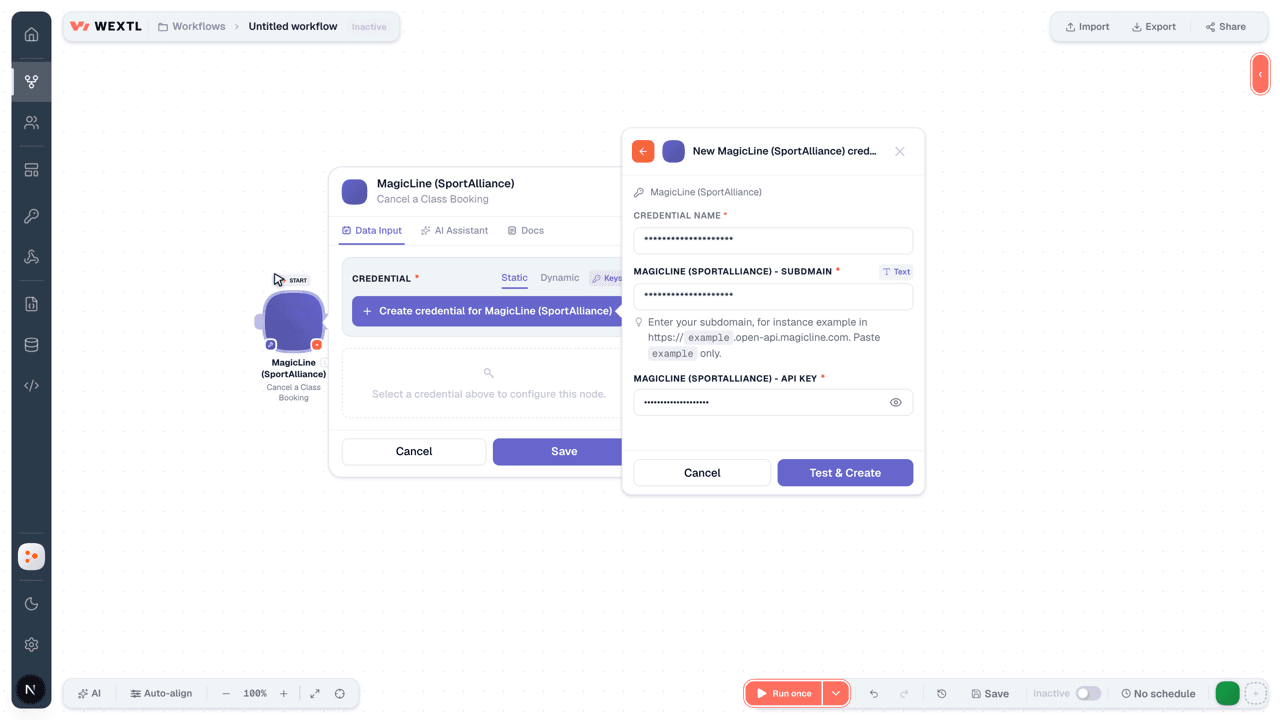
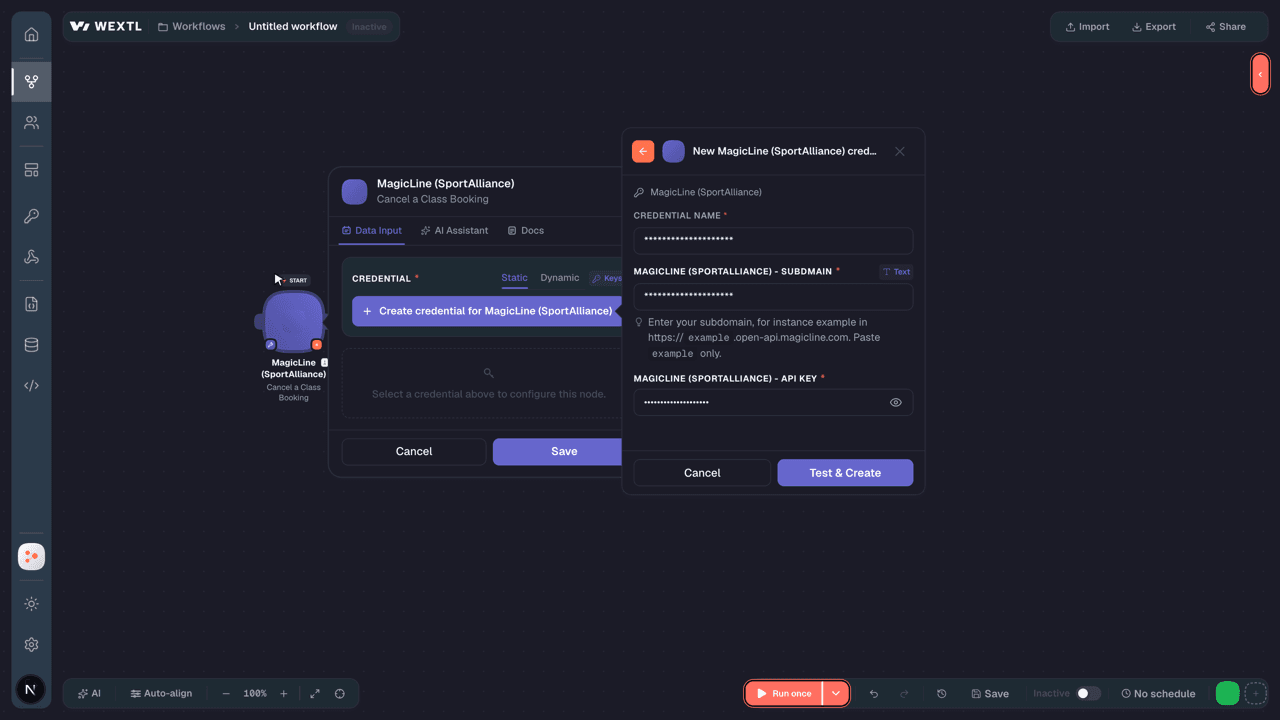
Enter your subdomain, for instance example in https://
example.open-api.magicline.com. Pasteexampleonly.[1] - API KeypasswordRequired
Connect MagicLine (SportAlliance) in WEXTL
- Log in to your WEXTL account, add the MagicLine (SportAlliance) node module to your workflow, and click Create new credential.Instant triggers use webhooks — click Create a webhook first when adding one, then create the credential.
- Optional: In the Credential name field, enter a name for the credential.
- Enter the authentication credentials you copied from your MagicLine (SportAlliance) account, or follow the on-screen instructions to create the credential.
- If prompted, authenticate your account and confirm access.
- If you want to make changes to your credential in the future, follow the steps in Manage credentials →
MagicLine (SportAlliance) triggers and actions on WEXTL
The list below is a reference of every MagicLine (SportAlliance) node module the integration supports. You will be able to pick any of them on the workflow canvas while building automations.
Each MagicLine (SportAlliance) node module below opens to reveal its input parameters, outputs, and connection requirements.
Watch Events
Trigger
| Field | Type |
|---|---|
| User ID | number |
| Email address | |
| Name | text |
| Date created | date |
Get a Bookable Appointment
Action
| Field | Type |
|---|---|
Bookable Appointment IDRequired | choice |
| Field | Type |
|---|---|
| ID | number |
| Title | text |
| Duration | number |
| Category | text |
| Description | text |
| Img URL | text |
Get a Class
Action
| Field | Type |
|---|---|
Class IDRequired | choice |
| Field | Type |
|---|---|
| ID | number |
| Title | text |
| Type | text |
| Duration | number |
| Category | text |
| Description | text |
| Img URL | text |
| Bookable | boolean |
| Cancel condition | object |
| Cancelation after latest possible | boolean |
| Latest cancel term | object |
Get a Class Booking
Action
| Field | Type |
|---|---|
Customer IDRequired | choice |
| Field | Type |
|---|---|
| Booking ID | number |
| Booking status | text |
| Class slot ID | number |
| Class ID | number |
| Customer ID | number |
| Class slot status | text |
| Participant status | text |
Get a Customer
Action
| Field | Type |
|---|---|
Customer IDRequired | choice |
| Field | Type |
|---|---|
| ID | number |
| Customer number | text |
| First name | text |
| Second first name | text |
| Last name | text |
| Second last name | text |
| Date of birth | date |
| text | |
| Gender | text |
| Street | text |
| House number | number |
| Zip code | text |
| City | text |
| Country | text |
| Second street | text |
| City part | text |
| District | text |
| Street type | text |
| Street block | text |
| Portal | text |
24other output fields
Get a Membership Offer
Action
| Field | Type |
|---|---|
Membership Offer IDRequired | choice |
| Field | Type |
|---|---|
| ID | number |
| Description | text |
| Name | text |
| Sub description | text |
| Image URL | text |
| Footnote | text |
| Pre use type | text |
| Limited offering period | object |
| Start date | text |
| End date | text |
| Rate codes | array |
| Included modules | array |
| Contract signatures required | boolean |
| Allowed payment choices | array |
| Maximum number of selectable modules | number |
| Contract text blocks | array |
| Selectable modules | array |
| Terms | array |
| Time restrictions | object |
| Opening hours category | object |
| Availabilities | array |
Get an Appointment Booking
Action
| Field | Type |
|---|---|
Customer IDRequired | choice |
| Field | Type |
|---|---|
| Booking ID | number |
| Booking status | text |
| Start date time | date |
| End date time | date |
| Title | text |
| Duration | number |
| Category | text |
| Description | text |
| Img URL | text |
| Instructors | array |
| Appointment status | text |
| Participant status | text |
Get an Employee
Action
| Field | Type |
|---|---|
IDRequired | choice |
| Field | Type |
|---|---|
| ID | number |
| First name | text |
| Last name | text |
| Employee image URL | text |
| Gender | text |
| Date of birth | date |
| Employee number | text |
| Employee initials | text |
| Public name | text |
| Business role | text |
| External role | text |
| Phone 1 | text |
| Phone 2 | text |
| text | |
| Street | text |
| House number | text |
| Zip code | text |
| City | text |
| Country | text |
| Employee competences | array |
Get Appointment Bookings
Search
| Field | Type |
|---|---|
Customer IDRequired | choice |
| Limit | number |
| Field | Type |
|---|---|
| Booking ID | number |
| Booking status | text |
| Start date time | date |
| End date time | date |
| Title | text |
| Duration | number |
| Category | text |
| Description | text |
| Img URL | text |
| Instructors | array |
| Appointment status | text |
| Participant status | text |
Get Bookable Appointment Slots
Search
| Field | Type |
|---|---|
Bookable Appointment IDRequired | choice |
Customer IDRequired | choice |
Days AheadRequired | number |
| Slot Window Start Date | date |
| Limit | number |
| Field | Type |
|---|---|
| Start date time | date |
| End date time | date |
| Instructors | array |
Get Bookable Appointments
Search
| Field | Type |
|---|---|
| Limit | number |
| Field | Type |
|---|---|
| ID | number |
| Title | text |
| Duration | number |
| Category | text |
| Description | text |
| Img URL | text |
Get Bookable Trial Offer Appointments
Search
| Field | Type |
|---|---|
| Limit | number |
| Field | Type |
|---|---|
| Trial offer config ID | number |
| Trial offer bookable appointment | object |
| ID | number |
| Title | text |
| Duration | number |
| Category | text |
| Description | text |
| Img URL | text |
| ID | number |
Get Bookable Trial Offer Classes
Search
| Field | Type |
|---|---|
| Limit | number |
| Field | Type |
|---|---|
| Trial offer config ID | number |
| Trial offer class | object |
| ID | number |
| Title | text |
| Type | text |
| Duration | number |
| Category | text |
| Description | text |
| Img URL | text |
| Bookable | boolean |
| Cancel condition | object |
| ID | number |
Get Class Bookings
Search
| Field | Type |
|---|---|
Customer IDRequired | choice |
| Limit | number |
| Field | Type |
|---|---|
| Booking ID | number |
| Booking status | text |
| Class slot ID | number |
| Class ID | number |
| Customer ID | number |
| Class slot status | text |
| Participant status | text |
Get Class Slots
Search
| Field | Type |
|---|---|
Class IDRequired | choice |
| Limit | number |
| Field | Type |
|---|---|
| ID | number |
| Start date time | date |
| End date time | date |
| Class information | object |
| ID | number |
| Title | text |
| Instructors | array |
| Location | object |
| ID | number |
| Name | text |
| Description | text |
| Earliest booking date time | date |
| Latest booking date time | date |
| Max participants | number |
| Max waiting list participants | number |
| Booked participants | number |
| Additional participants | number |
| Waiting list participants | number |
Get Classes
Search
| Field | Type |
|---|---|
| Limit | number |
| Field | Type |
|---|---|
| ID | number |
| Title | text |
| Type | text |
| Duration | number |
| Category | text |
| Description | text |
| Img URL | text |
| Bookable | boolean |
| Cancel condition | object |
| Cancelation after latest possible | boolean |
| Latest cancel term | object |
Get Customers
Search
| Field | Type |
|---|---|
| Card Number Format | choice |
| Customer Status | choice |
| Limit | number |
| Field | Type |
|---|---|
| ID | number |
| Customer number | text |
| First name | text |
| Second first name | text |
| Last name | text |
| Second last name | text |
| Date of birth | date |
| text | |
| Gender | text |
| Street | text |
| House number | number |
| Zip code | text |
| City | text |
| Country | text |
| Second street | text |
| City part | text |
| District | text |
| Street type | text |
| Street block | text |
| Portal | text |
24other output fields
Get Employees
Search
| Field | Type |
|---|---|
| Limit | number |
| Field | Type |
|---|---|
| ID | number |
| First name | text |
| Last name | text |
| Employee image URL | text |
| Gender | text |
| Date of birth | date |
| Employee number | text |
| Employee initials | text |
| Public name | text |
| Business role | text |
| External role | text |
| Phone 1 | text |
| Phone 2 | text |
| text | |
| Street | text |
| House number | text |
| Zip code | text |
| City | text |
| Country | text |
| Employee competences | array |
Get Lead Configuration
Action
| Field | Type |
|---|---|
| Address mode | text |
| Date of birth mode | text |
| Gender mode | text |
| Telephone mode | text |
| Additional information | array |
| Communication preferences | array |
Get Membership Offers
Search
| Field | Type |
|---|---|
| Limit | number |
| Field | Type |
|---|---|
| ID | number |
| Description | text |
| Name | text |
| Sub description | text |
| Image URL | text |
| Footnote | text |
| Pre use type | text |
| Limited offering period | object |
| Start date | text |
| End date | text |
| Rate codes | array |
| Terms | array |
Search Customers Across Studios
Search
| Field | Type |
|---|---|
| First Name | text |
| Last Name | text |
| Date of Birth | date |
| Card Number Format | choice |
| Field | Type |
|---|---|
| ID | number |
| Customer number | text |
| First name | text |
| Second first name | text |
| Last name | text |
| Second last name | text |
| Date of birth | date |
| text | |
| Gender | text |
| Street | text |
| House number | number |
| Zip code | text |
| City | text |
| Country | text |
| Second street | text |
| City part | text |
| District | text |
| Street type | text |
| Street block | text |
| Portal | text |
24other output fields
Cancel a Class Booking
Action
| Field | Type |
|---|---|
Customer IDRequired | choice |
Confirm a Trial Offer Booking
Action
| Field | Type |
|---|---|
Customer IDRequired | choice |
StatusRequired | choice |
| Field | Type |
|---|---|
| Status | text |
Create a Class Booking
Action
| Field | Type |
|---|---|
Class IDRequired | choice |
Customer IDRequired | choice |
| Field | Type |
|---|---|
| Booking ID | number |
| Booking status | text |
| Class slot ID | number |
| Class ID | number |
| Customer ID | number |
| Class slot status | text |
| Participant status | text |
Create a Customer
Action
| Field | Type |
|---|---|
First NameRequired | text |
Last NameRequired | text |
Date of BirthRequired | date |
EmailRequired | |
StreetRequired | text |
CityRequired | text |
Zip CodeRequired | text |
Country CodeRequired | text |
LanguageRequired | object |
Language CodeRequired | text |
| Country Code | text |
| Third Party ID | text |
| Second First Name | text |
| Second Last Name | text |
| Place of Birth | text |
| Country of Birth | text |
| Gender | choice |
| Private Phone Number | text |
| Mobile Phone Number | text |
| Second Street | text |
| City Part | text |
| District | text |
15other input fields
| Field | Type |
|---|---|
| Customer ID | number |
Create a Lead
Action
| Field | Type |
|---|---|
| Lead Customer | object |
First NameRequired | text |
Last NameRequired | text |
EmailRequired | |
| Third Party ID | text |
| Second First Name | text |
| Second Last Name | text |
| Telephone | text |
| Gender | choice |
| Date of Birth | date |
| Language | object |
Language CodeRequired | text |
| Country Code | text |
| Address | object |
StreetRequired | text |
House NumberRequired | text |
ZIP CodeRequired | text |
CityRequired | text |
Country CodeRequired | text |
| Second Street | text |
| Street Type | text |
| Street Block | text |
| City Part | text |
| District | text |
| Communication Preferences | array |
| Additional Information | array |
| Notes | text |
| External Campaign ID | text |
| Field | Type |
|---|---|
| ID | number |
| UUID | text |
| Customer number | text |
Create a Membership Signup
Action
| Field | Type |
|---|---|
Customer IDRequired | choice |
Start DateRequired | date |
| Preuse Date | date |
| Notes | text |
| Third Party Contract ID | text |
| Employee ID | choice |
| Referral Code | text |
| Voucher Code | text |
| Initial Payment Request Token | text |
| Selected Selectable Module IDs | array |
| Selectable Module ID | number |
| Selected Optional Module IDs | array |
| Optional Module ID | number |
| Contract Signature | object |
Contract Signature (Base64 SVG)Required | text |
| Text Block Signatures | array |
| Third Party Customer ID | text |
First NameRequired | text |
| Second First Name | text |
Last NameRequired | text |
| Second Last Name | text |
Date of BirthRequired | date |
| Place of Birth | text |
23other input fields
| Field | Type |
|---|---|
| Customer ID | number |
Create a Payment Session
Action
| Field | Type |
|---|---|
AmountRequired | number |
ScopeRequired | choice |
| Customer ID | choice |
| Finion Pay Customer ID | text |
| Permitted Payment Choices | array |
Reference TextRequired | text |
| Require Direct Debit Signature | boolean |
| Show Existing Payment Instruments | boolean |
| Field | Type |
|---|---|
| Token | text |
| Token valid until | date |
| Finion pay customer ID | text |
Create a Trial Offer Appointment Booking
Action
| Field | Type |
|---|---|
Customer IDRequired | choice |
Bookable Appointment IDRequired | choice |
Start Date TimeRequired | date |
End Date TimeRequired | date |
| Instructor IDs | choice |
| Field | Type |
|---|---|
| Booking ID | number |
| Booking status | text |
| Start date time | date |
| End date time | date |
| Title | text |
| Duration | number |
| Category | text |
| Description | text |
| Img URL | text |
| Instructors | array |
| Appointment status | text |
| Participant status | text |
Create a Trial Offer Class Booking
Action
| Field | Type |
|---|---|
Customer IDRequired | choice |
Class IDRequired | choice |
| Field | Type |
|---|---|
| Booking ID | number |
| Booking status | text |
| Class slot ID | number |
| Class ID | number |
| Customer ID | number |
| Class slot status | text |
| Participant status | text |
Create a Trial Offer Lead Customer
Action
| Field | Type |
|---|---|
| Lead Customer Data | object |
First NameRequired | text |
Last NameRequired | text |
EmailRequired | |
| Language | object |
| Address | object |
| Third Party ID | text |
| Second First Name | text |
| Second Last Name | text |
| Gender | choice |
| Date of Birth | date |
Trial Offer Config IDRequired | number |
| Field | Type |
|---|---|
| Lead customer ID | number |
Create an Appointment Booking
Action
| Field | Type |
|---|---|
Customer IDRequired | choice |
Bookable Appointment IDRequired | choice |
Start Date TimeRequired | date |
End Date TimeRequired | date |
| Instructor IDs | choice |
| Field | Type |
|---|---|
| Booking ID | number |
| Booking status | text |
| Start date time | date |
| End date time | date |
| Title | text |
| Duration | number |
| Category | text |
| Description | text |
| Img URL | text |
| Instructors | array |
| Appointment status | text |
| Participant status | text |
Delete an Appointment Booking
Action
| Field | Type |
|---|---|
Booking IDRequired | choice |
Make an API Call
universal
| Field | Type |
|---|---|
MethodRequired | choice |
| Headers | array |
| Header | object |
| Query String | array |
| Parameter | object |
| Body | text |
| Field | Type |
|---|---|
| Body | text |
| Headers | object |
| Status code | number |
Redeem a Check-in Voucher
Action
| Field | Type |
|---|---|
Voucher CodeRequired | text |
First NameRequired | text |
Last NameRequired | text |
EmailRequired |
| Field | Type |
|---|---|
| Studio access code | text |
Validate a Lead Creation
Action
| Field | Type |
|---|---|
| Lead Customer | object |
First NameRequired | text |
Last NameRequired | text |
EmailRequired | |
| Third Party ID | text |
| Second First Name | text |
| Second Last Name | text |
| Telephone | text |
| Gender | choice |
| Date of Birth | date |
| Language | object |
Language CodeRequired | text |
| Country Code | text |
| Address | object |
StreetRequired | text |
House NumberRequired | text |
ZIP CodeRequired | text |
CityRequired | text |
Country CodeRequired | text |
| Second Street | text |
| Street Type | text |
| Street Block | text |
| City Part | text |
| District | text |
| Communication Preferences | array |
| Additional Information | array |
| Notes | text |
| External Campaign ID | text |
| Field | Type |
|---|---|
| Status | text |
Templates
Look for MagicLine (SportAlliance) templates in the WEXTL template library.
Browse templates →Other scheduling integrations on WEXTL
 Avirato[2]Hotel property management and channel booking for rates, availability, and reservations.
 AgendaProSalon and clinic booking, payments, and client management.
 Cal.comOpen scheduling — event types, bookings, teams, organizations, and webhooks.
 CalendeskOnline booking and appointment scheduling for service businesses.
 AmenitizAll-in-one hotel management platform for bookings, channels, and guests.
References
- WEXTL® MagicLine (SportAlliance) Source Code connector implementation.
- Our users use cases and automations.
- Official API Documentation for MagicLine (SportAlliance).
- WEXTL® visual workflow builder data.
Last updated: Jul 24, 2026 18:12
How we write our apps documentation
How we compile these docs — sources, AI's role, and how we verify.