


Requirements
Connecting Affinity takes an active account plus an API access token from your account settings — no other setup is required.[3]
Get your Affinity credentials
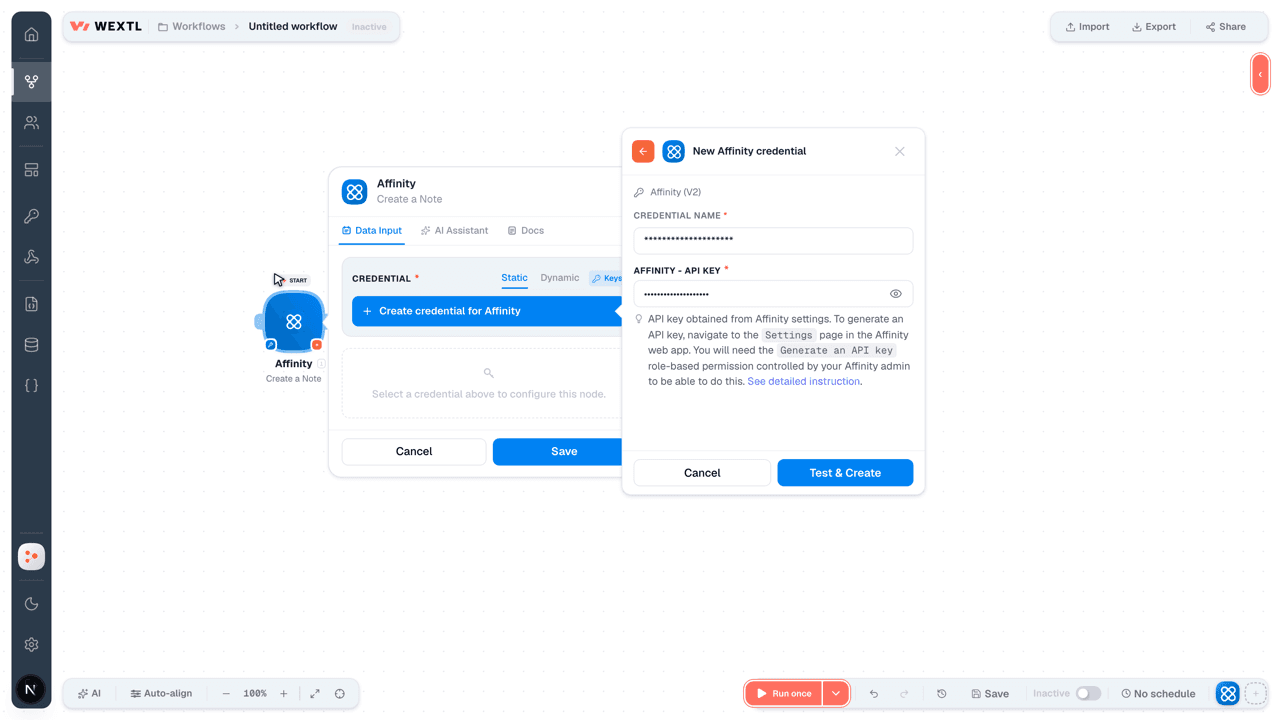
- API KeypasswordRequired
API key obtained from Affinity settings. To generate an API key, navigate to the
[1]Settingspage in the web app. You will need theGenerate an API keyrole-based permission controlled by your admin to be able to do this. See detailed instruction.
Connect Affinity in WEXTL
- Log in to your WEXTL account, add the Affinity node module to your workflow, and click Create new credential.Instant triggers use webhooks — click Create a webhook first when adding one, then create the credential.
- Optional: In the Credential name field, enter a name for the credential.
- Enter the authentication credentials you copied from your Affinity account, or follow the on-screen instructions to create the credential.
- If prompted, authenticate your account and confirm access.
- If you want to make changes to your credential in the future, follow the steps in Manage credentials →

Notes
Credentials are org-scoped; share them with teammates from the Credentials picker on any of its nodes.For detailed information on connecting an application, see Connect an application →
Affinity node modules
The list below is a reference of every Affinity node module the integration supports. You will be able to pick any of them on the workflow canvas while building automations.
Expand any Affinity node module below to see exactly what it takes in, what it returns, and what connection it needs.
Watch EventsTrigger
| Field | Type |
|---|---|
| User ID | number |
| Email address | |
| Name | text |
| Date created | date |
Get a CompanyAction
Get a ListAction
Get a PersonAction
Get a Person ListsSearch
Get an OpportunityAction
Get Company ListsSearch
Get Company Lists EntriesSearch
Get ListsSearch
List Custom Field ValuesSearch
List OpportunitiesSearch
Search CompaniesSearch
Search List EntriesSearch
Search List Entries from a Saved ViewSearch
Search OrganizationsSearch
Search PersonsSearch
Create a NoteAction
| Field | Type |
|---|---|
ContentRequired | text |
| Person IDs | array |
| Organization IDs | array |
| Opportunity IDs | array |
| Type | choice |
| Parent ID | number |
| Creator ID | number |
| Field | Type |
|---|---|
| ID | number |
| Creator ID | number |
| Person Ids | array |
| Associated Person Ids | array |
| Interaction Person Ids | array |
| Interaction ID | number |
| Interaction Type | number |
| Is Meeting | boolean |
| Mentioned Person Ids | array |
| Organization Ids | array |
| Opportunity Ids | array |
| Parent ID | text |
| Content | text |
| Type | number |
| Created at | date |
| Updated at | date |
Create a PersonAction
Create an OpportunityAction
Create an OrganizationAction
Delete a NoteAction
| Field | Type |
|---|---|
Note IDRequired | number |
Delete a PersonAction
| Field | Type |
|---|---|
Person IDRequired | number |
Delete an OpportunityAction
| Field | Type |
|---|---|
Opportunity IDRequired | number |
Make an API Calluniversal
Set a Custom Field ValueAction
Update a Custom Field ValueAction
Update a PersonAction
Update an OpportunityAction
Templates
Look for Affinity templates in the WEXTL template library.
Browse templates →Explore alternative apps
- Breakcold CRM[2]Lightweight CRM for sales teams to manage leads, pipelines, and customer relationships.
- ApptivoAll-in-one CRM and business suite for contacts, deals, projects, and invoicing.
- ClientifyCRM and sales automation platform for managing contacts, deals, and customer communication.
- Agile CRMManage contacts, companies, and deals in Agile CRM.
- AxonautManage companies, quotations, invoices, opportunities, projects, tasks and products in Axonaut, the CRM and invoicing software for small businesses.


References
- WEXTL® Affinity Source Code connector implementation.
- Our users use cases and automations.
- Official API Documentation for Affinity.
- WEXTL® visual workflow builder data.
Last updated: Jul 23, 2026 22:38