


Requirements
To use Benchmark Email on WEXTL you need an active account and an API access token from your account settings.[3]
Get your Benchmark Email credentials
- API TokenpasswordRequired
You can get your api token via
[1]https://ui.benchmarkemail.com/Integrate#API
Connect Benchmark Email in WEXTL
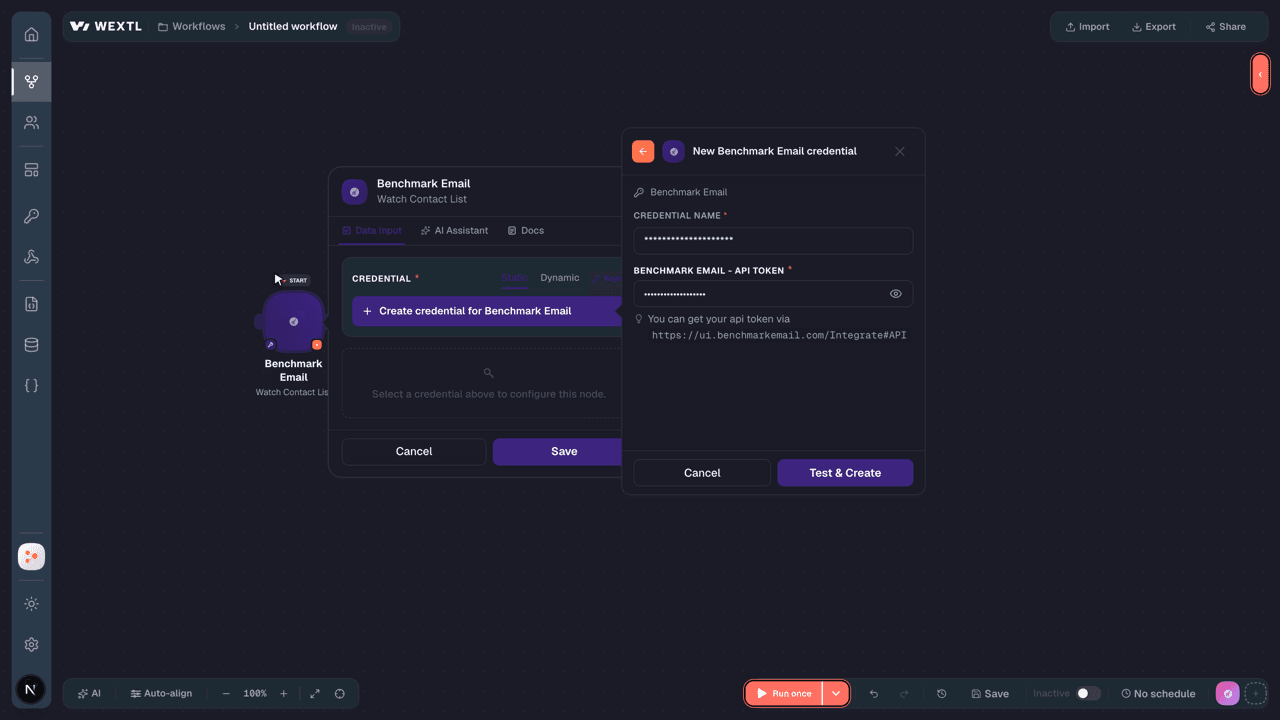
- Log in to your WEXTL account, add the Benchmark Email node module to your workflow, and click Create new credential.
- Optional: In the Credential name field, enter a name for the credential.
- Enter the authentication credentials you copied from your Benchmark Email account, or follow the on-screen instructions to create the credential.
- If prompted, authenticate your account and confirm access.
- If you want to make changes to your credential in the future, follow the steps in Manage credentials →

Notes
Credentials are org-scoped; share them with teammates from the Credentials picker on any of its nodes.For detailed information on connecting an application, see Connect an application →
Benchmark Email node modules
The list below is a reference of every Benchmark Email node module the integration supports. You will be able to pick any of them on the workflow canvas while building automations.
Open any Benchmark Email node module below to inspect its input parameters, outputs, and connection requirements.
Watch Contact ListTrigger
| Field | Type |
|---|---|
| Allow Delete | text |
| Contact Count | number |
| Created Date | date |
| ID | text |
| Is Importing | text |
| Is Master Unsubscribe | text |
| List Audited | text |
| List Description | text |
| List Import V3 | text |
| Modified Date | date |
| Name | text |
| Name Short | text |
| Permission Pass List | text |
| Segments | array |
| Status | text |
Watch ContactsTrigger
| Field | Type |
|---|---|
| Active Contact Count | text |
| Created Date Time | date |
| Description | text |
| Field 10Name | text |
| Field 10Type | text |
| Field 11Name | text |
| Field 11Type | text |
| Field 12Name | text |
| Field 12Type | text |
| Field 13Name | text |
| Field 13Type | text |
| Field 14Name | text |
| Field 14Type | text |
| Field 15Name | text |
| Field 15Type | text |
| Field 16Name | text |
| Field 16Type | text |
| Field 17Name | text |
| Field 17Type | text |
| Field 18Name | text |
Watch Emails by StatusTrigger
| Field | Type |
|---|---|
| Contact Lists | array |
| Created Date | text |
| Email Type | text |
| Exclude Contact Lists | array |
| From Email | text |
| From Name | text |
| ID | text |
| Is Favorite | text |
| Is RSS | text |
| Is RSSActive | text |
| Modified Date | text |
| Name | text |
| RSSSchedule | text |
| RSSURL | text |
| Reply Email | text |
| Review Reason | text |
| Schedule Date | text |
| Status | text |
| Status Text | text |
| Subject | text |
Find a ContactSearch
Get Contact ListsSearch
| Field | Type |
|---|---|
| Order By | choice |
| Sort Order | choice |
| Search Filter | text |
| Status | text |
| Limit | number |
| Field | Type |
|---|---|
| Allow Delete | text |
| Contact Count | number |
| Created Date | date |
| ID | text |
| Is Importing | text |
| Is Master Unsubscribe | text |
| List Audited | text |
| List Description | text |
| List Import V3 | text |
| Modified Date | date |
| Name | text |
| Name Short | text |
| Permission Pass List | text |
| Segments | array |
| Status | text |
Get ContactsSearch
| Field | Type |
|---|---|
Contact ListRequired | choice |
| Limit | number |
| Field | Type |
|---|---|
| Active Contact Count | text |
| Created Date Time | date |
| Description | text |
| Field 10Name | text |
| Field 10Type | text |
| Field 11Name | text |
| Field 11Type | text |
| Field 12Name | text |
| Field 12Type | text |
| Field 13Name | text |
| Field 13Type | text |
| Field 14Name | text |
| Field 14Type | text |
| Field 15Name | text |
| Field 15Type | text |
| Field 16Name | text |
| Field 16Type | text |
| Field 17Name | text |
| Field 17Type | text |
| Field 18Name | text |
Add a Contact to a ListAction
| Field | Type |
|---|---|
Contact ListRequired | choice |
EmailRequired | |
| First Name | text |
| Middle Name | text |
| Last Name | text |
| Email Permission | boolean |
| Field | Type |
|---|---|
| Contact Master ID | text |
| text | |
| Email Perm | text |
| Email Type | text |
| Field 1 | text |
| Field 10 | text |
| Field 11 | text |
| Field 12 | text |
| Field 13 | text |
| Field 14 | text |
| Field 15 | text |
| Field 16 | text |
| Field 17 | text |
| Field 18 | text |
| Field 19 | text |
| Field 2 | text |
| Field 20 | text |
| Field 21 | text |
| Field 22 | text |
| Field 23 | text |
Delete a ContactAction
| Field | Type |
|---|---|
Contact ListRequired | choice |
Make an API Calluniversal
Update a ContactAction
| Field | Type |
|---|---|
Contact ListRequired | choice |
| First Name | text |
| Middle Name | text |
| Last Name | text |
| Email Permission | boolean |
| Field | Type |
|---|---|
| Contact Master ID | text |
| text | |
| Email Perm | text |
| Email Type | text |
| Field 1 | text |
| Field 10 | text |
| Field 11 | text |
| Field 12 | text |
| Field 13 | text |
| Field 14 | text |
| Field 15 | text |
| Field 16 | text |
| Field 17 | text |
| Field 18 | text |
| Field 19 | text |
| Field 2 | text |
| Field 20 | text |
| Field 21 | text |
| Field 22 | text |
| Field 23 | text |
Templates
Look for Benchmark Email templates in the WEXTL template library.
Browse templates →Explore alternative apps
- Callbell[2]Shared inbox for WhatsApp, Messenger, Instagram, and Telegram support.
- AcumbamailEmail marketing platform for campaigns, lists, and subscriber automation.
- Bland AIAI phone-calling platform that places and handles automated voice conversations at scale.
- ArpooneBusiness SMS messaging platform for sending and managing text campaigns.
- BrevoEmail, SMS, and marketing automation platform (formerly Sendinblue).


References
- WEXTL® Benchmark Email Source Code connector implementation.
- Our users use cases and automations.
- Official API Documentation for Benchmark Email.
- WEXTL® visual workflow builder data.
Last updated: Jul 23, 2026 22:38