


Requirements
Before you set up the credential, make sure you have an active Bland AI account and an API access token from your account settings ready.[3]
Get your Bland AI credentials
- API KeytextRequired
You can generate API Key at
[1]Account Settings -> API Key -> Generate API Key.
Connect Bland AI in WEXTL
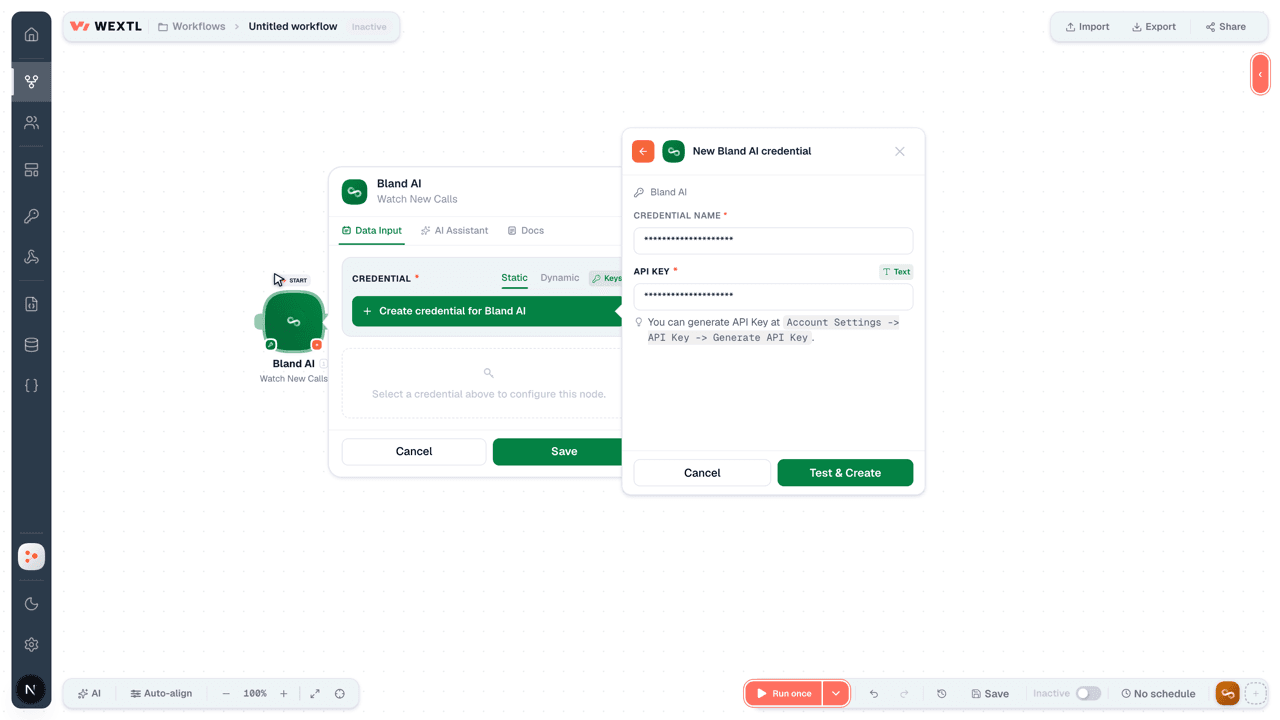
- Log in to your WEXTL account, add the Bland AI node module to your workflow, and click Create new credential.
- Optional: In the Credential name field, enter a name for the credential.
- Enter the authentication credentials you copied from your Bland AI account, or follow the on-screen instructions to create the credential.
- If prompted, authenticate your account and confirm access.
- If you want to make changes to your credential in the future, follow the steps in Manage credentials →
Notes
Credentials are org-scoped; share them with teammates from the Credentials picker on any of its nodes.For detailed information on connecting an application, see Connect an application →
Bland AI node modules
The list below is a reference of every Bland AI node module the integration supports. You will be able to pick any of them on the workflow canvas while building automations.
Each Bland AI node module below opens to reveal its input parameters, outputs, and connection requirements.
Watch New CallsTrigger
| Field | Type |
|---|---|
| Call ID | text |
| Created at | date |
| Call Length | number |
| To | text |
| From | text |
| Completed | boolean |
| Queue Status | text |
| Error Message | text |
| Answered by | text |
| Batch ID | text |
Get Audio RecordingAction
| Field | Type |
|---|---|
Call IDRequired | text |
Accept TypeRequired | choice |
Get Call DetailsAction
| Field | Type |
|---|---|
Call IDRequired | text |
| Field | Type |
|---|---|
| Status | text |
| Corrected Duration | text |
| End At | date |
| Call ID | text |
| To | text |
| From | text |
| Completed | boolean |
| Created At | text |
| Queue Status | text |
| Endpoint Url | text |
| Max Duration | number |
| Error Message | text |
| Answered By | text |
| Batch ID | text |
| Variables | object |
| Appointment Time | text |
| Now | text |
| Short From | text |
| Short To | text |
| From | text |
| To | text |
| Call ID | text |
| City | text |
| State | text |
| Country | text |
| Concatenated Transcript | text |
| Request Data | object |
| Phone Number | text |
| Reduce Latency | boolean |
| Wait | boolean |
| Language | text |
| Transcripts | array |
| Call Length | number |
List CallsSearch
List VoicesSearch
Make an API Calluniversal
Send a Batch of CallsAction
| Field | Type |
|---|---|
Base PromptRequired | text |
Call DataRequired | array |
| Label | text |
| Campaign ID | text |
Test ModeRequired | boolean |
| Voice | choice |
| First Sentence | text |
Wait For GreetingRequired | boolean |
| Interruption Threshold | number |
| Pathway ID | text |
| Model | choice |
| Webhook | text |
RecordRequired | boolean |
| Transfer Phone Number | text |
| Transfer List | object |
| Default | text |
| Sales | text |
| Support | text |
| Billing | text |
| Voice Settings | object |
| Quality | number |
| Stability | number |
| Similarity | number |
| Speed | number |
| Language | text |
| Max Duration | number |
Answered By EnabledRequired | boolean |
| From | text |
| Field | Type |
|---|---|
| Message | text |
| Batch ID | text |
Send a CallAction
| Field | Type |
|---|---|
Phone NumberRequired | text |
TaskRequired | text |
| Voice | choice |
| First Sentence | text |
Wait For GreetingRequired | boolean |
| Interruption Threshold | number |
| Pathway ID | text |
| Model | choice |
| Webhook | text |
RecordRequired | boolean |
| Transfer Phone Number | text |
| Transfer List | object |
| Default | text |
| Sales | text |
| Support | text |
| Billing | text |
| Voice Settings | object |
| Quality | number |
| Stability | number |
| Similarity | number |
| Speed | number |
| Language | text |
| Max Duration | number |
Answered By EnabledRequired | boolean |
| From | text |
| Pronunciation Guide | array |
| Temperature | number |
| Start Time | text |
| Field | Type |
|---|---|
| Status | text |
| Message | text |
| Call ID | text |
| Batch ID | text |
| Errors | array |
Templates
Look for Bland AI templates in the WEXTL template library.
Browse templates →Explore alternative apps
- Bandwidth[2]Enterprise communications APIs for voice, messaging, and phone number services.
- Benchmark EmailEmail marketing platform for campaigns, lists, automations, and subscriber engagement.
- CallbellShared inbox for WhatsApp, Messenger, Instagram, and Telegram support.
- ArpooneBusiness SMS messaging platform for sending and managing text campaigns.
- BatchDialerCloud predictive dialer for sales and collections teams with contacts and campaigns.


References
- WEXTL® Bland AI Source Code connector implementation.
- Our users use cases and automations.
- Official API Documentation for Bland AI.
- WEXTL® visual workflow builder data.
Last updated: Jul 23, 2026 22:38