


Requirements
To use Calendesk on WEXTL you need an active account and an API access token from your account settings.[3]
Get your Calendesk credentials
Connect Calendesk in WEXTL
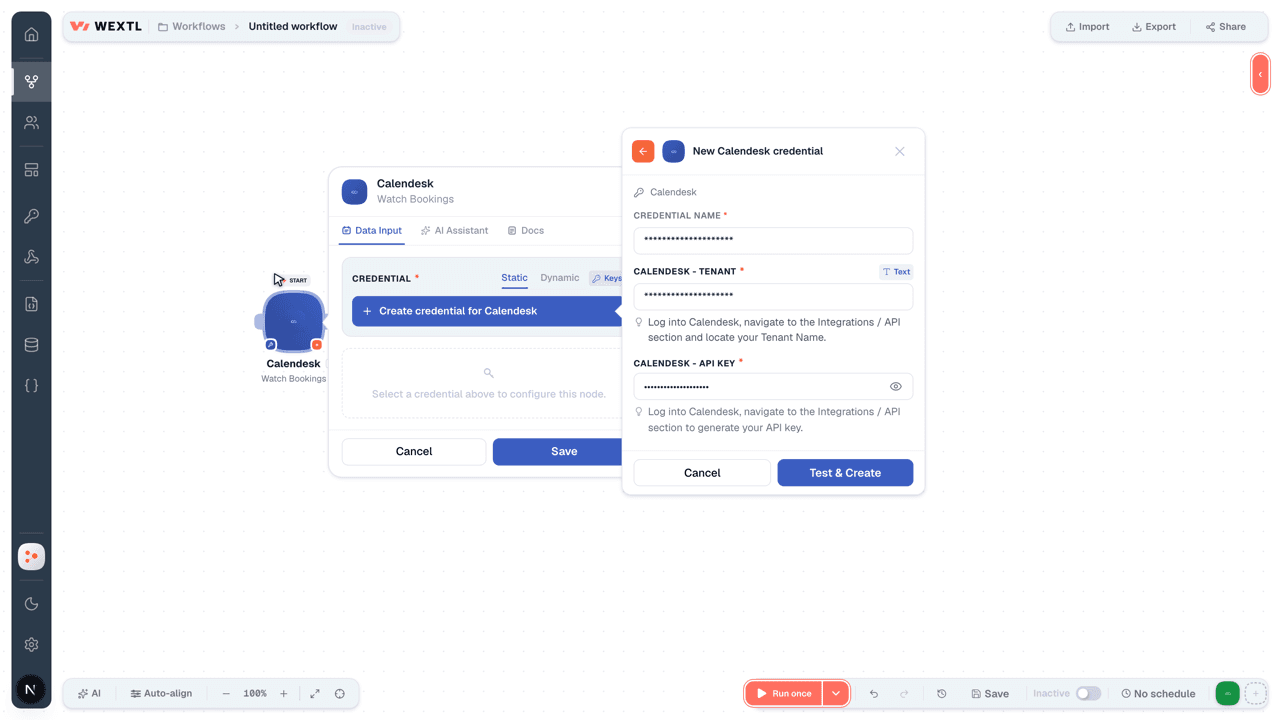
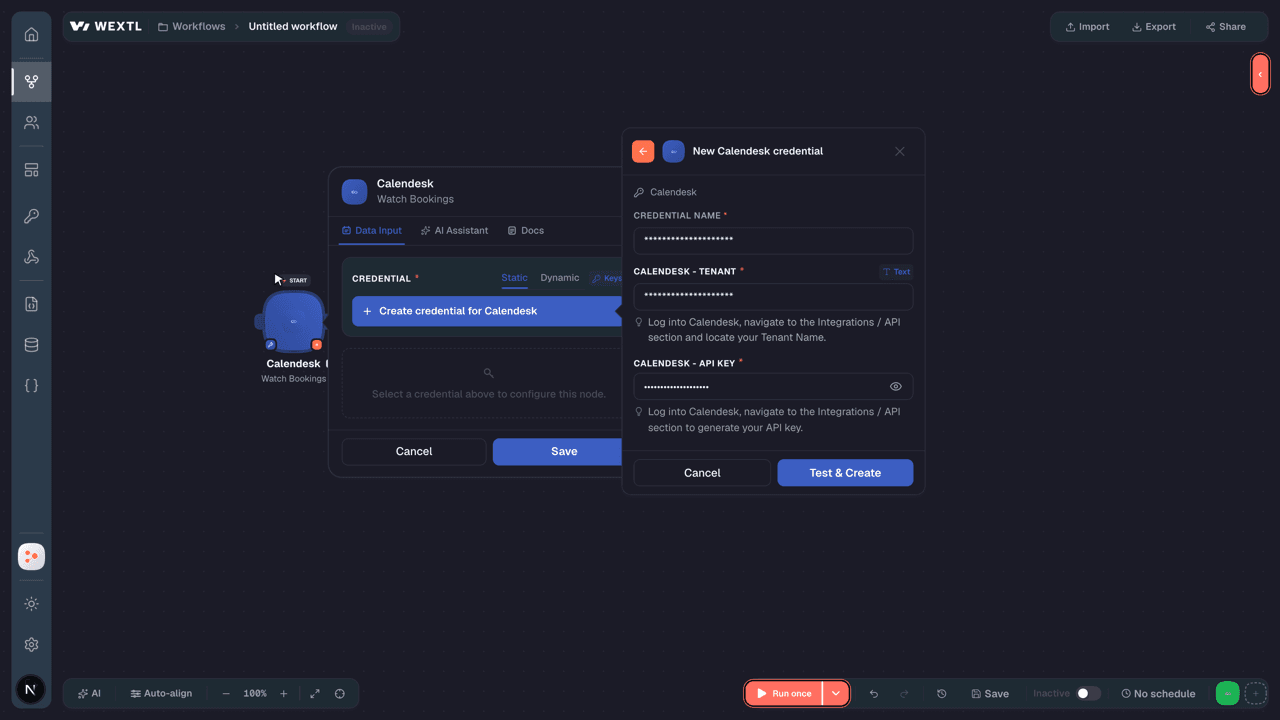
- Log in to your WEXTL account, add the Calendesk node module to your workflow, and click Create new credential.Instant triggers use webhooks — click Create a webhook first when adding one, then create the credential.
- Optional: In the Credential name field, enter a name for the credential.
- Enter the authentication credentials you copied from your Calendesk account, or follow the on-screen instructions to create the credential.
- If prompted, authenticate your account and confirm access.
- If you want to make changes to your credential in the future, follow the steps in Manage credentials →
Notes
Credentials are org-scoped; share them with teammates from the Credentials picker on any of its nodes.For detailed information on connecting an application, see Connect an application →
Calendesk node modules
The list below is a reference of every Calendesk node module the integration supports. You will be able to pick any of them on the workflow canvas while building automations.
Open any Calendesk node module below to inspect its input parameters, outputs, and connection requirements.
Watch BookingsTrigger
Output fields[3]
| Field | Type |
|---|---|
| ID | number |
| Employee ID | number |
| User ID | number |
| Service ID | number |
| Service type ID | text |
| Start date | date |
| Starts at | date |
| Ends at | date |
| All day event | boolean |
| Created at | date |
| Updated at | date |
| End date | date |
| Start time | text |
| End time | text |
| Customer time zone | text |
| Status | text |
| Group ID | text |
| Multi slot group ID | text |
| Recurrence params | text |
11other output fields
Watch EmployeesTrigger
Output fields[3]
| Field | Type |
|---|---|
| ID | number |
| Title | text |
| Description | text |
| url | |
| url | |
| Youtube | url |
| url | |
| Tiktok | url |
| url | |
| Color | text |
| Is public | boolean |
| Google calendar enabled | boolean |
| Google calendar ID | text |
| Outlook calendar ID | text |
| Outlook enabled | boolean |
| Outlook allowed meeting providers | text |
| Teams business enabled | boolean |
| Skype business enabled | boolean |
| Skype consumer enabled | boolean |
9other output fields
Watch EventTrigger
Output fields[3]
| Field | Type |
|---|---|
| ID | number |
| URL | url |
| User ID | number |
| Events | array |
| Created at | date |
Watch FilesTrigger
Output fields[3]
| Field | Type |
|---|---|
| ID | number |
| Employee ID | number |
| User ID | number |
| Service ID | number |
| Service type ID | text |
| Start date | date |
| Starts at | date |
| Ends at | date |
| All day event | boolean |
| Created at | date |
| Updated at | date |
| End date | date |
| Start time | text |
| End time | text |
| Customer time zone | text |
| Status | text |
| Group ID | text |
| Multi slot group ID | text |
| Recurrence params | text |
11other output fields
Watch InvoicesTrigger
Output fields[3]
| Field | Type |
|---|---|
| ID | number |
| Number | text |
| Issue date | date |
| Currency | text |
| Lang | text |
| Description | text |
| Price gross | number |
| Gov status | text |
| Gov ID | text |
| Gov verification link | url |
| Gov error messages | text |
Watch LocationTrigger
Output fields[3]
| Field | Type |
|---|---|
| ID | number |
| Type | number |
| Data | text |
| Name | text |
| Service ids | array |
Watch SubscriptionsTrigger
Output fields[3]
| Field | Type |
|---|---|
| ID | number |
| Stripe product price ID | number |
| Name | text |
| Description | text |
| Status | text |
| Success URL | url |
| Cancel URL | url |
| Recurring interval | text |
| Interval count | number |
| Service limit | number |
| Wants invoice | boolean |
| Require billing data | boolean |
| Disable robot indexing | boolean |
| Only company invoice data type | boolean |
| Allow users to cancel | boolean |
| Stop automatic payments recurring interval | text |
| Stop automatic payments interval count | number |
| Gdpr fields | array |
| Tax | text |
6other output fields
Watch UsersTrigger
Output fields[3]
| Field | Type |
|---|---|
| ID | number |
| Name | text |
| Surname | text |
| Status | text |
| Identity number | text |
| Time zone | text |
| Locale | text |
| Accepts push | boolean |
| Created at | date |
| Default image | text |
| Default phone | object |
| ID | number |
| E 164 | text |
| Default address | object |
| Name | text |
| Tax number | text |
| Vat iso prefix | text |
| Street | text |
| Postal code | text |
| City | text |
| Country iso code | text |
| Groups | array |
Get a BookingAction
Input fields[3]
| Field | Type |
|---|---|
Booking IDRequired | choice |
Output fields[3]
| Field | Type |
|---|---|
| ID | number |
| Employee ID | number |
| User ID | number |
| Service ID | number |
| Service type ID | text |
| Start date | date |
| Starts at | date |
| Ends at | date |
| End date | date |
| All day event | boolean |
| Start time | text |
| End time | text |
| Customer time zone | text |
| Status | text |
| Description | text |
| Custom fields | text |
| Group ID | text |
| Multi slot group ID | text |
| Recurrence params | text |
27other output fields
Get a Group BookingAction
Input fields[3]
| Field | Type |
|---|---|
Group IDRequired | choice |
Output fields[3]
| Field | Type |
|---|---|
| ID | number |
| Employee ID | number |
| User ID | number |
| Service ID | number |
| Service type ID | text |
| Start date | date |
| Starts at | date |
| Ends at | date |
| End date | date |
| All day event | boolean |
| Start time | text |
| End time | text |
| Customer time zone | text |
| Status | text |
| Description | text |
| Custom fields | text |
| Group ID | text |
| Multi slot group ID | text |
| Recurrence params | text |
27other output fields
Get a SubscriptionAction
Input fields[3]
| Field | Type |
|---|---|
Subscription IDRequired | choice |
Output fields[3]
| Field | Type |
|---|---|
| ID | number |
| Stripe product price ID | number |
| Name | text |
| Description | text |
| Status | text |
| Success URL | url |
| Cancel URL | url |
| Recurring interval | text |
| Interval count | number |
| Service limit | number |
| Wants invoice | boolean |
| Require billing data | boolean |
| Disable robot indexing | boolean |
| Only company invoice data type | boolean |
| Allow users to cancel | boolean |
| Stop automatic payments recurring interval | text |
| Stop automatic payments interval count | number |
| Gdpr fields | array |
| Tax | text |
6other output fields
Get a UserAction
Input fields[3]
| Field | Type |
|---|---|
User IDRequired | choice |
Output fields[3]
| Field | Type |
|---|---|
| ID | number |
| Name | text |
| Surname | text |
| Status | text |
| Permissions | array |
| Two factor enabled | boolean |
| Preferences | object |
| Email notification booking created | boolean |
| Email notification booking prepayment | boolean |
| Email notification booking updated | boolean |
| Email notification booking deleted | boolean |
| Email notification booking reminder | boolean |
| Sms notification booking created | boolean |
| Sms notification booking prepayment | boolean |
| Sms notification booking updated | boolean |
| Sms notification booking deleted | boolean |
| Sms notification booking reminder | boolean |
| Roles | array |
| Date of birth | date |
| Date of names day | date |
| Email verified at | date |
| Gender | text |
| Identity number | text |
| Time zone | text |
| Locale | text |
| Stripe ID | text |
| Fakturownia ID | text |
| Card brand | text |
12other output fields
Get an EmployeeAction
Input fields[3]
| Field | Type |
|---|---|
Employee IDRequired | choice |
Output fields[3]
| Field | Type |
|---|---|
| ID | number |
| Title | text |
| Description | text |
| url | |
| url | |
| Youtube | url |
| url | |
| Tiktok | url |
| url | |
| Color | text |
| Is public | boolean |
| Google calendar enabled | boolean |
| Google calendar ID | text |
| Outlook calendar ID | text |
| Outlook enabled | boolean |
| Outlook allowed meeting providers | text |
| Teams business enabled | boolean |
| Skype business enabled | boolean |
| Skype consumer enabled | boolean |
9other output fields
Get Authenticated UserAction
Output fields[3]
| Field | Type |
|---|---|
| ID | number |
| Name | text |
| Surname | text |
| Status | text |
| Permissions | array |
| Two factor enabled | boolean |
| Preferences | object |
| Email notification booking created | boolean |
| Email notification booking prepayment | boolean |
| Email notification booking updated | boolean |
| Email notification booking deleted | boolean |
| Email notification booking reminder | boolean |
| Sms notification booking created | boolean |
| Sms notification booking prepayment | boolean |
| Sms notification booking updated | boolean |
| Sms notification booking deleted | boolean |
| Sms notification booking reminder | boolean |
| Roles | array |
| Date of birth | date |
| Date of names day | date |
| Email verified at | date |
| Gender | text |
| Identity number | text |
| Time zone | text |
| Locale | text |
| Stripe ID | text |
| Fakturownia ID | text |
| Card brand | text |
12other output fields
List BookingsSearch
Input fields[3]
| Field | Type |
|---|---|
| Order By | choice |
| Ascending | choice |
| Query | text |
| Employee IDs | choice |
| User IDs | choice |
| Service IDs | choice |
| Service ID | choice |
| Service Type ID | number |
| Tag IDs | choice |
| Booking IDs | choice |
| Group ID | choice |
| Status IDs | choice |
| Paid | choice |
| Booking Date From | date |
| Booking Date To | date |
| Create Date From | date |
| Create Date To | date |
| Identity Number | text |
| choice |
1other input field
Output fields[3]
| Field | Type |
|---|---|
| ID | number |
| Employee ID | number |
| User ID | number |
| Service ID | number |
| Service type ID | text |
| Start date | date |
| Starts at | date |
| Ends at | date |
| All day event | boolean |
| Created at | date |
| Updated at | date |
| End date | date |
| Start time | text |
| End time | text |
| Customer time zone | text |
| Status | text |
| Group ID | text |
| Multi slot group ID | text |
| Recurrence params | text |
11other output fields
List EmployeesSearch
Input fields[3]
| Field | Type |
|---|---|
| Ascending | choice |
| Order By | choice |
| Query | text |
| Status | choice |
| Status IDs | choice |
| Is Public | choice |
| Integration IDs | choice |
| Limit | number |
Output fields[3]
| Field | Type |
|---|---|
| ID | number |
| Title | text |
| Description | text |
| url | |
| url | |
| Youtube | url |
| url | |
| Tiktok | url |
| url | |
| Color | text |
| Is public | boolean |
| Google calendar enabled | boolean |
| Google calendar ID | text |
| Outlook calendar ID | text |
| Outlook enabled | boolean |
| Outlook allowed meeting providers | text |
| Teams business enabled | boolean |
| Skype business enabled | boolean |
| Skype consumer enabled | boolean |
9other output fields
List FilesSearch
Input fields[3]
| Field | Type |
|---|---|
| Sort Direction | choice |
| Order By | choice |
| Search Query | text |
| User IDs | choice |
| Parent Directory IDs | choice |
| Created From | date |
| Created To | date |
| Limit | number |
Output fields[3]
| Field | Type |
|---|---|
| UUID | text |
| File directory ID | number |
| Name | text |
| Path | text |
| Mime type | text |
| Size | number |
| User ID | number |
| In sandbox | boolean |
| Created at | date |
| Updated at | date |
List InvoicesSearch
List LocationsSearch
List SubscriptionsSearch
Input fields[3]
| Field | Type |
|---|---|
| Sort Direction | choice |
| Order By | choice |
| Search Term | text |
| Service IDs | choice |
| Limit | number |
Output fields[3]
| Field | Type |
|---|---|
| ID | number |
| Stripe product price ID | number |
| Name | text |
| Description | text |
| Status | text |
| Success URL | url |
| Cancel URL | url |
| Recurring interval | text |
| Interval count | number |
| Service limit | number |
| Wants invoice | boolean |
| Require billing data | boolean |
| Disable robot indexing | boolean |
| Only company invoice data type | boolean |
| Allow users to cancel | boolean |
| Stop automatic payments recurring interval | text |
| Stop automatic payments interval count | number |
| Gdpr fields | array |
| Tax | text |
6other output fields
List UsersSearch
Input fields[3]
| Field | Type |
|---|---|
| Ascending | choice |
| Query | text |
| Order By | choice |
| User IDs | choice |
| Status IDs | choice |
| Group IDs | choice |
| Integration IDs | choice |
| Created From | date |
| Created To | date |
| Identity Number | text |
| Time Zone | text |
| Locale | choice |
| choice | |
| Limit | number |
Output fields[3]
| Field | Type |
|---|---|
| ID | number |
| Name | text |
| Surname | text |
| text | |
| Status | text |
| Identity number | text |
| Time zone | text |
| Locale | text |
| Accepts push | boolean |
| Created at | date |
| Default image | text |
| Default phone | object |
| ID | number |
| E 164 | text |
| Default address | object |
| Name | text |
| Tax number | text |
| Vat iso prefix | text |
| Street | text |
| Postal code | text |
| City | text |
| Country iso code | text |
| Groups | array |
Retrieve a Setup IntentAction
Attach a Payment MethodAction
Input fields[3]
| Field | Type |
|---|---|
Payment Method IdentifierRequired | text |
| Default | boolean |
Create a BookingAction
Input fields[3]
| Field | Type |
|---|---|
Employee IDRequired | choice |
End DateRequired | date |
Service IDRequired | choice |
Start DateRequired | date |
| All Day Event | boolean |
| Custom Fields | array |
| Description | text |
| End Time | text |
| Paid | boolean |
| Payment Method | choice |
| Recurrence Parameters | text |
| Service Location ID | choice |
| User ID | choice |
| User IDs | choice |
| Service Type ID | number |
| Skip Notifications | boolean |
| Start Time | time |
| Status | choice |
| Tags | choice |
Output fields[3]
| Field | Type |
|---|---|
| ID | number |
| Employee ID | number |
| User ID | number |
| Service ID | number |
| Service type ID | text |
| Start date | date |
| Starts at | date |
| Ends at | date |
| End date | date |
| All day event | boolean |
| Start time | text |
| End time | text |
| Customer time zone | text |
| Status | text |
| Description | text |
| Custom fields | text |
| Group ID | text |
| Multi slot group ID | text |
| Recurrence params | text |
27other output fields
Create a CustomerAction
Output fields[3]
| Field | Type |
|---|---|
| ID | number |
| Name | text |
| Surname | text |
| Status | text |
| Date of birth | text |
| Date of names day | text |
| Gender | text |
| Preferences | text |
| Subscriptions | array |
| Gdpr fields | text |
| Email verified at | date |
| Stripe ID | text |
| Card brand | text |
| Card last four | text |
| Default image | text |
| Default phone | text |
| Default address | text |
Create a DirectoryAction
Create a LocationAction
Create a SubscriptionAction
Input fields[3]
| Field | Type |
|---|---|
Subscription Plan NameRequired | text |
Subscription StatusRequired | choice |
| Interval Count | number |
| Stop Automatic Payments Interval Count | number |
| Allow Users to Cancel | boolean |
| Cancel URL | url |
| Subscription Description | text |
| Disable Robot Indexing | boolean |
| GDPR Fields | text |
| Max Active Subscriptions | number |
| Only Company Invoice Data | boolean |
| Recurring Interval | choice |
| Require Billing Data | boolean |
| Service IDs | choice |
| Service Limit | number |
| Stop Automatic Payments Recurring Interval | choice |
| Stripe Product Price ID | choice |
| Success URL | url |
| Tax | text |
1other input field
Output fields[3]
| Field | Type |
|---|---|
| ID | number |
| Stripe product price ID | number |
| Name | text |
| Description | text |
| Status | text |
| Success URL | url |
| Cancel URL | url |
| Recurring interval | text |
| Interval count | number |
| Service limit | number |
| Wants invoice | boolean |
| Require billing data | boolean |
| Disable robot indexing | boolean |
| Only company invoice data type | boolean |
| Allow users to cancel | boolean |
| Stop automatic payments recurring interval | text |
| Stop automatic payments interval count | number |
| Gdpr fields | array |
| Tax | text |
6other output fields
Create a UserAction
Input fields[3]
| Field | Type |
|---|---|
EmailRequired | |
First NameRequired | text |
Last NameRequired | text |
PasswordRequired | secret |
| Activate Account | boolean |
| Send Reset Password Email | boolean |
| Date of Birth | date |
| Name Day Date | date |
| Default Address | object |
CityRequired | text |
Country ISO CodeRequired | text |
Address Label or Company NameRequired | text |
Postal/ZIP CodeRequired | text |
Street AddressRequired | text |
| Tax Number | text |
| VAT ISO Prefix | text |
| Default Image ID | number |
| Default Phone | text |
| Description | text |
| Fakturownia ID | text |
| Firebase Token | text |
| Gender | choice |
| Groups | choice |
| Identity Number | text |
| Locale | choice |
| Status | choice |
3other input fields
Output fields[3]
| Field | Type |
|---|---|
| ID | number |
| Name | text |
| Surname | text |
| Status | text |
| Permissions | array |
| Two factor enabled | boolean |
| Preferences | object |
| Email notification booking created | boolean |
| Email notification booking prepayment | boolean |
| Email notification booking updated | boolean |
| Email notification booking deleted | boolean |
| Email notification booking reminder | boolean |
| Sms notification booking created | boolean |
| Sms notification booking prepayment | boolean |
| Sms notification booking updated | boolean |
| Sms notification booking deleted | boolean |
| Sms notification booking reminder | boolean |
| Roles | array |
| Date of birth | date |
| Date of names day | date |
| Email verified at | date |
| Gender | text |
| Identity number | text |
| Time zone | text |
| Locale | text |
| Stripe ID | text |
| Fakturownia ID | text |
| Card brand | text |
12other output fields
Create an EmployeeAction
Input fields[3]
| Field | Type |
|---|---|
First NameRequired | text |
Last NameRequired | text |
| Availability Schedule ID | number |
| Card Number | text |
| Color | text |
| Date of Birth | date |
| Date of Names Day | date |
| Custom Working Hours | choice |
| Default Address | object |
| City | text |
| Country ISO Code | text |
| Address Label | text |
| Postal Code | text |
| Street | text |
| Tax Number | text |
| VAT ISO Prefix | text |
| Default Image ID | number |
| Default Phone | text |
| Description | text |
| url | |
| Gender | choice |
| Identity Number | text |
| url | |
| Is Public | boolean |
| url |
15other input fields
Output fields[3]
| Field | Type |
|---|---|
| ID | number |
| Title | text |
| Description | text |
| url | |
| url | |
| Youtube | url |
| url | |
| Tiktok | url |
| url | |
| Color | text |
| Is public | boolean |
| Google calendar enabled | boolean |
| Google calendar ID | text |
| Outlook calendar ID | text |
| Outlook enabled | boolean |
| Outlook allowed meeting providers | text |
| Teams business enabled | boolean |
| Skype business enabled | boolean |
| Skype consumer enabled | boolean |
9other output fields
Delete a BookingAction
Input fields[3]
| Field | Type |
|---|---|
Booking IDRequired | choice |
Delete a DirectoryAction
Input fields[3]
| Field | Type |
|---|---|
Directory IDRequired | choice |
Delete a FileAction
Input fields[3]
| Field | Type |
|---|---|
File UUIDRequired | choice |
Delete a LocationAction
Input fields[3]
| Field | Type |
|---|---|
IDRequired | choice |
Delete a SubscriptionAction
Input fields[3]
| Field | Type |
|---|---|
Subscription IDRequired | choice |
Delete an EmployeeAction
Input fields[3]
| Field | Type |
|---|---|
Employee IDRequired | choice |
Delete Multiple BookingsAction
Input fields[3]
| Field | Type |
|---|---|
| Booking IDs | choice |
Group IDRequired | choice |
| Skip Notifications | boolean |
| Start From ID | choice |
Delete Multiple EmployeesAction
Input fields[3]
| Field | Type |
|---|---|
Employee IDsRequired | choice |
Delete Multiple UsersAction
Input fields[3]
| Field | Type |
|---|---|
User IDsRequired | choice |
Detach a Payment MethodAction
Input fields[3]
| Field | Type |
|---|---|
Payment Method IdentifierRequired | text |
| Default | boolean |
Download an Invoice PDFAction
Input fields[3]
| Field | Type |
|---|---|
IDRequired | choice |
Export a Bookings FileAction
Input fields[3]
| Field | Type |
|---|---|
Booking IDRequired | choice |
TypeRequired | choice |
Export EmployeesAction
Input fields[3]
| Field | Type |
|---|---|
Employees IDsRequired | choice |
TypeRequired | choice |
Export UsersAction
Input fields[3]
| Field | Type |
|---|---|
User IDsRequired | choice |
TypeRequired | choice |
Make an API Calluniversal
Remove Users From GroupsAction
Input fields[3]
| Field | Type |
|---|---|
User IDsRequired | choice |
Group IDsRequired | choice |
Resend Booking NotificationsAction
Input fields[3]
| Field | Type |
|---|---|
Booking IDRequired | choice |
EventRequired | choice |
Update a BookingAction
Input fields[3]
| Field | Type |
|---|---|
Booking IDRequired | choice |
| All Day Event | boolean |
| Custom Fields | array |
| Customer Time Notation | choice |
| Customer Time Zone | time |
| Description | text |
| Employee ID | choice |
| End Date | date |
| End Time | time |
| Group ID | choice |
| Paid | boolean |
| Payment Method | choice |
| Recurrence Parameters | text |
| Service ID | choice |
| Service Location ID | choice |
| Service Type ID | number |
| Simple Store Product IDs | choice |
| Skip Notifications | boolean |
| Start Date | date |
5other input fields
Output fields[3]
| Field | Type |
|---|---|
| ID | number |
| Employee ID | number |
| User ID | number |
| Service ID | number |
| Service type ID | text |
| Start date | date |
| Starts at | date |
| Ends at | date |
| End date | date |
| All day event | boolean |
| Start time | text |
| End time | text |
| Customer time zone | text |
| Status | text |
| Description | text |
| Custom fields | text |
| Group ID | text |
| Multi slot group ID | text |
| Recurrence params | text |
27other output fields
Update a DirectoryAction
Update a FileAction
Update a Group BookingAction
Input fields[3]
| Field | Type |
|---|---|
Group IDRequired | choice |
Start DateRequired | date |
| End Date | date |
| Start Time | time |
| End Time | time |
| All Day Event | boolean |
| Employee ID | choice |
| Recurrence Parameters | text |
| Service ID | choice |
| Service Location ID | choice |
| Service Type ID | number |
| Skip Notifications | boolean |
| Start From ID | choice |
| User IDs | choice |
Update a LocationAction
Update a SubscriptionAction
Input fields[3]
| Field | Type |
|---|---|
Subscription IDRequired | choice |
Subscription Plan NameRequired | text |
Subscription StatusRequired | choice |
| Interval Count | number |
| Stop Automatic Payments Interval Count | number |
| Allow Users to Cancel | boolean |
| Cancel URL | url |
| Subscription Description | text |
| Disable Robot Indexing | boolean |
| GDPR Fields | text |
| Max Active Subscriptions | number |
| Only Company Invoice Data | boolean |
| Recurring Interval | choice |
| Require Billing Data | boolean |
| Service IDs | choice |
| Service Limit | number |
| Stop Automatic Payments Recurring Interval | choice |
| Stripe Product Price ID | choice |
| Success URL | url |
2other input fields
Output fields[3]
| Field | Type |
|---|---|
| ID | number |
| Stripe product price ID | number |
| Name | text |
| Description | text |
| Status | text |
| Success URL | url |
| Cancel URL | url |
| Recurring interval | text |
| Interval count | number |
| Service limit | number |
| Wants invoice | boolean |
| Require billing data | boolean |
| Disable robot indexing | boolean |
| Only company invoice data type | boolean |
| Allow users to cancel | boolean |
| Stop automatic payments recurring interval | text |
| Stop automatic payments interval count | number |
| Gdpr fields | array |
| Tax | text |
6other output fields
Update a UserAction
Input fields[3]
| Field | Type |
|---|---|
User IDRequired | choice |
| Card Number | text |
| First Name | text |
| Last Name | text |
| Password | secret |
| Activate Account | boolean |
| Send Reset Password Email | boolean |
| Date of Birth | date |
| Name Day Date | date |
| Default Address | object |
| City | text |
| Country ISO Code | text |
| Address Label or Company Name | text |
| Postal/ZIP Code | text |
| Street Address | text |
| Tax Number | text |
| VAT ISO Prefix | text |
| Default Image ID | number |
| Default Phone | text |
| Description | text |
| Fakturownia ID | text |
| Firebase Token | text |
| Gender | choice |
| Groups | choice |
| Identity Number | text |
5other input fields
Output fields[3]
| Field | Type |
|---|---|
| ID | number |
| Name | text |
| Surname | text |
| Status | text |
| Permissions | array |
| Two factor enabled | boolean |
| Preferences | object |
| Email notification booking created | boolean |
| Email notification booking prepayment | boolean |
| Email notification booking updated | boolean |
| Email notification booking deleted | boolean |
| Email notification booking reminder | boolean |
| Sms notification booking created | boolean |
| Sms notification booking prepayment | boolean |
| Sms notification booking updated | boolean |
| Sms notification booking deleted | boolean |
| Sms notification booking reminder | boolean |
| Roles | array |
| Date of birth | date |
| Date of names day | date |
| Email verified at | date |
| Gender | text |
| Identity number | text |
| Time zone | text |
| Locale | text |
| Stripe ID | text |
| Fakturownia ID | text |
| Card brand | text |
12other output fields
Update a User DescriptionAction
Input fields[3]
| Field | Type |
|---|---|
User IDRequired | choice |
DescriptionRequired | text |
Output fields[3]
| Field | Type |
|---|---|
| ID | number |
| Name | text |
| Surname | text |
| Status | text |
| Permissions | array |
| Two factor enabled | boolean |
| Preferences | object |
| Email notification booking created | boolean |
| Email notification booking prepayment | boolean |
| Email notification booking updated | boolean |
| Email notification booking deleted | boolean |
| Email notification booking reminder | boolean |
| Sms notification booking created | boolean |
| Sms notification booking prepayment | boolean |
| Sms notification booking updated | boolean |
| Sms notification booking deleted | boolean |
| Sms notification booking reminder | boolean |
| Roles | array |
| Date of birth | date |
| Date of names day | date |
| Email verified at | date |
| Gender | text |
| Identity number | text |
| Time zone | text |
| Locale | text |
| Stripe ID | text |
| Fakturownia ID | text |
| Card brand | text |
12other output fields
Update a User's PictureAction
Update an EmployeeAction
Input fields[3]
| Field | Type |
|---|---|
Booking IDRequired | choice |
| First Name | text |
| Last Name | text |
| Availability Schedule ID | number |
| Card Number | text |
| Color | text |
| Date of Birth | date |
| Date of Names Day | date |
| Custom Working Hours | choice |
| Default Address | object |
| City | text |
| Country ISO Code | text |
| Address Label | text |
| Postal Code | text |
| Street | text |
| Tax Number | text |
| VAT ISO Prefix | text |
| Default Image ID | number |
| Default Phone | text |
| Description | text |
| url | |
| Gender | choice |
| Identity Number | text |
| url | |
| Is Public | boolean |
16other input fields
Output fields[3]
| Field | Type |
|---|---|
| ID | number |
| Title | text |
| Description | text |
| url | |
| url | |
| Youtube | url |
| url | |
| Tiktok | url |
| url | |
| Color | text |
| Is public | boolean |
| Google calendar enabled | boolean |
| Google calendar ID | text |
| Outlook calendar ID | text |
| Outlook enabled | boolean |
| Outlook allowed meeting providers | text |
| Teams business enabled | boolean |
| Skype business enabled | boolean |
| Skype consumer enabled | boolean |
9other output fields
Update Multiple BookingsAction
Input fields[3]
| Field | Type |
|---|---|
Booking IDRequired | choice |
| All Day Event | boolean |
| Custom Fields | array |
| Customer Time Notation | choice |
| Customer Time Zone | time |
| Description | text |
| Employee ID | choice |
| End Date | date |
| End Time | time |
| Group ID | choice |
| Paid | boolean |
| Payment Method | choice |
| Recurrence Parameters | text |
| Service ID | choice |
| Service Location ID | choice |
| Service Type ID | number |
| Simple Store Product IDs | choice |
| Skip Notifications | boolean |
| Start Date | date |
5other input fields
Update Multiple EmployeesAction
Input fields[3]
| Field | Type |
|---|---|
Booking IDRequired | choice |
| First Name | text |
| Last Name | text |
| Availability Schedule ID | number |
| Card Number | text |
| Color | text |
| Date of Birth | date |
| Date of Names Day | date |
| Custom Working Hours | choice |
| Default Address | object |
| City | text |
| Country ISO Code | text |
| Address Label | text |
| Postal Code | text |
| Street | text |
| Tax Number | text |
| VAT ISO Prefix | text |
| Default Image ID | number |
| Default Phone | text |
| Description | text |
| url | |
| Gender | choice |
| Identity Number | text |
| url | |
| Is Public | boolean |
16other input fields
Update Multiple UsersAction
Input fields[3]
| Field | Type |
|---|---|
User IDsRequired | choice |
| Card Number | text |
| First Name | text |
| Last Name | text |
| Password | secret |
| Activate Account | boolean |
| Send Reset Password Email | boolean |
| Date of Birth | date |
| Name Day Date | date |
| Default Address | object |
CityRequired | text |
Country ISO CodeRequired | text |
Address Label or Company NameRequired | text |
Postal/ZIP CodeRequired | text |
Street AddressRequired | text |
| Tax Number | text |
| VAT ISO Prefix | text |
| Default Image ID | number |
| Default Phone | text |
| Description | text |
| Fakturownia ID | text |
| Firebase Token | text |
| Gender | choice |
| Groups | choice |
| Identity Number | text |
5other input fields
Update Own AccountAction
Input fields[3]
| Field | Type |
|---|---|
| Card Number | text |
| First Name | text |
| Last Name | text |
| Password | secret |
| Activate Account | boolean |
| Send Reset Password Email | boolean |
| Date of Birth | date |
| Name Day Date | date |
| Default Address | object |
CityRequired | text |
Country ISO CodeRequired | text |
Address Label or Company NameRequired | text |
Postal/ZIP CodeRequired | text |
Street AddressRequired | text |
| Tax Number | text |
| VAT ISO Prefix | text |
| Default Image ID | number |
| Default Phone | text |
| Description | text |
| Fakturownia ID | text |
| Firebase Token | text |
| Gender | choice |
| Groups | choice |
| Identity Number | text |
| Locale | choice |
4other input fields
Output fields[3]
| Field | Type |
|---|---|
| ID | number |
| Name | text |
| Surname | text |
| Status | text |
| Permissions | array |
| Two factor enabled | boolean |
| Preferences | object |
| Email notification booking created | boolean |
| Email notification booking prepayment | boolean |
| Email notification booking updated | boolean |
| Email notification booking deleted | boolean |
| Email notification booking reminder | boolean |
| Sms notification booking created | boolean |
| Sms notification booking prepayment | boolean |
| Sms notification booking updated | boolean |
| Sms notification booking deleted | boolean |
| Sms notification booking reminder | boolean |
| Roles | array |
| Date of birth | date |
| Date of names day | date |
| Email verified at | date |
| Gender | text |
| Identity number | text |
| Time zone | text |
| Locale | text |
| Stripe ID | text |
| Fakturownia ID | text |
| Card brand | text |
12other output fields
Update User PreferencesAction
Input fields[3]
| Field | Type |
|---|---|
User IDRequired | choice |
| Dashboard Config | object |
| Version | number |
| Widgets | array |
| Email Notification Booking Created | boolean |
| Email Notification Booking Deleted | boolean |
| Email Notification Booking Prepayment | boolean |
| Email Notification Booking Reminder | boolean |
| Email Notification Booking Updated | boolean |
| SMS Notification Booking Created | boolean |
| SMS Notification Booking Deleted | boolean |
| SMS Notification Booking Prepayment | boolean |
| SMS Notification Booking Reminder | boolean |
| SMS Notification Booking Updated | boolean |
Output fields[3]
| Field | Type |
|---|---|
| ID | number |
| Name | text |
| Surname | text |
| Status | text |
| Permissions | array |
| Two factor enabled | boolean |
| Preferences | object |
| Email notification booking created | boolean |
| Email notification booking prepayment | boolean |
| Email notification booking updated | boolean |
| Email notification booking deleted | boolean |
| Email notification booking reminder | boolean |
| Sms notification booking created | boolean |
| Sms notification booking prepayment | boolean |
| Sms notification booking updated | boolean |
| Sms notification booking deleted | boolean |
| Sms notification booking reminder | boolean |
| Roles | array |
| Date of birth | date |
| Date of names day | date |
| Email verified at | date |
| Gender | text |
| Identity number | text |
| Time zone | text |
| Locale | text |
| Stripe ID | text |
| Fakturownia ID | text |
| Card brand | text |
12other output fields
Templates
Look for Calendesk templates in the WEXTL template library.
Browse templates →Explore alternative apps
- Appointedd[2]Online booking and appointment scheduling for retail and service businesses.
- Acuity SchedulingOnline appointment scheduling for service businesses and calendars.
- AgendizeOnline appointment scheduling and customer engagement platform for businesses.
- AmeliaWordPress booking and appointment scheduling for services and events.
- AgendaProSalon and clinic booking, payments, and client management.


References
- WEXTL® Calendesk Source Code connector implementation.
- Our users use cases and automations.
- Official API Documentation for Calendesk.
- WEXTL® visual workflow builder data.
Last updated: Jul 23, 2026 22:38