


Requirements
Before you set up the credential, make sure you have an active Cronofy account and OAuth client credentials, granted by signing in with your account ready.[3]
Get your Cronofy credentials
Cronofy
You’ll be redirected to sign in and approve access — your password is never shared with WEXTL.
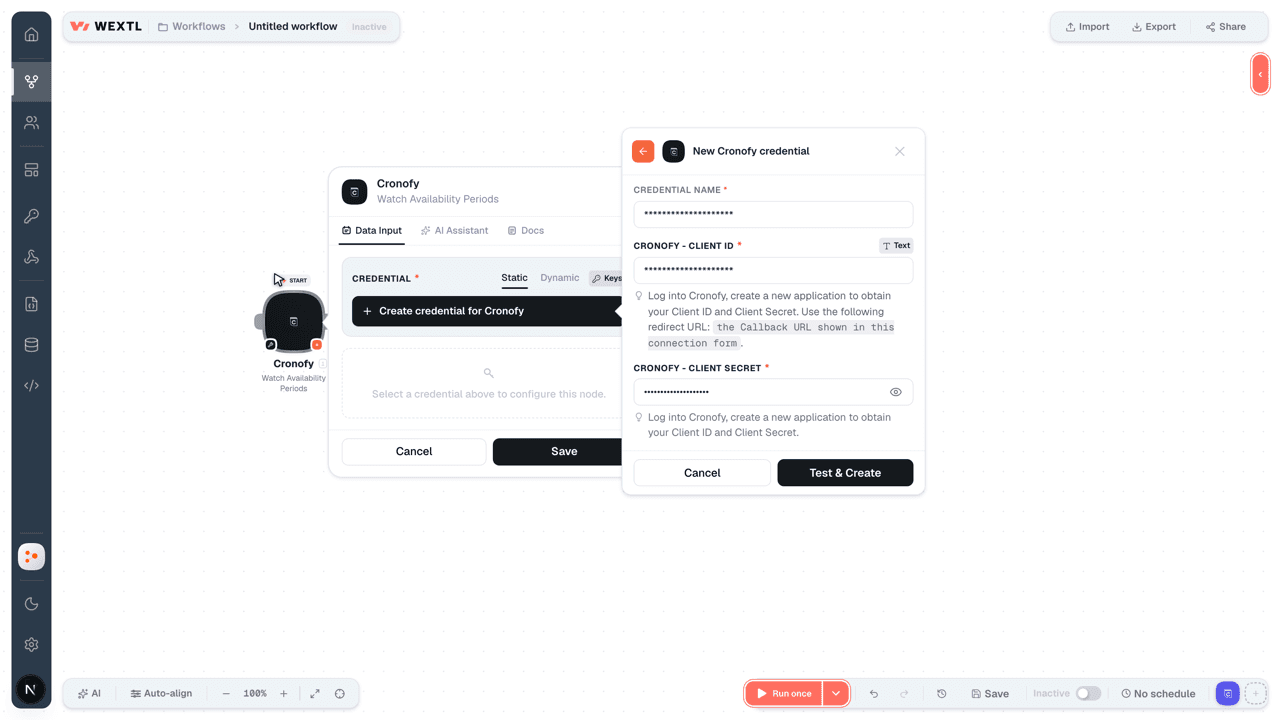
- Client IDtextRequired
Log into Cronofy, create a new application to obtain your Client ID and Client Secret. Use the following redirect URL:
[1]the Callback URL shown in this connection form. - Client SecretpasswordRequired
Log into Cronofy, create a new application to obtain your Client ID and Client Secret.
[1] - Data Center URLselectRequired
The URL for the data center you want to communicate with.
[1] - Time Zone IdentifiertimezoneRequired
A String representing a known time zone identifier from the IANA Time Zone Database. Common examples are: Etc/UTC, Europe/Paris, America/Chicago.
[1]
Cronofy - API Key
- API KeypasswordRequired
Log into your account, go to the Admin API section, choose an organizational unit, and create a new Admin API key.
[1] - Data Center URLselectRequired
The URL for the data center you want to communicate with.
[1] - Time Zone IdentifiertimezoneRequired
A String representing a known time zone identifier from the IANA Time Zone Database. Common examples are: Etc/UTC, Europe/Paris, America/Chicago.
[1]
Connect Cronofy in WEXTL
- Log in to your WEXTL account, add the Cronofy node module to your workflow, and click Create new credential.
- Optional: In the Credential name field, enter a name for the credential.
- Enter the authentication credentials you copied from your Cronofy account, or follow the on-screen instructions to create the credential.
- If prompted, authenticate your account and confirm access.
- If you want to make changes to your credential in the future, follow the steps in Manage credentials →
Notes
Credentials are org-scoped; share them with teammates from the Credentials picker on any of its nodes.For detailed information on connecting an application, see Connect an application →
Cronofy node modules
The list below is a reference of every Cronofy node module the integration supports. You will be able to pick any of them on the workflow canvas while building automations.
Each Cronofy node module below opens to reveal its input parameters, outputs, and connection requirements.
Watch Availability PeriodsTrigger
| Field | Type |
|---|---|
| Available period ID | text |
| Start | date |
| End | date |
Watch EventsTrigger
| Field | Type |
|---|---|
| Calendar ID | text |
| Event uid | text |
| Summary | text |
| Description | text |
| Start | date |
| End | date |
| Deleted | boolean |
| Location | object |
| Description | text |
| Participation status | text |
| Transparency | text |
| Event status | text |
| Categories | array |
| Attendees | array |
| Created | date |
| Updated | date |
Watch Free BusyTrigger
| Field | Type |
|---|---|
| Calendar ID | text |
| Start | date |
| End | date |
| Free busy status | text |
Get a User AccountAction
| Field | Type |
|---|---|
| Account | object |
| Account ID | text |
| Name | text |
| Scope | text |
| Default tzid | text |
| Sub | text |
Get an Availability RuleAction
Get Invite StatusAction
| Field | Type |
|---|---|
Recipient EmailRequired | |
Smart Invite IDRequired | text |
| Include ICS | boolean |
| Field | Type |
|---|---|
| Recipient | object |
| Status | text |
| Comment | text |
| Proposal | object |
| Replies | array |
| Smart invite ID | text |
| Callback URL | url |
| Event | object |
| Summary | text |
| Description | text |
| Start | object |
| End | object |
| Location | object |
| Attachments | object |
| Icalendar | text |
Get User InformationAction
| Field | Type |
|---|---|
| Sub | text |
| Name | text |
| Zoneinfo | text |
| Cronofy type | text |
| Cronofy data | object |
| Authorization | object |
| Profiles | array |
List AvailabilitySearch
List Availability RulesSearch
List Available PeriodsSearch
List Calendar ProfilesSearch
List CalendarsSearch
List EventsSearch
| Field | Type |
|---|---|
Time Zone IdentifierRequired | time |
| From Date | date |
| To Date | date |
| Calendar IDs | choice |
| Include Deleted | boolean |
| Include Moved | boolean |
| Last Modified | time |
| Include Managed | boolean |
| Only Managed | boolean |
| Localized Times | boolean |
| Include Geo | boolean |
| Include User Info | boolean |
| Limit | number |
| Field | Type |
|---|---|
| Calendar ID | text |
| Event uid | text |
| Summary | text |
| Description | text |
| Start | date |
| End | date |
| Deleted | boolean |
| Location | object |
| Description | text |
| Participation status | text |
| Transparency | text |
| Event status | text |
| Categories | array |
| Attendees | array |
| Created | date |
| Updated | date |
List Free/Busy EventsSearch
| Field | Type |
|---|---|
Time Zone IdentifierRequired | time |
| From Date | date |
| To Date | date |
| Include Managed Events | boolean |
| Calendar IDs | array |
| Calendar ID | text |
| Localized Times | boolean |
| Include User Information | boolean |
| Include Event IDs | boolean |
| Include Free Events | boolean |
| Include Deleted Events | boolean |
| Last Modified Time | time |
| Limit | number |
| Field | Type |
|---|---|
| Calendar ID | text |
| Start | date |
| End | date |
| Free busy status | text |
List Scheduling RequestsSearch
Activate Meeting AgentAction
| Field | Type |
|---|---|
| Notification | object |
TypeRequired | choice |
| Interactions | array |
| Event | object |
Event IDRequired | choice |
SummaryRequired | text |
StartRequired | date |
EndRequired | date |
Timezone IDRequired | time |
| Conferencing | object |
| Meeting Agent | object |
| Meeting Agent | object |
SubjectRequired | text |
StateRequired | text |
| Resources | array |
| Field | Type |
|---|---|
| User ID | number |
Add Attachment to an EventAction
| Field | Type |
|---|---|
Event IDRequired | text |
SummaryRequired | text |
| Description | text |
Start TimeRequired | date |
End TimeRequired | date |
| Location | object |
| Description | text |
| Attachments | array |
Cancel a Meeting AgentAction
| Field | Type |
|---|---|
Scheduling KeyRequired | text |
Cancel a Scheduling RequestAction
| Field | Type |
|---|---|
Scheduling RequestRequired | text |
Cancel an InviteAction
| Field | Type |
|---|---|
Smart Invite IDRequired | text |
MethodRequired | choice |
RecipientRequired | object |
EmailRequired |
| Field | Type |
|---|---|
| Recipient | object |
| Status | text |
| Comment | text |
| Proposal | object |
| Replies | array |
| Smart invite ID | text |
| Callback URL | url |
| Event | object |
| Summary | text |
| Description | text |
| Start | object |
| End | object |
| Location | object |
| Attachments | object |
| Icalendar | text |
Create a Bookable EventAction
Create a CalendarAction
Create a Scheduling RequestAction
| Field | Type |
|---|---|
HostRequired | object |
| Subscriber | text |
RecipientsRequired | array |
| Collaborator Groups | array |
EventRequired | object |
SummaryRequired | text |
| Description | text |
| Location | object |
| Duration | object |
| Locale | text |
| Minimum Notice | object |
| Hours | number |
| Tags | array |
| Field | Type |
|---|---|
| Scheduling request ID | text |
| Slot selection | text |
| Primary select URL | url |
| Dashboard URL | url |
| Summary | text |
| Duration | object |
| Minutes | number |
| Recipient operations | object |
| View URL | url |
| Recipients | array |
| Collaborator groups | array |
| Event | object |
| Summary | text |
Create a Scheduling Request Using a TemplateAction
| Field | Type |
|---|---|
| Template | object |
SubRequired | text |
RecipientsRequired | array |
| Collaborator Groups | array |
EventRequired | object |
SummaryRequired | text |
| Description | text |
| Location | object |
| Duration | object |
| Locale | text |
| Minimum Notice | object |
| Hours | number |
| Tags | array |
| Field | Type |
|---|---|
| Scheduling request ID | text |
| Slot selection | text |
| Primary select URL | url |
| Dashboard URL | url |
| Summary | text |
| Duration | object |
| Minutes | number |
| Recipient operations | object |
| View URL | url |
| Recipients | array |
| Collaborator groups | array |
| Event | object |
| Summary | text |
Create or Update a RegistrationAction
Create or Update an AttachmentAction
Create or Update an Availability RuleAction
Create or Update an EventAction
| Field | Type |
|---|---|
Calendar IDRequired | choice |
Event IDRequired | text |
SummaryRequired | text |
Start TimeRequired | date |
End TimeRequired | date |
| Description | text |
| Location | object |
| Description | text |
| Latitude | number |
| Longitude | number |
| Transparency | choice |
| Extended Transparency | choice |
| Color | text |
| Reminders Create Only | boolean |
| Attendees | object |
| Invite | array |
| Remove | array |
| URL | url |
| Reminders | array |
| Event Private | boolean |
Create or Update an InviteAction
| Field | Type |
|---|---|
MethodRequired | choice |
Smart Invite IDRequired | text |
RecipientRequired | object |
EmailRequired | |
Callback URLRequired | url |
EventRequired | object |
SummaryRequired | text |
| Description | text |
Start TimeRequired | date |
End TimeRequired | date |
| Time Zone ID | time |
| Location | object |
| Organizer | object |
| Name | text |
| Field | Type |
|---|---|
| Recipient | object |
| text | |
| Status | text |
| Smart invite ID | text |
| Callback URL | text |
| Event | object |
| Summary | text |
| Description | text |
| Start | object |
| End | object |
| Location | object |
| Attachments | object |
| Icalendar | text |
Create or Update AvailabilityAction
| Field | Type |
|---|---|
Available Period IDRequired | text |
StartRequired | date |
EndRequired | date |
Delete an Availability RuleAction
| Field | Type |
|---|---|
Availability Rule IDRequired | choice |
Delete an Available PeriodAction
| Field | Type |
|---|---|
Available Period IDRequired | choice |
Delete an EventAction
| Field | Type |
|---|---|
Calendar IDRequired | choice |
Event IDRequired | choice |
Delete an External EventAction
| Field | Type |
|---|---|
Calendar IDRequired | choice |
Event IDRequired | text |
Delete Bulk EventsAction
| Field | Type |
|---|---|
Calendar IDRequired | choice |
Make an API Calluniversal
Provision a Meeting AgentAction
Remove a RegistrationAction
Update External EventsAction
| Field | Type |
|---|---|
Calendar IDRequired | choice |
Event IDRequired | text |
SummaryRequired | text |
Start TimeRequired | date |
End TimeRequired | date |
| Description | text |
| Location | object |
| Description | text |
| Latitude | number |
| Longitude | number |
| Transparency | choice |
| Extended Transparency | choice |
| Color | text |
| Reminders Create Only | boolean |
| Attendees | object |
| Invite | array |
| Remove | array |
| URL | url |
| Reminders | array |
| Event Private | boolean |
Update Participant StatusAction
| Field | Type |
|---|---|
Calendar IDRequired | choice |
Event IDRequired | choice |
StatusRequired | choice |
Watch Meeting Agent FailuresAction
| Field | Type |
|---|---|
| Notification | object |
TypeRequired | choice |
| Interactions | array |
| Event | object |
Event IDRequired | choice |
SummaryRequired | text |
StartRequired | date |
EndRequired | date |
Timezone IDRequired | time |
| Conferencing | object |
| Meeting Agent | object |
| Meeting Agent | object |
SubjectRequired | text |
StateRequired | text |
| Resources | array |
| Field | Type |
|---|---|
| User ID | number |
Watch Meeting CompletionAction
| Field | Type |
|---|---|
| Notification | object |
TypeRequired | choice |
| Interactions | array |
| Event | object |
Event IDRequired | choice |
SummaryRequired | text |
StartRequired | date |
EndRequired | date |
Timezone IDRequired | time |
| Conferencing | object |
| Meeting Agent | object |
| Meeting Agent | object |
SubjectRequired | text |
StateRequired | text |
| Resources | array |
| Field | Type |
|---|---|
| User ID | number |
Templates
Look for Cronofy templates in the WEXTL template library.
Browse templates →Explore alternative apps
- Anny Admin API[2]Online booking and scheduling platform for managing services, resources, timeslots, and customer appointments.
- AviratoHotel property management and channel booking for rates, availability, and reservations.
- Acuity SchedulingOnline appointment scheduling for service businesses and calendars.
- AppointeddOnline booking and appointment scheduling for retail and service businesses.
- AgendaProSalon and clinic booking, payments, and client management.


References
- WEXTL® Cronofy Source Code connector implementation.
- Our users use cases and automations.
- Official API Documentation for Cronofy.
- WEXTL® visual workflow builder data.
Last updated: Jul 23, 2026 22:39