


Requirements
Before you set up the credential, make sure you have an active Deskbird account and an API access token from your account settings ready.[3]
Get your Deskbird credentials
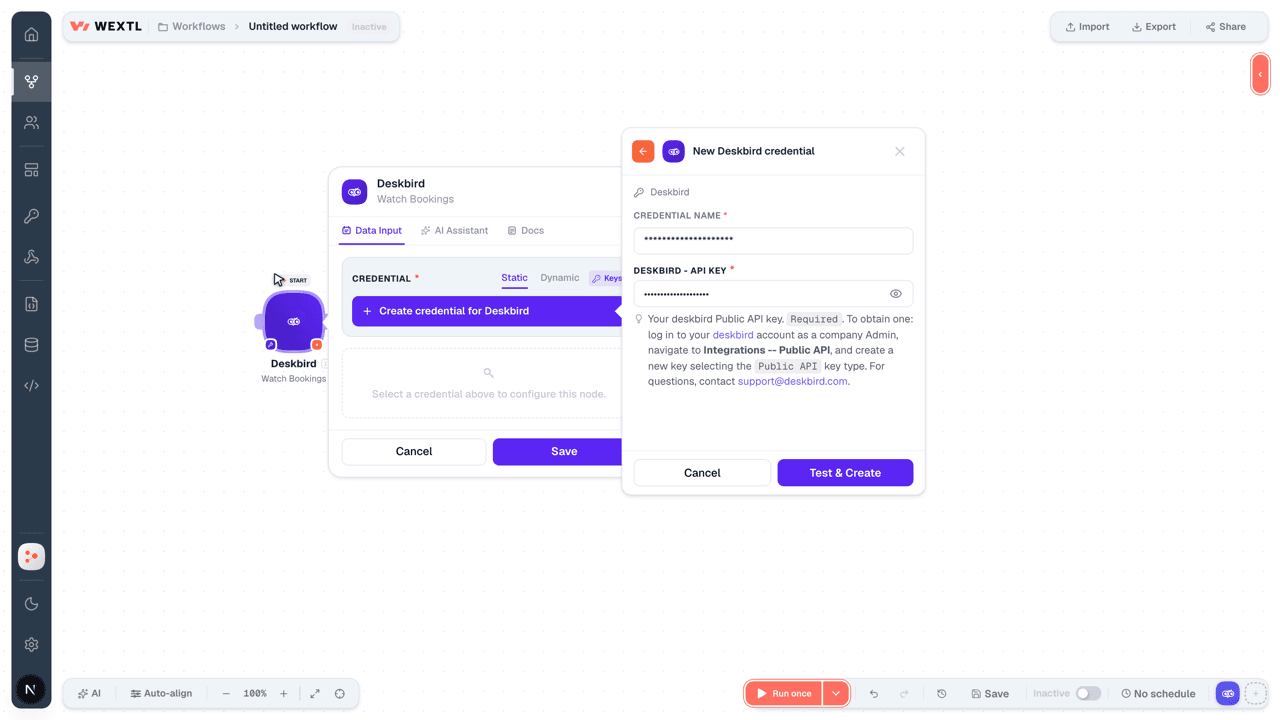
- deskbird - API KeypasswordRequired
Your Public API key.
[1]Required. To obtain one: log in to your deskbird account as a company Admin, navigate to Integrations -- Public API, and create a new key selecting thePublic APIkey type. For questions, contact [email protected].
Connect Deskbird in WEXTL
- Log in to your WEXTL account, add the Deskbird node module to your workflow, and click Create new credential.
- Optional: In the Credential name field, enter a name for the credential.
- Enter the authentication credentials you copied from your Deskbird account, or follow the on-screen instructions to create the credential.
- If prompted, authenticate your account and confirm access.
- If you want to make changes to your credential in the future, follow the steps in Manage credentials →
Notes
Credentials are org-scoped; share them with teammates from the Credentials picker on any of its nodes.For detailed information on connecting an application, see Connect an application →
Deskbird node modules
The list below is a reference of every Deskbird node module the integration supports. You will be able to pick any of them on the workflow canvas while building automations.
Each Deskbird node module below opens to reveal its input parameters, outputs, and connection requirements.
Watch BookingsTrigger
| Field | Type |
|---|---|
| ID | text |
| User ID | text |
| Anonymized | boolean |
| Auto cancellation time | date |
| Check in status | text |
| Early release end time | date |
| End time | date |
| Guest | object |
| First name | text |
| Last name | text |
| Is anonymous booking | boolean |
| Start time | date |
| Status | text |
| Zone ID | text |
| Zone UUID | text |
| Floor ID | text |
| Floor UUID | text |
| Resource ID | text |
| Resource | object |
| ID | text |
| Name | text |
| Type | text |
| Office ID | text |
| User | object |
| ID | text |
| First name | text |
| Last name | text |
| Cancelled by | text |
Watch ResourcesTrigger
| Field | Type |
|---|---|
| ID | text |
| Type | text |
| Capacity | number |
| Name | text |
| Description | text |
| Status | text |
| Zone ID | text |
| Office ID | text |
| Access info | object |
| Type | text |
| Equipment | array |
| Created at | date |
| Updated at | date |
Get a Company BookingAction
| Field | Type |
|---|---|
Booking IDRequired | choice |
| Field | Type |
|---|---|
| ID | text |
| User ID | text |
| Anonymized | boolean |
| Auto cancellation time | date |
| Check in status | text |
| Early release end time | date |
| End time | date |
| Guest | object |
| First name | text |
| Last name | text |
| Is anonymous booking | boolean |
| Start time | date |
| Status | text |
| Zone ID | text |
| Zone UUID | text |
| Floor ID | text |
| Floor UUID | text |
| Resource ID | text |
| Resource | object |
| ID | text |
| Name | text |
| Type | text |
| Office ID | text |
| User | object |
| ID | text |
| First name | text |
| Last name | text |
| Cancelled by | text |
Get a Company UserAction
Get a Company User GroupAction
Get a Resource by IDAction
Get a RoomAction
Get a Room BookingAction
List BookingsSearch
| Field | Type |
|---|---|
| Start Date | date |
| End Date | date |
| Updated At | text |
| Created At | text |
| Booking IDs | text |
| Statuses | array |
| User IDs | text |
| Zone IDs | text |
| Resource IDs | text |
| Office IDs | text |
| Limit | number |
| Field | Type |
|---|---|
| ID | text |
| User ID | text |
| Anonymized | boolean |
| Auto cancellation time | date |
| Check in status | text |
| Early release end time | date |
| End time | date |
| Guest | object |
| First name | text |
| Last name | text |
| Is anonymous booking | boolean |
| Start time | date |
| Status | text |
| Zone ID | text |
| Zone UUID | text |
| Floor ID | text |
| Floor UUID | text |
| Resource ID | text |
| Resource | object |
| ID | text |
| Name | text |
| Type | text |
| Office ID | text |
| User | object |
| ID | text |
| First name | text |
| Last name | text |
| Cancelled by | text |
List Company FloorsSearch
List Company ResourcesSearch
List Company RoomsSearch
List Company Scheduling OptionsSearch
List Company Scheduling StatusesAction
| Field | Type |
|---|---|
| Start Date | date |
| End Date | date |
| User IDs | array |
| Option IDs | array |
| Office IDs | array |
| Limit | number |
| Field | Type |
|---|---|
| ID | text |
| Day | text |
| User ID | text |
| Office ID | text |
| Option ID | text |
| External status | boolean |
| External status ID | text |
| External calendar event ID | text |
| Duration | text |
| Anonymized | boolean |
| User | object |
| Option | object |
| ID | text |
| Name | text |
| Type | text |
| Color | text |
| Order | number |
| Is primary | boolean |
| Is active | boolean |
| Policy rule | text |
| Office | object |
| ID | text |
| Name | text |
| Address | object |
| Opening hours | object |
List Company UsersSearch
List Company ZonesSearch
List OfficesSearch
| Field | Type |
|---|---|
| Office IDs | text |
| Limit | number |
List Room BookingsSearch
Add Scheduling Statuses for a UserAction
| Field | Type |
|---|---|
User IDRequired | choice |
Scheduling StatusesRequired | array |
DayRequired | date |
Option IDRequired | choice |
| Office ID | choice |
| Duration | choice |
| Field | Type |
|---|---|
| ID | text |
| Day | text |
| User ID | text |
| Option ID | text |
| Office ID | text |
| External status | boolean |
| External status ID | text |
| External calendar event ID | text |
| Duration | text |
| Anonymized | boolean |
| User | object |
| ID | text |
| First name | text |
| Last name | text |
| Option | object |
| ID | text |
| Name | text |
| Type | text |
| Color | text |
| Order | number |
| Is primary | boolean |
| Is active | boolean |
| Policy rule | text |
| Office | object |
| ID | text |
| Name | text |
| Address | object |
Cancel a BookingAction
| Field | Type |
|---|---|
Booking IDRequired | choice |
Cancel a Room BookingAction
| Field | Type |
|---|---|
Room IDRequired | choice |
Check a User into an OfficeAction
| Field | Type |
|---|---|
Office IDRequired | choice |
User IDRequired | choice |
Check In to a BookingAction
| Field | Type |
|---|---|
Booking IDRequired | choice |
| Resource ID | choice |
Check In to a Room BookingAction
| Field | Type |
|---|---|
Room IDRequired | choice |
Create a Resource BookingAction
| Field | Type |
|---|---|
User IDRequired | choice |
Resource IDRequired | choice |
Start TimeRequired | date |
End TimeRequired | date |
Is Anonymous BookingRequired | boolean |
| Guest | object |
First NameRequired | text |
Last NameRequired | text |
EmailRequired |
| Field | Type |
|---|---|
| ID | text |
| User ID | text |
| Anonymized | boolean |
| Auto cancellation time | date |
| Check in status | text |
| Early release end time | date |
| End time | date |
| Guest | object |
| First name | text |
| Last name | text |
| text | |
| Is anonymous booking | boolean |
| Start time | date |
| Status | text |
| Zone ID | text |
| Zone UUID | text |
| Floor ID | text |
| Floor UUID | text |
| Resource ID | text |
| Resource | object |
| ID | text |
| Name | text |
| Type | text |
| Office ID | text |
| User | object |
| ID | text |
| text | |
| First name | text |
| Last name | text |
| Cancelled by | text |
Create a Room BookingAction
| Field | Type |
|---|---|
Room IDRequired | choice |
User IDRequired | choice |
Start TimeRequired | date |
Duration (Seconds)Required | number |
TitleRequired | text |
DescriptionRequired | text |
Is PrivateRequired | boolean |
| Attendees | array |
EmailRequired |
| Field | Type |
|---|---|
| Attendees | array |
| Duration in seconds | number |
| ID | text |
| Is checked in | boolean |
| Is private | boolean |
| Office ID | text |
| Room ID | text |
| Start time | text |
| Title | text |
| Type | text |
| User ID | text |
| Description | text |
Delete Scheduling StatusesAction
| Field | Type |
|---|---|
Status IDsRequired | array |
Make an API Calluniversal
Release a Booking EarlyAction
| Field | Type |
|---|---|
Booking IDRequired | choice |
Update a BookingAction
| Field | Type |
|---|---|
Booking IDRequired | choice |
| User ID | choice |
| Resource ID | choice |
| Start Time | date |
| End Time | date |
| Is Anonymous Booking | boolean |
| Field | Type |
|---|---|
| ID | text |
| User ID | text |
| Anonymized | boolean |
| Auto cancellation time | date |
| Check in status | text |
| Early release end time | date |
| End time | date |
| Guest | object |
| First name | text |
| Last name | text |
| Is anonymous booking | boolean |
| Start time | date |
| Status | text |
| Zone ID | text |
| Zone UUID | text |
| Floor ID | text |
| Floor UUID | text |
| Resource ID | text |
| Resource | object |
| ID | text |
| Name | text |
| Type | text |
| Office ID | text |
| User | object |
| ID | text |
| First name | text |
| Last name | text |
| Cancelled by | text |
Update a Room BookingAction
| Field | Type |
|---|---|
Booking IDRequired | choice |
Room IDRequired | choice |
| User ID | choice |
| Start Time | date |
| Duration (Seconds) | number |
| Title | text |
| Description | text |
| Is Private | boolean |
| Attendees | array |
EmailRequired |
| Field | Type |
|---|---|
| Attendees | array |
| Duration in seconds | number |
| ID | text |
| Is checked in | boolean |
| Is private | boolean |
| Office ID | text |
| Room ID | text |
| Start time | text |
| Title | text |
| Type | text |
| User ID | text |
| Description | text |
Templates
Look for Deskbird templates in the WEXTL template library.
Browse templates →Explore alternative apps
- AgendaPro[2]Salon and clinic booking, payments, and client management.
- AviratoHotel property management and channel booking for rates, availability, and reservations.
- AppointeddOnline booking and appointment scheduling for retail and service businesses.
- AmenitizAll-in-one hotel management platform for bookings, channels, and guests.
- AcceleventsVirtual and hybrid event platform for registration, ticketing, networking, and attendee engagement.


References
- WEXTL® Deskbird Source Code connector implementation.
- Our users use cases and automations.
- Official API Documentation for Deskbird.
- WEXTL® visual workflow builder data.
Last updated: Jul 23, 2026 22:39