


Requirements
Connecting Distru takes an active account plus an API access token from your account settings — no other setup is required.[3]
Get your Distru credentials
- API KeypasswordRequired
You can create an API Key via
[1]Settings > Integrations > API > Create API Key.
Connect Distru in WEXTL
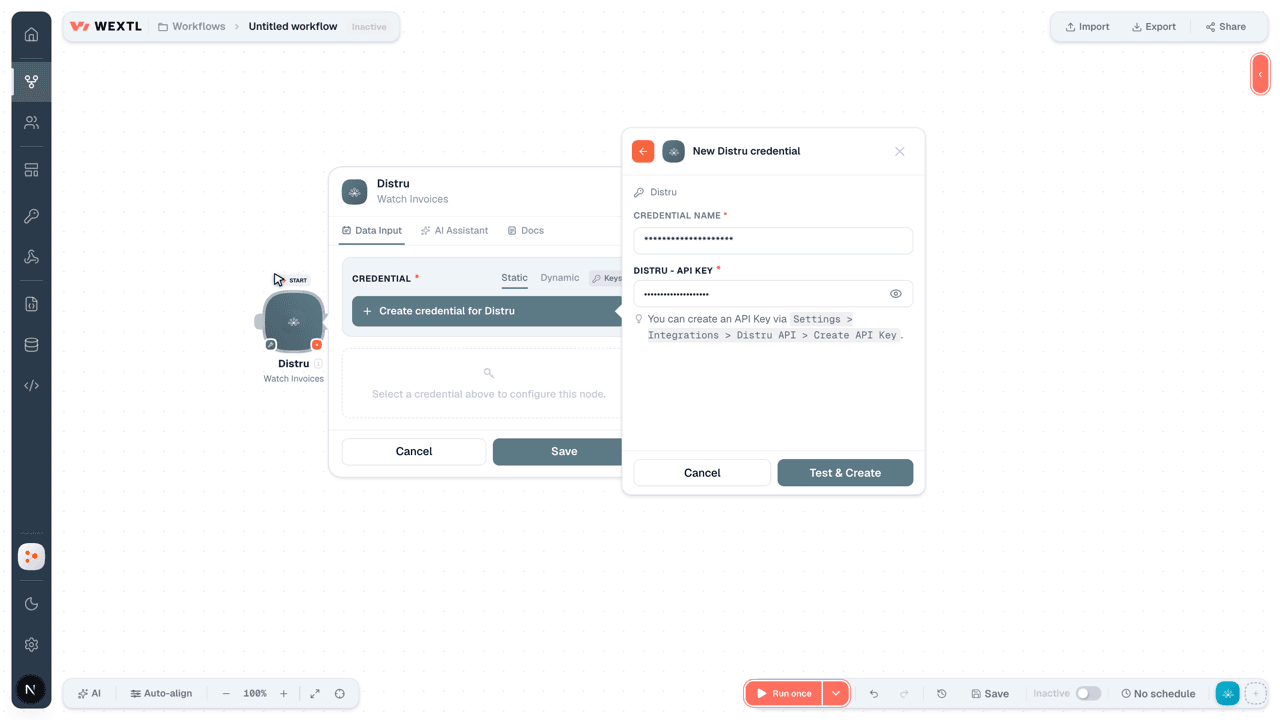
- Log in to your WEXTL account, add the Distru node module to your workflow, and click Create new credential.
- Optional: In the Credential name field, enter a name for the credential.
- Enter the authentication credentials you copied from your Distru account, or follow the on-screen instructions to create the credential.
- If prompted, authenticate your account and confirm access.
- If you want to make changes to your credential in the future, follow the steps in Manage credentials →

Notes
Credentials are org-scoped; share them with teammates from the Credentials picker on any of its nodes.For detailed information on connecting an application, see Connect an application →
Distru node modules
The list below is a reference of every Distru node module the integration supports. You will be able to pick any of them on the workflow canvas while building automations.
Expand any Distru node module below to see exactly what it takes in, what it returns, and what connection it needs.
Watch Inventory LevelsTrigger
| Field | Type |
|---|---|
| Active | text |
| Available | text |
| Product ID | text |
| Updated Datetime | date |
Watch InvoicesTrigger
| Field | Type |
|---|---|
| Charges | array |
| Company | object |
| ID | text |
| Name | text |
| Updated Datetime | text |
| Creator | object |
| Banned | boolean |
| text | |
| Full Name | text |
| ID | text |
| Role | object |
| Custom Data | array |
| Due Datetime | text |
| ID | text |
| Inserted Datetime | date |
| Invoice Datetime | text |
| Invoice Number | text |
| Items | array |
| Order | object |
| ID | text |
| Order Number | text |
| Status | text |
| Total | text |
| Owner | object |
| Banned | boolean |
| text | |
| Full Name | text |
| ID | text |
| Role | object |
| Paid Amount | text |
| Status | text |
| Total | text |
| Updated Datetime | date |
Watch OrdersTrigger
| Field | Type |
|---|---|
| Billing Location | object |
| Address | text |
| Company ID | text |
| ID | text |
| License ID | text |
| Name | text |
| Charges | array |
| Company | object |
| ID | text |
| Name | text |
| Updated Datetime | text |
| Creator | object |
| Banned | boolean |
| text | |
| Full Name | text |
| ID | text |
| Role | object |
| Custom Data | array |
| Delivery Datetime | text |
| Due Datetime | text |
| External Notes | text |
| ID | text |
| Inserted Datetime | date |
| Internal Notes | text |
| Items | array |
| Leaflink Order Number | text |
| Order Datetime | text |
| Order Number | text |
| Owner | object |
| Banned | boolean |
| text | |
| Full Name | text |
| ID | text |
| Role | object |
| Shipping Location | object |
| Address | text |
| Company ID | text |
| ID | text |
| License ID | text |
| Name | text |
| Status | text |
| Total | text |
| Updated Datetime | date |
Watch ProductsTrigger
| Field | Type |
|---|---|
| Brand | object |
| ID | text |
| Name | text |
| Updated Datetime | text |
| Category | object |
| ID | text |
| Name | text |
| Type | text |
| Custom Data | array |
| Description | text |
| ID | text |
| Images | array |
| Is Active | boolean |
| Msrp | text |
| Name | text |
| Sku | text |
| Strain | object |
| ID | text |
| Name | text |
| Subcategory | object |
| ID | text |
| Name | text |
| Unit Price | text |
| Unit Type | object |
| ID | text |
| Name | text |
| Units Per Case | text |
| Updated Datetime | date |
| Vendor | object |
| ID | text |
| Name | text |
| Updated Datetime | text |
Watch PurchasesTrigger
| Field | Type |
|---|---|
| Charges | array |
| Company | object |
| ID | text |
| Name | text |
| Updated Datetime | text |
| Custom Data | array |
| Due Datetime | text |
| ID | text |
| Inserted Datetime | date |
| Items | array |
| Order Datetime | text |
| Purchase Number | text |
| Status | text |
| Total | text |
| Updated Datetime | date |
Get AdjustmentsSearch
Get an InvoiceAction
| Field | Type |
|---|---|
Invoice IDRequired | choice |
| Field | Type |
|---|---|
| Charges | array |
| Company | object |
| ID | text |
| Name | text |
| Updated Datetime | text |
| Creator | object |
| Banned | boolean |
| text | |
| Full Name | text |
| ID | text |
| Role | object |
| Custom Data | array |
| Due Datetime | text |
| ID | text |
| Inserted Datetime | date |
| Invoice Datetime | text |
| Invoice Number | text |
| Items | array |
| Order | object |
| ID | text |
| Order Number | text |
| Status | text |
| Total | text |
| Owner | object |
| Banned | boolean |
| text | |
| Full Name | text |
| ID | text |
| Role | object |
| Paid Amount | text |
| Status | text |
| Total | text |
| Updated Datetime | date |
Get an OrderAction
| Field | Type |
|---|---|
Order IDRequired | choice |
| Field | Type |
|---|---|
| Billing Location | object |
| Address | text |
| Company ID | text |
| ID | text |
| License ID | text |
| Name | text |
| Charges | array |
| Company | object |
| ID | text |
| Name | text |
| Updated Datetime | text |
| Creator | object |
| Banned | boolean |
| text | |
| Full Name | text |
| ID | text |
| Role | object |
| Custom Data | array |
| Delivery Datetime | text |
| Due Datetime | text |
| External Notes | text |
| ID | text |
| Inserted Datetime | date |
| Internal Notes | text |
| Items | array |
| Leaflink Order Number | text |
| Order Datetime | text |
| Order Number | text |
| Owner | object |
| Banned | boolean |
| text | |
| Full Name | text |
| ID | text |
| Role | object |
| Shipping Location | object |
| Address | text |
| Company ID | text |
| ID | text |
| License ID | text |
| Name | text |
| Status | text |
| Total | text |
| Updated Datetime | date |
Get ContactsSearch
Get Inventory LevelsSearch
Get InvoicesSearch
| Field | Type |
|---|---|
| Due Datetime | date |
| Inserted Datetime | date |
| Invoice Datetime | date |
| Invoice Number | text |
| Order ID | choice |
| Status | choice |
| Updated Datetime | date |
| Limit | number |
| Field | Type |
|---|---|
| Charges | array |
| Company | object |
| ID | text |
| Name | text |
| Updated Datetime | text |
| Creator | object |
| Banned | boolean |
| text | |
| Full Name | text |
| ID | text |
| Role | object |
| Custom Data | array |
| Due Datetime | text |
| ID | text |
| Inserted Datetime | date |
| Invoice Datetime | text |
| Invoice Number | text |
| Items | array |
| Order | object |
| ID | text |
| Order Number | text |
| Status | text |
| Total | text |
| Owner | object |
| Banned | boolean |
| text | |
| Full Name | text |
| ID | text |
| Role | object |
| Paid Amount | text |
| Status | text |
| Total | text |
| Updated Datetime | date |
Get OrdersSearch
| Field | Type |
|---|---|
| Delivery Datetime | date |
| Due Datetime | date |
| Inserted Datetime | date |
| Order Datetime | date |
| Status | array |
| Updated Datetime | date |
| Limit | number |
| Field | Type |
|---|---|
| Billing Location | object |
| Address | text |
| Company ID | text |
| ID | text |
| License ID | text |
| Name | text |
| Charges | array |
| Company | object |
| ID | text |
| Name | text |
| Updated Datetime | text |
| Creator | object |
| Banned | boolean |
| text | |
| Full Name | text |
| ID | text |
| Role | object |
| Custom Data | array |
| Delivery Datetime | text |
| Due Datetime | text |
| External Notes | text |
| ID | text |
| Inserted Datetime | date |
| Internal Notes | text |
| Items | array |
| Leaflink Order Number | text |
| Order Datetime | text |
| Order Number | text |
| Owner | object |
| Banned | boolean |
| text | |
| Full Name | text |
| ID | text |
| Role | object |
| Shipping Location | object |
| Address | text |
| Company ID | text |
| ID | text |
| License ID | text |
| Name | text |
| Status | text |
| Total | text |
| Updated Datetime | date |
Get ProductsSearch
| Field | Type |
|---|---|
| Inserted Datetime | date |
| Updated Datetime | date |
| Limit | number |
| Field | Type |
|---|---|
| Brand | object |
| ID | text |
| Name | text |
| Updated Datetime | text |
| Category | object |
| ID | text |
| Name | text |
| Type | text |
| Custom Data | array |
| Description | text |
| ID | text |
| Images | array |
| Is Active | boolean |
| Msrp | text |
| Name | text |
| Sku | text |
| Strain | object |
| ID | text |
| Name | text |
| Subcategory | object |
| ID | text |
| Name | text |
| Unit Price | text |
| Unit Type | object |
| ID | text |
| Name | text |
| Units Per Case | text |
| Updated Datetime | date |
| Vendor | object |
| ID | text |
| Name | text |
| Updated Datetime | text |
Get PurchasesSearch
| Field | Type |
|---|---|
| Status | choice |
| Due DateTime | date |
| Inserted DateTime | date |
| Order DateTime | date |
| Updated DateTime | date |
| Limit | number |
| Field | Type |
|---|---|
| Charges | array |
| Company | object |
| ID | text |
| Name | text |
| Updated Datetime | text |
| Custom Data | array |
| Due Datetime | text |
| ID | text |
| Inserted Datetime | date |
| Items | array |
| Order Datetime | text |
| Purchase Number | text |
| Status | text |
| Total | text |
| Updated Datetime | date |
Create a Stock AdjustmentAction
| Field | Type |
|---|---|
| Product ID | choice |
| Batch ID | choice |
| Package ID | choice |
| Quantity | number |
| Compliance Quantity | number |
| Description | text |
| Unit Cost | number |
| Completion Datetime | date |
| Reason | choice |
| Location ID | choice |
| Field | Type |
|---|---|
| Batch ID | text |
| Completion Datetime | text |
| Compliance Quantity | text |
| Description | text |
| ID | text |
| License ID | text |
| Location ID | text |
| Owner ID | text |
| Package ID | text |
| Product ID | text |
| Quantity | text |
| Reason | text |
| Total Cost | text |
Create or Update a ProductAction
| Field | Type |
|---|---|
| <p style="color: red; border: 1px solid red; padding: 8px;">Upsert a single product. To update an existing product, pass in an existing product ID in the id field. When updating a product, you must pass in all fields (no sparse update currently supported)</p> | text |
| Product ID | choice |
| Inventory Tracking Method | choice |
| SKU | text |
| Name | text |
| Vendor ID | text |
| Category ID | text |
| Unit Type ID | text |
| Unit Price | number |
| Description | text |
| UPC | text |
| Subcategory ID | text |
| Group ID | text |
| Brand ID | text |
| Quantity Available Threshold Min | number |
| Quantity Available Threshold Max | number |
| Units Per Case | number |
| Unit Cost | number |
| MSRP | number |
| Wholesale Unit Price | number |
| Field | Type |
|---|---|
| Brand | object |
| ID | text |
| Name | text |
| Updated Datetime | text |
| Category | object |
| ID | text |
| Name | text |
| Type | text |
| Custom Data | array |
| Description | text |
| ID | text |
| Images | array |
| Is Active | boolean |
| Msrp | text |
| Name | text |
| Sku | text |
| Strain | object |
| ID | text |
| Name | text |
| Subcategory | object |
| ID | text |
| Name | text |
| Unit Price | text |
| Unit Type | object |
| ID | text |
| Name | text |
| Units Per Case | text |
| Updated Datetime | date |
| Vendor | object |
| ID | text |
| Name | text |
| Updated Datetime | text |
Create or Update a PurchaseAction
| Field | Type |
|---|---|
| <p style="color: red; border: 1px solid red; padding: 8px;">Upsert a single purchase order. To update an existing purchase order, pass in an existing purchase order ID in the id field. When updating a purchase order, you must pass in all fields (no sparse update currently supported). Any existing order item or charge you do not pass in to items and charges respectively will be deleted</p> | text |
| Purchase ID | choice |
| Description | text |
| Location ID | choice |
| Billing Location ID | choice |
| Company ID | choice |
| Order DateTime | date |
| Due DateTime | date |
| Charges | array |
| Items | array |
| Field | Type |
|---|---|
| Charges | array |
| Company | object |
| ID | text |
| Name | text |
| Updated Datetime | text |
| Custom Data | array |
| Due Datetime | text |
| ID | text |
| Inserted Datetime | date |
| Items | array |
| Order Datetime | text |
| Purchase Number | text |
| Status | text |
| Total | text |
| Updated Datetime | date |
Create or Update an InvoiceAction
| Field | Type |
|---|---|
| <p style="color: red; border: 1px solid red; padding: 8px;">To update an existing invoice, pass in an existing invoice ID in the id field. When updating an invoice, you must pass in all fields (no sparse update currently supported). Any existing invoice item or charge you do not pass in to items and charges respectively will be deleted</p> | text |
| Invoice ID | choice |
| Billing Location ID | choice |
| Due DateTime | date |
| Invoice DateTime | date |
| Charges | array |
| Items | array |
| Field | Type |
|---|---|
| Charges | array |
| Company | object |
| ID | text |
| Name | text |
| Updated Datetime | text |
| Creator | object |
| Banned | boolean |
| text | |
| Full Name | text |
| ID | text |
| Role | object |
| Custom Data | array |
| Due Datetime | text |
| ID | text |
| Inserted Datetime | date |
| Invoice Datetime | text |
| Invoice Number | text |
| Items | array |
| Order | object |
| ID | text |
| Order Number | text |
| Status | text |
| Total | text |
| Owner | object |
| Banned | boolean |
| text | |
| Full Name | text |
| ID | text |
| Role | object |
| Paid Amount | text |
| Status | text |
| Total | text |
| Updated Datetime | date |
Create or Update an OrderAction
| Field | Type |
|---|---|
| <p style="color: red; border: 1px solid red; padding: 8px;">Upsert a single order. To update an existing order, pass in an existing order ID in the id field. When updating an order, you must pass in all fields (no sparse update currently supported). Any existing order item or charge you do not pass in to items and charges respectively will be deleted</p> | text |
| Order ID | choice |
| Blaze Payment Type | text |
| Company ID | choice |
| Delivery Datetime | date |
| Due Datetime | date |
| External Notes | text |
| Order Datetime | date |
| Charges | array |
| Items | array |
| Internal Notes | text |
| Metrc Transfer Template Transporter Info | text |
| Metrc Transfer Template Directions | text |
| Metrc Transfer Template Recipient License Number | text |
| Metrc Transfer Template Status | text |
| Metrc Transfer Template Type | text |
| Billing Location ID | choice |
| Shipping Location ID | choice |
| Owner ID | choice |
| Status | choice |
| Field | Type |
|---|---|
| Billing Location | object |
| Address | text |
| Company ID | text |
| ID | text |
| License ID | text |
| Name | text |
| Charges | array |
| Company | object |
| ID | text |
| Name | text |
| Updated Datetime | text |
| Creator | object |
| Banned | boolean |
| text | |
| Full Name | text |
| ID | text |
| Role | object |
| Custom Data | array |
| Delivery Datetime | text |
| Due Datetime | text |
| External Notes | text |
| ID | text |
| Inserted Datetime | date |
| Internal Notes | text |
| Items | array |
| Leaflink Order Number | text |
| Order Datetime | text |
| Order Number | text |
| Owner | object |
| Banned | boolean |
| text | |
| Full Name | text |
| ID | text |
| Role | object |
| Shipping Location | object |
| Address | text |
| Company ID | text |
| ID | text |
| License ID | text |
| Name | text |
| Status | text |
| Total | text |
| Updated Datetime | date |
Insert a Payment for a PurchaseAction
| Field | Type |
|---|---|
Purchase IDRequired | choice |
Payment Method IDRequired | choice |
AmountRequired | number |
Payment DateRequired | date |
DescriptionRequired | text |
| Quickbooks Deposit Account ID | text |
| Quickbooks Deposit Account Name | text |
| Field | Type |
|---|---|
| Amount | text |
| Description | text |
| ID | text |
| Inserted Datetime | date |
| Payment Date | text |
| Payment Method | object |
| ID | text |
| Name | text |
| Payment Number | text |
| Purchase ID | text |
| Quickbooks Deposit Account ID | text |
Insert a Payment for an InvoiceAction
| Field | Type |
|---|---|
Invoice IDRequired | choice |
Payment Method IDRequired | choice |
AmountRequired | number |
Payment DateRequired | date |
DescriptionRequired | text |
| Quickbooks Deposit Account ID | text |
| Quickbooks Deposit Account Name | text |
| Field | Type |
|---|---|
| Amount | text |
| Description | text |
| ID | text |
| Inserted Datetime | date |
| Invoice ID | text |
| Payment Date | date |
| Payment Method | object |
| ID | text |
| Name | text |
| Payment Number | text |
| Quickbooks Deposit Account ID | text |
Templates
Look for Distru templates in the WEXTL template library.
Browse templates →Explore alternative apps
- Billdu[2]Invoice creation, billing, and payment management for small businesses.
- BybitCryptocurrency exchange API for orders, tickers, and market data.
- BillogramDigital invoicing and billing platform that sends invoices and collects payments from customers.
- CoinbaseCryptocurrency exchange and payments platform for trading, transfers, and digital asset orders.
- CoinGeckoLook up crypto coin prices, market data, and exchange rankings with CoinGecko.


References
- WEXTL® Distru Source Code connector implementation.
- Our users use cases and automations.
- Official API Documentation for Distru.
- WEXTL® visual workflow builder data.
Last updated: Jul 23, 2026 22:39