


Requirements
Before you set up the credential, make sure you have an active Microsoft Bookings account and OAuth client credentials, granted by signing in with your account ready.[3]
Get your Microsoft Bookings credentials
Microsoft Bookings - Secondary
You’ll be redirected to sign in and approve access — your password is never shared with WEXTL.
- Microsoft - TenantselectRequired
Go to
[1]https://entra.microsoft.comand copy your tennat ID or select any of the following` - Microsoft - Client IDtextRequired
Go to the Microsoft Entra admin center → Entra ID → App registrations and select New registration. → enter a description and expiration → Add, then immediately copy your Client ID
[1] - Microsoft - Client SecretpasswordRequired
Copy you client Secret from the previously created app
[1]
Microsoft Bookings - Primary
You’ll be redirected to sign in and approve access — your password is never shared with WEXTL.
- Microsoft - TenantselectRequired
Use your tenant ID or primary domain from https://entra.microsoft.com. Application permissions do not work with Common, Organizations or Consumers.
[1] - Microsoft - Client IDtextRequired
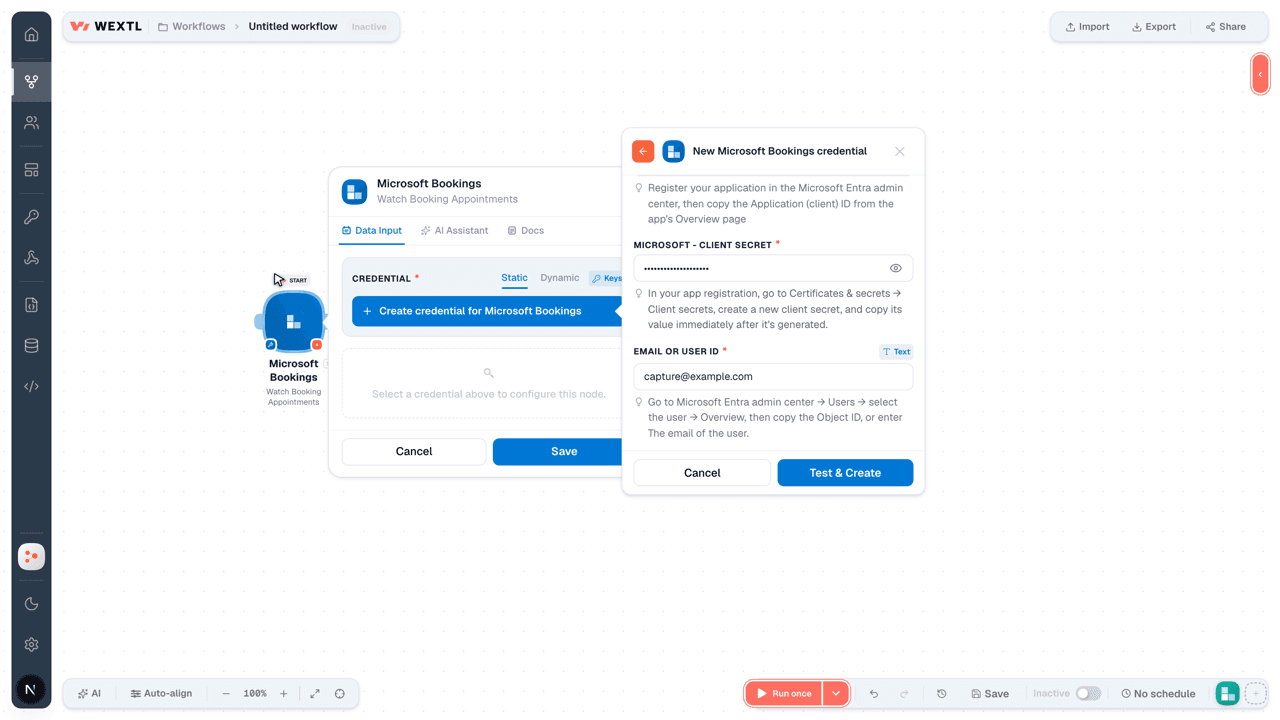
Register your application in the Microsoft Entra admin center, then copy the Application (client) ID from the app's Overview page
[1] - Microsoft - Client SecretpasswordRequired
In your app registration, go to Certificates & secrets → Client secrets, create a new client secret, and copy its value immediately after it's generated.
[1] - Email or User IDtext
Not used by Bookings. Leave blank.
[1]
Connect Microsoft Bookings in WEXTL
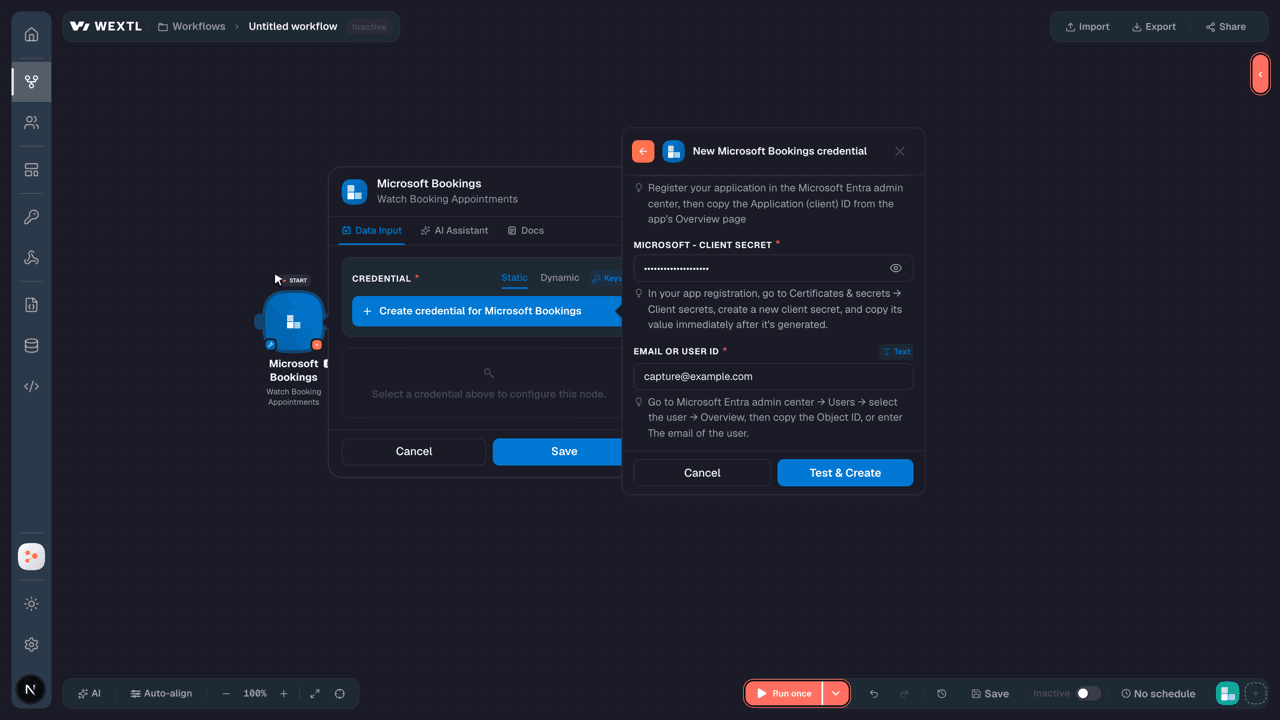
- Log in to your WEXTL account, add the Microsoft Bookings node module to your workflow, and click Create new credential.
- Optional: In the Credential name field, enter a name for the credential.
- Enter the authentication credentials you copied from your Microsoft Bookings account, or follow the on-screen instructions to create the credential.
- If prompted, authenticate your account and confirm access.
- If you want to make changes to your credential in the future, follow the steps in Manage credentials →
Notes
Credentials are org-scoped; share them with teammates from the Credentials picker on any of its nodes.For detailed information on connecting an application, see Connect an application →
Microsoft Bookings node modules
The list below is a reference of every Microsoft Bookings node module the integration supports. You will be able to pick any of them on the workflow canvas while building automations.
Each Microsoft Bookings node module below opens to reveal its input parameters, outputs, and connection requirements.
Watch Booking AppointmentsTrigger
| Field | Type |
|---|---|
| @odata type | text |
| Additional information | text |
| Anonymous join web URL | text |
| Appointment label | text |
| Created date time | date |
| Customer email address | |
| Customer name | text |
| Customer notes | text |
| Customer phone | text |
| Customers | array |
| Customer time zone | text |
| Duration | text |
| End | object |
| @odata type | text |
| Filled attendees count | text |
| ID | text |
| Is customer allowed to manage booking | text |
| Is location online | text |
| Join web URL | url |
| Last updated date time | date |
| Maximum attendees count | text |
Watch Booking BusinessTrigger
| Field | Type |
|---|---|
| @odata type | text |
| Address | object |
| @odata type | text |
| Booking page settings | object |
| @odata type | text |
| Business hours | array |
| Business type | text |
| Created date time | date |
| Default currency iso | text |
| Display name | text |
| ID | text |
| Is published | text |
| Language tag | text |
| Last updated date time | date |
| Phone | text |
| Public URL | url |
| Scheduling policy | object |
| @odata type | text |
| Web site URL | url |
Watch Booking CustomersTrigger
| Field | Type |
|---|---|
| @odata type | text |
| Addresses | array |
| Created date time | date |
| Display name | text |
| Email address | |
| ID | text |
| Last updated date time | date |
| Phones | array |
Watch Booking QuestionsTrigger
| Field | Type |
|---|---|
| @odata type | text |
| Answer input type | text |
| Answer options | array |
| Created date time | date |
| Display name | text |
| ID | text |
| Last updated date time | date |
Watch Booking ServicesTrigger
| Field | Type |
|---|---|
| @odata type | text |
| Additional information | text |
| Created date time | date |
| Custom questions | array |
| Default duration | text |
| Default location | object |
| @odata type | text |
| Default price | text |
| Default price type | text |
| Default reminders | array |
| Description | text |
| Display name | text |
| ID | text |
| Is anonymous join enabled | text |
| Is customer allowed to manage booking | text |
| Is hidden from customers | text |
| Is location online | text |
| Language tag | text |
| Last updated date time | date |
| Maximum attendees count | text |
| Notes | text |
Watch Booking Staff MembersTrigger
| Field | Type |
|---|---|
| @odata type | text |
| Availability is affected by personal calendar | text |
| Created date time | date |
| Display name | text |
| Email address | |
| ID | text |
| Is email notification enabled | text |
| Last updated date time | date |
| Role | text |
| Time zone | time |
| Use business hours | text |
| Working hours | array |
List Booking AppointmentsSearch
| Field | Type |
|---|---|
Booking Business IDRequired | choice |
| Limit | number |
| Field | Type |
|---|---|
| @odata type | text |
| Additional information | text |
| Anonymous join web URL | text |
| Appointment label | text |
| Created date time | date |
| Customer email address | |
| Customer name | text |
| Customer notes | text |
| Customer phone | text |
| Customers | array |
| Customer time zone | text |
| Duration | text |
| End | object |
| @odata type | text |
| Filled attendees count | text |
| ID | text |
| Is customer allowed to manage booking | text |
| Is location online | text |
| Join web URL | url |
| Last updated date time | date |
| Maximum attendees count | text |
List Booking BusinessesSearch
| Field | Type |
|---|---|
| Search Query | text |
| Limit | number |
| Field | Type |
|---|---|
| @odata type | text |
| Address | object |
| @odata type | text |
| Booking page settings | object |
| @odata type | text |
| Business hours | array |
| Business type | text |
| Created date time | date |
| Default currency iso | text |
| Display name | text |
| ID | text |
| Is published | text |
| Language tag | text |
| Last updated date time | date |
| Phone | text |
| Public URL | url |
| Scheduling policy | object |
| @odata type | text |
| Web site URL | url |
List Booking CustomersSearch
List Booking QuestionsSearch
List Booking ServicesSearch
| Field | Type |
|---|---|
Booking Business IDRequired | choice |
| Limit | number |
| Field | Type |
|---|---|
| @odata type | text |
| Additional information | text |
| Created date time | date |
| Custom questions | array |
| Default duration | text |
| Default location | object |
| @odata type | text |
| Default price | text |
| Default price type | text |
| Default reminders | array |
| Description | text |
| Display name | text |
| ID | text |
| Is anonymous join enabled | text |
| Is customer allowed to manage booking | text |
| Is hidden from customers | text |
| Is location online | text |
| Language tag | text |
| Last updated date time | date |
| Maximum attendees count | text |
| Notes | text |
List Booking Staff MembersSearch
| Field | Type |
|---|---|
Booking Business IDRequired | choice |
| Limit | number |
| Field | Type |
|---|---|
| @odata type | text |
| Availability is affected by personal calendar | text |
| Created date time | date |
| Display name | text |
| Email address | |
| ID | text |
| Is email notification enabled | text |
| Last updated date time | date |
| Role | text |
| Time zone | time |
| Use business hours | text |
| Working hours | array |
Retrieve a Booking AppointmentAction
| Field | Type |
|---|---|
Booking Business IDRequired | choice |
| Field | Type |
|---|---|
| @odata type | text |
| Additional information | text |
| Anonymous join web URL | text |
| Appointment label | text |
| Created date time | date |
| Customer email address | |
| Customer name | text |
| Customer notes | text |
| Customer phone | text |
| Customers | array |
| Customer time zone | text |
| Duration | text |
| End | object |
| @odata type | text |
| Filled attendees count | text |
| ID | text |
| Is customer allowed to manage booking | text |
| Is location online | text |
| Join web URL | url |
| Last updated date time | date |
| Maximum attendees count | text |
Retrieve a Booking BusinessAction
| Field | Type |
|---|---|
Booking Business IDRequired | choice |
| Field | Type |
|---|---|
| @odata type | text |
| Address | object |
| @odata type | text |
| Booking page settings | object |
| @odata type | text |
| Business hours | array |
| Business type | text |
| Created date time | date |
| Default currency iso | text |
| Display name | text |
| ID | text |
| Is published | text |
| Language tag | text |
| Last updated date time | date |
| Phone | text |
| Public URL | url |
| Scheduling policy | object |
| @odata type | text |
| Web site URL | url |
Retrieve a Booking CustomerAction
Retrieve a Booking QuestionAction
Retrieve a Booking ServiceAction
| Field | Type |
|---|---|
Booking Business IDRequired | choice |
| Field | Type |
|---|---|
| @odata type | text |
| Additional information | text |
| Created date time | date |
| Custom questions | array |
| Default duration | text |
| Default location | object |
| @odata type | text |
| Default price | text |
| Default price type | text |
| Default reminders | array |
| Description | text |
| Display name | text |
| ID | text |
| Is anonymous join enabled | text |
| Is customer allowed to manage booking | text |
| Is hidden from customers | text |
| Is location online | text |
| Language tag | text |
| Last updated date time | date |
| Maximum attendees count | text |
| Notes | text |
Retrieve a Booking Staff MemberAction
Cancel a Booking AppointmentAction
| Field | Type |
|---|---|
Booking Business IDRequired | choice |
Create a Booking AppointmentAction
| Field | Type |
|---|---|
Booking Business IDRequired | choice |
Service IDRequired | choice |
| Customer Email Address | |
| Customer Name | text |
Start DateTimeRequired | object |
DateTimeRequired | date |
| Time Zone | time |
End DateTimeRequired | object |
DateTimeRequired | date |
| Time Zone | time |
| Duration | text |
| Additional Information | text |
| Appointment Label | text |
| Anonymous Join Web URL | url |
| Customer Notes | text |
| Customer Phone | text |
| Customers | array |
| Customer Time Zone | time |
| Filled Attendees Count | number |
| Is Customer Allowed To Manage Booking | boolean |
| Is Location Online | boolean |
| Join Web URL | url |
| Maximum Attendees Count | number |
| Opt-Out Of Customer Email | boolean |
| Field | Type |
|---|---|
| @odata type | text |
| Additional information | text |
| Anonymous join web URL | text |
| Appointment label | text |
| Created date time | date |
| Customer email address | |
| Customer name | text |
| Customer notes | text |
| Customer phone | text |
| Customers | array |
| Customer time zone | text |
| Duration | text |
| End | object |
| @odata type | text |
| Filled attendees count | text |
| ID | text |
| Is customer allowed to manage booking | text |
| Is location online | text |
| Join web URL | url |
| Last updated date time | date |
| Maximum attendees count | text |
Create a Booking BusinessAction
| Field | Type |
|---|---|
Display NameRequired | text |
Business TypeRequired | text |
| Address | object |
| Street | text |
| City | text |
| State | text |
| Postal Code | text |
| Country Or Region | text |
| Booking Page Settings | object |
| Allow Anonymous Bookings | boolean |
| Is Published | boolean |
| Business Hours | array |
| Default Currency ISO | text |
| Language Tag | text |
| Phone | text |
| Public URL | url |
| Website URL | url |
| Scheduling Policy | object |
| Maximum Advance | number |
| Minimum Lead Time | number |
| Send Confirmations To Owner | boolean |
| Field | Type |
|---|---|
| @odata type | text |
| Address | object |
| @odata type | text |
| Booking page settings | object |
| @odata type | text |
| Business hours | array |
| Business type | text |
| Created date time | date |
| Default currency iso | text |
| Display name | text |
| ID | text |
| Is published | text |
| Language tag | text |
| Last updated date time | date |
| Phone | text |
| Public URL | url |
| Scheduling policy | object |
| @odata type | text |
| Web site URL | url |
Create a Booking CustomerAction
Create a Booking QuestionAction
Create a Booking ServiceAction
| Field | Type |
|---|---|
Booking Business IDRequired | choice |
Display NameRequired | text |
| Description | text |
| Language Tag | text |
| Maximum Attendees Count | number |
| Default Duration | text |
| Default Location | object |
| Display Name | text |
| Address | object |
| Default Price | number |
| Default Price Type | text |
| Additional Information | text |
| Notes | text |
| Is Anonymous Join Enabled | boolean |
| Is Customer Allowed to Manage Booking | boolean |
| Is Hidden From Customers | boolean |
| Is Location Online | boolean |
| SMS Notifications Enabled | boolean |
| Post Buffer | text |
| Pre Buffer | text |
| Web URL | url |
| Staff Member IDs | choice |
| Field | Type |
|---|---|
| @odata type | text |
| Additional information | text |
| Created date time | date |
| Custom questions | array |
| Default duration | text |
| Default location | object |
| @odata type | text |
| Default price | text |
| Default price type | text |
| Default reminders | array |
| Description | text |
| Display name | text |
| ID | text |
| Is anonymous join enabled | text |
| Is customer allowed to manage booking | text |
| Is hidden from customers | text |
| Is location online | text |
| Language tag | text |
| Last updated date time | date |
| Maximum attendees count | text |
| Notes | text |
Create a Booking Staff MemberAction
| Field | Type |
|---|---|
Booking Business IDRequired | choice |
Display NameRequired | text |
Email AddressRequired | |
RoleRequired | text |
| Availability Is Affected By Personal Calendar | boolean |
| Is Email Notification Enabled | boolean |
| Time Zone | time |
| Use Business Hours | boolean |
| Working Hours | array |
| Field | Type |
|---|---|
| @odata type | text |
| Addresses | array |
| Created date time | date |
| Display name | text |
| Email address | |
| ID | text |
| Last updated date time | date |
| Phones | array |
Delete a Booking AppointmentAction
| Field | Type |
|---|---|
Booking Business IDRequired | choice |
Delete a Booking BusinessAction
| Field | Type |
|---|---|
Booking Business IDRequired | choice |
Delete a Booking CustomerAction
| Field | Type |
|---|---|
Booking Business IDRequired | choice |
Delete a Booking QuestionAction
| Field | Type |
|---|---|
Booking Business IDRequired | choice |
Delete a Booking ServiceAction
| Field | Type |
|---|---|
Booking Business IDRequired | choice |
Delete a Booking Staff MemberAction
| Field | Type |
|---|---|
Booking Business IDRequired | choice |
Make an API Calluniversal
Update a Booking AppointmentAction
| Field | Type |
|---|---|
Booking Business IDRequired | choice |
| Service ID | choice |
| Customer Email Address | |
| Customer Name | text |
Start DateTimeRequired | object |
DateTimeRequired | date |
| Time Zone | time |
End DateTimeRequired | object |
DateTimeRequired | date |
| Time Zone | time |
| Duration | text |
| Additional Information | text |
| Appointment Label | text |
| Anonymous Join Web URL | url |
| Customer Notes | text |
| Customer Phone | text |
| Customers | array |
| Customer Time Zone | time |
| Filled Attendees Count | number |
| Is Customer Allowed To Manage Booking | boolean |
| Is Location Online | boolean |
| Join Web URL | url |
| Maximum Attendees Count | number |
| Opt-Out Of Customer Email | boolean |
| Field | Type |
|---|---|
| @odata type | text |
| Additional information | text |
| Anonymous join web URL | text |
| Appointment label | text |
| Created date time | date |
| Customer email address | |
| Customer name | text |
| Customer notes | text |
| Customer phone | text |
| Customers | array |
| Customer time zone | text |
| Duration | text |
| End | object |
| @odata type | text |
| Filled attendees count | text |
| ID | text |
| Is customer allowed to manage booking | text |
| Is location online | text |
| Join web URL | url |
| Last updated date time | date |
| Maximum attendees count | text |
Update a Booking BusinessAction
| Field | Type |
|---|---|
Booking Business IDRequired | choice |
| Display Name | text |
| Business Type | text |
| Address | object |
| Street | text |
| City | text |
| State | text |
| Postal Code | text |
| Country Or Region | text |
| Booking Page Settings | object |
| Allow Anonymous Bookings | boolean |
| Is Published | boolean |
| Business Hours | array |
| Default Currency ISO | text |
| Language Tag | text |
| Phone | text |
| Public URL | url |
| Website URL | url |
| Scheduling Policy | object |
| Maximum Advance | number |
| Minimum Lead Time | number |
| Send Confirmations To Owner | boolean |
| Field | Type |
|---|---|
| @odata type | text |
| Address | object |
| @odata type | text |
| Booking page settings | object |
| @odata type | text |
| Business hours | array |
| Business type | text |
| Created date time | date |
| Default currency iso | text |
| Display name | text |
| ID | text |
| Is published | text |
| Language tag | text |
| Last updated date time | date |
| Phone | text |
| Public URL | url |
| Scheduling policy | object |
| @odata type | text |
| Web site URL | url |
Update a Booking CustomerAction
Update a Booking QuestionAction
Update a Booking ServiceAction
| Field | Type |
|---|---|
Booking Business IDRequired | choice |
| Display Name | text |
| Description | text |
| Language Tag | text |
| Maximum Attendees Count | number |
| Default Duration | text |
| Default Location | object |
| Display Name | text |
| Address | object |
| Default Price | number |
| Default Price Type | text |
| Additional Information | text |
| Notes | text |
| Is Anonymous Join Enabled | boolean |
| Is Customer Allowed to Manage Booking | boolean |
| Is Hidden From Customers | boolean |
| Is Location Online | boolean |
| SMS Notifications Enabled | boolean |
| Post Buffer | text |
| Pre Buffer | text |
| Web URL | url |
| Staff Member IDs | choice |
| Field | Type |
|---|---|
| @odata type | text |
| Additional information | text |
| Created date time | date |
| Custom questions | array |
| Default duration | text |
| Default location | object |
| @odata type | text |
| Default price | text |
| Default price type | text |
| Default reminders | array |
| Description | text |
| Display name | text |
| ID | text |
| Is anonymous join enabled | text |
| Is customer allowed to manage booking | text |
| Is hidden from customers | text |
| Is location online | text |
| Language tag | text |
| Last updated date time | date |
| Maximum attendees count | text |
| Notes | text |
Update a Booking Staff MemberAction
| Field | Type |
|---|---|
Booking Business IDRequired | choice |
| Display Name | text |
| Email Address | |
| Role | text |
| Availability Is Affected By Personal Calendar | boolean |
| Is Email Notification Enabled | boolean |
| Time Zone | time |
| Use Business Hours | boolean |
| Working Hours | array |
| Field | Type |
|---|---|
| @odata type | text |
| Addresses | array |
| Created date time | date |
| Display name | text |
| Email address | |
| ID | text |
| Last updated date time | date |
| Phones | array |
Templates
Look for Microsoft Bookings templates in the WEXTL template library.
Browse templates →Explore alternative apps
- Anny Customer API[2]Online booking and scheduling platform that lets customers book resources, services, and appointments in real time.
- BookedSchedulerResource reservation and scheduling platform for booking rooms, equipment, and shared assets.
- BookeoOnline booking and appointment scheduling platform for tours, classes, and service businesses.
- Anny Admin APIOnline booking and scheduling platform for managing services, resources, timeslots, and customer appointments.
- Acuity SchedulingOnline appointment scheduling for service businesses and calendars.


References
- WEXTL® Microsoft Bookings Source Code connector implementation.
- Our users use cases and automations.
- Official API Documentation for Microsoft Bookings.
- WEXTL® visual workflow builder data.
Last updated: Jul 22, 2026 23:18