


Requirements
Before you set up the credential, make sure you have an active Microsoft Calendar account and OAuth client credentials, granted by signing in with your account ready.[3]
Get your Microsoft Calendar credentials
Microsoft Calendar - Secondary
You’ll be redirected to sign in and approve access — your password is never shared with WEXTL.
- Microsoft - TenantselectRequired
Go to
[1]https://entra.microsoft.comand copy your tennat ID or select any of the following` - Microsoft - Client IDtextRequired
Go to the Microsoft Entra admin center → Entra ID → App registrations and select New registration. → enter a description and expiration → Add, then immediately copy your Client ID
[1] - Microsoft - Client SecretpasswordRequired
Copy you client Secret from the previously created app
[1]
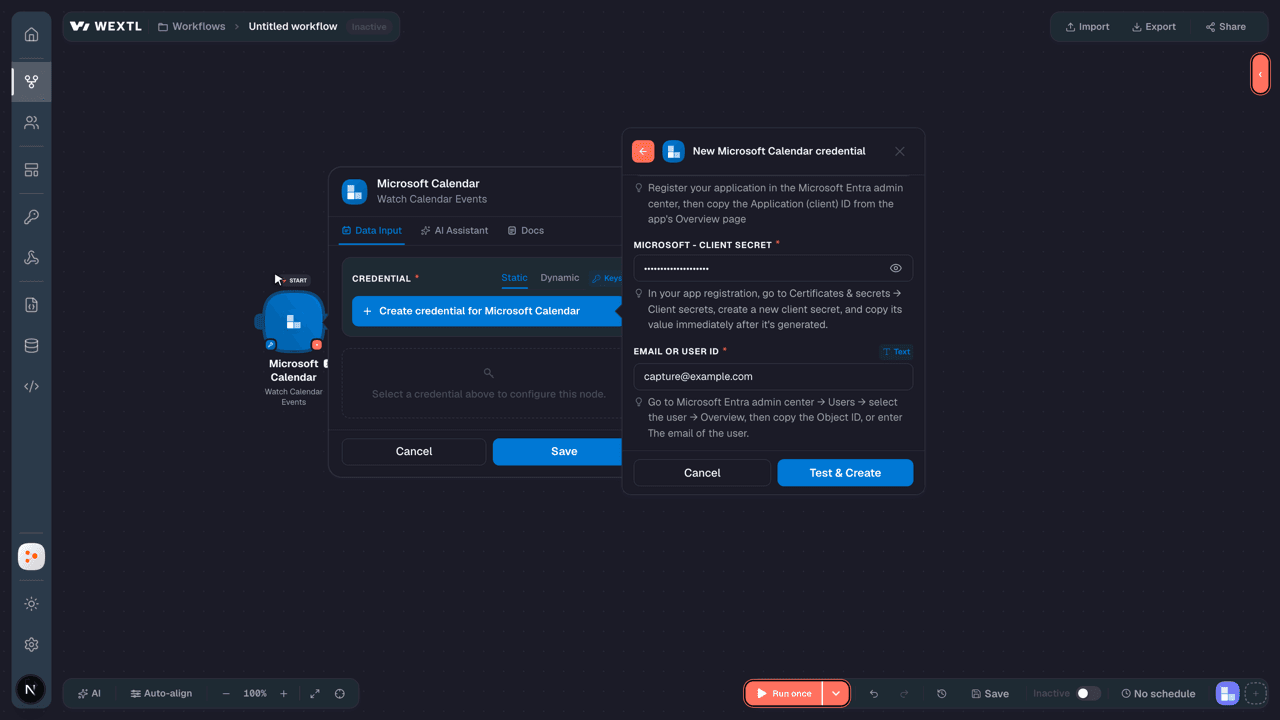
Microsoft Calendar - Primary
You’ll be redirected to sign in and approve access — your password is never shared with WEXTL.
- Microsoft - TenanttextRequired
Directory (tenant) ID or verified domain, e.g. contoso.onmicrosoft.com. common/organizations/consumers are not valid for app-only.
[1] - Microsoft - Client IDtextRequired
Register your application in the Microsoft Entra admin center, then copy the Application (client) ID from the app's Overview page
[1] - Microsoft - Client SecretpasswordRequired
In your app registration, go to Certificates & secrets → Client secrets, create a new client secret, and copy its value immediately after it's generated.
[1] - Email or User IDtextRequired
Go to Microsoft Entra admin center → Users → select the user → Overview, then copy the Object ID, or enter The email of the user.
[1]
Connect Microsoft Calendar in WEXTL
- Log in to your WEXTL account, add the Microsoft Calendar node module to your workflow, and click Create new credential.
- Optional: In the Credential name field, enter a name for the credential.
- Enter the authentication credentials you copied from your Microsoft Calendar account, or follow the on-screen instructions to create the credential.
- If prompted, authenticate your account and confirm access.
- If you want to make changes to your credential in the future, follow the steps in Manage credentials →

Notes
Credentials are org-scoped; share them with teammates from the Credentials picker on any of its nodes.For detailed information on connecting an application, see Connect an application →
Microsoft Calendar node modules
The list below is a reference of every Microsoft Calendar node module the integration supports. You will be able to pick any of them on the workflow canvas while building automations.
Each Microsoft Calendar node module below opens to reveal its input parameters, outputs, and connection requirements.
Watch Calendar EventsTrigger
| Field | Type |
|---|---|
| @odata etag | text |
| ID | text |
| Created date time | date |
| Last modified date time | date |
| Change key | text |
| Categories | array |
| Transaction ID | text |
| Original start time zone | time |
| Original end time zone | time |
| I cal u ID | text |
| Reminder minutes before start | number |
| Is reminder on | boolean |
| Has attachments | boolean |
| Subject | text |
| Body preview | text |
| Importance | text |
| Sensitivity | text |
| Is all day | boolean |
| Is cancelled | boolean |
| Is organizer | boolean |
List CalendarSearch
| Field | Type |
|---|---|
| Search | text |
| Limit | number |
| Field | Type |
|---|---|
| Allowed online meeting providers | array |
| Can edit | boolean |
| Can share | boolean |
| Can view private items | boolean |
| Change key | text |
| Color | text |
| Default online meeting provider | text |
| Hex color | text |
| ID | text |
| Is default calendar | boolean |
| Is removable | boolean |
| Is tallying responses | text |
| Name | text |
| Owner | object |
| @odata type | text |
List Calendar Event AttachmentsSearch
List Calendar Event InstancesSearch
List Calendar EventsSearch
| Field | Type |
|---|---|
| Limit | number |
| Field | Type |
|---|---|
| @odata etag | text |
| ID | text |
| Created date time | date |
| Last modified date time | date |
| Change key | text |
| Categories | array |
| Transaction ID | text |
| Original start time zone | time |
| Original end time zone | time |
| I cal u ID | text |
| Reminder minutes before start | number |
| Is reminder on | boolean |
| Has attachments | boolean |
| Subject | text |
| Body preview | text |
| Importance | text |
| Sensitivity | text |
| Is all day | boolean |
| Is cancelled | boolean |
| Is organizer | boolean |
List Calendar Group PermissionsSearch
List Calendar GroupsSearch
List Calendar ViewSearch
Retrieve a CalendarAction
| Field | Type |
|---|---|
Calendar IDRequired | choice |
| Field | Type |
|---|---|
| @odata context | url |
| @odata ID | url |
| ID | text |
| Name | text |
| Color | text |
| Change key | text |
| Can share | boolean |
| Can view private items | boolean |
| Hex color | text |
| Can edit | boolean |
| Allowed online meeting providers | array |
| Default online meeting provider | text |
| Is tallying responses | boolean |
| Is removable | boolean |
| Owner | object |
| Name | text |
| Address | text |
Retrieve a Calendar EventAction
| Field | Type |
|---|---|
Calendar Event IDRequired | choice |
| Field | Type |
|---|---|
| @odata etag | text |
| ID | text |
| Created date time | date |
| Last modified date time | date |
| Change key | text |
| Categories | array |
| Transaction ID | text |
| Original start time zone | time |
| Original end time zone | time |
| I cal u ID | text |
| Reminder minutes before start | number |
| Is reminder on | boolean |
| Has attachments | boolean |
| Subject | text |
| Body preview | text |
| Importance | text |
| Sensitivity | text |
| Is all day | boolean |
| Is cancelled | boolean |
| Is organizer | boolean |
Retrieve a Calendar GroupAction
Retrieve a Calendar PermissionAction
Accept a Calendar EventAction
| Field | Type |
|---|---|
Calendar Event IDRequired | choice |
| Send Response | choice |
| Comment | text |
Add Event AttachmentAction
Cancel a Calendar EventAction
| Field | Type |
|---|---|
Calendar Event IDRequired | choice |
| Comment | text |
Create a CalendarAction
| Field | Type |
|---|---|
| Allowed Online Meeting Providers | array |
| Can Edit | boolean |
| Can Share | boolean |
| Can View Private Items | boolean |
| Change Key | text |
| Color | choice |
| Default Online Meeting Provider | choice |
| Hex Color | text |
| Is Default Calendar | boolean |
| Is Removable | boolean |
| Is Tallying Responses | boolean |
| Name | text |
| Owner | object |
| Address | |
| Name | text |
| Field | Type |
|---|---|
| @odata context | url |
| @odata ID | url |
| ID | text |
| Name | text |
| Color | text |
| Change key | text |
| Can share | boolean |
| Can view private items | boolean |
| Hex color | text |
| Can edit | boolean |
| Allowed online meeting providers | array |
| Default online meeting provider | text |
| Is tallying responses | boolean |
| Is removable | boolean |
| Owner | object |
| Name | text |
| Address | text |
Create a Calendar EventAction
| Field | Type |
|---|---|
SubjectRequired | text |
StartRequired | object |
| Date and Time | text |
| Time Zone | text |
EndRequired | object |
| Date and Time | text |
| Time Zone | text |
| Attendees | array |
| Location | object |
| Display Name | text |
| Location Type | text |
| Body | object |
| Content Type | choice |
| Content | text |
| Online Meeting URL | url |
| Is All Day | boolean |
| Importance | choice |
| Reminder Minutes Before Start | number |
| Sensitivity | choice |
| Show As | choice |
| Web Link | url |
| Field | Type |
|---|---|
| @odata etag | text |
| ID | text |
| Created date time | date |
| Last modified date time | date |
| Change key | text |
| Categories | array |
| Transaction ID | text |
| Original start time zone | time |
| Original end time zone | time |
| I cal u ID | text |
| Reminder minutes before start | number |
| Is reminder on | boolean |
| Has attachments | boolean |
| Subject | text |
| Body preview | text |
| Importance | text |
| Sensitivity | text |
| Is all day | boolean |
| Is cancelled | boolean |
| Is organizer | boolean |
Create a Calendar GroupAction
Create a Calendar Group PermissionAction
| Field | Type |
|---|---|
Calendar Group IDRequired | choice |
Email AddressRequired | object |
| Name | text |
| Address | |
| Is Inside Organization | boolean |
| Is Removable | boolean |
| Role | choice |
| Field | Type |
|---|---|
| ID | text |
| Is removable | boolean |
| Is inside organization | boolean |
| Role | text |
| Allowed roles | array |
| Email address | object |
| Name | text |
| Address | text |
Decline a Calendar EventAction
| Field | Type |
|---|---|
Calendar Event IDRequired | choice |
| Send Response | choice |
| Comment | text |
| Proposed New Time | date |
Delete a CalendarAction
| Field | Type |
|---|---|
Calendar IDRequired | choice |
Delete a Calendar EventAction
| Field | Type |
|---|---|
Calendar Event IDRequired | choice |
Delete a Calendar GroupAction
| Field | Type |
|---|---|
Calendar Group IDRequired | choice |
Delete a Calendar PermissionAction
| Field | Type |
|---|---|
Calendar Group IDRequired | choice |
Forward a Calendar EventAction
| Field | Type |
|---|---|
Calendar Event IDRequired | choice |
To RecipientsRequired | array |
| Comment | text |
Make an API Calluniversal
Tentatively Accept a Calendar EventAction
| Field | Type |
|---|---|
Calendar Event IDRequired | choice |
| Send Response | choice |
| Comment | text |
| Proposed New Time | date |
Update a CalendarAction
| Field | Type |
|---|---|
Calendar IDRequired | choice |
| Allowed Online Meeting Providers | array |
| Can Edit | boolean |
| Can Share | boolean |
| Can View Private Items | boolean |
| Change Key | text |
| Color | choice |
| Default Online Meeting Provider | choice |
| Hex Color | text |
| Is Default Calendar | boolean |
| Is Removable | boolean |
| Is Tallying Responses | boolean |
| Name | text |
| Owner | object |
| Address | |
| Name | text |
| Field | Type |
|---|---|
| @odata context | url |
| @odata ID | url |
| ID | text |
| Name | text |
| Color | text |
| Change key | text |
| Can share | boolean |
| Can view private items | boolean |
| Hex color | text |
| Can edit | boolean |
| Allowed online meeting providers | array |
| Default online meeting provider | text |
| Is tallying responses | boolean |
| Is removable | boolean |
| Owner | object |
| Name | text |
| Address | text |
Update a Calendar EventAction
| Field | Type |
|---|---|
Calendar Event IDRequired | choice |
| Subject | text |
| Start | object |
| Date and Time | text |
| Time Zone | text |
| End | object |
| Date and Time | text |
| Time Zone | text |
| Attendees | array |
| Location | object |
| Display Name | text |
| Location Type | text |
| Body | object |
| Content Type | choice |
| Content | text |
| Online Meeting URL | url |
| Is All Day | boolean |
| Importance | choice |
| Reminder Minutes Before Start | number |
| Sensitivity | choice |
| Show As | choice |
| Web Link | url |
| Field | Type |
|---|---|
| @odata etag | text |
| ID | text |
| Created date time | date |
| Last modified date time | date |
| Change key | text |
| Categories | array |
| Transaction ID | text |
| Original start time zone | time |
| Original end time zone | time |
| I cal u ID | text |
| Reminder minutes before start | number |
| Is reminder on | boolean |
| Has attachments | boolean |
| Subject | text |
| Body preview | text |
| Importance | text |
| Sensitivity | text |
| Is all day | boolean |
| Is cancelled | boolean |
| Is organizer | boolean |
Update a Calendar GroupAction
Update a Calendar PermissionAction
Templates
Look for Microsoft Calendar templates in the WEXTL template library.
Browse templates →Explore alternative apps
- Anny Customer API[2]Online booking and scheduling platform that lets customers book resources, services, and appointments in real time.
- BookedSchedulerResource reservation and scheduling platform for booking rooms, equipment, and shared assets.
- BookeoOnline booking and appointment scheduling platform for tours, classes, and service businesses.
- Anny Admin APIOnline booking and scheduling platform for managing services, resources, timeslots, and customer appointments.
- AddEventCalendar event sharing and add-to-calendar links for websites and campaigns.


References
- WEXTL® Microsoft Calendar Source Code connector implementation.
- Our users use cases and automations.
- Official API Documentation for Microsoft Calendar.
- WEXTL® visual workflow builder data.
Last updated: Jul 22, 2026 23:18