


Requirements
To use Paytrail on WEXTL you need an active account and an API access token from your account settings.[3]
Get your Paytrail credentials
Connect Paytrail in WEXTL
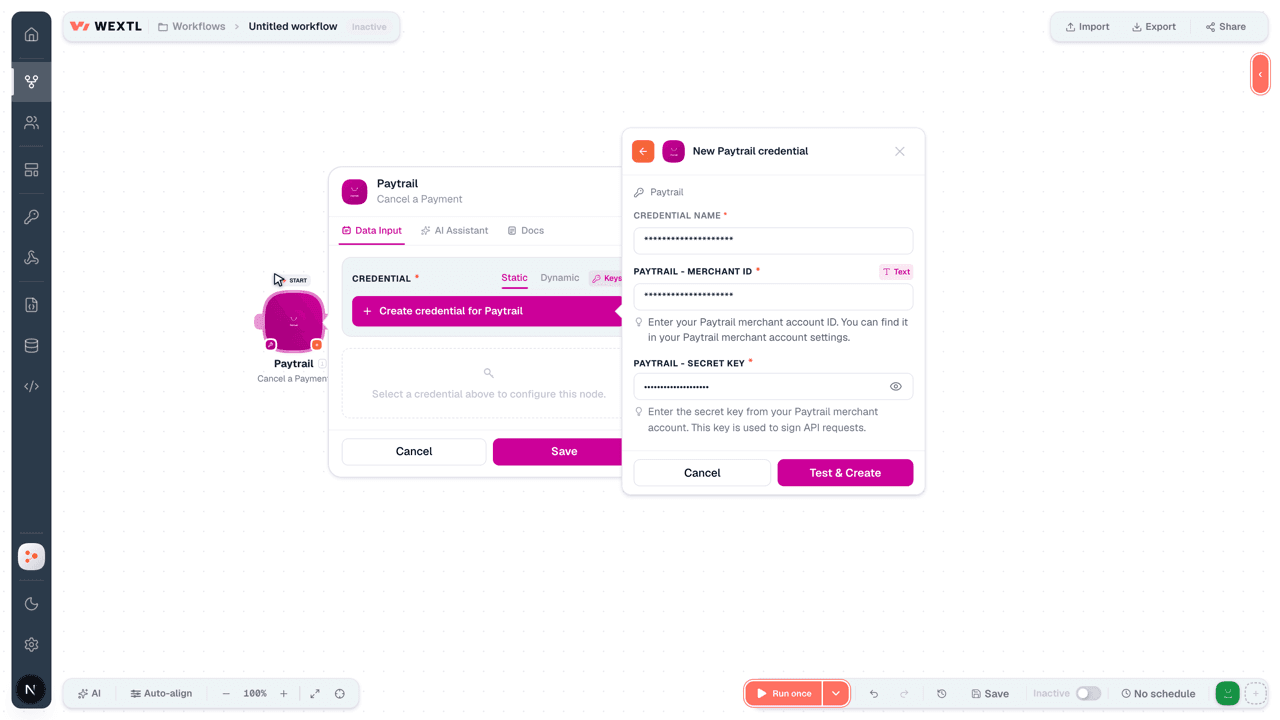
- Log in to your WEXTL account, add the Paytrail node module to your workflow, and click Create new credential.
- Optional: In the Credential name field, enter a name for the credential.
- Enter the authentication credentials you copied from your Paytrail account, or follow the on-screen instructions to create the credential.
- If prompted, authenticate your account and confirm access.
- If you want to make changes to your credential in the future, follow the steps in Manage credentials →
Notes
Credentials are org-scoped; share them with teammates from the Credentials picker on any of its nodes.For detailed information on connecting an application, see Connect an application →
Paytrail node modules
The list below is a reference of every Paytrail node module the integration supports. You will be able to pick any of them on the workflow canvas while building automations.
Open any Paytrail node module below to inspect its input parameters, outputs, and connection requirements.
Get a PaymentAction
List Grouped Payment ProvidersAction
List Payment ProvidersAction
Input fields[3]
| Field | Type |
|---|---|
| Amount | number |
| Payment Method Groups | array |
| Group | text |
Cancel a PaymentAction
Capture a PaymentAction
Create a PaymentAction
Input fields[3]
| Field | Type |
|---|---|
StampRequired | text |
ReferenceRequired | text |
AmountRequired | number |
CurrencyRequired | choice |
LanguageRequired | choice |
| Items | array |
Unit PriceRequired | number |
UnitsRequired | number |
VAT PercentageRequired | number |
Product CodeRequired | text |
| Delivery Date | date |
| Description | text |
| Category | text |
CustomerRequired | object |
EmailRequired | text |
| First Name | text |
| Last Name | text |
| Phone | text |
| VAT ID | text |
| Delivery Address | object |
| Street Address | text |
| Postal Code | text |
| City | text |
| County | text |
| Country | text |
| Invoicing Address | object |
| Street Address | text |
| Postal Code | text |
| City | text |
| County | text |
| Country | text |
Redirect URLsRequired | object |
Success URLRequired | text |
Cancel URLRequired | text |
| Callback URLs | object |
| Success Callback URL | text |
| Cancel Callback URL | text |
| Callback Delay | number |
| Manual Invoice Activation | boolean |
| Use Prices Without VAT | boolean |
| Payment Method Groups | array |
| Group ID | text |
| Provider Details | object |
Output fields[3]
| Field | Type |
|---|---|
| Transaction ID | text |
| Href | text |
| Reference | text |
| Terms | text |
| Groups | array |
| Providers | array |
| Custom providers | object |
| Applepay | object |
Make an API Calluniversal
Refund a PaymentAction
Input fields[3]
| Field | Type |
|---|---|
Transaction IDRequired | text |
| Refund Amount | number |
| Refund Email | text |
| Refund Stamp | text |
| Refund Reference | text |
Callback URLsRequired | object |
Success Callback URLRequired | text |
Cancel Callback URLRequired | text |
| Refund Items | array |
Item Refund AmountRequired | number |
Item StampRequired | text |
| Item Refund Stamp | text |
| Item Refund Reference | text |
| Commission | object |
Output fields[3]
| Field | Type |
|---|---|
| Provider | text |
| Status | text |
| Transaction ID | text |
Request a Payment ReportAction
Templates
Look for Paytrail templates in the WEXTL template library.
Browse templates →Explore alternative apps
- Coinbase[2]Cryptocurrency exchange and payments platform for trading, transfers, and digital asset orders.
- CoinGeckoLook up crypto coin prices, market data, and exchange rankings with CoinGecko.
- BybitCryptocurrency exchange API for orders, tickers, and market data.
- CheckoutGlobal payment platform for accepting cards, wallets, and alternative payment methods.
- BlueSnapGlobal payment gateway for accepting cards, local payment methods, and managing subscriptions.


References
- WEXTL® Paytrail Source Code connector implementation.
- Our users use cases and automations.
- Official API Documentation for Paytrail.
- WEXTL® visual workflow builder data.
Last updated: Jul 24, 2026 18:12