


Requirements
Before you set up the credential, make sure you have an active AgencyZoom account and OAuth client credentials, granted by signing in with your account ready.[3]
Get your AgencyZoom credentials
_AgencyZoom
You’ll be redirected to sign in and approve access — your password is never shared with WEXTL.
- UsernametextRequired
The user's email address as the username.
[1] - PasswordpasswordRequired
AgencyZoom - Connection
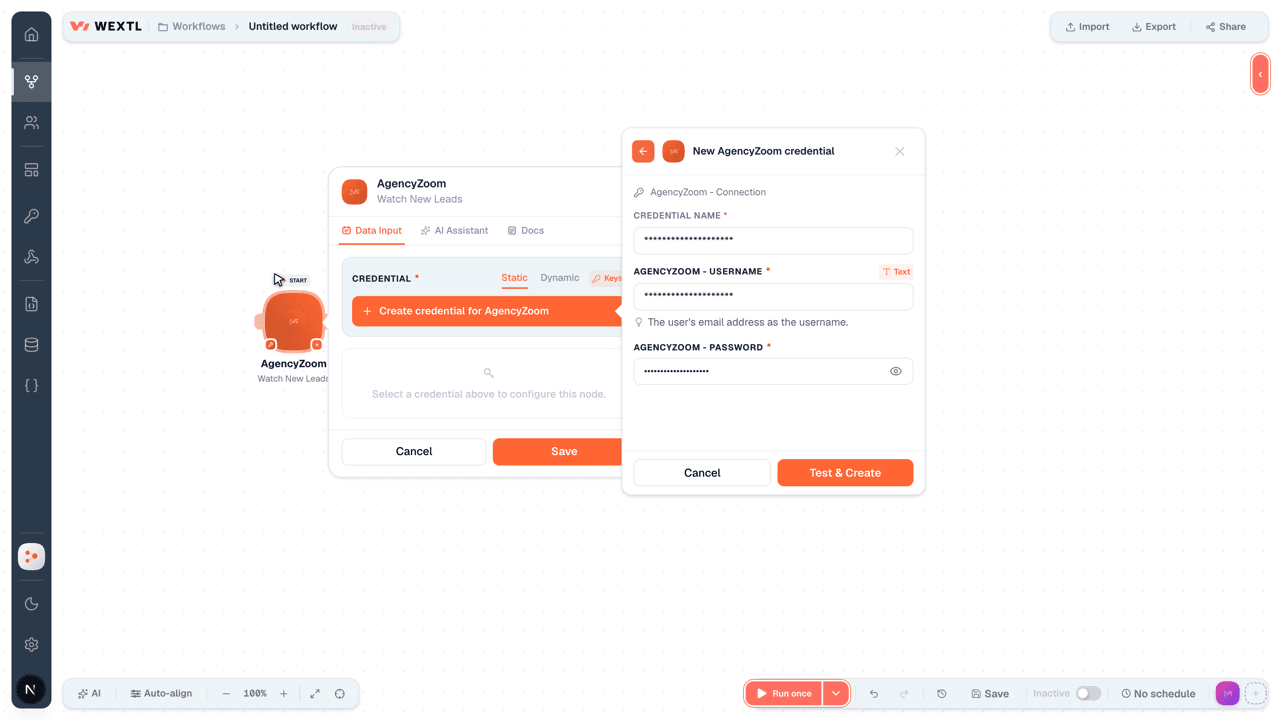
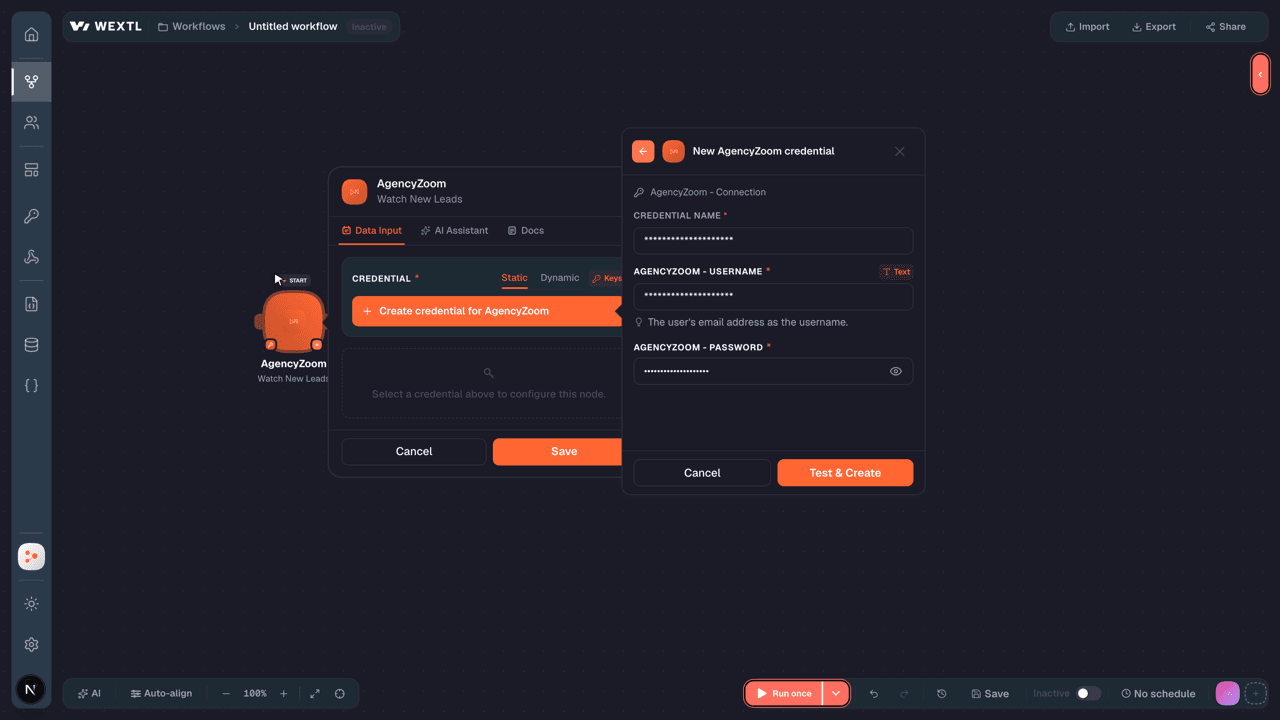
- UsernametextRequired
The user's email address as the username.
[1] - PasswordpasswordRequired
Connect AgencyZoom in WEXTL
- Log in to your WEXTL account, add the AgencyZoom node module to your workflow, and click Create new credential.
- Optional: In the Credential name field, enter a name for the credential.
- Enter the authentication credentials you copied from your AgencyZoom account, or follow the on-screen instructions to create the credential.
- If prompted, authenticate your account and confirm access.
- If you want to make changes to your credential in the future, follow the steps in Manage credentials →
Notes
Credentials are org-scoped; share them with teammates from the Credentials picker on any of its nodes.For detailed information on connecting an application, see Connect an application →
AgencyZoom node modules
The list below is a reference of every AgencyZoom node module the integration supports. You will be able to pick any of them on the workflow canvas while building automations.
Each AgencyZoom node module below opens to reveal its input parameters, outputs, and connection requirements.
Watch New LeadsTrigger
| Field | Type |
|---|---|
| ID | number |
| First Name | text |
| Middle Name | text |
| Last Name | text |
| Lead Type | text |
| Phone | text |
| Secondary Email | |
| Secondary Phone | text |
| Street Address | text |
| City | text |
| State | text |
| Country | text |
| Zip | text |
| Comments | text |
| Status | number |
| Contact Date | text |
| Sold Date | text |
| Lead Source ID | number |
| Lead Source Name | text |
Watch New TasksTrigger
| Field | Type |
|---|---|
| ID | number |
| Title | text |
| Status | number |
| Create Date | text |
| Due Date | text |
| Task Date Time | text |
| Duration | number |
| Complete Date | text |
| Assigned Date | text |
| Comments | text |
| Assignees | array |
| Completed By | text |
| Is Completed By Employee | boolean |
| Time Specific | boolean |
| Customer Name | text |
| Customer ID | number |
| Customer Type | text |
Watch Updated LeadsTrigger
| Field | Type |
|---|---|
| ID | number |
| First Name | text |
| Middle Name | text |
| Last Name | text |
| Lead Type | text |
| Phone | text |
| Secondary Email | |
| Secondary Phone | text |
| Street Address | text |
| City | text |
| State | text |
| Country | text |
| Zip | text |
| Comments | text |
| Status | number |
| Contact Date | text |
| Sold Date | text |
| Lead Source ID | number |
| Lead Source Name | text |
Get a LeadAction
| Field | Type |
|---|---|
Lead IDRequired | choice |
| Field | Type |
|---|---|
| ID | number |
| Firstname | text |
| Middlename | text |
| Lastname | text |
| Lead Type | text |
| Phone | text |
| Secondary Email | |
| Secondary Phone | text |
| Street Address | text |
| City | text |
| State | text |
| Country | text |
| Zip | text |
| Comments | text |
| Status | number |
| Contact Date | text |
| Sold Date | text |
| Lead Source ID | number |
| Lead Source Name | text |
Get a TaskAction
| Field | Type |
|---|---|
Task IDRequired | choice |
| Field | Type |
|---|---|
| ID | number |
| Title | text |
| Status | number |
| Create Date | text |
| Due Date | text |
| Task Date Time | text |
| Duration | number |
| Complete Date | text |
| Assigned Date | text |
| Comments | text |
| Assignees | array |
| Completed By | text |
| Is Completed By Employee | boolean |
| Time Specific | boolean |
| Customer Name | text |
| Customer ID | number |
| Customer Type | text |
List Lead NotesSearch
List Lead OpportunitiesSearch
List Lead TasksSearch
| Field | Type |
|---|---|
Lead IDRequired | choice |
| Limit | number |
| Field | Type |
|---|---|
| ID | number |
| Title | text |
| Status | number |
| Create Date | text |
| Due Date | text |
| Task Date Time | text |
| Duration | number |
| Complete Date | text |
| Assigned Date | text |
| Comments | text |
| Assignees | array |
| Completed By | text |
| Is Completed By Employee | boolean |
| Time Specific | boolean |
| Customer Name | text |
| Customer ID | number |
| Customer Type | text |
Search LeadsSearch
| Field | Type |
|---|---|
| Lead ID | choice |
| Assigned To | choice |
| Creator | number |
| Status | choice |
| Lead Source ID | choice |
| Customer Name | text |
| Customer Email | |
| Customer Phone | text |
| Customer Phone List | array |
| Phone | text |
| Start Creation Date | date |
| End Creation Date | date |
| Sold Period | choice |
| Workflow ID | number |
| Workflow Stage ID | text |
| Last Activity Earliest Date | date |
| Last Activity Latest Date | date |
| Sort By | choice |
| Location | choice |
| Limit | number |
| Field | Type |
|---|---|
| ID | number |
| First Name | text |
| Middle Name | text |
| Last Name | text |
| Lead Type | text |
| Phone | text |
| Secondary Email | |
| Secondary Phone | text |
| Street Address | text |
| City | text |
| State | text |
| Country | text |
| Zip | text |
| Comments | text |
| Status | number |
| Contact Date | text |
| Sold Date | text |
| Lead Source ID | number |
| Lead Source Name | text |
Search TasksSearch
| Field | Type |
|---|---|
| Sort Field | choice |
| Order | choice |
| Location ID | choice |
| Start Date | date |
| End Date | date |
| Task Type | choice |
| Assignee ID | number |
| Life & Health Professional ID | number |
| Task Status | choice |
| Period | choice |
| Lead Source Category ID | number |
| Lead Source ID | choice |
| Field | Type |
|---|---|
| ID | number |
| Title | text |
| Status | number |
| Create Date | text |
| Due Date | text |
| Task Date Time | text |
| Duration | number |
| Complete Date | text |
| Assigned Date | text |
| Comments | text |
| Assignees | array |
| Completed By | text |
| Is Completed By Employee | boolean |
| Time Specific | boolean |
| Customer Name | text |
| Customer ID | number |
| Customer Type | text |
Complete a TaskAction
Create a Business LeadAction
| Field | Type |
|---|---|
First NameRequired | text |
EmailRequired | |
Pipeline IDRequired | choice |
Lead Source IDRequired | choice |
Assigned ToRequired | choice |
CountryRequired | text |
| Last Name | text |
| Phone | text |
| Secondary Email | |
| Secondary Phone | text |
| Notes | text |
| Contact Date | date |
| Sold Date | date |
| Assignment Group ID | choice |
| X Date | date |
| Quote Date | date |
| CSR ID | number |
| Street Address | text |
| Street Address Line 2 | text |
| City | text |
| Field | Type |
|---|---|
| Message | text |
| ID | number |
| Result | boolean |
Create a NoteAction
Create a Personal LeadAction
| Field | Type |
|---|---|
First NameRequired | text |
EmailRequired | |
Pipeline IDRequired | choice |
Lead Source IDRequired | choice |
Assigned ToRequired | choice |
CountryRequired | text |
| Last Name | text |
| Phone | text |
| Secondary Email | |
| Secondary Phone | text |
| Notes | text |
| Contact Date | date |
| Sold Date | date |
| Assignment Group ID | choice |
| X Date | date |
| Quote Date | date |
| CSR ID | number |
| Street Address | text |
| Street Address Line 2 | text |
| City | text |
| Field | Type |
|---|---|
| Message | text |
| ID | number |
| Result | boolean |
Create a TaskAction
| Field | Type |
|---|---|
Task TitleRequired | text |
Contact EmailRequired | |
Assignee IDRequired | number |
Task TypeRequired | choice |
Due Date TimeRequired | date |
| Task Notes | text |
| Life & Health Professional ID | number |
| Customer ID | number |
| Lead ID | choice |
| Duration | number |
| Invitees | array |
| Time Specific | boolean |
| Field | Type |
|---|---|
| Message | text |
| ID | number |
| Result | boolean |
Delete a LeadAction
| Field | Type |
|---|---|
Lead IDRequired | choice |
Delete a TaskAction
| Field | Type |
|---|---|
Task IDRequired | choice |
Make an API Calluniversal
Reopen a TaskAction
Update a Business LeadAction
| Field | Type |
|---|---|
Lead IDRequired | choice |
| First Name | text |
| Pipeline ID | choice |
| Lead Source ID | choice |
| Assigned To | choice |
| Country | text |
| Last Name | text |
| Phone | text |
| Secondary Email | |
| Secondary Phone | text |
| Notes | text |
| Contact Date | date |
| Sold Date | date |
| Assignment Group ID | choice |
| X Date | date |
| Quote Date | date |
| CSR ID | number |
| Street Address | text |
| Street Address Line 2 | text |
| Field | Type |
|---|---|
| Message | text |
| ID | number |
| Result | boolean |
Update a Personal LeadAction
| Field | Type |
|---|---|
Lead IDRequired | choice |
| First Name | text |
| Pipeline ID | choice |
| Lead Source ID | choice |
| Assigned To | choice |
| Country | text |
| Last Name | text |
| Phone | text |
| Secondary Email | |
| Secondary Phone | text |
| Notes | text |
| Contact Date | date |
| Sold Date | date |
| Assignment Group ID | choice |
| X Date | date |
| Quote Date | date |
| CSR ID | number |
| Street Address | text |
| Street Address Line 2 | text |
| Field | Type |
|---|---|
| Message | text |
| ID | number |
| Result | boolean |
Update a TaskAction
| Field | Type |
|---|---|
Task IDRequired | choice |
| Task Title | text |
| Contact Email | |
| Assignee ID | number |
| Task Type | choice |
| Due Date Time | date |
| Task Notes | text |
| Life & Health Professional ID | number |
| Customer ID | number |
| Lead ID | choice |
| Duration | number |
| Invitees | array |
| Time Specific | boolean |
| Field | Type |
|---|---|
| Message | text |
| ID | number |
| Result | boolean |
Templates
Look for AgencyZoom templates in the WEXTL template library.
Browse templates →Explore alternative apps
- Aryeo[2]Real estate media production platform for orders, appointments, and delivery workflows.
- AsanaWork management for teams — tasks, projects, and timelines.
- AspireField service management for landscaping — estimating, scheduling, production, and billing.
- AcculynxRoofing business management CRM for jobs, leads, estimates, and field production.
- 2SolarCRM and project platform for sustainable energy installers and solar projects.


References
- WEXTL® AgencyZoom Source Code connector implementation.
- Our users use cases and automations.
- Official API Documentation for AgencyZoom.
- WEXTL® visual workflow builder data.
Last updated: Jul 23, 2026 22:38