


Requirements
To use Asset Panda on WEXTL you need an active account and OAuth client credentials, granted by signing in with your account.[3]
Get your Asset Panda credentials
Connect Asset Panda in WEXTL
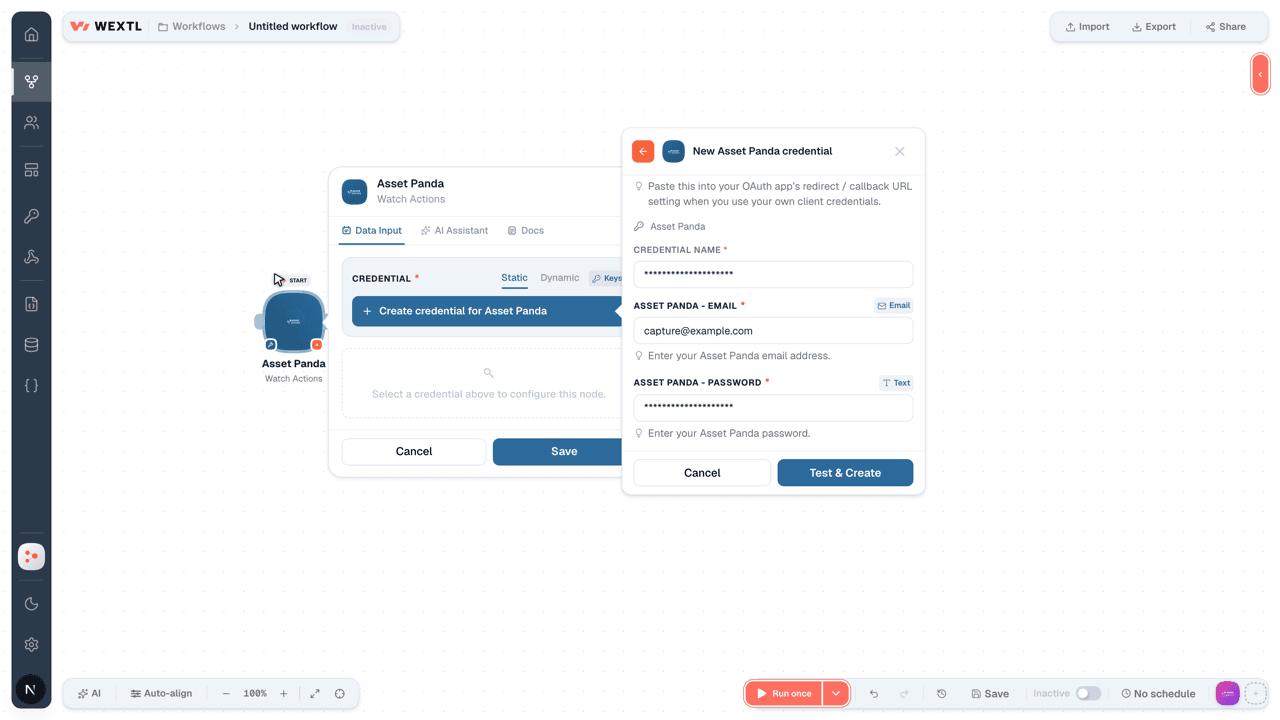
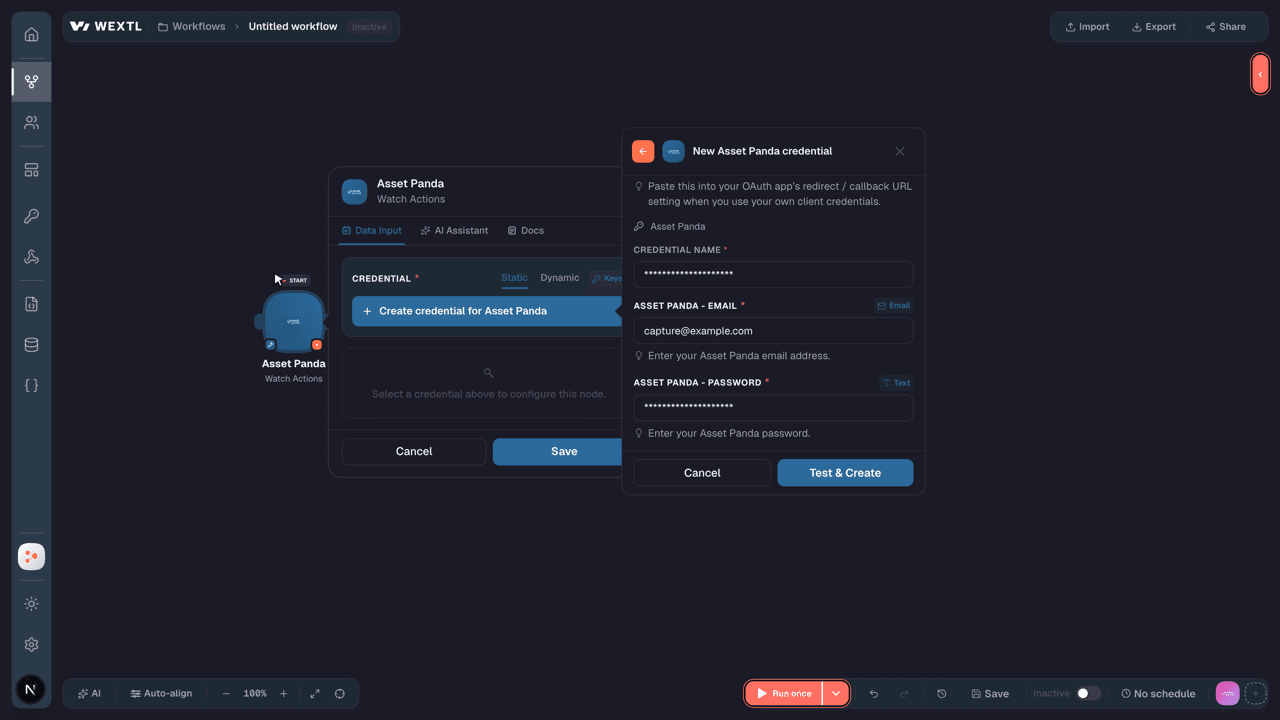
- Log in to your WEXTL account, add the Asset Panda node module to your workflow, and click Create new credential.
- Optional: In the Credential name field, enter a name for the credential.
- Enter the authentication credentials you copied from your Asset Panda account, or follow the on-screen instructions to create the credential.
- If prompted, authenticate your account and confirm access.
- If you want to make changes to your credential in the future, follow the steps in Manage credentials →
Notes
Credentials are org-scoped; share them with teammates from the Credentials picker on any of its nodes.For detailed information on connecting an application, see Connect an application →
Asset Panda node modules
The list below is a reference of every Asset Panda node module the integration supports. You will be able to pick any of them on the workflow canvas while building automations.
Open any Asset Panda node module below to inspect its input parameters, outputs, and connection requirements.
Watch ActionsTrigger
Output fields[3]
| Field | Type |
|---|---|
| ID | number |
| Name | text |
| Type | text |
| Key | text |
| Account ID | number |
| Entity ID | number |
| Has all entities | boolean |
| Has all statuses | boolean |
| Auto return linked action | boolean |
| Fields counter | number |
| Is default | boolean |
| Is returnable | boolean |
| Is auto returnable | boolean |
| Allow attachment on open | boolean |
| Allow attachment on return | boolean |
| Perform on not returned | boolean |
| Created at | date |
| Updated at | date |
| Ordering | number |
| Track gps | boolean |
12other output fields
Watch GroupsTrigger
Output fields[3]
| Field | Type |
|---|---|
| ID | number |
| Name | text |
| Key | text |
| Icon | text |
Watch UsersTrigger
Output fields[3]
| Field | Type |
|---|---|
| ID | number |
| text | |
| First name | text |
| Last name | text |
| Account ID | number |
| Is admin | boolean |
| Is active | boolean |
| Template rule ID | text |
| Integ ad sid | text |
Get a GroupAction
Get a Specific ActionSearch
Get Action FieldsSearch
Get Action ObjectsSearch
Input fields[3]
| Field | Type |
|---|---|
Object IDRequired | text |
| Limit | number |
Get an Action GroupSearch
Input fields[3]
| Field | Type |
|---|---|
Action IDRequired | choice |
| Limit | number |
Get AttachmentsSearch
Get Group ActionsSearch
Input fields[3]
| Field | Type |
|---|---|
| Group ID | choice |
| Limit | number |
Output fields[3]
| Field | Type |
|---|---|
| ID | number |
| Name | text |
| Type | text |
| Key | text |
| Account ID | number |
| Entity ID | number |
| Has all entities | boolean |
| Has all statuses | boolean |
| Auto return linked action | boolean |
| Fields counter | number |
| Is default | boolean |
| Is returnable | boolean |
| Is auto returnable | boolean |
| Allow attachment on open | boolean |
| Allow attachment on return | boolean |
| Perform on not returned | boolean |
| Created at | date |
| Updated at | date |
| Ordering | number |
| Track gps | boolean |
9other output fields
Get Group FieldsSearch
Get GroupsSearch
Get Linked FieldsSearch
Input fields[3]
| Field | Type |
|---|---|
IDRequired | text |
| Limit | number |
Get Linked ObjectsSearch
Input fields[3]
| Field | Type |
|---|---|
IDRequired | text |
Field IDRequired | text |
| Limit | number |
Get ReportsSearch
Get Returnable Action ObjectsSearch
Input fields[3]
| Field | Type |
|---|---|
Object IDRequired | text |
Action IDRequired | number |
| Limit | number |
Get Self DetailsAction
Output fields[3]
| Field | Type |
|---|---|
| ID | text |
| text | |
| First name | text |
| Last name | text |
| Account ID | text |
| Is admin | boolean |
| Is active | boolean |
| Sign in count | number |
| Created at | date |
| Phone | text |
| Full name | text |
| API token | text |
| Provider | text |
| Timezone | text |
| Integ ad sid | text |
| Template rule ID | text |
| After action perform display | text |
| Reservation tutorial | boolean |
| Strptime datetime format | text |
| Is password temporary | boolean |
10other output fields
Get SettingsAction
No fields documented.
Get User TemplatesSearch
Get UsersSearch
List Group StatusesSearch
Retrieve ActionsSearch
Input fields[3]
| Field | Type |
|---|---|
| Limit | number |
Output fields[3]
| Field | Type |
|---|---|
| ID | number |
| Name | text |
| Type | text |
| Key | text |
| Account ID | number |
| Entity ID | number |
| Has all entities | boolean |
| Has all statuses | boolean |
| Auto return linked action | boolean |
| Fields counter | number |
| Is default | boolean |
| Is returnable | boolean |
| Is auto returnable | boolean |
| Allow attachment on open | boolean |
| Allow attachment on return | boolean |
| Perform on not returned | boolean |
| Created at | date |
| Updated at | date |
| Ordering | number |
| Track gps | boolean |
12other output fields
Retrieve Group Action FieldsSearch
Search ObjectsAction
Input fields[3]
| Field | Type |
|---|---|
Group IDRequired | choice |
| Search | text |
| Field Filters | array |
| Key | text |
| Value | text |
Archive ObjectsAction
Input fields[3]
| Field | Type |
|---|---|
Group IDRequired | choice |
Object IDsRequired | array |
| Object ID | text |
Stop DateRequired | date |
Attach an Attachment to an ObjectAction
Input fields[3]
| Field | Type |
|---|---|
Group IDRequired | choice |
Group Object IDRequired | text |
Attachment IDRequired | text |
Create a FolderAction
Input fields[3]
| Field | Type |
|---|---|
Folder IDRequired | number |
Attachment IDsRequired | text |
Create a GroupAction
Input fields[3]
| Field | Type |
|---|---|
| Group ID | choice |
TypeRequired | text |
NameRequired | text |
| Is Active | text |
| Deactivate Depreciation | text |
| Is Returnable | text |
| Perform on Not Returned | text |
| Change Return Name | text |
| Return Name | text |
| Is Auto Returnable | text |
| Is Creating Entity Objects | text |
| Creates Entity Relation Attributes | object |
Creates Entity IDRequired | choice |
IDRequired | text |
| On Web Perform Group Action Before Scan Records | text |
| On Mobile Perform Group Action Before Scan Records | text |
| Allow Attachments | text |
| Track GPS | text |
Output fields[3]
| Field | Type |
|---|---|
| ID | number |
| Name | text |
| Type | text |
| Key | text |
| Account ID | number |
| Entity ID | number |
| Has all entities | boolean |
| Has all statuses | boolean |
| Linked action ID | text |
| Auto return linked action | boolean |
| Linked action flags | text |
| Fields counter | number |
| Is default | boolean |
| Is returnable | boolean |
| Is auto returnable | boolean |
| Allow attachment on open | boolean |
| Allow attachment on return | boolean |
| Perform on not returned | boolean |
| Created at | date |
| Updated at | date |
18other output fields
Create a ReportAction
Input fields[3]
| Field | Type |
|---|---|
Report TypeRequired | choice |
| Report | object |
FieldsRequired | text |
NameRequired | text |
Entity IDRequired | number |
| Sort Fields | text |
| Output | choice |
| Size | choice |
| Orientation | choice |
| Has Gridlines | boolean |
| Font Size | number |
| Sum Currency | boolean |
| Report Filters Attributes | array |
| Form Ordering Fields Attributes | array |
| Entity Embed Y/N | text |
| Entity Embed Y/N | text |
| Object Selector | text |
| Reportable Value | text |
Create a UserAction
Input fields[3]
| Field | Type |
|---|---|
Response FieldsRequired | text |
DeviceRequired | text |
UserRequired | object |
First NameRequired | text |
Last NameRequired | text |
EmailRequired | |
PasswordRequired | secret |
Password ConfirmationRequired | secret |
Create for AccountRequired | text |
| Phone | text |
| Template Rule ID | choice |
Output fields[3]
| Field | Type |
|---|---|
| User ID | number |
Create Multiple Action FieldsAction
Input fields[3]
| Field | Type |
|---|---|
Action IDRequired | choice |
| Fields | array |
Create Multiple Action ObjectsAction
Input fields[3]
| Field | Type |
|---|---|
IDRequired | text |
| Object IDs | array |
| Object ID | text |
| Action Fields | array |
| Key | text |
| Value | text |
Create ObjectsAction
Input fields[3]
| Field | Type |
|---|---|
Group IDRequired | choice |
ObjectsRequired | array |
FieldsRequired | array |
Delete a FolderAction
Input fields[3]
| Field | Type |
|---|---|
Folder IDRequired | number |
Delete a ReportAction
Input fields[3]
| Field | Type |
|---|---|
Report IDRequired | choice |
Delete an Action FieldAction
Input fields[3]
| Field | Type |
|---|---|
Action IDRequired | choice |
Delete an AttachmentAction
Input fields[3]
| Field | Type |
|---|---|
Attachment IDsRequired | text |
Detach an Attachment from an ObjectAction
Input fields[3]
| Field | Type |
|---|---|
Group IDRequired | choice |
Group Object IDRequired | text |
Attachment IDRequired | text |
Generate a ReportAction
Input fields[3]
| Field | Type |
|---|---|
Report IDRequired | choice |
Link an Attachment to an ObjectAction
Input fields[3]
| Field | Type |
|---|---|
Group Object IDRequired | choice |
FileRequired | text |
TypeRequired | choice |
Make an API Calluniversal
Return an Action ObjectAction
Input fields[3]
| Field | Type |
|---|---|
Action IDRequired | choice |
Object IDRequired | text |
| Action Object ID | text |
| Action Fields | array |
| Key | text |
| Value | text |
Return Multiple Action ObjectsAction
Input fields[3]
| Field | Type |
|---|---|
IDRequired | text |
| Object IDs | array |
| Object ID | text |
| Action Fields | array |
| Key | text |
| Value | text |
Unarchive ObjectsAction
Input fields[3]
| Field | Type |
|---|---|
Group IDRequired | choice |
Object IDsRequired | array |
| Object ID | text |
Update a Group ObjectAction
Input fields[3]
| Field | Type |
|---|---|
Group IDRequired | choice |
Object IDRequired | text |
| GPS Coordinates | array |
| Coordinate | number |
| Fields | array |
| Key | text |
| Value | text |
Update a ReportAction
Input fields[3]
| Field | Type |
|---|---|
Report IDRequired | choice |
Report TypeRequired | text |
| Response Fields | text |
| Report | object |
FieldsRequired | text |
NameRequired | text |
Entity IDRequired | number |
| Sort Fields | text |
| Output | choice |
| Size | choice |
| Orientation | choice |
| Has Gridlines | boolean |
| Font Size | number |
| Sum Currency | boolean |
| Entity Embed Y/N | text |
| Object Selector | text |
| Reportable Value | text |
Update a UserAction
Input fields[3]
| Field | Type |
|---|---|
User IDRequired | choice |
First NameRequired | text |
Last NameRequired | text |
EmailRequired | |
PasswordRequired | text |
Password ConfirmationRequired | text |
Create For AccountRequired | text |
| Phone | text |
| Template Rule ID | choice |
Update an Action FieldAction
Input fields[3]
| Field | Type |
|---|---|
Action IDRequired | choice |
| Fields | object |
NameRequired | text |
| Long Name | text |
TypeRequired | text |
| Allow Scanning | text |
| Mobile Scan Only | text |
| Is Open Field | boolean |
| Is Required | text |
| Is Editable | text |
| Is Return Field | text |
| Is Required Return | text |
Output fields[3]
| Field | Type |
|---|---|
| Name | text |
| Long name | text |
| Type | text |
| Allow scanning | text |
| Mobile scan only | text |
| Is open field | text |
| Is required | text |
| Is editable | text |
| Is return field | text |
| Is required return | text |
| Is editable return | text |
Update an AttachmentAction
Input fields[3]
| Field | Type |
|---|---|
Attachment IDRequired | text |
NameRequired | text |
Update Multiple ObjectsAction
Input fields[3]
| Field | Type |
|---|---|
Object IDRequired | text |
Group IDRequired | choice |
ObjectsRequired | array |
FieldsRequired | array |
Templates
Look for Asset Panda templates in the WEXTL template library.
Browse templates →Explore alternative apps
- Buildern[2]Construction project management for budgets, clients, and job progress.
- BigChangeField service management platform for scheduling jobs, technicians, and customer work orders.
- BasecampProject management and team communication for companies and their clients.
- AgencyZoomSales and onboarding platform for insurance agencies, with producer leaderboards and goal tracking.
- AsanaWork management for teams — tasks, projects, and timelines.


References
- WEXTL® Asset Panda Source Code connector implementation.
- Our users use cases and automations.
- Official API Documentation for Asset Panda.
- WEXTL® visual workflow builder data.
Last updated: Jul 23, 2026 22:38