


Requirements
To use Hiveage on WEXTL you need an active account and an API access token from your account settings.[3]
Get your Hiveage credentials
Connect Hiveage in WEXTL
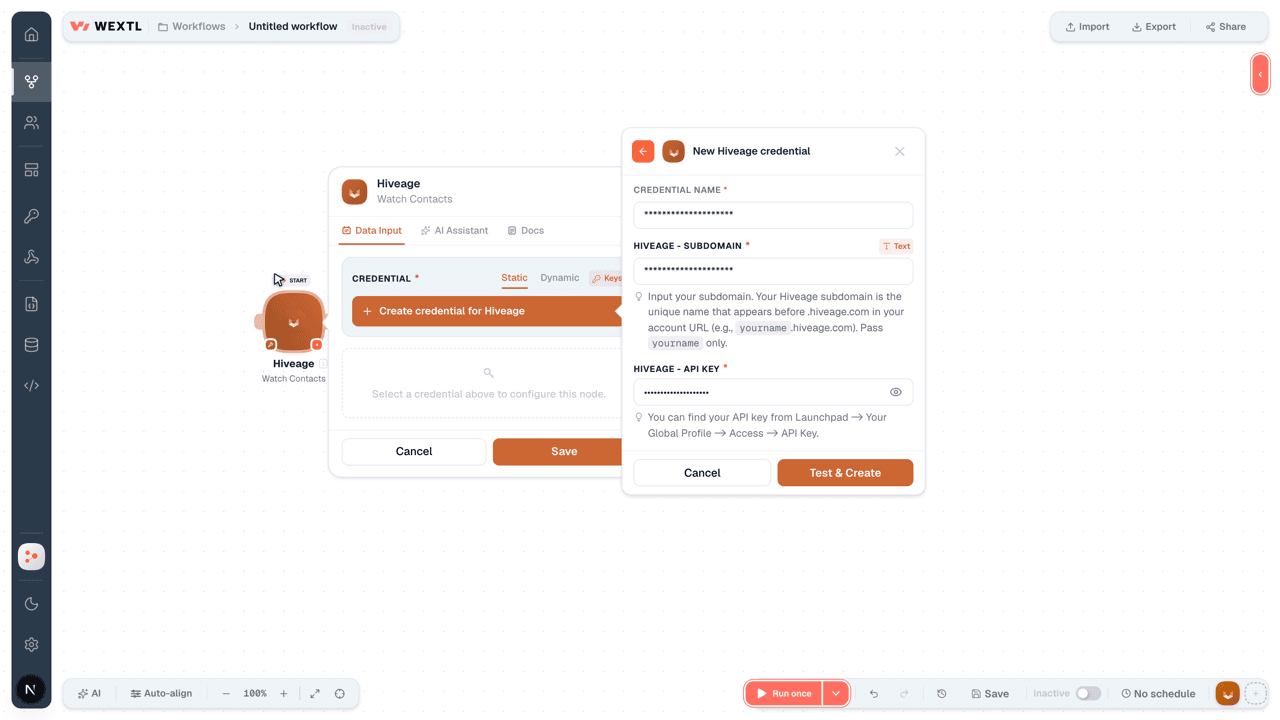
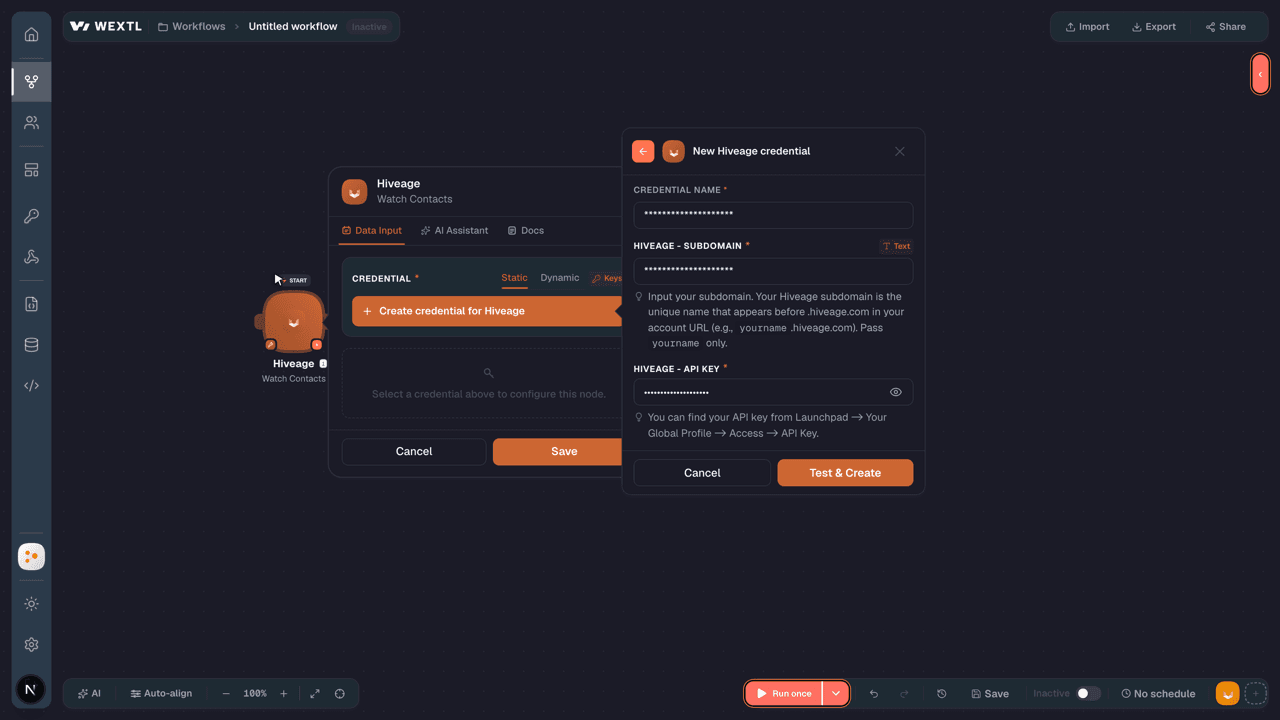
- Log in to your WEXTL account, add the Hiveage node module to your workflow, and click Create new credential.
- Optional: In the Credential name field, enter a name for the credential.
- Enter the authentication credentials you copied from your Hiveage account, or follow the on-screen instructions to create the credential.
- If prompted, authenticate your account and confirm access.
- If you want to make changes to your credential in the future, follow the steps in Manage credentials →
Notes
Credentials are org-scoped; share them with teammates from the Credentials picker on any of its nodes.For detailed information on connecting an application, see Connect an application →
Hiveage node modules
The list below is a reference of every Hiveage node module the integration supports. You will be able to pick any of them on the workflow canvas while building automations.
Open any Hiveage node module below to inspect its input parameters, outputs, and connection requirements.
Watch ContactsTrigger
Output fields[3]
| Field | Type |
|---|---|
| ID | number |
| First name | text |
| Last name | text |
| text | |
| Mobile | text |
| Phone | text |
| Created at | date |
Watch Estimate ActivitiesTrigger
Output fields[3]
| Field | Type |
|---|---|
| ID | number |
| Connection | object |
| ID | number |
| Hash key | text |
| Name | text |
| Date | text |
| Expire date | text |
| Hash key | text |
| State | text |
| Summary | text |
| Note | text |
| Company ID | number |
| Statement no | text |
| Currency iso code | text |
| Currency symbol | text |
| Send reminders | boolean |
| Billed total | text |
| Sub total | text |
| Created at | date |
Watch EstimatesTrigger
Output fields[3]
| Field | Type |
|---|---|
| ID | number |
| Connection | object |
| ID | number |
| Hash key | text |
| Name | text |
| Date | text |
| Expire date | text |
| Hash key | text |
| State | text |
| Summary | text |
| Note | text |
| Company ID | number |
| Statement no | text |
| Currency iso code | text |
| Currency symbol | text |
| Send reminders | boolean |
| Billed total | text |
| Sub total | text |
| Created at | date |
Watch ExpensesTrigger
Output fields[3]
| Field | Type |
|---|---|
| ID | number |
| Name | text |
| Created at | date |
Watch Invoice ActivitiesTrigger
Output fields[3]
| Field | Type |
|---|---|
| ID | number |
| Connection | object |
| ID | number |
| Hash key | text |
| Name | text |
| Due date | text |
| Date | text |
| Hash key | text |
| State | text |
| Summary | text |
| Note | text |
| Company ID | number |
| Statement no | text |
| Payment options | array |
| Allow partial payments | boolean |
| Send receipts automatically | boolean |
| Po number | text |
| Currency iso code | text |
| Currency symbol | text |
| Send reminders | boolean |
5other output fields
Watch Invoice PaymentsTrigger
Output fields[3]
| Field | Type |
|---|---|
| ID | number |
| Date | text |
| Amount | text |
| Formatted amount | text |
| Balance | text |
| Formatted balance | text |
| Payment method | text |
| Details | text |
| Combined payment details | text |
| Currency iso code | text |
| Currency symbol | text |
| Payment receipt no | text |
| Payment receipt hash key | text |
| State | text |
| Created at | date |
Watch InvoicesTrigger
Output fields[3]
| Field | Type |
|---|---|
| ID | number |
| Connection | object |
| ID | number |
| Hash key | text |
| Name | text |
| Due date | text |
| Date | text |
| Hash key | text |
| State | text |
| Summary | text |
| Note | text |
| Company ID | number |
| Statement no | text |
| Payment options | array |
| Allow partial payments | boolean |
| Send receipts automatically | boolean |
| Po number | text |
| Currency iso code | text |
| Currency symbol | text |
| Send reminders | boolean |
5other output fields
Watch ItemsTrigger
Output fields[3]
| Field | Type |
|---|---|
| ID | number |
| Name | text |
| Description | text |
| Unit | text |
| Price | text |
| Formatted price | text |
| Created at | date |
Watch Recurring Invoice ActivitiesTrigger
Output fields[3]
| Field | Type |
|---|---|
| ID | number |
| Connection | object |
| ID | number |
| Hash key | text |
| Name | text |
| Recurring method | text |
| Next billing date | text |
| Start date | text |
| Profile name | text |
| Profile no | text |
| Occurrences | number |
| Interval | number |
| Interval unit | text |
| Iteration no | number |
| Due date options | number |
| Hash key | text |
| State | text |
| Summary | text |
| Note | text |
| Company ID | number |
11other output fields
Watch Recurring InvoicesTrigger
Output fields[3]
| Field | Type |
|---|---|
| ID | number |
| Connection | object |
| ID | number |
| Hash key | text |
| Name | text |
| Recurring method | text |
| Next billing date | text |
| Start date | text |
| Profile name | text |
| Profile no | text |
| Occurrences | number |
| Interval | number |
| Interval unit | text |
| Iteration no | number |
| Due date options | number |
| Hash key | text |
| State | text |
| Summary | text |
| Note | text |
| Company ID | number |
11other output fields
Watch TasksTrigger
Output fields[3]
| Field | Type |
|---|---|
| ID | number |
| Name | text |
| Rate | text |
| Formatted rate | text |
| Created at | date |
Watch TripsTrigger
Output fields[3]
| Field | Type |
|---|---|
| ID | number |
| Name | text |
| Rate | text |
| Formatted rate | text |
| Created at | date |
Get a ConnectionAction
Get a ContactAction
Get a Recurring InvoiceAction
Input fields[3]
| Field | Type |
|---|---|
Recurring Invoice Hash KeyRequired | choice |
Output fields[3]
| Field | Type |
|---|---|
| ID | number |
| Connection | object |
| ID | number |
| Hash key | text |
| Name | text |
| Recurring method | text |
| Next billing date | text |
| Start date | text |
| Profile name | text |
| Profile no | text |
| Occurrences | number |
| Interval | number |
| Interval unit | text |
| Iteration no | number |
| Due date options | number |
| Hash key | text |
| State | text |
| Summary | text |
| Note | text |
| Company ID | number |
11other output fields
Get a TaskAction
Get a TripAction
Get an EstimateAction
Input fields[3]
| Field | Type |
|---|---|
Estimate Hash KeyRequired | choice |
Output fields[3]
| Field | Type |
|---|---|
| ID | number |
| Connection | object |
| ID | number |
| Hash key | text |
| Name | text |
| Date | text |
| Expire date | text |
| Hash key | text |
| State | text |
| Summary | text |
| Note | text |
| Company ID | number |
| Statement no | text |
| Currency iso code | text |
| Currency symbol | text |
| Send reminders | boolean |
| Billed total | text |
| Sub total | text |
| Created at | date |
Get an ExpenseAction
Get an InvoiceAction
Input fields[3]
| Field | Type |
|---|---|
Invoice Hash KeyRequired | choice |
Output fields[3]
| Field | Type |
|---|---|
| ID | number |
| Connection | object |
| ID | number |
| Hash key | text |
| Name | text |
| Due date | text |
| Date | text |
| Hash key | text |
| State | text |
| Summary | text |
| Note | text |
| Company ID | number |
| Statement no | text |
| Payment options | array |
| Allow partial payments | boolean |
| Send receipts automatically | boolean |
| Po number | text |
| Currency iso code | text |
| Currency symbol | text |
| Send reminders | boolean |
5other output fields
Get an Invoice PaymentAction
Input fields[3]
| Field | Type |
|---|---|
Invoice Hash KeyRequired | choice |
Output fields[3]
| Field | Type |
|---|---|
| ID | number |
| Date | text |
| Amount | text |
| Formatted amount | text |
| Balance | text |
| Formatted balance | text |
| Payment method | text |
| Details | text |
| Combined payment details | text |
| Currency iso code | text |
| Currency symbol | text |
| Payment receipt no | text |
| Payment receipt hash key | text |
| State | text |
| Created at | date |
Get an ItemAction
Get ConnectionsSearch
Get ContactsSearch
Get Estimate ActivitiesSearch
Input fields[3]
| Field | Type |
|---|---|
ConnectionRequired | choice |
| Order | choice |
| Limit | number |
Output fields[3]
| Field | Type |
|---|---|
| ID | number |
| Connection | object |
| ID | number |
| Hash key | text |
| Name | text |
| Date | text |
| Expire date | text |
| Hash key | text |
| State | text |
| Summary | text |
| Note | text |
| Company ID | number |
| Statement no | text |
| Currency iso code | text |
| Currency symbol | text |
| Send reminders | boolean |
| Billed total | text |
| Sub total | text |
| Created at | date |
Get EstimatesSearch
Input fields[3]
| Field | Type |
|---|---|
| Order | choice |
| Limit | number |
Output fields[3]
| Field | Type |
|---|---|
| ID | number |
| Connection | object |
| ID | number |
| Hash key | text |
| Name | text |
| Date | text |
| Expire date | text |
| Hash key | text |
| State | text |
| Summary | text |
| Note | text |
| Company ID | number |
| Statement no | text |
| Currency iso code | text |
| Currency symbol | text |
| Send reminders | boolean |
| Billed total | text |
| Sub total | text |
| Created at | date |
Get ExpensesSearch
Get Invoice ActivitiesSearch
Input fields[3]
| Field | Type |
|---|---|
ConnectionRequired | choice |
| Order | choice |
| Limit | number |
Output fields[3]
| Field | Type |
|---|---|
| ID | number |
| Connection | object |
| ID | number |
| Hash key | text |
| Name | text |
| Due date | text |
| Date | text |
| Hash key | text |
| State | text |
| Summary | text |
| Note | text |
| Company ID | number |
| Statement no | text |
| Payment options | array |
| Allow partial payments | boolean |
| Send receipts automatically | boolean |
| Po number | text |
| Currency iso code | text |
| Currency symbol | text |
| Send reminders | boolean |
5other output fields
Get Invoice PaymentsSearch
Input fields[3]
| Field | Type |
|---|---|
Invoice Hash KeyRequired | choice |
| Order | choice |
| Limit | number |
Output fields[3]
| Field | Type |
|---|---|
| ID | number |
| Date | text |
| Amount | text |
| Formatted amount | text |
| Balance | text |
| Formatted balance | text |
| Payment method | text |
| Details | text |
| Combined payment details | text |
| Currency iso code | text |
| Currency symbol | text |
| Payment receipt no | text |
| Payment receipt hash key | text |
| State | text |
| Created at | date |
Get InvoicesSearch
Input fields[3]
| Field | Type |
|---|---|
| Order | choice |
| Limit | number |
Output fields[3]
| Field | Type |
|---|---|
| ID | number |
| Connection | object |
| ID | number |
| Hash key | text |
| Name | text |
| Due date | text |
| Date | text |
| Hash key | text |
| State | text |
| Summary | text |
| Note | text |
| Company ID | number |
| Statement no | text |
| Payment options | array |
| Allow partial payments | boolean |
| Send receipts automatically | boolean |
| Po number | text |
| Currency iso code | text |
| Currency symbol | text |
| Send reminders | boolean |
5other output fields
Get ItemsSearch
Get Recurring Invoice ActivitiesSearch
Input fields[3]
| Field | Type |
|---|---|
ConnectionRequired | choice |
| Order | choice |
| Limit | number |
Output fields[3]
| Field | Type |
|---|---|
| ID | number |
| Connection | object |
| ID | number |
| Hash key | text |
| Name | text |
| Recurring method | text |
| Next billing date | text |
| Start date | text |
| Profile name | text |
| Profile no | text |
| Occurrences | number |
| Interval | number |
| Interval unit | text |
| Iteration no | number |
| Due date options | number |
| Hash key | text |
| State | text |
| Summary | text |
| Note | text |
| Company ID | number |
11other output fields
Get Recurring InvoicesSearch
Input fields[3]
| Field | Type |
|---|---|
| Order | choice |
| Limit | number |
Output fields[3]
| Field | Type |
|---|---|
| ID | number |
| Connection | object |
| ID | number |
| Hash key | text |
| Name | text |
| Recurring method | text |
| Next billing date | text |
| Start date | text |
| Profile name | text |
| Profile no | text |
| Occurrences | number |
| Interval | number |
| Interval unit | text |
| Iteration no | number |
| Due date options | number |
| Hash key | text |
| State | text |
| Summary | text |
| Note | text |
| Company ID | number |
11other output fields
Get TasksSearch
Get TripsSearch
Create a ConnectionAction
Input fields[3]
| Field | Type |
|---|---|
Organization NameRequired | text |
First NameRequired | text |
Business EmailRequired | |
LanguageRequired | choice |
CurrencyRequired | text |
CategoryRequired | choice |
| Last Name | text |
| Address | text |
| Country | text |
| City | text |
| State Name | text |
| Zip Code | text |
| Phone | text |
| Fax | text |
| Primary Contact First Name | text |
| Primary Contact Last Name | text |
Output fields[3]
| Field | Type |
|---|---|
| ID | number |
| Hash key | text |
| First name | text |
| Last name | text |
| Business email | text |
| Currency | text |
| Address | text |
| City | text |
| State name | text |
| Zip code | text |
| Country | text |
| Phone | text |
| Fax | text |
| Website URL | text |
| Category | text |
| Language | text |
Create a ContactAction
Create a Recurring InvoiceAction
Input fields[3]
| Field | Type |
|---|---|
Connection IDRequired | choice |
Profile NameRequired | text |
Recurring MethodRequired | choice |
Start DateRequired | date |
Interval UnitRequired | choice |
IntervalRequired | number |
| Profile No | text |
| Occurrences | number |
| Due Date Options | number |
| Summary | text |
| Note | text |
| Payment Options | array |
| Payment Method | choice |
| Allow Partial Payments | boolean |
| Send Receipts Automatically | boolean |
| Send Reminders | boolean |
| PO Number | text |
Output fields[3]
| Field | Type |
|---|---|
| ID | number |
| Connection | object |
| ID | number |
| Hash key | text |
| Name | text |
| Recurring method | text |
| Next billing date | text |
| Start date | text |
| Profile name | text |
| Profile no | text |
| Occurrences | number |
| Interval | number |
| Interval unit | text |
| Iteration no | number |
| Due date options | number |
| Hash key | text |
| State | text |
| Summary | text |
| Note | text |
| Company ID | number |
11other output fields
Create a TaskAction
Create a TripAction
Create an EstimateAction
Input fields[3]
| Field | Type |
|---|---|
Connection IDRequired | choice |
Estimate DateRequired | date |
Due DateRequired | date |
Statement NoRequired | text |
| Summary | text |
| Note | text |
| Send Reminders | boolean |
Output fields[3]
| Field | Type |
|---|---|
| ID | number |
| Connection | object |
| ID | number |
| Hash key | text |
| Name | text |
| Date | text |
| Expire date | text |
| Hash key | text |
| State | text |
| Summary | text |
| Note | text |
| Company ID | number |
| Statement no | text |
| Currency iso code | text |
| Currency symbol | text |
| Send reminders | boolean |
| Billed total | text |
| Sub total | text |
| Created at | date |
Create an ExpenseAction
Create an InvoiceAction
Input fields[3]
| Field | Type |
|---|---|
Connection IDRequired | choice |
DateRequired | date |
Due DateRequired | date |
Statement NoRequired | text |
| Summary | text |
| Note | text |
| Payment Options | array |
| Allow Partial Payments | boolean |
| Send Receipts Automatically | boolean |
| Send Reminders | boolean |
| PO Number | text |
Output fields[3]
| Field | Type |
|---|---|
| ID | number |
| Connection | object |
| ID | number |
| Hash key | text |
| Name | text |
| Due date | text |
| Date | text |
| Hash key | text |
| State | text |
| Summary | text |
| Note | text |
| Company ID | number |
| Statement no | text |
| Payment options | array |
| Allow partial payments | boolean |
| Send receipts automatically | boolean |
| Po number | text |
| Currency iso code | text |
| Currency symbol | text |
| Send reminders | boolean |
5other output fields
Create an Invoice PaymentAction
Input fields[3]
| Field | Type |
|---|---|
Invoice Hash KeyRequired | choice |
| Date | date |
| Amount | text |
| Payment Method | choice |
| Details | text |
Output fields[3]
| Field | Type |
|---|---|
| ID | number |
| Date | text |
| Amount | text |
| Formatted amount | text |
| Balance | text |
| Formatted balance | text |
| Payment method | text |
| Details | text |
| Combined payment details | text |
| Currency iso code | text |
| Currency symbol | text |
| Payment receipt no | text |
| Payment receipt hash key | text |
| State | text |
| Created at | date |
Create an ItemAction
Delete a ConnectionAction
Delete a ContactAction
Delete a Recurring InvoiceAction
Delete a TaskAction
Delete a TripAction
Delete an EstimateAction
Delete an ExpenseAction
Delete an InvoiceAction
Delete an Invoice PaymentAction
Delete an ItemAction
Make an API Calluniversal
Mark a Payment as RealizedAction
Input fields[3]
| Field | Type |
|---|---|
Invoice Hash KeyRequired | choice |
Output fields[3]
| Field | Type |
|---|---|
| ID | number |
| Date | text |
| Amount | text |
| Formatted amount | text |
| Balance | text |
| Formatted balance | text |
| Payment method | text |
| Details | text |
| Combined payment details | text |
| Currency iso code | text |
| Currency symbol | text |
| Payment receipt no | text |
| Payment receipt hash key | text |
| State | text |
| Created at | date |
Send an InvoiceAction
Send an Invoice ReminderAction
Update a ConnectionAction
Input fields[3]
| Field | Type |
|---|---|
Connection IDRequired | choice |
Organization NameRequired | text |
First NameRequired | text |
Business EmailRequired | |
LanguageRequired | choice |
CurrencyRequired | text |
CategoryRequired | choice |
| Last Name | text |
| Address | text |
| Country | text |
| City | text |
| State Name | text |
| Zip Code | text |
| Phone | text |
| Fax | text |
| Primary Contact First Name | text |
| Primary Contact Last Name | text |
Output fields[3]
| Field | Type |
|---|---|
| ID | number |
| Hash key | text |
| First name | text |
| Last name | text |
| Business email | text |
| Currency | text |
| Address | text |
| City | text |
| State name | text |
| Zip code | text |
| Country | text |
| Phone | text |
| Fax | text |
| Website URL | text |
| Category | text |
| Language | text |
Update a ContactAction
Update a Recurring InvoiceAction
Input fields[3]
| Field | Type |
|---|---|
Recurring Invoice Hash KeyRequired | choice |
Profile NameRequired | text |
Recurring MethodRequired | choice |
Start DateRequired | date |
Interval UnitRequired | choice |
IntervalRequired | number |
| Profile No | text |
| Occurrences | number |
| Due Date Options | number |
| Summary | text |
| Note | text |
| Payment Options | array |
| Payment Method | choice |
| Allow Partial Payments | boolean |
| Send Receipts Automatically | boolean |
| Send Reminders | boolean |
| PO Number | text |
Output fields[3]
| Field | Type |
|---|---|
| ID | number |
| Connection | object |
| ID | number |
| Hash key | text |
| Name | text |
| Recurring method | text |
| Next billing date | text |
| Start date | text |
| Profile name | text |
| Profile no | text |
| Occurrences | number |
| Interval | number |
| Interval unit | text |
| Iteration no | number |
| Due date options | number |
| Hash key | text |
| State | text |
| Summary | text |
| Note | text |
| Company ID | number |
11other output fields
Update a TaskAction
Update a TripAction
Update an EstimateAction
Input fields[3]
| Field | Type |
|---|---|
Estimate Hash KeyRequired | choice |
Connection IDRequired | choice |
Estimate DateRequired | date |
Due DateRequired | date |
Statement NoRequired | text |
| Summary | text |
| Note | text |
| Send Reminders | boolean |
Output fields[3]
| Field | Type |
|---|---|
| ID | number |
| Connection | object |
| ID | number |
| Hash key | text |
| Name | text |
| Date | text |
| Expire date | text |
| Hash key | text |
| State | text |
| Summary | text |
| Note | text |
| Company ID | number |
| Statement no | text |
| Currency iso code | text |
| Currency symbol | text |
| Send reminders | boolean |
| Billed total | text |
| Sub total | text |
| Created at | date |
Update an ExpenseAction
Update an InvoiceAction
Input fields[3]
| Field | Type |
|---|---|
Invoice Hash KeyRequired | choice |
Connection IDRequired | choice |
DateRequired | date |
Due DateRequired | date |
Statement NoRequired | text |
| Summary | text |
| Note | text |
| Payment Options | array |
| Allow Partial Payments | boolean |
| Send Receipts Automatically | boolean |
| Send Reminders | boolean |
| PO Number | text |
Output fields[3]
| Field | Type |
|---|---|
| ID | number |
| Connection | object |
| ID | number |
| Hash key | text |
| Name | text |
| Recurring method | text |
| Next billing date | text |
| Start date | text |
| Profile name | text |
| Profile no | text |
| Occurrences | number |
| Interval | number |
| Interval unit | text |
| Iteration no | number |
| Due date options | number |
| Hash key | text |
| State | text |
| Summary | text |
| Note | text |
| Company ID | number |
11other output fields
Update an Invoice PaymentAction
Input fields[3]
| Field | Type |
|---|---|
Invoice Hash KeyRequired | choice |
| Date | date |
| Amount | text |
| Payment Method | choice |
| Details | text |
Output fields[3]
| Field | Type |
|---|---|
| ID | number |
| Date | text |
| Amount | text |
| Formatted amount | text |
| Balance | text |
| Formatted balance | text |
| Payment method | text |
| Details | text |
| Combined payment details | text |
| Currency iso code | text |
| Currency symbol | text |
| Payment receipt no | text |
| Payment receipt hash key | text |
| State | text |
| Created at | date |
Templates
Look for Hiveage templates in the WEXTL template library.
Browse templates →Explore alternative apps
- Billingo[2]Hungarian online invoicing and billing platform for creating invoices, tracking payments, and managing customers.
- BillogramDigital invoicing and billing platform that sends invoices and collects payments from customers.
- CapiumCloud accounting and practice management platform for accountants, covering invoicing, expenses, payments, and client communications.
- BilltrustB2B accounts receivable and payment automation platform for invoices, collections, and cash application.
- BillduInvoice creation, billing, and payment management for small businesses.


References
- WEXTL® Hiveage Source Code connector implementation.
- Our users use cases and automations.
- Official API Documentation for Hiveage.
- WEXTL® visual workflow builder data.
Last updated: Jul 24, 2026 18:11