


Requirements
Before you set up the credential, make sure you have an active OKX account and an API access token from your account settings ready.[3]
Get your OKX credentials
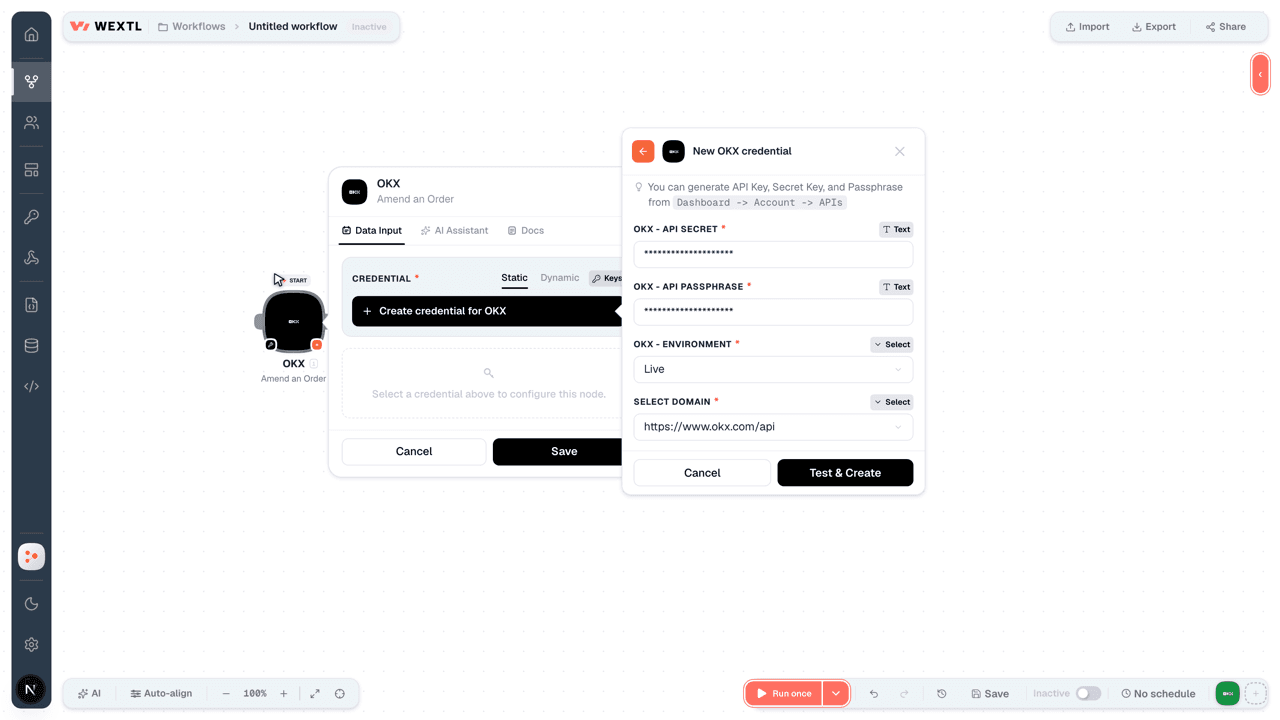
- API KeytextRequired
You can generate API Key, Secret Key, and Passphrase from
[1]Dashboard -> Account -> APIs - API SecrettextRequired
- API PassphrasetextRequired
- EnvironmentselectRequired
Connect OKX in WEXTL
- Log in to your WEXTL account, add the OKX node module to your workflow, and click Create new credential.
- Optional: In the Credential name field, enter a name for the credential.
- Enter the authentication credentials you copied from your OKX account, or follow the on-screen instructions to create the credential.
- If prompted, authenticate your account and confirm access.
- If you want to make changes to your credential in the future, follow the steps in Manage credentials →
Notes
Credentials are org-scoped; share them with teammates from the Credentials picker on any of its nodes.For detailed information on connecting an application, see Connect an application →
OKX node modules
The list below is a reference of every OKX node module the integration supports. You will be able to pick any of them on the workflow canvas while building automations.
Each OKX node module below opens to reveal its input parameters, outputs, and connection requirements.
Cancel Multiple OrdersSearch
Get an OrderAction
| Field | Type |
|---|---|
Instrument TypeRequired | choice |
Order IDRequired | text |
| Client Order ID | text |
| Field | Type |
|---|---|
| Acc Fill Size | text |
| Algo Client Ord ID | text |
| Algo ID | text |
| Attach Algo Client Ord ID | text |
| Attach Algo Orders | array |
| Avg Price | text |
| Creation Time | text |
| Cancel Source | text |
| Cancel Source Reason | text |
| Category | text |
| Margin Currency | text |
| Client Ord ID | text |
| Fee | text |
| Fee Currency | text |
| Fill Price | text |
| Fill Size | text |
| Fill Time | text |
| Instrument ID | text |
| Instrument Type | text |
| Is Tp Limit | text |
Get Funding RateSearch
| Field | Type |
|---|---|
Instrument IDRequired | choice |
| Limit | number |
| Field | Type |
|---|---|
| Funding Rate | text |
| Funding Time | text |
| Instrument ID | text |
| Instrument Type | text |
| Method | text |
| Max Funding Rate | text |
| Min Funding Rate | text |
| Next Funding Rate | text |
| Next Funding Time | text |
| Premium | text |
| Sett Funding Rate | text |
| Sett State | text |
| Timestamp | text |
Get Market TickersSearch
Get Open InterestSearch
Get Order BookSearch
Amend an OrderAction
| Field | Type |
|---|---|
Instrument TypeRequired | choice |
| Close On Fail | boolean |
Order IDRequired | text |
| Client Order ID | text |
| Request ID | text |
| New Size | text |
| TP/SL information | array |
| Algo ID | text |
| Client Order ID | text |
| New TP order kind | choice |
| New Take-profit trigger price type | choice |
| New Stop-loss trigger price type | choice |
| SL Based On Trigger? | choice |
| Size | text |
| Amend Price on Trigger Type | choice |
| Field | Type |
|---|---|
| Client Order ID | text |
| Order ID | text |
| Request ID | text |
| Success Code | text |
| Success Message | text |
Cancel an OrderAction
Make an API Calluniversal
Place an OrderAction
| Field | Type |
|---|---|
SideRequired | choice |
SizeRequired | text |
Trade ModeRequired | choice |
Instrument TypeRequired | choice |
| Margin Currency | text |
| Client Order ID | text |
| Tag | text |
| Self trade prevention mode. | choice |
| TP/SL information | array |
| Client Order ID | text |
| TP order kind | choice |
| Take-profit trigger price type | choice |
| Stop-loss trigger price type | choice |
| SL Based On Trigger? | choice |
| Size | text |
| Amend Price on Trigger Type | choice |
| Field | Type |
|---|---|
| Client Order ID | text |
| Order ID | text |
| Tag | text |
| Success Code | text |
| Success Message | text |
Templates
Look for OKX templates in the WEXTL template library.
Browse templates →Explore alternative apps
- Coinbase[2]Cryptocurrency exchange and payments platform for trading, transfers, and digital asset orders.
- CoinGeckoLook up crypto coin prices, market data, and exchange rankings with CoinGecko.
- BybitCryptocurrency exchange API for orders, tickers, and market data.
- BillduInvoice creation, billing, and payment management for small businesses.
- BillogramDigital invoicing and billing platform that sends invoices and collects payments from customers.


References
- WEXTL® OKX Source Code connector implementation.
- Our users use cases and automations.
- Official API Documentation for OKX.
- WEXTL® visual workflow builder data.
Last updated: Jul 24, 2026 18:12