


Requirements
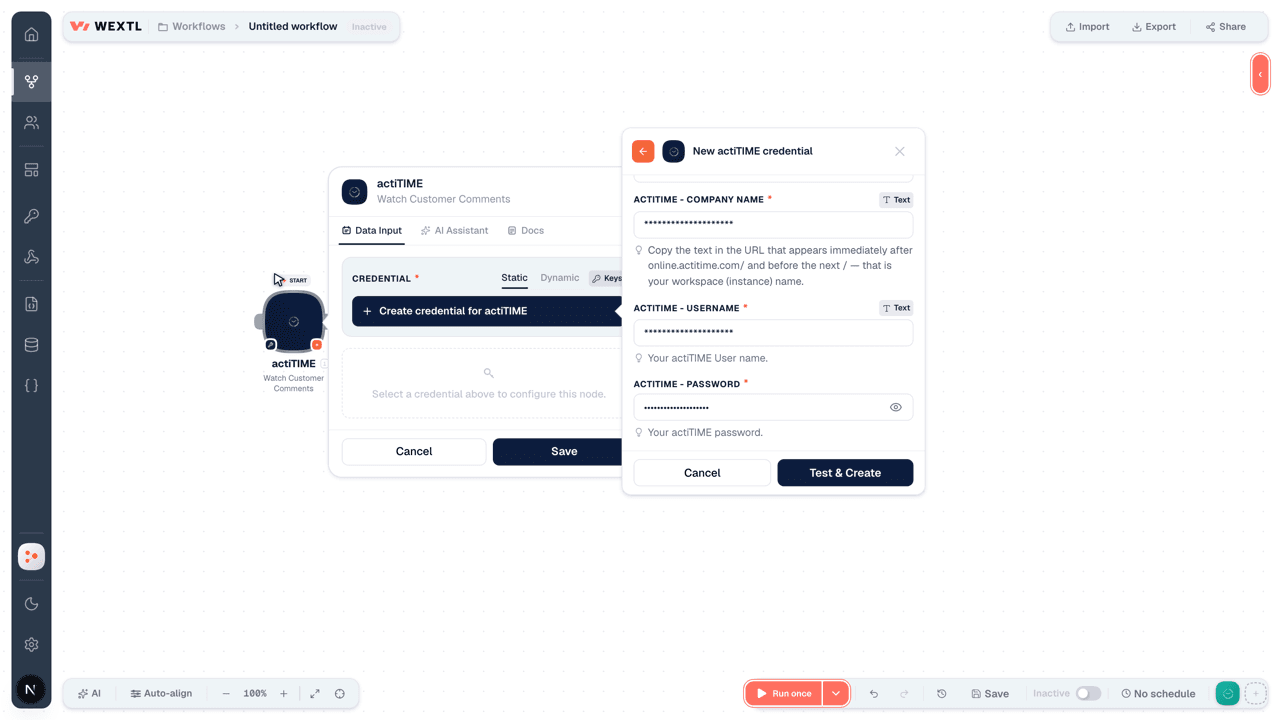
Before you set up the credential, make sure you have an active actiTIME account and an API access token from your account settings ready.[3]
Get your actiTIME credentials
Connect actiTIME in WEXTL
- Log in to your WEXTL account, add the actiTIME node module to your workflow, and click Create new credential.Instant triggers use webhooks — click Create a webhook first when adding one, then create the credential.
- Optional: In the Credential name field, enter a name for the credential.
- Enter the authentication credentials you copied from your actiTIME account, or follow the on-screen instructions to create the credential.
- If prompted, authenticate your account and confirm access.
- If you want to make changes to your credential in the future, follow the steps in Manage credentials →

Notes
Credentials are org-scoped; share them with teammates from the Credentials picker on any of its nodes.For detailed information on connecting an application, see Connect an application →
actiTIME node modules
The list below is a reference of every actiTIME node module the integration supports. You will be able to pick any of them on the workflow canvas while building automations.
Each actiTIME node module below opens to reveal its input parameters, outputs, and connection requirements.
Watch Customer CommentsTrigger
Output fields[3]
| Field | Type |
|---|---|
| ID | number |
| User ID | number |
| Created | date |
| Updated | date |
| Updating user ID | number |
| Text | text |
Watch CustomersTrigger
Output fields[3]
| Field | Type |
|---|---|
| ID | number |
| Name | text |
| Archived | boolean |
| Created | date |
| URL | text |
| Allowed actions | object |
| Can modify | boolean |
| Can delete | boolean |
| Description | text |
Watch DepartmentsTrigger
Output fields[3]
| Field | Type |
|---|---|
| ID | number |
| Name | text |
| Default | boolean |
Watch EventsTrigger
No fields documented.
Watch Leave TimeTrigger
Output fields[3]
| Field | Type |
|---|---|
| User ID | number |
| Day offset | number |
| Date | date |
| Leave type ID | number |
| Leave time | number |
Watch Leave Time TypesTrigger
Output fields[3]
| Field | Type |
|---|---|
| ID | number |
| Name | text |
| Balance | text |
| Archived | boolean |
Watch Project CommentsTrigger
Output fields[3]
| Field | Type |
|---|---|
| ID | number |
| User ID | number |
| Created | date |
| Updated | date |
| Updating user ID | number |
| Text | text |
Watch ProjectsTrigger
Output fields[3]
| Field | Type |
|---|---|
| ID | number |
| Customer ID | number |
| Name | text |
| Archived | boolean |
| Created | date |
| URL | url |
| Customer name | text |
| Allowed actions | object |
| Can modify | boolean |
| Can delete | boolean |
| Description | text |
Watch Task CommentsTrigger
Output fields[3]
| Field | Type |
|---|---|
| ID | number |
| User ID | number |
| Created | date |
| Updated | date |
| Updating user ID | number |
| Text | text |
Watch TasksTrigger
Output fields[3]
| Field | Type |
|---|---|
| ID | number |
| Name | text |
| Description | text |
| Created | date |
| Status | text |
| Workflow status ID | number |
| Type of work ID | number |
| URL | text |
| Project name | text |
| Customer name | text |
| Workflow status name | text |
| Type of work name | text |
| Allowed actions | object |
| Can modify | boolean |
| Can delete | boolean |
| Deadline | date |
| Estimated time | number |
2other output fields
Watch Time TracksTrigger
Output fields[3]
| Field | Type |
|---|---|
| User ID | number |
| Records | array |
| Approved | boolean |
| Day offset | number |
| Date | text |
Watch Timezone GroupsTrigger
Output fields[3]
| Field | Type |
|---|---|
| ID | number |
| Name | text |
| Time zone ID | text |
| Default | boolean |
Watch Types of WorkTrigger
Output fields[3]
| Field | Type |
|---|---|
| ID | number |
| Name | text |
| Rate | number |
| Archived | boolean |
| Billable | boolean |
| Default | boolean |
Watch User RateTrigger
Output fields[3]
| Field | Type |
|---|---|
| Date from | date |
| Regular rate | number |
| Overtime rate | number |
| Leave rates | array |
Watch User RatesTrigger
Output fields[3]
| Field | Type |
|---|---|
| Date from | date |
| Regular rate | number |
| Overtime rate | number |
| Leave rates | array |
Watch UsersTrigger
Output fields[3]
| Field | Type |
|---|---|
| ID | number |
| Department ID | number |
| Time zone group ID | number |
| Hired | date |
| Release date | date |
| Allowed actions | object |
| Can submit timetrack | boolean |
| Full name | text |
| Username | text |
| Active | boolean |
| First name | text |
| Middle name | text |
| Last name | text |
Watch Work StatusesTrigger
Output fields[3]
| Field | Type |
|---|---|
| ID | number |
| Name | text |
| Type | text |
Get a CustomerAction
Get a DepartmentAction
Get a Leave TypeAction
Get a ProjectAction
Get a TaskAction
Input fields[3]
| Field | Type |
|---|---|
Task IdentifierRequired | choice |
Output fields[3]
| Field | Type |
|---|---|
| ID | number |
| Name | text |
| Description | text |
| Created | date |
| Status | text |
| Workflow status ID | number |
| Type of work ID | number |
| URL | text |
| Project name | text |
| Customer name | text |
| Workflow status name | text |
| Type of work name | text |
| Allowed actions | object |
| Can modify | boolean |
| Can delete | boolean |
| Deadline | date |
| Estimated time | number |
2other output fields
Get a Time TrackAction
Get a TimeZone GroupAction
Get a Type of WorkAction
Get a UserAction
Get a User ScheduleAction
Get a User's Work AssignmentsAction
Get a Work StatusAction
Get an Authorized UserAction
Output fields[3]
| Field | Type |
|---|---|
| ID | number |
| Department ID | number |
| Time zone group ID | number |
| Hired | date |
| Release date | date |
| Allowed actions | object |
| Can submit timetrack | boolean |
| Full name | text |
| Username | text |
| Active | boolean |
| First name | text |
| Middle name | text |
| Last name | text |
Get Assigned UsersAction
Get Default Time Zone GroupAction
Output fields[3]
| Field | Type |
|---|---|
| ID | number |
| Name | text |
| Time zone ID | text |
| Default | boolean |
Get Default Type of WorkAction
Output fields[3]
| Field | Type |
|---|---|
| ID | number |
| Name | text |
| Rate | number |
| Archived | boolean |
| Billable | boolean |
| Default | boolean |
Get Instance InfoAction
Output fields[3]
| Field | Type |
|---|---|
| Company | object |
| Logo URI | text |
| Name | text |
| Custom names | object |
| First level | object |
| Second level | object |
| Third level | object |
| Department | object |
| Format | object |
| Currency | text |
| Decimal separator | text |
| Time format | text |
| Clock format | text |
| Day of week start | number |
| Features | object |
| Overtime registration | boolean |
| Departments | boolean |
| Time zone groups | boolean |
| Task estimates | boolean |
| Task workflow | boolean |
| Work assignments | boolean |
| Types of work | boolean |
| Leavetime registration | boolean |
| Urls | object |
| Acti time | text |
| Acti plans | text |
| API | text |
| API documentation | text |
| Limits | object |
| Max batch size | number |
| Max query limit | number |
| Server UUID | text |
Get Project Assigned UsersAction
Get Users Assigned to a TaskAction
List Customer CommentsSearch
List CustomersSearch
List DepartmentsSearch
List Leave TimeSearch
List Leave TypesSearch
List Project CommentsSearch
List ProjectsSearch
Input fields[3]
| Field | Type |
|---|---|
| Project IDs | choice |
| Customer IDs | choice |
| Sort | array |
| Project Name | choice |
| Name Contains Words | text |
| Archived Status | choice |
| Limit | number |
Output fields[3]
| Field | Type |
|---|---|
| ID | number |
| Customer ID | number |
| Name | text |
| Archived | boolean |
| Created | date |
| URL | url |
| Customer name | text |
| Allowed actions | object |
| Can modify | boolean |
| Can delete | boolean |
| Description | text |
List Task CommentsSearch
List TasksSearch
Input fields[3]
| Field | Type |
|---|---|
| Task IDs | choice |
| Customer IDs | choice |
| Project IDs | choice |
| Type of Work IDs | choice |
| Workflow Status IDs | choice |
| Sort | array |
| Task Name | choice |
| Words in Task Name | text |
| Task Status | choice |
| Limit | number |
Output fields[3]
| Field | Type |
|---|---|
| ID | number |
| Name | text |
| Description | text |
| Created | date |
| Status | text |
| Workflow status ID | number |
| Type of work ID | number |
| URL | text |
| Project name | text |
| Customer name | text |
| Workflow status name | text |
| Type of work name | text |
| Allowed actions | object |
| Can modify | boolean |
| Can delete | boolean |
| Deadline | date |
| Estimated time | number |
2other output fields
List Time TracksSearch
List Time Zone GroupsSearch
List Types of WorkSearch
List User RatesSearch
List User Rates by IDSearch
List UsersSearch
Input fields[3]
| Field | Type |
|---|---|
| choice | |
| User IDs | choice |
| Department IDs | choice |
| Time Zone Group IDs | choice |
| Active | choice |
| Username | choice |
| Name | choice |
| Sort | array |
| Limit | number |
Output fields[3]
| Field | Type |
|---|---|
| ID | number |
| Department ID | number |
| Time zone group ID | number |
| Hired | date |
| Release date | date |
| Allowed actions | object |
| Can submit timetrack | boolean |
| Full name | text |
| Username | text |
| Active | boolean |
| First name | text |
| Middle name | text |
| Last name | text |
List Work StatusesSearch
Update a User RateSearch
Add User to a CustomerAction
Input fields[3]
| Field | Type |
|---|---|
Customer IDRequired | choice |
User IDsRequired | choice |
Add Users to a ProjectAction
Add Users to a TaskAction
Adjust Leave TimeAction
Adjust User Work AssignmentsAction
Input fields[3]
| Field | Type |
|---|---|
User IDRequired | choice |
| Task IDs | object |
| Add Task IDs | choice |
| Remove Task IDs | choice |
| Project IDs | object |
| Add Project IDs | choice |
| Remove Project IDs | choice |
| Customer IDs | object |
| Add Customer IDs | choice |
| Remove Customer IDs | choice |
Create a CustomerAction
Create a ProjectAction
Create a TaskAction
Input fields[3]
| Field | Type |
|---|---|
Task NameRequired | text |
Project IDRequired | choice |
| Status | choice |
| Task Description | text |
| Workflow Status ID | choice |
| Type of Work ID | choice |
| Deadline | date |
| Estimated Time | number |
Output fields[3]
| Field | Type |
|---|---|
| ID | number |
| Name | text |
| Description | text |
| Created | date |
| Status | text |
| Workflow status ID | number |
| Type of work ID | number |
| URL | text |
| Project name | text |
| Customer name | text |
| Workflow status name | text |
| Type of work name | text |
| Allowed actions | object |
| Can modify | boolean |
| Can delete | boolean |
| Deadline | date |
| Estimated time | number |
2other output fields
Create a UserAction
Input fields[3]
| Field | Type |
|---|---|
EmailRequired | |
UsernameRequired | text |
First NameRequired | text |
Last NameRequired | text |
| Middle Name | text |
| Full Name | text |
PasswordRequired | secret |
| Department ID | choice |
| Time Zone Group ID | choice |
| Hire Date | date |
| Release Date | date |
| Active | boolean |
Output fields[3]
| Field | Type |
|---|---|
| ID | number |
| Department ID | number |
| Time zone group ID | number |
| Hired | date |
| Release date | date |
| Allowed actions | object |
| Can submit timetrack | boolean |
| Full name | text |
| Username | text |
| Active | boolean |
| First name | text |
| Middle name | text |
| Last name | text |
Create a Work StatusAction
Delete a CustomerAction
Input fields[3]
| Field | Type |
|---|---|
Customer IDRequired | choice |
Delete a ProjectAction
Input fields[3]
| Field | Type |
|---|---|
IDRequired | choice |
Delete a TaskAction
Input fields[3]
| Field | Type |
|---|---|
Task IdentifierRequired | choice |
Delete a Work StatusAction
Input fields[3]
| Field | Type |
|---|---|
IDRequired | choice |
Invite a UserAction
Input fields[3]
| Field | Type |
|---|---|
EmailRequired | |
UsernameRequired | text |
First NameRequired | text |
Last NameRequired | text |
| Middle Name | text |
| Full Name | text |
PasswordRequired | secret |
| Department ID | choice |
| Time Zone Group ID | choice |
| Hire Date | date |
| Release Date | date |
| Active | boolean |
Output fields[3]
| Field | Type |
|---|---|
| ID | number |
| Department ID | number |
| Time zone group ID | number |
| Hired | date |
| Release date | date |
| Allowed actions | object |
| Can submit timetrack | boolean |
| Full name | text |
| Username | text |
| Active | boolean |
| First name | text |
| Middle name | text |
| Last name | text |
Lock Time TrackAction
Make an API Calluniversal
Remove Users from a CustomerAction
Input fields[3]
| Field | Type |
|---|---|
Customer IDRequired | choice |
User IDsRequired | choice |
Remove Users from a ProjectAction
Input fields[3]
| Field | Type |
|---|---|
IDRequired | choice |
User IDsRequired | choice |
Remove Users from a TaskAction
Input fields[3]
| Field | Type |
|---|---|
Task IdentifierRequired | choice |
User IDsRequired | choice |
Replace a Time TrackAction
Unlock a Time TrackAction
Update a CustomerAction
Update a ProjectAction
Update a TaskAction
Input fields[3]
| Field | Type |
|---|---|
Task IdentifierRequired | choice |
| Task Name | text |
| Project ID | choice |
| Status | choice |
| Task Description | text |
| Workflow Status ID | choice |
| Type of Work ID | choice |
| Deadline | date |
| Estimated Time | number |
Output fields[3]
| Field | Type |
|---|---|
| ID | number |
| Name | text |
| Description | text |
| Created | date |
| Status | text |
| Workflow status ID | number |
| Type of work ID | number |
| URL | text |
| Project name | text |
| Customer name | text |
| Workflow status name | text |
| Type of work name | text |
| Allowed actions | object |
| Can modify | boolean |
| Can delete | boolean |
| Deadline | date |
| Estimated time | number |
2other output fields
Update a Time TrackAction
Update a UserAction
Input fields[3]
| Field | Type |
|---|---|
User IDRequired | choice |
EmailRequired | |
UsernameRequired | text |
First NameRequired | text |
Last NameRequired | text |
| Middle Name | text |
| Full Name | text |
PasswordRequired | secret |
| Department ID | choice |
| Time Zone Group ID | choice |
| Hire Date | date |
| Release Date | date |
| Active | boolean |
Output fields[3]
| Field | Type |
|---|---|
| ID | number |
| Department ID | number |
| Time zone group ID | number |
| Hired | date |
| Release date | date |
| Allowed actions | object |
| Can submit timetrack | boolean |
| Full name | text |
| Username | text |
| Active | boolean |
| First name | text |
| Middle name | text |
| Last name | text |
Update a Work StatusAction
Templates
Look for actiTIME templates in the WEXTL template library.
Browse templates →Explore alternative apps
- BambooHR[2]HRIS for employee records, time off, time tracking, benefits, hiring, and payroll-adjacent workflows.
- AshbyAll-in-one recruiting ATS with analytics, scheduling, and candidate CRM.
- AffindaAI document parsing for resumes, invoices, and structured data extraction.
- CalamariHR leave, attendance, and timesheet management for growing teams.
- BuddyPunchEmployee time clock and attendance tracking for hourly teams.


References
- WEXTL® actiTIME Source Code connector implementation.
- Our users use cases and automations.
- Official API Documentation for actiTIME.
- WEXTL® visual workflow builder data.
Last updated: Jul 23, 2026 22:38