


Requirements
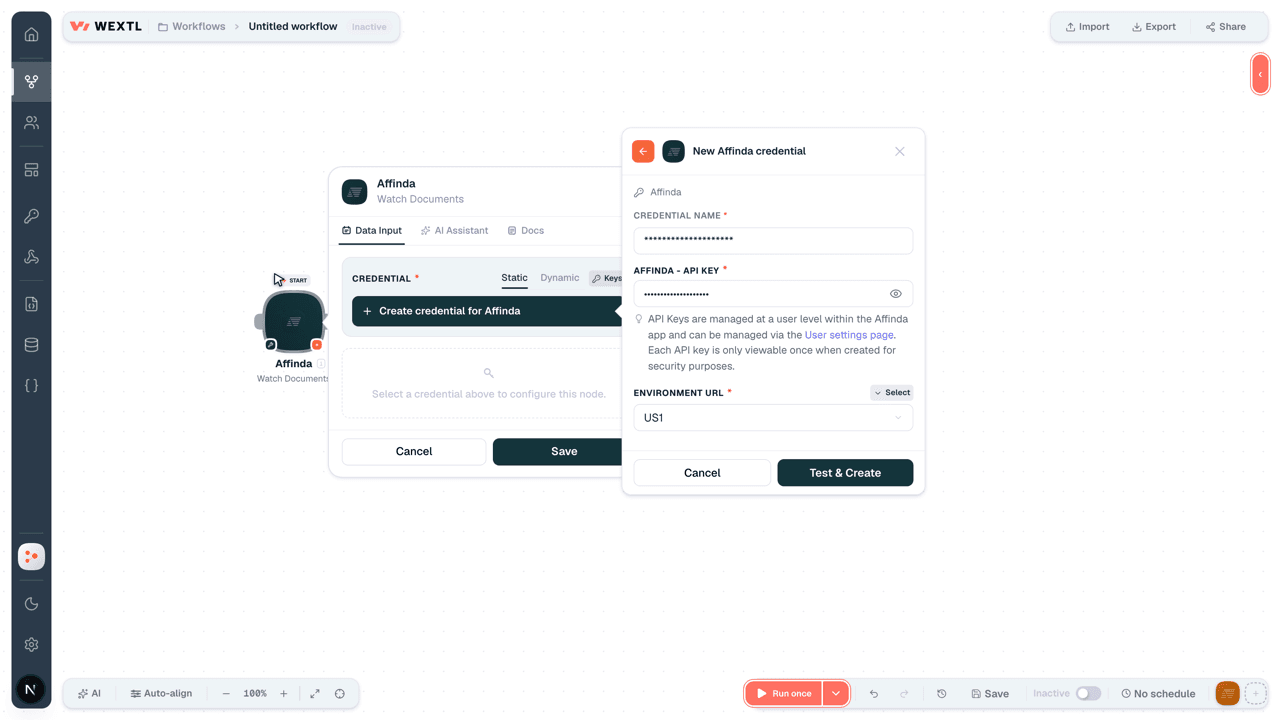
To use Affinda on WEXTL you need an active account and an API access token from your account settings.[3]
Get your Affinda credentials
- API KeypasswordRequired
API Keys are managed at a user level within the app and can be managed via the User settings page. Each API key is only viewable once when created for security purposes.
[1] - Environment URLselectRequired
Connect Affinda in WEXTL
- Log in to your WEXTL account, add the Affinda node module to your workflow, and click Create new credential.Instant triggers use webhooks — click Create a webhook first when adding one, then create the credential.
- Optional: In the Credential name field, enter a name for the credential.
- Enter the authentication credentials you copied from your Affinda account, or follow the on-screen instructions to create the credential.
- If prompted, authenticate your account and confirm access.
- If you want to make changes to your credential in the future, follow the steps in Manage credentials →
Notes
Credentials are org-scoped; share them with teammates from the Credentials picker on any of its nodes.For detailed information on connecting an application, see Connect an application →
Affinda node modules
The list below is a reference of every Affinda node module the integration supports. You will be able to pick any of them on the workflow canvas while building automations.
Open any Affinda node module below to inspect its input parameters, outputs, and connection requirements.
Watch DocumentsTrigger
| Field | Type |
|---|---|
| Data | object |
| Extractor | text |
| Meta | object |
| Identifier | text |
| Custom Identifier | text |
| File Name | text |
| Ready | boolean |
| Ready Dt | text |
| Failed | boolean |
| Expiry Time | date |
| Language | text |
| text | |
| Parent Document | object |
| Error | object |
| Error Code | text |
| Error Detail | text |
| Warnings | array |
Watch EventsTrigger
| Field | Type |
|---|---|
| ID | text |
| Event | text |
| Timestamp | number |
| Payload | object |
| Identifier | text |
| Ready | boolean |
| Failed | boolean |
| Ready Dt | text |
| File Name | text |
| Expiry Time | text |
| Language | text |
| text | |
| Parent Document | text |
| Child Documents | array |
Get a DocumentAction
| Field | Type |
|---|---|
Document IdentifierRequired | choice |
| Field | Type |
|---|---|
| Data | object |
| Extractor | text |
| Meta | object |
| Identifier | text |
| Custom Identifier | text |
| File Name | text |
| Ready | boolean |
| Ready Dt | text |
| Failed | boolean |
| Expiry Time | date |
| Language | text |
| text | |
| Parent Document | object |
| Error | object |
| Error Code | text |
| Error Detail | text |
| Warnings | array |
Get a Redacted DocumentAction
Search DocumentsSearch
| Field | Type |
|---|---|
| Search | text |
| In Review | boolean |
| Failed | boolean |
| Ready | boolean |
| Validatable | boolean |
| Has Challenges | boolean |
| Custom Identifier | text |
| Compact | boolean |
| Count | boolean |
| State | choice |
| Limit | number |
| Field | Type |
|---|---|
| Data | object |
| Extractor | text |
| Meta | object |
| Identifier | text |
| Custom Identifier | text |
| File Name | text |
| Ready | boolean |
| Ready Dt | text |
| Failed | boolean |
| Expiry Time | date |
| Language | text |
| text | |
| Parent Document | object |
| Error | object |
| Error Code | text |
| Error Detail | text |
| Warnings | array |
Make an API Calluniversal
Upload a DocumentAction
| Field | Type |
|---|---|
OrganizationRequired | choice |
Upload MethodRequired | choice |
| Language | text |
| Reject Duplicates | boolean |
| Region Bias | text |
| Low Priority | boolean |
| Compact | boolean |
| Delete After Parse | boolean |
| Enable Validation Tool | boolean |
| Use OCR | boolean |
Templates
Look for Affinda templates in the WEXTL template library.
Browse templates →Explore alternative apps
- BrioHR[2]HR management platform for employee data, leave, payroll-ready records, and people operations.
- AshbyAll-in-one recruiting ATS with analytics, scheduling, and candidate CRM.
- actiTIMETime tracking and project work-assignment software for teams and leave management.
- BambooHRHRIS for employee records, time off, time tracking, benefits, hiring, and payroll-adjacent workflows.
- CalamariHR leave, attendance, and timesheet management for growing teams.


References
- WEXTL® Affinda Source Code connector implementation.
- Our users use cases and automations.
- Official API Documentation for Affinda.
- WEXTL® visual workflow builder data.
Last updated: Jul 23, 2026 22:38