


Requirements
Before you set up the credential, make sure you have an active DailyPay account and OAuth client credentials, granted by signing in with your account ready.[3]
Get your DailyPay credentials
You’ll be redirected to sign in and approve access — your password is never shared with WEXTL.
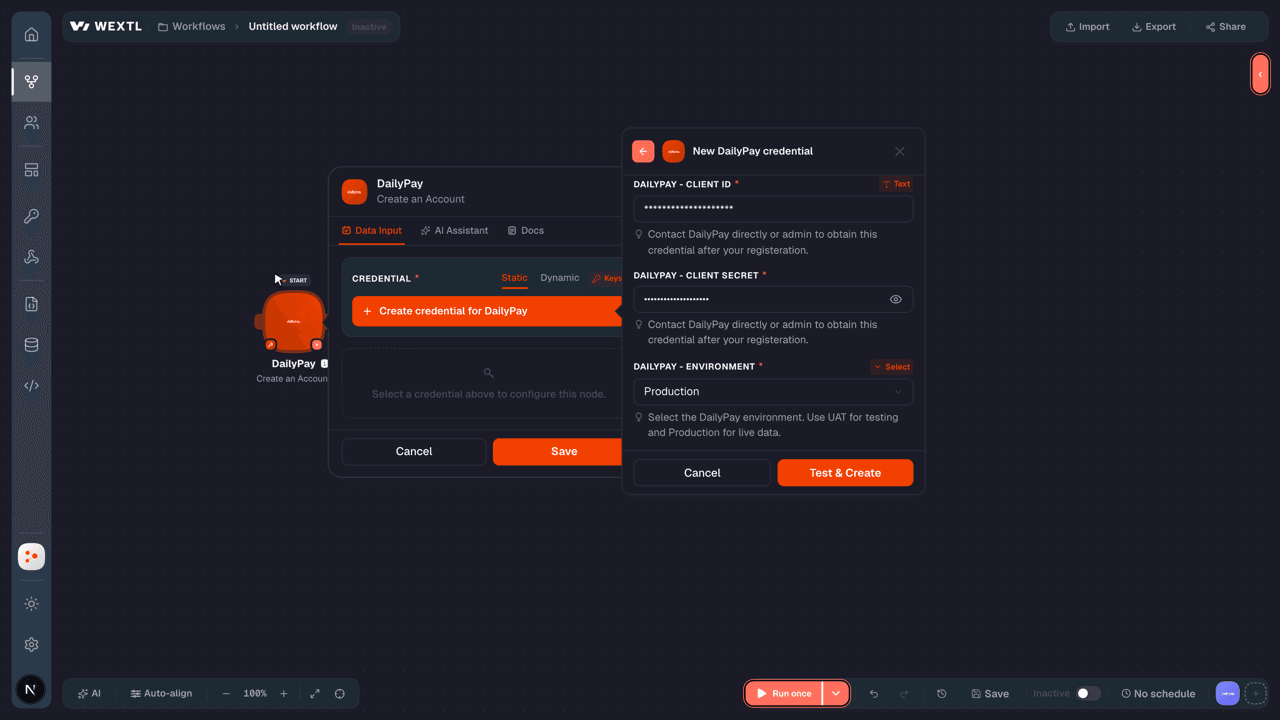
- Client IDtextRequired
Contact DailyPay directly or admin to obtain this credential after your registeration.
[1] - Client SecretpasswordRequired
Contact DailyPay directly or admin to obtain this credential after your registeration.
[1] - EnvironmentselectRequired
Select the environment. Use UAT for testing and Production for live data.
[1]
Connect DailyPay in WEXTL
- Log in to your WEXTL account, add the DailyPay node module to your workflow, and click Create new credential.
- Optional: In the Credential name field, enter a name for the credential.
- Enter the authentication credentials you copied from your DailyPay account, or follow the on-screen instructions to create the credential.
- If prompted, authenticate your account and confirm access.
- If you want to make changes to your credential in the future, follow the steps in Manage credentials →

Notes
Credentials are org-scoped; share them with teammates from the Credentials picker on any of its nodes.For detailed information on connecting an application, see Connect an application →
DailyPay node modules
The list below is a reference of every DailyPay node module the integration supports. You will be able to pick any of them on the workflow canvas while building automations.
Each DailyPay node module below opens to reveal its input parameters, outputs, and connection requirements.
Get a JobAction
Get a PaycheckAction
Get a PersonAction
Get a TransferAction
Get an AccountAction
Get an OrganisationAction
List AccountsSearch
| Field | Type |
|---|---|
Filter by Person IDRequired | choice |
Filter by Account TypeRequired | choice |
| Filter by Subtype | choice |
| Limit | number |
| Field | Type |
|---|---|
| Type | text |
| ID | text |
| Attributes | object |
| Name | text |
| Account type | text |
| Subtype | text |
| Verification status | text |
| Balances | object |
| Capabilities | object |
| Details | object |
| Relationships | object |
| Person | object |
| Links | object |
| Self | url |
List JobsSearch
| Field | Type |
|---|---|
| Filter: Primary Identifier | text |
| Filter: Employee ID | text |
| Filter: Group | text |
| Filter: Person ID | choice |
| Filter: Organization | choice |
| Limit | number |
| Field | Type |
|---|---|
| Type | text |
| ID | text |
| Attributes | object |
| External identifiers | object |
| First name | text |
| Last name | text |
| Activation status | text |
| Wage rate | object |
| Title | text |
| Department | text |
| Location | text |
| Direct deposit status | text |
| Links | object |
| Self | url |
| Relationships | object |
| Person | object |
| Organization | object |
| Direct deposit default depository | object |
| Direct deposit default card | object |
List OrganizationsSearch
List PaychecksSearch
| Field | Type |
|---|---|
| Filter: Job | choice |
| Filter: Paycheck Status | choice |
| Filter: Deposit Expected At (From) | date |
| Filter: Deposit Expected At (To) | date |
| Filter: Pay Period Ends At (From) | date |
| Filter: Pay Period Ends At (To) | date |
| Filter: Pay Period Starts At (From) | date |
| Filter: Pay Period Starts At (To) | date |
| Limit | number |
| Field | Type |
|---|---|
| Type | text |
| ID | text |
| Attributes | object |
| Status | text |
| Pay period ends at | text |
| Pay period starts at | text |
| Deposit expected at | text |
| Total debited | number |
| Gross earnings | number |
| Employer withholdings | number |
| Net earnings | number |
| Currency | text |
| Links | object |
| Self | url |
| Relationships | object |
| Person | object |
| Job | object |
List TransfersSearch
| Field | Type |
|---|---|
| Filter: Submitted After | date |
| Include | choice |
| Limit | number |
| Field | Type |
|---|---|
| Type | text |
| ID | text |
| Attributes | object |
| Preview | boolean |
| Amount | number |
| Currency | text |
| Schedule | text |
| Status | text |
| Submitted at | date |
| Resolved at | date |
| Fee | number |
| Links | object |
| Self | url |
| Relationships | object |
| Origin | object |
| Destination | object |
| Person | object |
| Estimated funding sources | object |
| Final funding sources | object |
Create a Card TokenAction
| Field | Type |
|---|---|
First NameRequired | text |
Last NameRequired | text |
Card NumberRequired | text |
Expiration YearRequired | text |
Expiration MonthRequired | text |
| CVV | text |
Address Line 1Required | text |
| Address Line 2 | text |
CityRequired | text |
StateRequired | text |
Zip CodeRequired | text |
CountryRequired | text |
| Field | Type |
|---|---|
| Token | text |
Create a TransferAction
Create an AccountAction
Make an API Calluniversal
Update a JobAction
Templates
Look for DailyPay templates in the WEXTL template library.
Browse templates →Explore alternative apps
- Breezy HR[2]Applicant tracking and recruiting platform for posting jobs, sourcing candidates, and hiring.
- AchieversEmployee recognition and engagement platform for celebrations, rewards, and newsfeeds.
- BrightHRHR software for small businesses covering people, absence, and time tracking.
- BeameryTalent lifecycle CRM for recruiting, talent pooling, campaigns, and workforce planning.
- AladtecWorkforce scheduling and timekeeping for public safety and healthcare teams.


References
- WEXTL® DailyPay Source Code connector implementation.
- Our users use cases and automations.
- Official API Documentation for DailyPay.
- WEXTL® visual workflow builder data.
Last updated: Jul 23, 2026 22:39