EBP Paie integration guide
VerifiedHow to connect EBP Paie to WEXTL and use its 39 actions in your workflows. About EBP Paie: French payroll and HR software for managing employee pay, documents, and compliance exports.
- 34 searches
- 5 actions
- Polling
- Auth: OAuth
AI-assisted documentation12 min read
This documentation is compiled from our integration source code, internal specs for EBP Paie, its official API documentation and anonymized requests logs we collect from our support team[2].


Requirements
Get your EBP Paie credentials
You’ll be redirected to sign in and approve access. Your password is never shared with WEXTL.
- Client IDtextRequired
Found in the confirmation email sent by EBP after your API subscription request was validated. Use the following redirect URL:
the Callback URL shown in this connection form.[1] - Client SecretpasswordRequired
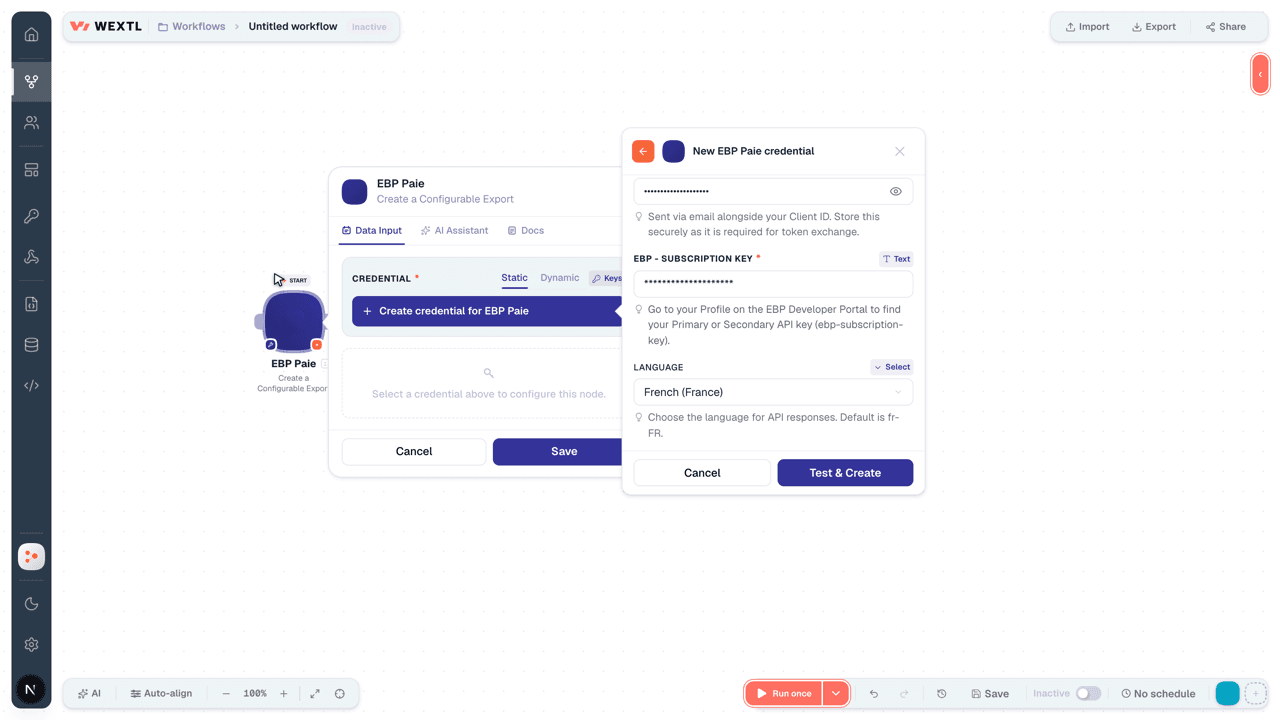
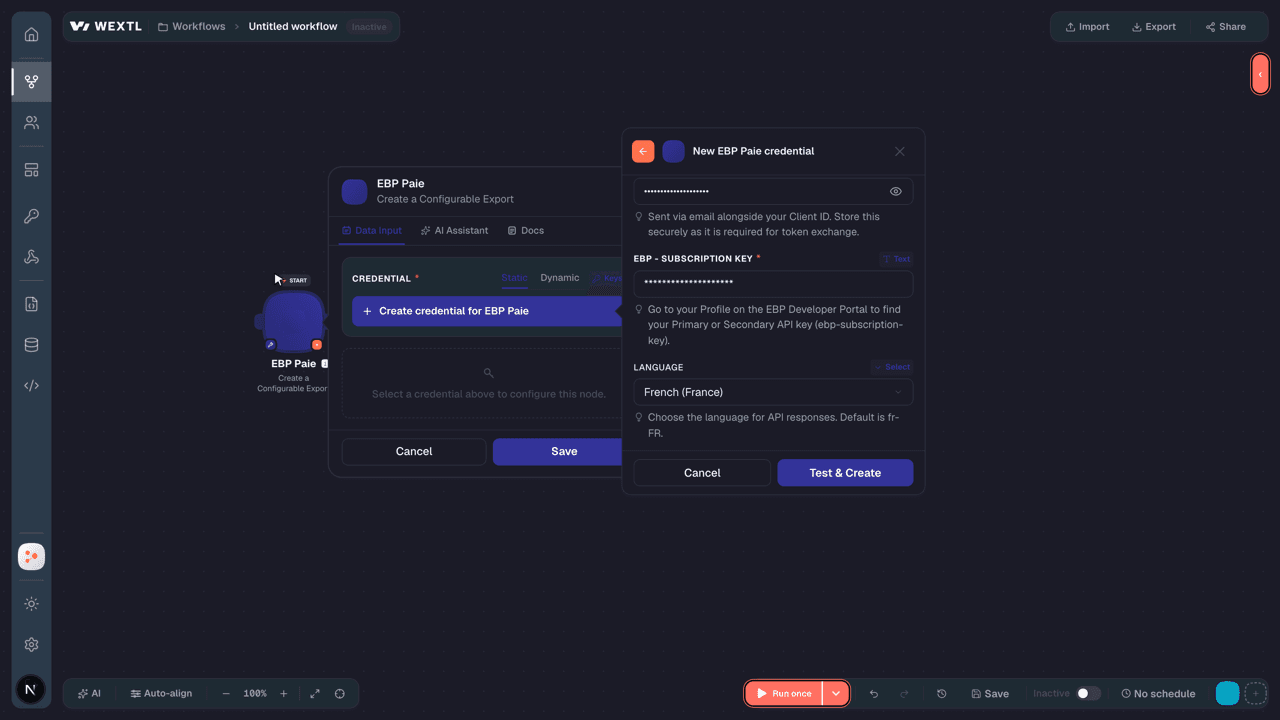
Sent via email alongside your Client ID. Store this securely as it is required for token exchange.[1]
- Subscription KeytextRequired
Go to your Profile on the EBP Developer Portal to find your Primary or Secondary API key (ebp-subscription-key).[1]
- Languageselect
Choose the language for API responses. Default is fr-FR.[1]
Connect EBP Paie in WEXTL
- Log in to your WEXTL account, add the EBP Paie node module to your workflow, and click Create new credential.
- Optional: In the Credential name field, enter a name for the credential.
- Enter the authentication credentials you copied from your EBP Paie account, or follow the on-screen instructions to create the credential.
- If prompted, authenticate your account and confirm access.
- If you want to make changes to your credential in the future, follow the steps in Manage credentials →
EBP Paie triggers and actions on WEXTL
The list below is a reference of every EBP Paie node module the integration supports. You will be able to pick any of them on the workflow canvas while building automations.
Expand any EBP Paie node module below to see exactly what it takes in, what it returns, and what connection it needs.
Get a Generic Query by ID
ActionSingle table row looked up by primary key.
| Field | Type |
|---|---|
FolderRequired | choice |
Table NameRequired | text |
Record ID (Primary Key)Required | text |
| Columns | text |
Get a Generic Query by ID on Building
ActionOne Building table record by its key.
| Field | Type |
|---|---|
FolderRequired | choice |
Table NameRequired | text |
Record ID (Primary Key)Required | text |
| Columns | text |
Get an Export Result
ActionFile content of a completed export.
| Field | Type |
|---|---|
Export IDRequired | text |
| Field | Type |
|---|---|
| Data | text |
Get Export Status
ActionProgress and file reference of an export.
| Field | Type |
|---|---|
Export IDRequired | text |
| Field | Type |
|---|---|
| Export ID | text |
| File ID | text |
| Status | text |
| Export type | text |
| Export infos | object |
| Return code | number |
| Message | text |
| Response | object |
Get the Custom Fields
ActionCustom field setup for the Management data.
| Field | Type |
|---|---|
FolderRequired | choice |
| Field | Type |
|---|---|
| Schema | array |
| Version | text |
Get the Custom Fields (Building)
ActionCustom field structure for Building data.
| Field | Type |
|---|---|
FolderRequired | choice |
| Field | Type |
|---|---|
| Schema | array |
| Version | text |
Get the Table Dependencies
ActionManagement tables linked to one main table.
| Field | Type |
|---|---|
Table NameRequired | text |
| Field | Type |
|---|---|
| Linked tables | array |
Get the Table Dependencies (Building)
ActionBuilding tables linked to a chosen main table.
| Field | Type |
|---|---|
Table NameRequired | text |
| Field | Type |
|---|---|
| Linked tables | array |
List Building Folders
SearchBuilding workspaces you can reach, with short names.
| Field | Type |
|---|---|
| Limit | number |
| Field | Type |
|---|---|
| ID | text |
| Name | text |
| Short name | text |
List Clients
SearchClients with phone, email and client type.
| Field | Type |
|---|---|
FolderRequired | choice |
| Client Type | choice |
| Search Term | text |
| Limit | number |
| Field | Type |
|---|---|
| Code | object |
| Value | text |
| Has right | boolean |
| Name | object |
| Value | text |
| Has right | boolean |
| Home phone number | object |
| Value | text |
| Has right | boolean |
| Mobile phone number | object |
| Value | text |
| Has right | boolean |
| object | |
| Value | text |
| Has right | boolean |
| Solde echu | object |
| Value | number |
| Has right | boolean |
| Display name | text |
| Currency | text |
| Client type | object |
| Value | text |
| Has right | boolean |
List Clients (Building)
SearchBuilding clients with contact and balance fields.
| Field | Type |
|---|---|
FolderRequired | choice |
| Client Type | choice |
| Search Term | text |
| Limit | number |
| Field | Type |
|---|---|
| Code | object |
| Value | text |
| Has right | boolean |
| Name | object |
| Value | text |
| Has right | boolean |
| Home phone number | object |
| Value | text |
| Has right | boolean |
| Mobile phone number | object |
| Value | text |
| Has right | boolean |
| object | |
| Value | text |
| Has right | boolean |
| Solde echu | object |
| Value | number |
| Has right | boolean |
| Display name | text |
| Currency | text |
| Client type | object |
| Value | text |
| Has right | boolean |
List Clients Extended
SearchExtended customer query with family, state and column filters.
| Field | Type |
|---|---|
FolderRequired | choice |
| Columns | text |
| From Modified Date | date |
| Order By | text |
| Customer Type | choice |
| Customer Active State | choice |
| Family IDs (include) | text |
| Family IDs (exclude) | text |
| Include Records Without Family | boolean |
| Sub-Family IDs (include) | text |
| Sub-Family IDs (exclude) | text |
| Include Records Without Sub-Family | boolean |
| Where Condition | text |
| Limit | number |
List Clients Extended (Building)
SearchBuilding customer query with family and state filters.
| Field | Type |
|---|---|
FolderRequired | choice |
| Columns | text |
| From Modified Date | date |
| Order By | text |
| Customer Type | choice |
| Customer Active State | choice |
| Family IDs (include) | text |
| Family IDs (exclude) | text |
| Include Records Without Family | boolean |
| Sub-Family IDs (include) | text |
| Sub-Family IDs (exclude) | text |
| Include Records Without Sub-Family | boolean |
| Where Condition | text |
| Limit | number |
List Clients with Address
SearchClients with address query, filtered by change date.
| Field | Type |
|---|---|
FolderRequired | choice |
| Columns | text |
| From Modified Date | date |
| Order By | text |
| Customer Type | choice |
| Customer Active State | choice |
| Family IDs (include) | text |
| Family IDs (exclude) | text |
| Include Records Without Family | boolean |
| Sub-Family IDs (include) | text |
| Sub-Family IDs (exclude) | text |
| Include Records Without Sub-Family | boolean |
| Where Condition | text |
| Limit | number |
| Field | Type |
|---|---|
| User ID | number |
| Email address | |
| Name | text |
| Date created | date |
List Clients with Address (Building)
SearchBuilding clients with address query and sub-family filters.
| Field | Type |
|---|---|
FolderRequired | choice |
| Columns | text |
| From Modified Date | date |
| Order By | text |
| Customer Type | choice |
| Customer Active State | choice |
| Family IDs (include) | text |
| Family IDs (exclude) | text |
| Include Records Without Family | boolean |
| Sub-Family IDs (include) | text |
| Sub-Family IDs (exclude) | text |
| Include Records Without Sub-Family | boolean |
| Where Condition | text |
| Limit | number |
List Deals (Building)
SearchBuilding deals with filter and sort choice.
| Field | Type |
|---|---|
FolderRequired | choice |
| Columns | text |
| Exclude Deal State | choice |
| Order By | text |
| To Date | date |
| Duration (days) | number |
| Where Condition | text |
| Limit | number |
List Deals (Management)
SearchDeals over a recent window, minus chosen states.
| Field | Type |
|---|---|
FolderRequired | choice |
| Columns | text |
| Exclude Deal State | choice |
| Order By | text |
| To Date | date |
Duration (days)Required | number |
| Where Condition | text |
| Limit | number |
List Deals with Colleagues (Building)
SearchColleague-linked deals in the Building data.
| Field | Type |
|---|---|
FolderRequired | choice |
| Columns | text |
| Exclude Deal State | choice |
| Order By | text |
| To Date | date |
Duration (days)Required | number |
| Where Condition | text |
| Limit | number |
List Deals with Colleagues (Management)
SearchManagement deals joined with colleague data.
| Field | Type |
|---|---|
FolderRequired | choice |
| Columns | text |
| Exclude Deal State | choice |
| Order By | text |
| To Date | date |
Duration (days)Required | number |
| Where Condition | text |
| Limit | number |
List Items Extended (Building)
SearchBuilding items with family and sub-family filters.
| Field | Type |
|---|---|
FolderRequired | choice |
| Columns | text |
| Modified After Date | date |
| Order By | text |
| Family IDs (include) | text |
| Family IDs (exclude) | text |
| Include Items Without Family | boolean |
| Sub-Family IDs (include) | text |
| Sub-Family IDs (exclude) | text |
| Include Items Without Sub-Family | boolean |
| Exclude Active State | choice |
| Where Condition | text |
| Limit | number |
List Items Extended (Management)
SearchExtended item query with family, state and date filters.
| Field | Type |
|---|---|
FolderRequired | choice |
| Columns | text |
| Modified After Date | date |
| Order By | text |
| Family IDs (include) | text |
| Family IDs (exclude) | text |
| Include Items Without Family | boolean |
| Sub-Family IDs (include) | text |
| Sub-Family IDs (exclude) | text |
| Include Items Without Sub-Family | boolean |
| Exclude Active State | choice |
| Where Condition | text |
| Limit | number |
List Items with Stock Tracking (Building)
SearchStock-tracked items in the Building data.
| Field | Type |
|---|---|
FolderRequired | choice |
| Columns | text |
| Modified After Date | date |
| Order By | text |
| Family IDs (include) | text |
| Family IDs (exclude) | text |
| Include Items Without Family | boolean |
| Sub-Family IDs (include) | text |
| Sub-Family IDs (exclude) | text |
| Include Items Without Sub-Family | boolean |
| Exclude Active State | choice |
| Where Condition | text |
| Limit | number |
List Items with Stock Tracking (Management)
SearchStock-tracked items from a Management folder.
| Field | Type |
|---|---|
FolderRequired | choice |
| Columns | text |
| Modified After Date | date |
| Order By | text |
| Family IDs (include) | text |
| Family IDs (exclude) | text |
| Include Items Without Family | boolean |
| Sub-Family IDs (include) | text |
| Sub-Family IDs (exclude) | text |
| Include Items Without Sub-Family | boolean |
| Exclude Active State | choice |
| Where Condition | text |
| Limit | number |
List Management Folders
SearchManagement workspaces available to your account.
| Field | Type |
|---|---|
| Limit | number |
| Field | Type |
|---|---|
| ID | text |
| Name | text |
| Short name | text |
List Purchase Documents (Building)
SearchBuilding purchase documents with date and order controls.
| Field | Type |
|---|---|
FolderRequired | choice |
| Columns | text |
| Modified After Date | date |
| Order By | text |
| To Date | date |
Duration (days)Required | number |
| Document Type | choice |
| Where Condition | text |
| Limit | number |
List Purchase Documents (Management)
SearchPurchase documents over a date window by document type.
| Field | Type |
|---|---|
FolderRequired | choice |
| Columns | text |
| Modified After Date | date |
| Order By | text |
| To Date | date |
Duration (days)Required | number |
| Document Type | choice |
| Where Condition | text |
| Limit | number |
List Purchase Documents with Lines (Building)
SearchBuilding purchase documents with lines over a window.
| Field | Type |
|---|---|
FolderRequired | choice |
| Columns | text |
| Modified After Date | date |
| Order By | text |
| To Date | date |
Duration (days)Required | number |
| Document Type | choice |
| Where Condition | text |
| Limit | number |
List Purchase Documents with Lines (Management)
SearchPurchase documents with the lines they contain.
| Field | Type |
|---|---|
FolderRequired | choice |
| Columns | text |
| Modified After Date | date |
| Order By | text |
| To Date | date |
Duration (days)Required | number |
| Document Type | choice |
| Where Condition | text |
| Limit | number |
List Sale Documents (Building)
SearchBuilding sale documents over a date window.
| Field | Type |
|---|---|
FolderRequired | choice |
| Columns | text |
| Modified After Date | date |
| Order By | text |
| To Date | date |
Duration (days)Required | number |
| Document Type | choice |
| Where Condition | text |
| Limit | number |
List Sale Documents (Management)
SearchSale documents by type and change date.
| Field | Type |
|---|---|
FolderRequired | choice |
| Columns | text |
| Modified After Date | date |
| Order By | text |
| To Date | text |
Duration (days)Required | number |
| Document Type | choice |
| Where Condition | text |
| Limit | number |
List Sale Documents with Lines (Building)
SearchBuilding sale documents with line detail attached.
| Field | Type |
|---|---|
FolderRequired | choice |
| Columns | text |
| Modified After Date | date |
| Order By | text |
| To Date | date |
| Duration (days) | number |
| Document Type | choice |
| Where Condition | text |
| Limit | number |
List Sale Documents with Lines (Management)
SearchSale documents with the lines inside each one, sorted and capped.
| Field | Type |
|---|---|
FolderRequired | choice |
| Columns | text |
| Modified After Date | date |
| Order By | text |
| To Date | date |
Duration (days)Required | number |
| Document Type | choice |
| Where Condition | text |
| Limit | number |
Perform a Generic Query on Building
SearchAuthorized table query against a Building Folder.
| Field | Type |
|---|---|
FolderRequired | choice |
Table NameRequired | text |
| Columns | text |
| From Modified Date | date |
| Order By Value | text |
| Where Condition | text |
| Limit | number |
Run a Generic Query
SearchTable rows from a Management Folder with filters.
| Field | Type |
|---|---|
FolderRequired | choice |
Table NameRequired | text |
| Columns | text |
| From Modified Date | date |
| Order By Value | text |
| Where Condition | text |
| Limit | number |
| Field | Type |
|---|---|
| Civility | text |
| Name | text |
| Sys modified date | date |
Create a Configurable Export
ActionStarts a model-based export of one sheet type.
| Field | Type |
|---|---|
Kind (Type of sheet)Required | text |
| Model Name | text |
| Field | Type |
|---|---|
| Export ID | text |
Create an Export
ActionExport file request tied to a form and a folder.
| Field | Type |
|---|---|
Export FormatRequired | choice |
Kind (Type of sheet)Required | text |
Entity ID (Code of form)Required | choice |
Folder IDRequired | choice |
| Report ID | choice |
| Field | Type |
|---|---|
| Export ID | text |
Make an API Call
universalFree-form EBP Paie REST API request.
| Field | Type |
|---|---|
URLRequired | text |
MethodRequired | choice |
| Headers | array |
| Header | object |
| Query String | array |
| Parameter | object |
| Body | text |
| Field | Type |
|---|---|
| Body | text |
| Headers | object |
| Status code | number |
Transfer a Building Document
ActionBuilding document conversion with an optional subtype.
| Field | Type |
|---|---|
FolderRequired | choice |
Document Type NameRequired | text |
Origin Document NumberRequired | text |
| Target Document Subtype Name | text |
| Target Document Date | date |
Transfer a Document
ActionConverts a document into another type, dated as chosen.
| Field | Type |
|---|---|
FolderRequired | choice |
Document Type NameRequired | text |
Origin Document NumberRequired | text |
| Target Document Subtype Name | text |
| Target Document Date | date |
Templates
Look for EBP Paie templates in the WEXTL template library.
Browse templates →Other HR integrations on WEXTL
 Achievers[2]Employee recognition and engagement platform for celebrations, rewards, and newsfeeds.
 AladtecWorkforce scheduling and timekeeping for public safety and healthcare teams.
 BeameryTalent lifecycle CRM for recruiting, talent pooling, campaigns, and workforce planning.
 DailyPayEarned wage access and on-demand pay platform that connects employees to earned wages early.
 CeipalTalent platform for recruiting, submissions, placements, and workforce.
References
- WEXTL® EBP Paie Source Code connector implementation.
- Our users use cases and automations.
- Official API Documentation for EBP Paie.
- WEXTL® visual workflow builder data.
Last updated: Jul 23, 2026 22:59
How we write our apps documentation
How we compile these docs: sources, the role of AI, and how we verify.