Jobber integration guide
VerifiedHow to connect Jobber to WEXTL and use its 3 triggers and 41 actions in your workflows. About Jobber: Field service management with scheduling, quoting and invoicing for home services.
- 3 triggers
- 13 searches
- 28 actions
- Instant (webhooks)
- Auth: OAuth
AI-assisted documentation22 min read
This documentation is compiled from our integration source code, internal specs for Jobber, its official API documentation and anonymized requests logs we collect from our support team[2].


Requirements
Get your Jobber credentials
You’ll be redirected to sign in and approve access. Your password is never shared with WEXTL.
- Client IDtextRequired
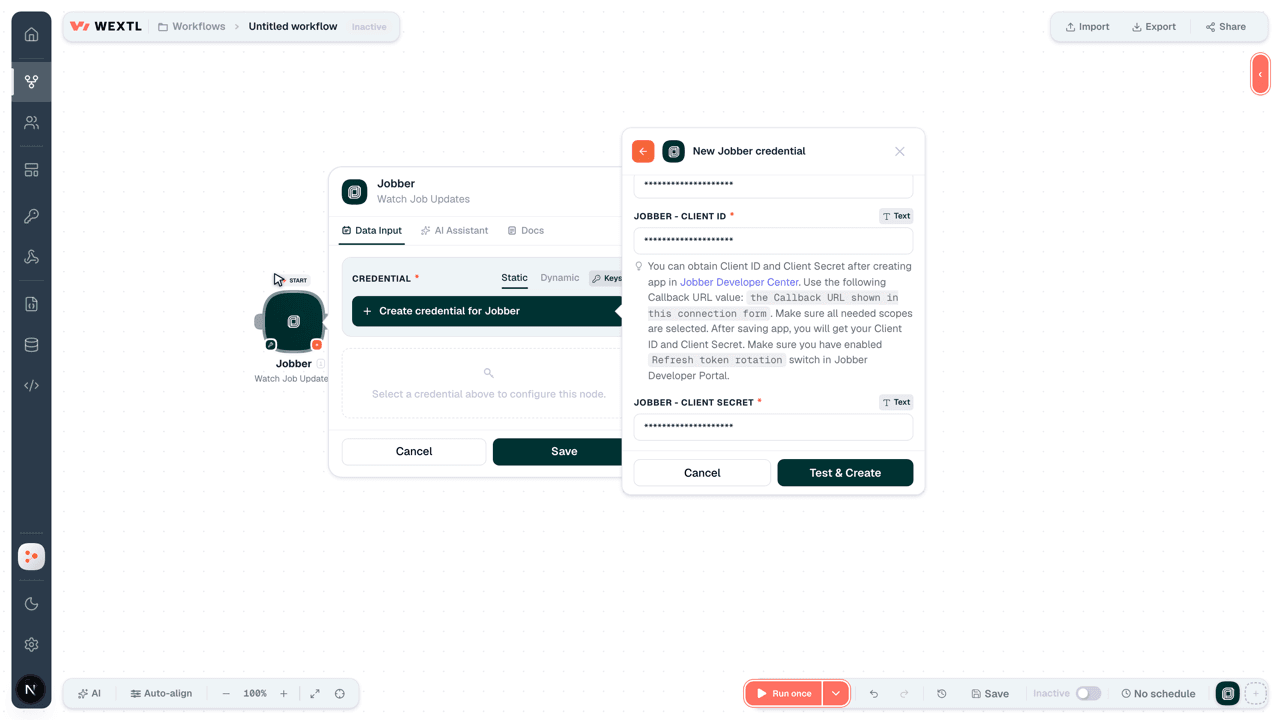
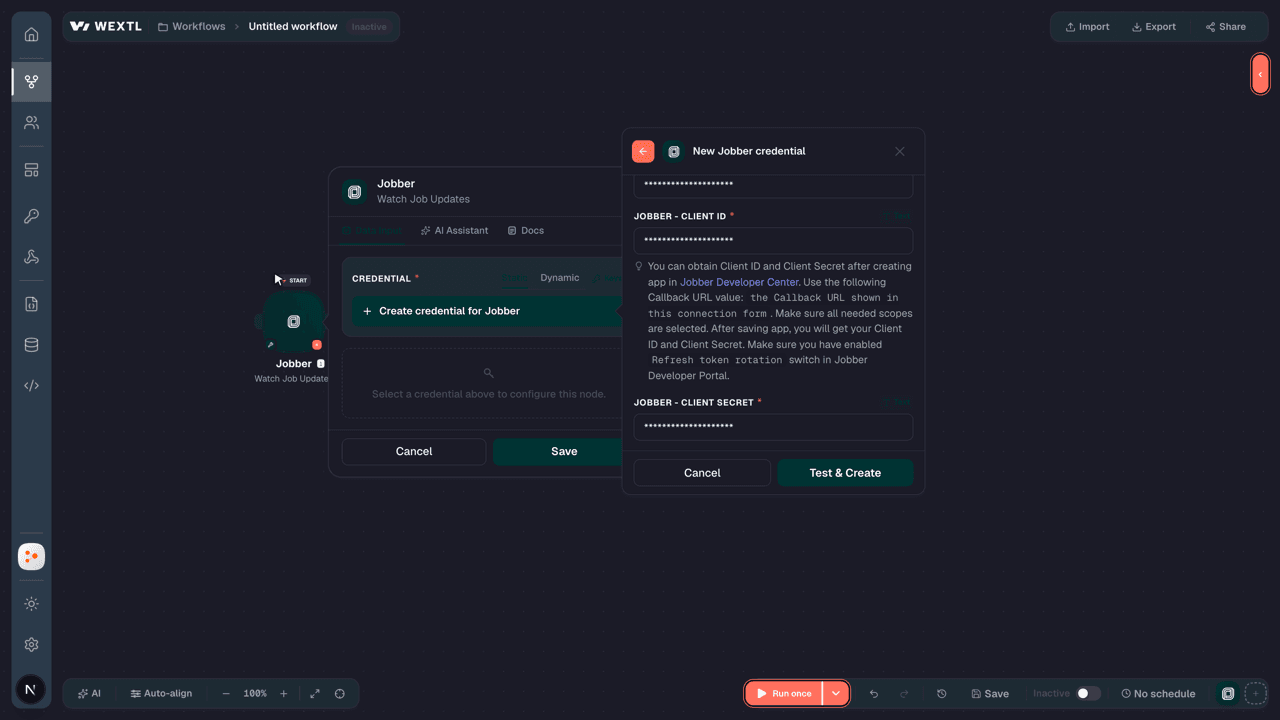
You can obtain Client ID and Client Secret after creating app in Jobber Developer Center. Use the following Callback URL value:
the Callback URL shown in this connection form. Make sure all needed scopes are selected. After saving app, you will get your Client ID and Client Secret. Make sure you have enabledRefresh token rotationswitch in Jobber Developer Portal.[1] - Client SecrettextRequired
Connect Jobber in WEXTL
- Log in to your WEXTL account, add the Jobber node module to your workflow, and click Create new credential.Instant triggers use webhooks. Click Create a webhook first when adding one, then create the credential.
- Optional: In the Credential name field, enter a name for the credential.
- Enter the authentication credentials you copied from your Jobber account, or follow the on-screen instructions to create the credential.
- If prompted, authenticate your account and confirm access.
- If you want to make changes to your credential in the future, follow the steps in Manage credentials →
Jobber triggers and actions on WEXTL
The list below is a reference of every Jobber node module the integration supports. You will be able to pick any of them on the workflow canvas while building automations.
Each Jobber node module below opens to reveal its input parameters, outputs, and connection requirements.
Watch Events
TriggerFires immediately for each Jobber event.
| Field | Type |
|---|---|
| Topic | text |
| App ID | text |
| Account ID | text |
| Item ID | text |
| Occurred at | date |
Watch Job Updates
TriggerChecks Jobber for new or updated jobs.
| Field | Type |
|---|---|
| Job ID | text |
| Job Number | number |
| Title | text |
| Job Status | text |
| Completed at | date |
| Created at | date |
| Updated at | date |
| Client | object |
| Client ID | text |
Watch New Clients
TriggerStarts one run per client in each check.
| Field | Type |
|---|---|
| ID | text |
| Is Lead | boolean |
| Emails | array |
| First Name | text |
| Last Name | text |
| Phones | array |
| Created at | date |
| Updated at | date |
Get a Client
ActionReturns one client with contact details.
| Field | Type |
|---|---|
Client IDRequired | text |
| Field | Type |
|---|---|
| Created at | date |
| ID | text |
| Is Lead | boolean |
| Updated at | date |
| Is Company | boolean |
| Is Archived | boolean |
| Is Archivable | boolean |
| Company Name | text |
| Secondary Name | text |
| Title | text |
| Emails | array |
| First Name | text |
| Last Name | text |
| Phones | array |
| Billing Address | object |
| City | text |
| Country | text |
| Latitude | text |
| Longitude | text |
| Postal Code | text |
| Province | text |
| Street | text |
| Street 1 | text |
| Street 2 | text |
| Custom Fields | array |
| ID | text |
| Label | text |
| Value Numeric | number |
| Value Area | object |
| Value Dropdown | text |
| Value Link | object |
| Value Text | text |
| Value True / False | boolean |
| Client Properties | object |
| Nodes | array |
Get a Property
ActionShows a property with its address and tax rate.
| Field | Type |
|---|---|
Client IDRequired | text |
| Field | Type |
|---|---|
| ID | text |
| Address | object |
| City | text |
| Country | text |
| ID | text |
| Postal Code | text |
| Province | text |
| Street | text |
| Street 1 | text |
| Street 2 | text |
| Client | object |
| ID | text |
| Jobber Web URI | text |
| Is Billing Address | boolean |
| Routing Order | text |
| Tax Rate | text |
| Custom Fields | array |
| ID | text |
| Label | text |
| Value Numeric | number |
| Value Area | object |
| Value Dropdown | text |
| Value Link | object |
| Value Text | text |
| Value True / False | boolean |
Get a Quote
ActionShows a quote with its status and amounts.
| Field | Type |
|---|---|
Quote IDRequired | text |
| Field | Type |
|---|---|
| ID | text |
| Client | object |
| ID | text |
| Amounts | object |
| Deposit Amount | number |
| Discount Amount | number |
| Non Tax Amount | number |
| Outstanding Deposit Amount | number |
| Subtotal | number |
| Tax Amount | number |
| Total | number |
| Client Hub Uri | text |
| Client Hub Viewed At | text |
| Jobber Web URI | url |
| Contract Disclaimer | text |
| Deposit Amount Unallocated | number |
| Message | text |
| Quote Status | text |
| Request | text |
| Salesperson | text |
| Tax Details | text |
| Title | text |
| Jobs | object |
| Nodes | array |
| Line Items | object |
| Nodes | array |
| Note Attachments | object |
| Nodes | array |
| Property | object |
| ID | text |
| Quote Number | text |
| Custom Fields | array |
3other output fields
Get a Task
ActionShows when a task runs and who is assigned.
| Field | Type |
|---|---|
Task IDRequired | text |
| Select Fields | choice |
| Field | Type |
|---|---|
| End at | date |
| Start at | date |
| ID | text |
| Title | text |
| Instructions | text |
| All Day | boolean |
| Client | text |
| Assigned Users | object |
| Nodes | array |
| Created by | object |
| ID | text |
| Property | text |
| Is Complete | boolean |
| Is Recurring | boolean |
| Is Default Title | boolean |
| Recurrence Schedule | text |
Get an Invoice
ActionShows an invoice with its dates and status.
| Field | Type |
|---|---|
Invoice IDRequired | text |
| Select Fields | choice |
| Field | Type |
|---|---|
| ID | text |
| Invoice Number | text |
| Issued Date | text |
| Message | text |
| Received Date | text |
| Subject | text |
| Due Date | text |
| Invoice Status | text |
| Jobber Web URI | url |
| Billing Address | object |
| City | text |
| Country | text |
| Postal Code | text |
| Province | text |
| Street | text |
| Street 1 | text |
| Street 2 | text |
| Coordinates | text |
| Client | object |
| ID | text |
| First Name | text |
| Last Name | text |
| Emails | array |
| Phones | array |
| Line Items | object |
| Nodes | array |
| Custom Fields | array |
| ID | text |
| Label | text |
| Value Numeric | number |
| Value Area | object |
| Value Dropdown | text |
| Value Link | object |
| Value Text | text |
| Value True / False | boolean |
Get Job Details
ActionShows a job with its visits and invoices.
| Field | Type |
|---|---|
Job IDRequired | text |
| Field | Type |
|---|---|
| ID | text |
| Job Number | number |
| Job Status | text |
| Billing Type | text |
| Job Type | text |
| Jobber Web URI | text |
| Title | text |
| Total | number |
| Invoices | object |
| Nodes | array |
| Quote | text |
| Instructions | text |
| Client | object |
| ID | text |
| First Name | text |
| Last Name | text |
| Emails | array |
| Phones | array |
| Visits | object |
| Nodes | array |
| Custom Fields | array |
| ID | text |
| Label | text |
| Value Numeric | number |
| Value Area | object |
| Value Dropdown | text |
| Value Link | object |
| Value Text | text |
| Value True / False | boolean |
| Line Items | object |
| Nodes | array |
List Quote Notes
SearchShows the notes on a quote with timestamps.
| Field | Type |
|---|---|
Quote IDRequired | text |
| Field | Type |
|---|---|
| ID | text |
| Message | text |
| Created At | date |
Search Clients
SearchLooks up clients with filters and sorting.
| Field | Type |
|---|---|
| Search Term | text |
| Is Company | boolean |
| Is Lead | boolean |
| Is Archived | boolean |
| Updated At | object |
| Before | date |
| After | date |
| Exact Date | date |
| Created At | object |
| Before | date |
| After | date |
| Exact Date | date |
| Tags | array |
| Sort by | object |
| Sort by | choice |
| Limit | number |
| Field | Type |
|---|---|
| ID | text |
| Is Lead | boolean |
| Emails | array |
| First Name | text |
| Last Name | text |
| Phones | array |
| Created at | date |
| Updated at | date |
Search Invoices
SearchFinds invoices by number, client or date.
| Field | Type |
|---|---|
| Search Term | text |
| Client ID | text |
| Invoice Number | text |
| Total | object |
| Minimum Total | number |
| Maximum Total | number |
| Exact Total | number |
| Issued Date | object |
| Before Date | date |
| After Date | date |
| Exact Date | date |
| Due Date | object |
| Before Date | date |
| After Date | date |
| Exact Date | date |
| Updated At | object |
| Before Date | date |
| After Date | date |
| Exact Date | date |
| Created At | object |
| Before Date | date |
| After Date | date |
| Exact Date | date |
| Status | choice |
| Exclude Origin | choice |
| Sort by | object |
| Field to sort by | choice |
| Limit | number |
| Field | Type |
|---|---|
| ID | text |
| Invoice Number | text |
| Issued Date | date |
| Message | text |
| Received Date | text |
| Subject | text |
| Due Date | text |
| Invoice Status | text |
| Jobber Web URI | text |
| Client | object |
| ID | text |
| Created at | date |
| Updated at | date |
Search Jobs
SearchLooks up jobs by type, status or date.
| Field | Type |
|---|---|
| Search Term | text |
| Job Type | choice |
| Created At | object |
| Before Date | date |
| After Date | date |
| Exact Date | date |
| Start At | object |
| Before Date | date |
| After Date | date |
| Exact Date | date |
| End At | object |
| Before Date | date |
| After Date | date |
| Exact Date | date |
| Completed At | object |
| Before Date | date |
| After Date | date |
| Exact Date | date |
| Include Unscheduled | boolean |
| Only Invoiceable | boolean |
| Status | choice |
| Sort by | object |
| Field to sort by | choice |
| Limit | number |
| Field | Type |
|---|---|
| End at | date |
| Start at | date |
| Job ID | text |
| Completed at | date |
| Job Status | text |
| Job Number | number |
| Billing Type | text |
| Job Type | text |
| Jobber Web URI | url |
| Title | text |
| Total | number |
| Instructions | text |
| Created at | date |
| Updated at | date |
Search Properties
SearchLooks up properties by keyword or client.
| Field | Type |
|---|---|
| Search Term | text |
| Client ID | text |
| Limit | number |
| Field | Type |
|---|---|
| ID | text |
| Address | object |
| City | text |
| Country | text |
| ID | text |
| Postal Code | text |
| Province | text |
| Street | text |
| Street 1 | text |
| Street 2 | text |
| Client | object |
| ID | text |
| Jobber Web URI | text |
| Is Billing Address | boolean |
| Routing Order | text |
| Tax Rate | text |
| Custom Fields | array |
| ID | text |
| Label | text |
| Value Numeric | number |
| Value Area | object |
| Value Dropdown | text |
| Value Link | object |
| Value Text | text |
| Value True / False | boolean |
Search Quotes
SearchLooks up quotes by status, client or amount.
| Field | Type |
|---|---|
| Client ID | text |
| Quote Number | object |
| Equal | number |
| Minimum | number |
| Maximum | number |
| Status | choice |
| Cost | object |
| Equal | number |
| Minimum | number |
| Maximum | number |
| Sent At | object |
| Equal | date |
| Before | date |
| After | date |
| Updated At | object |
| Equal | date |
| Before | date |
| After | date |
| Created At | object |
| Equal | date |
| Before | date |
| After | date |
| Salesperson ID | text |
| Search Term | text |
| Sort | object |
| Limit | number |
| Field | Type |
|---|---|
| ID | text |
| Client | object |
| ID | text |
| Amounts | object |
| Deposit Amount | number |
| Discount Amount | number |
| Non Tax Amount | number |
| Outstanding Deposit Amount | number |
| Subtotal | number |
| Tax Amount | number |
| Total | number |
| Client Hub Uri | text |
| Client Hub Viewed At | text |
| Jobber Web Uri | text |
| Contract Disclaimer | text |
| Deposit Amount Unallocated | number |
| Message | text |
| Quote Status | text |
| Request | text |
| Salesperson | text |
| Title | text |
| Transitioned At | text |
| Custom Fields | array |
| Created At | date |
| Updated At | date |
Search Visits
SearchLooks up visits by status or schedule.
| Field | Type |
|---|---|
| Visit Status | choice |
| Created at | object |
| Before | date |
| After | date |
| Exact Date | date |
| Start At | object |
| Before | date |
| After | date |
| Exact Date | date |
| End at | object |
| Before | date |
| After | date |
| Exact Date | date |
| Completed at | object |
| Before | date |
| After | date |
| Exact Date | date |
| Invoice Status | choice |
| Only Relevant To Billing Period | boolean |
| Assigned To | text |
| Product Or Service ID | text |
| Visit IDs | array |
| Sort by | object |
| Field to sort by | choice |
| Limit | number |
| Field | Type |
|---|---|
| Created at | date |
| ID | text |
| Completed at | date |
| End at | date |
| Start at | date |
| Title | text |
| Instructions | text |
| Actions Upon Complete | array |
| All Day | boolean |
| Arrival Window | text |
| Client | object |
| ID | text |
| Assigned Users | object |
| Nodes | array |
| Duration | number |
| Invoice | text |
| Is Complete | boolean |
| Is Default Title | boolean |
| Is Last Scheduled Visit | boolean |
| Job | object |
| ID | text |
| Notes | object |
| Nodes | array |
| Property | object |
| ID | text |
2other output fields
Archive a Client
ActionSets a client record to archived status.
| Field | Type |
|---|---|
Client IDRequired | text |
Archive a Request
ActionArchives one work request and returns its Title.
| Field | Type |
|---|---|
Request IDRequired | text |
| Field | Type |
|---|---|
| ID | text |
| Title | text |
Close a Job
ActionEnds a job and settles its open visits.
| Field | Type |
|---|---|
Job IDRequired | text |
Job Incomplete Visits ActionRequired | choice |
Complete a Visit
ActionFinishes one scheduled visit.
| Field | Type |
|---|---|
Visit IDRequired | text |
| Field | Type |
|---|---|
| Visit | object |
| ID | text |
| Is complete | boolean |
| Completed at | date |
| Visit status | text |
| Client | object |
| Errors | array |
| Message | text |
| Path | array |
Create a Client
ActionAdds a client with names, phones and emails.
| Field | Type |
|---|---|
| Client Title | choice |
First NameRequired | text |
| Last Name | text |
| Company Name | text |
| Is Company | boolean |
| Phone Numbers | array |
| Phone Type | choice |
Phone NumberRequired | text |
Can Receive Text MessagesRequired | boolean |
| Primary Phone Number | boolean |
| Email Addresses | array |
| Email Type | choice |
Email AddressRequired | |
| Primary Email Address | boolean |
| Properties | array |
| Address | object |
| Tax Rate ID | text |
| Billing Address | object |
| Street 1 | text |
| Street 2 | text |
| City | text |
| Country | text |
| Province | text |
| Postal Code | text |
| Custom Fields | array |
Custom Field NameRequired | choice |
| Source Attribution | object |
| Source Text | text |
| Field | Type |
|---|---|
| Client ID | text |
Create a Job
ActionStarts a job with scheduling and invoicing details.
| Field | Type |
|---|---|
Property IDRequired | text |
SchedulingRequired | object |
Create VisitsRequired | boolean |
Notify TeamRequired | boolean |
| Assigned To | array |
| Start Time | time |
| End Time | time |
InvoicingRequired | object |
| Invoicing Type | choice |
| Invoicing Schedule | choice |
Line ItemsRequired | array |
Line Item NameRequired | text |
Unit PriceRequired | number |
QuantityRequired | number |
Save to Products and ServicesRequired | boolean |
| Line Item Description | text |
| Category | choice |
| Taxable | boolean |
| Quote Line Item ID | text |
| Unit Cost | number |
Arrival WindowRequired | object |
| Duration in Minutes | number |
| Quote ID | text |
| Request ID | text |
| Job Form IDs | array |
| Job Form ID | text |
| Job Title | text |
| Job Number | number |
| Instructions | text |
| Tracking Origin | text |
| Timeframe | object |
| Starting Date | date |
| Unit of Duration | choice |
| Duration Value | number |
| Custom Fields | array |
Custom Field NameRequired | choice |
| Field | Type |
|---|---|
| Job ID | text |
| Errors | array |
| Message | text |
| Path | array |
Create a Property
ActionAdds property addresses to a client.
| Field | Type |
|---|---|
Client IDRequired | text |
PropertiesRequired | array |
AddressRequired | object |
| Tax Rate ID | text |
| Custom Fields | array |
| Field | Type |
|---|---|
| Client | object |
| Client ID | text |
| Properties | object |
| Property ID | text |
Create a Quote
ActionBuilds a priced quote for one property.
| Field | Type |
|---|---|
Client IDRequired | text |
Property IDRequired | text |
Line ItemsRequired | array |
NameRequired | text |
| Description | text |
| Category | choice |
Unit PriceRequired | number |
QuantityRequired | number |
| Taxable | boolean |
Save to Products and ServicesRequired | boolean |
| Unit Cost | number |
| Optional | boolean |
| Recommended | boolean |
| Title | text |
| Message | text |
| Quote Number | number |
| Allow Credit Card Payments | boolean |
| Allow ACH Payments | boolean |
| Deposit | object |
| Rate | number |
| Type | choice |
| Discount | object |
| Rate | number |
| Type | choice |
| Request ID | text |
| Tax Rate ID | text |
| Client View Options | object |
Show Line Item QuantitiesRequired | boolean |
Show Line Item Unit CostsRequired | boolean |
Show Line Item Total CostsRequired | boolean |
Show TotalsRequired | boolean |
| Notes | array |
| Custom Fields | array |
Custom Field NameRequired | choice |
| Field | Type |
|---|---|
| Quote ID | text |
Create a Quote Note
ActionSaves a comment alongside a quote.
| Field | Type |
|---|---|
Quote IDRequired | text |
InputRequired | object |
MessageRequired | text |
| Field | Type |
|---|---|
| Quote | object |
| ID | text |
| Quote Note | object |
| ID | text |
| Message | text |
| User Errors | array |
Create a Request
ActionLogs a work request with an optional assessment.
| Field | Type |
|---|---|
Client IDRequired | text |
| Property ID | text |
| Assessment | object |
| Instructions | text |
| Schedule | object |
| Referring Client ID | text |
| Request Details | object |
| Form | object |
| Title | text |
| Field | Type |
|---|---|
| ID | text |
| Arrival Window | text |
| Client | object |
| ID | text |
| Jobs | object |
| Nodes | array |
| Company Name | text |
| Created at | date |
| Phone | text |
| Property | text |
| Jobber Web URL | url |
| Quotes | object |
| Nodes | array |
| Referring Client | text |
| Request Status | text |
| Source | text |
| Title | text |
| Updated at | date |
Create a Task
ActionAdds a task with optional assignees and times.
| Field | Type |
|---|---|
TitleRequired | text |
| Assigned To | array |
| User ID | text |
| Instructions | text |
| Start at | date |
| End at | date |
| All Day | boolean |
| Email Assignments | boolean |
| Team Reminder Offset | number |
| Recurrence Rule | text |
| Client ID | text |
| Field | Type |
|---|---|
| Task ID | text |
Create a Visit
ActionBooks time slots for a job.
| Field | Type |
|---|---|
Job IDRequired | text |
VisitsRequired | array |
| Field | Type |
|---|---|
| Job | object |
| Job ID | text |
| Created Visits | array |
| ID | text |
| Start at | date |
| End at | date |
| Duration | number |
| Instructions | text |
| Title | text |
| Visit status | text |
| Client | object |
| Is last scheduled visit | boolean |
| Errors | array |
| Message | text |
| Path | array |
Create a Visit Line Item
ActionItemizes the work of a visit.
| Field | Type |
|---|---|
Visit IDRequired | text |
Line ItemsRequired | array |
| Field | Type |
|---|---|
| ID | text |
| Created at | date |
| Title | text |
| Line items | object |
| Nodes | array |
| Errors | array |
| Message | text |
| Path | array |
Create an Expense
ActionRecords a cost with an optional receipt link.
| Field | Type |
|---|---|
TitleRequired | text |
DateRequired | date |
| Description | text |
| Total | number |
| Reimbursable To ID | text |
| Accounting Code ID | text |
| Linked Job ID | text |
| Receipt URL | url |
| Field | Type |
|---|---|
| ID | text |
| Created at | date |
| Updated at | date |
| Date | text |
| Title | text |
| Description | text |
| Total | number |
| Entered by | object |
| ID | text |
| Name | text |
| Paid by | object |
| ID | text |
| Name | text |
| Reimbursable to | object |
| ID | text |
| Name | text |
| Linked job | object |
| ID | text |
| Title | text |
| Errors | array |
| Message | text |
| Path | array |
Delete a Task
ActionRemoves one task and optionally its repeats.
| Field | Type |
|---|---|
Task IDRequired | text |
| Delete Future Reccuring | boolean |
Delete a Visit
ActionRemoves a batch of visits.
| Field | Type |
|---|---|
Visit IDsRequired | text |
| Visit ID | text |
| Field | Type |
|---|---|
| Visits | array |
| Errors | array |
| Message | text |
| Path | array |
Delete an Expense
ActionRemoves a single recorded expense.
| Field | Type |
|---|---|
Expense IDRequired | text |
| Field | Type |
|---|---|
| ID | text |
| Created at | date |
| Updated at | date |
| Date | text |
| Title | text |
| Description | text |
| Total | number |
| Entered by | object |
| ID | text |
| Name | text |
| Paid by | object |
| ID | text |
| Name | text |
| Reimbursable to | object |
| ID | text |
| Name | text |
| Linked job | object |
| ID | text |
| Title | text |
| Errors | array |
| Message | text |
| Path | array |
Make an API Call
universalCustom Jobber GraphQL API request.
| Field | Type |
|---|---|
MethodRequired | choice |
| Field | Type |
|---|---|
| Body | text |
| Headers | object |
| Status code | number |
Mark a Visit as Incomplete
ActionUndoes the completed state of a visit.
| Field | Type |
|---|---|
Visit IDRequired | text |
| Field | Type |
|---|---|
| Visit | object |
| ID | text |
| Is complete | boolean |
| Completed at | date |
| Visit status | text |
| Client | object |
| Errors | array |
| Message | text |
| Path | array |
Reopen a Job
ActionRestores a closed job and handles its unfinished visits.
| Field | Type |
|---|---|
Job IDRequired | text |
| Job Incomplete Visits Action | choice |
Update a Client
ActionEdits names, phones and tags of a client.
| Field | Type |
|---|---|
Client IDRequired | text |
| Title | choice |
| First Name | text |
| Last Name | text |
| Company Name | text |
| Is Company | boolean |
| Phones to Add | array |
| Phone Type | choice |
Phone NumberRequired | text |
Can Receive Text MessagesRequired | boolean |
| Primary Phone Number | boolean |
| Phones to Edit | array |
| Phone ID | text |
| Phone Type | choice |
Phone NumberRequired | text |
Can Receive Text MessagesRequired | boolean |
| Primary Phone Number | boolean |
| Phones to Delete | array |
| Phone Encoded ID | text |
| Emails to Add | array |
| Email Type | choice |
Email AddressRequired | |
| Primary Email Address | boolean |
| Emails to Edit | array |
| Email ID | text |
| Email Type | choice |
Email AddressRequired | |
| Primary Email Address | boolean |
| Emails to Delete | array |
| Email Encoded ID | text |
| Tags to Add | array |
| Tag | text |
| Tags to Delete | array |
| Tag | text |
| Billing Address | object |
| Street Address Line 1 | text |
| Street Address Line 2 | text |
| City | text |
| Country | text |
| State/Province | text |
| ZIP / Postal Code | text |
| Custom Fields | array |
Custom Field NameRequired | choice |
| Custom Field Value ID | text |
| Field | Type |
|---|---|
| Client ID | text |
| Errors | array |
| Message | text |
| Path | array |
Update a Job
ActionEdits job details, schedule and invoicing.
| Field | Type |
|---|---|
Job IDRequired | text |
| Signature | object |
| Raw Image | text |
| Scheduling | object |
| Create Visits | boolean |
| Notify Team | boolean |
| Assigned To | array |
| Start Time | time |
| End Time | time |
| Recurrence | text |
| Visit Confirmation Status | boolean |
| Invoicing | object |
| Invoicing Type | choice |
| Invoicing Schedule | choice |
| Arrival Window | object |
| Duration in Minutes | number |
| Timeframe | object |
| Starting Date | date |
| Unit of Duration | choice |
| Duration Value | number |
| Job Title | text |
| Job Number | number |
| Instructions | text |
| Custom Fields | array |
Custom Field NameRequired | choice |
| Field | Type |
|---|---|
| Job ID | text |
Update a Property
ActionCorrects the address or custom data on a property.
| Field | Type |
|---|---|
Property IDRequired | text |
| Address | object |
| Street 1 | text |
| Street 2 | text |
| City | text |
| Country | text |
| Province | text |
| Postal Code | text |
| Custom Fields | array |
Custom Field NameRequired | choice |
| Field | Type |
|---|---|
| Property ID | text |
Update a Quote
ActionAmends the terms and payment options of a quote.
| Field | Type |
|---|---|
Quote IDRequired | text |
| Title | text |
| Message | text |
| Quote Number | text |
| Allow Credit Card Payments | boolean |
| Allow ACH Payments | boolean |
| Deposit | object |
| Rate | number |
| Type | choice |
| Discount | object |
| Rate | number |
| Type | choice |
| Tax Rate ID | text |
| Client View Options | object |
Show Line Item QuantitiesRequired | boolean |
Show Line Item Unit CostsRequired | boolean |
Show Line Item Total CostsRequired | boolean |
Show TotalsRequired | boolean |
| Custom Fields | array |
Custom Field NameRequired | choice |
| Field | Type |
|---|---|
| Quote ID | text |
Update a Quote Note
ActionEdits the text of an existing quote note.
| Field | Type |
|---|---|
Note IDRequired | text |
MessageRequired | text |
| Field | Type |
|---|---|
| Quote | object |
| ID | text |
| Quote Note | object |
| ID | text |
| Message | text |
| User Errors | array |
Update a Visit
ActionRetitles a visit or rewrites its instructions.
| Field | Type |
|---|---|
Visit IDRequired | text |
| Instructions | text |
| Title | text |
| Field | Type |
|---|---|
| Created at | date |
| ID | text |
| Completed at | date |
| End at | date |
| Start at | date |
| Title | text |
| Instructions | text |
| Actions Upon Complete | array |
| All Day | boolean |
| Arrival Window | text |
| Client | object |
| ID | text |
| Assigned Users | object |
| Nodes | array |
| Duration | number |
| Invoice | text |
| Is Complete | boolean |
| Is Default Title | boolean |
| Is Last Scheduled Visit | boolean |
| Job | object |
| ID | text |
| Notes | object |
| Nodes | array |
| Property | object |
| ID | text |
3other output fields
Update an Expense
ActionEdits the amount and details of an expense.
| Field | Type |
|---|---|
Expense IDRequired | text |
| Title | text |
| Accounting Code ID | text |
| Reimbursable To ID | text |
| Description | text |
| Receipt URL | url |
| Date | date |
| Total | number |
| Field | Type |
|---|---|
| ID | text |
| Created at | date |
| Updated at | date |
| Date | text |
| Title | text |
| Description | text |
| Total | number |
| Entered by | object |
| ID | text |
| Name | text |
| Paid by | object |
| ID | text |
| Name | text |
| Reimbursable to | object |
| ID | text |
| Name | text |
| Linked job | object |
| ID | text |
| Title | text |
| Errors | array |
| Message | text |
| Path | array |
Update an Invoice
ActionAdjusts invoice text, terms and payment options.
| Field | Type |
|---|---|
Invoice IDRequired | text |
| Message | text |
| Tax Rate ID | text |
| Discount | object |
| Discount Rate | number |
| Discount Type | choice |
| Allow Credit Card Payments | boolean |
| Allow ACH Payments | boolean |
| Invoice Number | number |
| Issued Date | text |
| Due Details | object |
| Due Date | date |
| Invoice Net | number |
| Subject | text |
| Allow Review Request | boolean |
| Custom Fields | array |
Custom Field NameRequired | choice |
| Field | Type |
|---|---|
| Invoice ID | text |
Templates
Look for Jobber templates in the WEXTL template library.
Browse templates →Other project management integrations on WEXTL
 Basecamp[2]Project management and team communication for companies and their clients.
 BigChangeField service management platform for scheduling jobs, technicians, and customer work orders.
 FieldwireConstruction project management for tasks, submittals, plans, and field coordination.
 Asset PandaFlexible asset tracking and workflow management for equipment, inventory, and audits.
 BuildernConstruction project management for budgets, clients, and job progress.
References
- WEXTL® Jobber Source Code connector implementation.
- Our users use cases and automations.
- Official API Documentation for Jobber.
- WEXTL® visual workflow builder data.
Last updated: Aug 17, 2026 09:06
How we write our apps documentation
How we compile these docs: sources, the role of AI, and how we verify.