


Requirements
Connecting Mekari Talent takes an active account plus an API access token from your account settings — no other setup is required.[3]
Get your Mekari Talent credentials
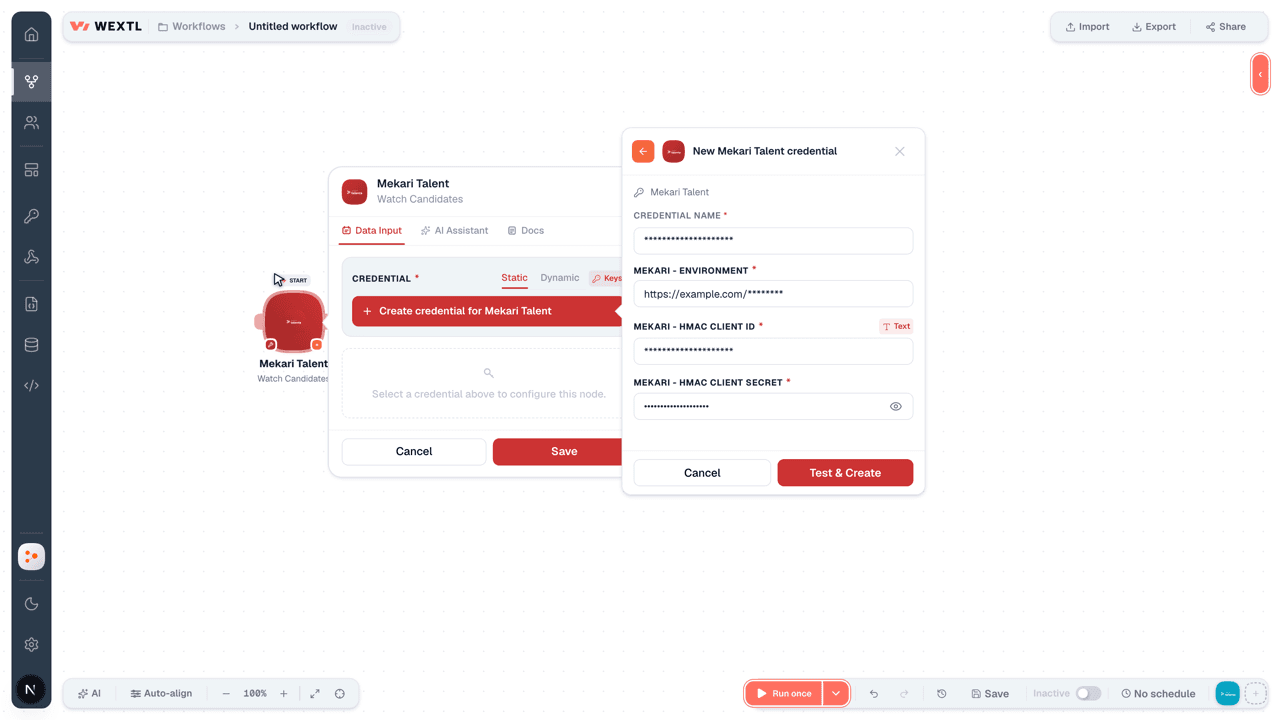
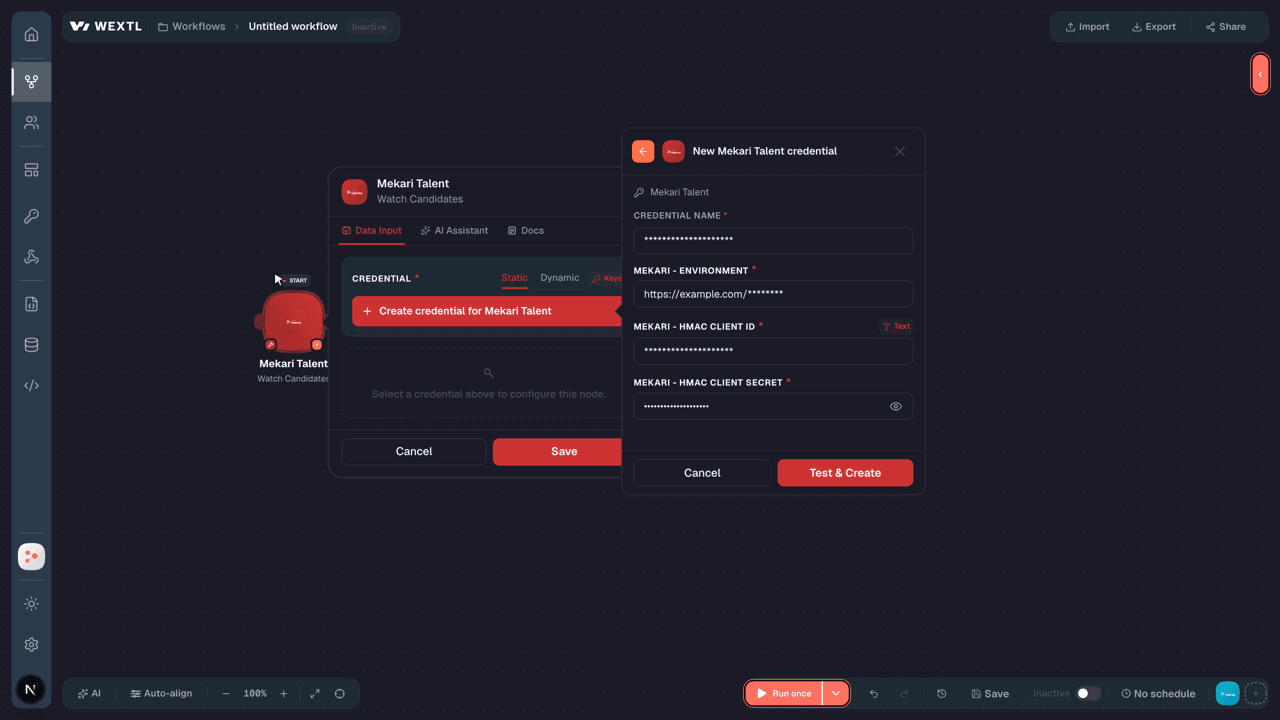
- Mekari - EnvironmenturlRequired
- Mekari - HMAC Client IDtextRequired
- Mekari - HMAC Client SecretpasswordRequired
Connect Mekari Talent in WEXTL
- Log in to your WEXTL account, add the Mekari Talent node module to your workflow, and click Create new credential.
- Optional: In the Credential name field, enter a name for the credential.
- Enter the authentication credentials you copied from your Mekari Talent account, or follow the on-screen instructions to create the credential.
- If prompted, authenticate your account and confirm access.
- If you want to make changes to your credential in the future, follow the steps in Manage credentials →
Notes
Credentials are org-scoped; share them with teammates from the Credentials picker on any of its nodes.For detailed information on connecting an application, see Connect an application →
Mekari Talent node modules
The list below is a reference of every Mekari Talent node module the integration supports. You will be able to pick any of them on the workflow canvas while building automations.
Expand any Mekari Talent node module below to see exactly what it takes in, what it returns, and what connection it needs.
Watch CandidatesTrigger
Output fields[3]
| Field | Type |
|---|---|
| Candidate ID | number |
| Job application ID | number |
| Company ID | number |
| Job ID | number |
| Job position ID | number |
| Job position name | text |
| Branch ID | number |
| Branch name | text |
| Organization ID | number |
| Organization name | text |
| Candidate name | text |
| First name | text |
| Last name | text |
| text | |
| Phone number | text |
| Last job position | text |
| Last company | text |
| Last education | number |
| Last education level | text |
| Avatar | text |
12other output fields
Watch Employee PayrollsTrigger
Output fields[3]
| Field | Type |
|---|---|
| ID | number |
| First name | text |
| Last name | text |
| Bpjs ketenagakerjaan | text |
| Bpjs kesehatan | text |
| Npwp | text |
| Bank ID | number |
| Bank name | text |
| Bank account | text |
| Bank account holder | text |
| Ptkp status | text |
| Bank code | text |
| Cost center ID | number |
| Cost center name | text |
| Cost center category ID | number |
| Cost center category name | text |
| Employee tax status | number |
| Nationality code | text |
| Expatriatedn date | text |
| Created at | date |
1other output field
Watch EmployeesTrigger
Output fields[3]
| Field | Type |
|---|---|
| User ID | number |
| Sso ID | text |
| Created at | date |
| Updated at | date |
| Personal | object |
| First name | text |
| Last name | text |
| Barcode | text |
| text | |
| Identity type | text |
| Identity number | text |
| Expired date identity ID | text |
| Postal code | text |
| Address | text |
| Current address | text |
| Family | object |
| Members | array |
| Emergency contacts | array |
| Education | object |
| Formal education history | array |
| Informal education history | array |
| Employment | object |
| Employee ID | text |
| Company ID | number |
| Organization ID | text |
| Organization name | text |
| Job position ID | number |
| Job position | text |
| Job level | text |
| Employment status | text |
| End date | text |
| Branch ID | text |
| Payroll info | object |
| Cost center ID | number |
| Cost center name | text |
| Cost center category ID | text |
| Cost center category name | text |
| Custom field | array |
| Access role | object |
| ID | number |
| Name | text |
| Role ID | number |
| Role name | text |
| Role type | text |
Watch Time Off RequestsTrigger
Output fields[3]
| Field | Type |
|---|---|
| ID | number |
| Company ID | number |
| User ID | choice |
| Requested | number |
| Approve flag | number |
| Start date | date |
| End date | date |
| Created date | date |
| Updated date | date |
| Policy ID | number |
| Approved by | number |
| Halfday flag | number |
| Reason | text |
| Delegate to | number |
| Schedule in | text |
| Schedule out | text |
| Filename | text |
| Policy code | text |
| Policy name | text |
| Taken | number |
8other output fields
Get a CandidateAction
Input fields[3]
| Field | Type |
|---|---|
Job Application IDRequired | number |
Output fields[3]
| Field | Type |
|---|---|
| Job application ID | number |
| Job ID | number |
| First name | text |
| Last name | text |
| Last job position | text |
| Last company | text |
| text | |
| Phone number | text |
| Resume | text |
| Profile picture | text |
| Last education | number |
| Is portfolio online | boolean |
| Portfolio | text |
| Status | number |
| Hiring stage ID | number |
| Application date | text |
| Tags | text |
| Question | array |
| Gender ID | number |
| Gender name | text |
20other output fields
Get a Time Off History DetailAction
Input fields[3]
| Field | Type |
|---|---|
Time Off IDRequired | text |
| Employee ID | choice |
Output fields[3]
| Field | Type |
|---|---|
| ID | number |
| Company ID | number |
| User ID | number |
| Requested | number |
| Approve flag | number |
| Start date | date |
| End date | text |
| Created date | date |
| Updated date | date |
| Policy ID | number |
| Approved by | text |
| Halfday flag | number |
| Reason | text |
| Delegate to | number |
| Schedule in | text |
| Schedule out | text |
| Filename | text |
| Policy code | text |
| Policy name | text |
| Taken | text |
8other output fields
Get an EmployeeAction
Get an Employee Payroll InfoAction
Input fields[3]
| Field | Type |
|---|---|
User IDRequired | choice |
Output fields[3]
| Field | Type |
|---|---|
| Bpjs ketenagakerjaan | text |
| Bpjs kesehatan | text |
| Npwp | text |
| Bank ID | number |
| Bank name | text |
| Bank account | text |
| Bank code | text |
| Bank account holder | text |
| Ptkp status | text |
| Cost center ID | number |
| Cost center name | text |
| Cost center category ID | text |
| Cost center category name | text |
| Employee tax status | number |
| Nationality code | text |
| Expatriatedn date | text |
Get CandidatesSearch
Input fields[3]
| Field | Type |
|---|---|
| Application Date Start | date |
| Application Date End | date |
| Search | text |
| Limit | number |
Output fields[3]
| Field | Type |
|---|---|
| Candidate ID | number |
| Job application ID | number |
| Company ID | number |
| Job ID | number |
| Job position ID | number |
| Job position name | text |
| Branch ID | number |
| Branch name | text |
| Organization ID | number |
| Organization name | text |
| Candidate name | text |
| First name | text |
| Last name | text |
| text | |
| Phone number | text |
| Last job position | text |
| Last company | text |
| Last education | number |
| Last education level | text |
| Avatar | text |
12other output fields
Get Employee PayrollsSearch
Input fields[3]
| Field | Type |
|---|---|
User IDRequired | choice |
| Modified Start Date | date |
| Modified End Date | date |
| Job Level | text |
| Status | choice |
| Branch | text |
| Organization | text |
| Job Position | text |
| Employment Status | text |
| Order | choice |
| Limit | number |
Output fields[3]
| Field | Type |
|---|---|
| ID | number |
| First name | text |
| Last name | text |
| Bpjs ketenagakerjaan | text |
| Bpjs kesehatan | text |
| Npwp | text |
| Bank ID | number |
| Bank name | text |
| Bank account | text |
| Bank account holder | text |
| Ptkp status | text |
| Bank code | text |
| Cost center ID | number |
| Cost center name | text |
| Cost center category ID | number |
| Cost center category name | text |
| Employee tax status | number |
| Nationality code | text |
| Expatriatedn date | text |
| Created at | date |
1other output field
Get Employee Time Off HistorySearch
Input fields[3]
| Field | Type |
|---|---|
Employee IDRequired | choice |
| Date | date |
| Limit | number |
Output fields[3]
| Field | Type |
|---|---|
| ID | number |
| Company ID | number |
| User ID | number |
| Requested | number |
| Approve flag | number |
| Start date | date |
| End date | date |
| Created date | date |
| Updated date | date |
| Policy ID | number |
| Approved by | number |
| Halfday flag | number |
| Reason | text |
| Delegate to | number |
| Schedule in | text |
| Schedule out | text |
| Filename | text |
| Policy code | text |
| Policy name | text |
| Taken | number |
8other output fields
Get EmployeesSearch
Input fields[3]
| Field | Type |
|---|---|
| Order | choice |
| Status | choice |
| Limit | number |
| Modified Start Date | date |
| Modified End Date | date |
| Branch | text |
| Organization | text |
| Job Level | text |
| Employment Status | text |
| Job Position | text |
| Join Start Date | date |
| Join End Date | date |
| Order Join Date | choice |
| Limit | number |
Output fields[3]
| Field | Type |
|---|---|
| User ID | number |
| Sso ID | text |
| Created at | date |
| Updated at | date |
| Personal | object |
| First name | text |
| Last name | text |
| Barcode | text |
| text | |
| Identity type | text |
| Identity number | text |
| Expired date identity ID | text |
| Postal code | text |
| Address | text |
| Current address | text |
| Family | object |
| Members | array |
| Emergency contacts | array |
| Education | object |
| Formal education history | array |
| Informal education history | array |
| Employment | object |
| Employee ID | text |
| Company ID | number |
| Organization ID | text |
| Organization name | text |
| Job position ID | number |
| Job position | text |
| Job level | text |
| Employment status | text |
| End date | text |
| Branch ID | text |
| Payroll info | object |
| Cost center ID | number |
| Cost center name | text |
| Cost center category ID | text |
| Cost center category name | text |
| Custom field | array |
| Access role | object |
| ID | number |
| Name | text |
| Role ID | number |
| Role name | text |
| Role type | text |
Get Form SubmissionsSearch
Get Job PositionsSearch
Get Time Off RequestsSearch
Create a Form SubmissionAction
Create a Job PositionAction
Create an EmployeeAction
Input fields[3]
| Field | Type |
|---|---|
Created ByRequired | choice |
First NameRequired | text |
EmailRequired | |
Date of BirthRequired | date |
GenderRequired | choice |
Marital StatusRequired | choice |
ReligionRequired | choice |
BranchRequired | text |
Organization NameRequired | text |
Job PositionRequired | text |
Job LevelRequired | text |
Employment StatusRequired | choice |
Join DateRequired | date |
Invite ESSRequired | boolean |
Basic SalaryRequired | number |
PTKP StatusRequired | choice |
Tax ConfigurationRequired | choice |
Type of SalaryRequired | choice |
Salary ConfigurationRequired | choice |
JHT ConfigurationRequired | choice |
43other input fields
Make an API Calluniversal
Submit a Time Off RequestAction
Input fields[3]
| Field | Type |
|---|---|
| Policy ID | choice |
| Employee ID | choice |
Use Half DayRequired | choice |
Start DateRequired | date |
End DateRequired | date |
Half Day TypeRequired | choice |
| Reason | text |
| Delegate To | number |
| File | text |
Output fields[3]
| Field | Type |
|---|---|
| Policy ID | number |
| Use half day | text |
| Half day type | text |
| Start date | date |
| End date | date |
| Schedule in | text |
| Schedule out | text |
| Is try again | text |
| Comment | text |
Update a Time Off Request ApprovalAction
Update an EmployeeAction
Input fields[3]
| Field | Type |
|---|---|
User IDRequired | choice |
User IDRequired | choice |
| First Name | text |
| Last Name | text |
| Mobile Phone Number | text |
| Home Phone Number | text |
| Place of Birth | text |
| Date of Birth | date |
| Gender | choice |
| Marital Status | choice |
| Blood Type | choice |
| Religion | choice |
| Citizen ID Type | choice |
| Citizen ID Expired Date | date |
| Citizen ID | text |
| Citizen Address | text |
| Residential Address | text |
| Postal Code | number |
| Employee ID | text |
8other input fields
Templates
Look for Mekari Talent templates in the WEXTL template library.
Browse templates →Explore alternative apps
- BrioHR[2]HR management platform for employee data, leave, payroll-ready records, and people operations.
- Breathe HRCloud HR software for employee records, leave, onboarding, and people management.
- BuddyPunchEmployee time clock and attendance tracking for hourly teams.
- Base.vnWorkplace suite for HR, requests, meetings, time off, and team operations.
- CalamariHR leave, attendance, and timesheet management for growing teams.


References
- WEXTL® Mekari Talent Source Code connector implementation.
- Our users use cases and automations.
- Official API Documentation for Mekari Talent.
- WEXTL® visual workflow builder data.
Last updated: Jul 24, 2026 18:12