Paycor integration guide
VerifiedHow to connect Paycor to WEXTL and use its 1 trigger and 38 actions in your workflows. About Paycor: HR and payroll software for growing organizations.
- 1 trigger
- 22 searches
- 16 actions
- Instant (webhooks)
- Auth: OAuth
AI-assisted documentation19 min read
This documentation is compiled from our integration source code, internal specs for Paycor, its official API documentation and anonymized requests logs we collect from our support team[2].


Requirements
Get your Paycor credentials
You’ll be redirected to sign in and approve access. Your password is never shared with WEXTL.
Connect Paycor in WEXTL
- Log in to your WEXTL account, add the Paycor node module to your workflow, and click Create new credential.Instant triggers use webhooks. Click Create a webhook first when adding one, then create the credential.
- Optional: In the Credential name field, enter a name for the credential.
- Enter the authentication credentials you copied from your Paycor account, or follow the on-screen instructions to create the credential.
- If prompted, authenticate your account and confirm access.
- If you want to make changes to your credential in the future, follow the steps in Manage credentials →
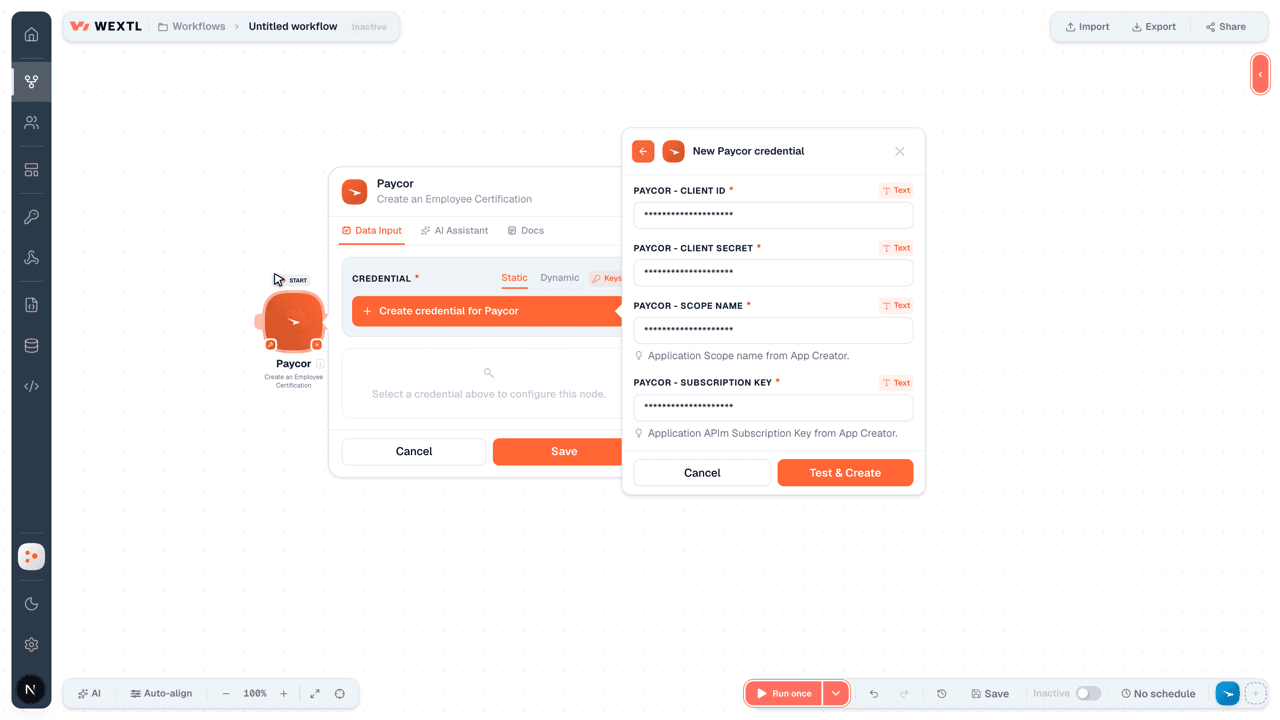
Paycor triggers and actions on WEXTL
The list below is a reference of every Paycor node module the integration supports. You will be able to pick any of them on the workflow canvas while building automations.
Browse every Paycor node module below. Each one opens to show its input parameters, outputs, and connection requirements.
Watch Events
TriggerInstant trigger for Paycor event subscriptions.
No fields documented.
Get a Candidate
ActionApplicant details: contact, hiring stage, status and origin.
| Field | Type |
|---|---|
Legal Entity IDRequired | choice |
ATS Account IDRequired | text |
ATS Job IDRequired | text |
ATS Candidate IDRequired | text |
| Field | Type |
|---|---|
| ID | text |
| Job ID | text |
| Ats account ID | text |
| text | |
| First name | text |
| Last name | text |
| Preferred name | text |
| Starting stage | number |
| Starting status | number |
| Stage | number |
| Status | number |
| Source | number |
| Mobile phone | number |
| Alt phone | number |
| Alt email | text |
| Address | text |
| Address 2 | text |
| City | text |
| State | text |
| Postal code | number |
3other output fields
Get a Person by Employee ID
ActionLinked person record with name, email and demographics.
| Field | Type |
|---|---|
Employee IDRequired | text |
| Include | choice |
| Field | Type |
|---|---|
| ID | text |
| Prefix | text |
| First name | text |
| Middle name | text |
| Last name | text |
| Suffix | text |
| Legal first name | text |
| Legal last name | text |
| Social security number | number |
| object | |
| Type | text |
| Email address | text |
| Demographic data | object |
| Birth date | text |
| Gender | text |
| Ethnicity | text |
| Marital status | text |
| Maiden name | text |
| Benefit data | object |
| Is tobacco user | boolean |
| Disability | text |
| Emergency contact data | array |
| Military data | object |
| Veteran | text |
| Discharge date | text |
| Is armed forces service medal veteran | boolean |
| Is disabled veteran | boolean |
| Is other protected veteran | boolean |
| Is recently separated veteran | boolean |
| Is vietnam era | boolean |
| Is special disabled | boolean |
| Social media data | array |
| Employee assignments | array |
| Addresses | array |
| Phones | array |
| Custom identifiers | array |
| Tenants | object |
| ID | text |
| URL | text |
Get a Person by Tenant and Person ID
ActionSingle person record from a tenant, with optional extra sections.
| Field | Type |
|---|---|
Tenant IDRequired | choice |
Person IDRequired | text |
| Include | array |
| Field | Type |
|---|---|
| ID | text |
| Prefix | text |
| First name | text |
| Middle name | text |
| Last name | text |
| Suffix | text |
| Legal first name | text |
| Legal last name | text |
| Social security number | number |
| object | |
| Type | text |
| Email address | text |
| Demographic data | object |
| Birth date | text |
| Gender | text |
| Ethnicity | text |
| Marital status | text |
| Maiden name | text |
| Benefit data | object |
| Is tobacco user | boolean |
| Disability | text |
| Emergency contact data | array |
| Military data | object |
| Veteran | text |
| Discharge date | text |
| Is armed forces service medal veteran | boolean |
| Is disabled veteran | boolean |
| Is other protected veteran | boolean |
| Is recently separated veteran | boolean |
| Is vietnam era | boolean |
| Is special disabled | boolean |
| Social media data | array |
| Employee assignments | array |
| Addresses | array |
| Phones | array |
| Custom identifiers | array |
| Tenants | object |
| ID | text |
| URL | text |
Get a Time Off Request
ActionA single time off request with hours and status.
| Field | Type |
|---|---|
Legal Entity IDRequired | choice |
Timeoff Request IDRequired | text |
| Field | Type |
|---|---|
| Legal entity ID | number |
| Time off request ID | text |
| Benefit code | text |
| Total hours | number |
| Days | array |
| Comment | text |
| Status | text |
| Created date | date |
| Status update time | date |
| Status update by employee ID | text |
| Created by employee ID | text |
| Employee ID | text |
Get an ATS Account Job
ActionOne ATS job with openings and priority.
| Field | Type |
|---|---|
Legal Entity IDRequired | choice |
ATS Account IDRequired | text |
ATS Job IDRequired | text |
| Include | choice |
| Field | Type |
|---|---|
| ID | text |
| Ats account ID | text |
| Number | number |
| Title | text |
| Description | text |
| Status | text |
| Openings | number |
| Priority | text |
| Confidential | boolean |
| Internal | boolean |
| Time to fill | number |
| Remote status | text |
| Eeo category | text |
| Pay range | object |
| Currency | text |
| Minimum | number |
| Maximum | number |
| Pay period | text |
| Ats location | object |
| ID | text |
| Address 1 | text |
| Address 2 | text |
| City | text |
| State | text |
| Postal code | number |
| Country | text |
| Ats department | object |
| ID | text |
| Title | text |
| Hiring managers | array |
| Recruiters | array |
| Team members | array |
| Executives | array |
9other output fields
Get an Employee Earning
ActionPay earning details with its code and frequency.
| Field | Type |
|---|---|
Employee IDRequired | text |
Employee Earning IDRequired | text |
| Include | choice |
| Field | Type |
|---|---|
| ID | text |
| Code | text |
| Description | text |
| Type | text |
| Frequency | text |
| Sequence number | number |
| Include in pay | text |
| On hold | boolean |
| Effective start date | date |
| Effective end date | date |
| Amount data | array |
| Employee | object |
| ID | text |
| URL | text |
| Legal entity earning | object |
| ID | text |
| URL | text |
Get ATS Account Jobs
SearchJobs listed under an ATS account, filtered by status.
| Field | Type |
|---|---|
Legal Entity IDRequired | choice |
ATS Account IDRequired | text |
| Include | array |
| Posted To Careers | boolean |
| Status | choice |
| Limit | number |
| Field | Type |
|---|---|
| ID | text |
| Job ID | text |
| Ats account ID | text |
| text | |
| First name | text |
| Last name | text |
| Preferred name | text |
| Starting stage | number |
| Starting status | number |
| Stage | number |
| Status | number |
| Source | number |
| Mobile phone | number |
| Alt phone | number |
| Alt email | text |
| Address | text |
| Address 2 | text |
| City | text |
| State | text |
| Postal code | number |
3other output fields
Get ATS Accounts
SearchAccount list with titles for a legal entity.
| Field | Type |
|---|---|
Legal Entity IDRequired | choice |
| Limit | number |
| Field | Type |
|---|---|
| ID | text |
| Title | text |
Get Candidates for a Job
SearchCandidates attached to one ATS job.
| Field | Type |
|---|---|
Legal Entity IDRequired | choice |
ATS Account IDRequired | text |
ATS Job IDRequired | text |
| Created or Modified Start Date | text |
| Created or Modified End Date | text |
| Limit | number |
| Field | Type |
|---|---|
| ID | text |
| Job ID | text |
| Ats account ID | text |
| text | |
| First name | text |
| Last name | text |
| Preferred name | text |
| Starting stage | number |
| Starting status | number |
| Stage | number |
| Status | number |
| Source | number |
| Mobile phone | number |
| Alt phone | number |
| Alt email | text |
| Address | text |
| Address 2 | text |
| City | text |
| State | text |
| Postal code | number |
3other output fields
Get Employee Certifications
SearchCertifications recorded for one employee, with issuer and dates.
| Field | Type |
|---|---|
Employee IDRequired | text |
| Limit | number |
| Field | Type |
|---|---|
| Certification ID | text |
| Certification name | text |
| Certification number | text |
| Certification organization name | text |
| Certification organization ID | text |
| Employee certification ID | text |
| Notes | text |
| Effective date | date |
| Expiration date | date |
Get Employee Custom Fields
SearchCustom field values stored on an employee.
| Field | Type |
|---|---|
Employee IDRequired | text |
| Limit | number |
| Field | Type |
|---|---|
| Custom field ID | text |
| Legal entity ID | number |
| Field name | text |
| Data type | text |
| Value | text |
| Is required | boolean |
| Custom fields options | array |
| Date modified | date |
| Employee | object |
| ID | text |
| URL | text |
Get Employee Earnings
SearchPay earnings with codes, types and frequencies.
| Field | Type |
|---|---|
Employee IDRequired | text |
Employee Earning IDRequired | text |
| Include | choice |
| Limit | number |
| Field | Type |
|---|---|
| ID | text |
| Code | text |
| Description | text |
| Type | text |
| Frequency | text |
| Sequence number | number |
| Include in pay | text |
| On hold | boolean |
| Effective start date | text |
| Effective end date | text |
| Amount data | array |
| Employee | object |
| ID | text |
| URL | text |
| Legal entity earning | object |
| ID | text |
| URL | text |
Get Employee Pay Rates
SearchHourly or salary rates with start and end dates.
| Field | Type |
|---|---|
Employee IDRequired | text |
| Limit | number |
| Field | Type |
|---|---|
| ID | text |
| Effective start date | date |
| Effective end date | date |
| Sequence number | number |
| Pay rate | number |
| Annual pay rate | number |
| Description | text |
| Annual hours | number |
| Type | text |
| Reason | text |
| Notes | text |
| Employees | object |
| ID | text |
| URL | text |
Get Employee Time Off Requests
SearchDate-ranged time off for one employee.
| Field | Type |
|---|---|
Employee IDRequired | text |
Start DateRequired | date |
End DateRequired | date |
| Limit | number |
| Field | Type |
|---|---|
| Legal entity ID | number |
| Time off request ID | text |
| Benefit code | text |
| Total hours | number |
| Days | array |
| Comment | text |
| Status | text |
| Created date | date |
| Status update time | date |
| Status update by employee ID | text |
| Created by employee ID | text |
| Employee ID | text |
Get Employees by Legal Entity ID
SearchFilterable employee list for a legal entity.
| Field | Type |
|---|---|
legal entity IDRequired | choice |
| Include | choice |
| Email Type | choice |
| Status Filter | choice |
| Employee Number | number |
| Last Name | text |
| Department Code | number |
| Work Location Name | text |
| Limit | number |
| Field | Type |
|---|---|
| ID | text |
| First name | text |
| Middle name | text |
| Last name | text |
| object | |
| Type | text |
| Email address | text |
| Employment date data | object |
| Hire date | date |
| Adjusted hire date | date |
| Termination date | date |
| Termination reason | text |
| Re hire date | date |
| Seniority date | date |
| Status data | object |
| Is full time | boolean |
| Status | text |
| Flsa | text |
| Type | text |
| Eligible for rehire | text |
| Work location | object |
| ID | text |
| Name | text |
| Street line 1 | text |
| Type | text |
| City | text |
| County | text |
| State | text |
| Zip code | text |
| Country | text |
| Earnings | object |
| ID | text |
| URL | text |
| Deductions | object |
| ID | text |
| URL | text |
| Taxes | object |
| ID | text |
| URL | text |
| Direct deposits | object |
| ID | text |
| URL | text |
| Pay rates | object |
| ID | text |
| URL | text |
| Legal entity | object |
| ID | text |
| URL | text |
| Person | object |
| ID | text |
| URL | text |
| Department | object |
| ID | text |
| URL | text |
| Position data | object |
| Job title | text |
| Job code | text |
| Effective start date | date |
| Effective end date | date |
| Pay group ID | text |
| Manager | object |
| Employee number | number |
| Alternate employee number | number |
| Badge number | number |
Get Employees by Tenant ID
SearchTenant employee list narrowed by status, department or job code.
| Field | Type |
|---|---|
Tenant IDRequired | choice |
| Status Filter | choice |
| Employee Number | number |
| Last Name | text |
| Department Code | number |
| Work Location Name | text |
| Job Code | text |
| Limit | number |
| Field | Type |
|---|---|
| ID | text |
| Employee number | number |
| First name | text |
| Middle name | text |
| Last name | text |
| Employee | object |
| ID | text |
| URL | text |
Get Employees in Onboarding
SearchOnboarding progress across a legal entity.
| Field | Type |
|---|---|
Legal Entity IDRequired | choice |
| Limit | number |
| Field | Type |
|---|---|
| Onboarding employee ID | text |
| Legal entity ID | number |
| First name | text |
| Last name | text |
| Full name | text |
| Email address | text |
| Invited date | date |
| Has onboarding access | boolean |
| Hire date | date |
| Steps total | number |
| Steps completed | number |
| Last employee step completed | number |
| Last employee step completed date | date |
| Last admin step completed | number |
| Last admin step completed date | date |
| Work location | text |
| Work location ID | text |
| Manager | text |
| Manager ID | text |
| Employee number | number |
Get I9 Delegate Users
SearchUsers who can act as I-9 delegates.
| Field | Type |
|---|---|
Legal Entity IDRequired | choice |
| Limit | number |
| Field | Type |
|---|---|
| I 9delegate user ID | text |
| Full name | text |
Get Persons by Legal Entity ID
SearchPeople under a legal entity, optionally with demographic and benefit data.
| Field | Type |
|---|---|
Legal Entity IDRequired | choice |
| Include | choice |
| Include Unpaid Workers Details | boolean |
| Limit | number |
| Field | Type |
|---|---|
| ID | text |
| Prefix | text |
| First name | text |
| Middle name | text |
| Last name | text |
| Suffix | text |
| Legal first name | text |
| Legal last name | text |
| Social security number | number |
| object | |
| Type | text |
| Email address | text |
| Demographic data | object |
| Birth date | text |
| Gender | text |
| Ethnicity | text |
| Marital status | text |
| Maiden name | text |
| Benefit data | object |
| Is tobacco user | boolean |
| Disability | text |
| Emergency contact data | array |
| Military data | object |
| Veteran | text |
| Discharge date | text |
| Is armed forces service medal veteran | boolean |
| Is disabled veteran | boolean |
| Is other protected veteran | boolean |
| Is recently separated veteran | boolean |
| Is vietnam era | boolean |
| Is special disabled | boolean |
| Social media data | array |
| Employee assignments | array |
| Addresses | array |
| Phones | array |
| Custom identifiers | array |
| Tenants | object |
| ID | text |
| URL | text |
Get Persons by Tenant ID
SearchPerson records across a tenant.
| Field | Type |
|---|---|
Tenant IDRequired | choice |
| Limit | number |
| Field | Type |
|---|---|
| ID | text |
| Prefix | text |
| First name | text |
| Middle name | text |
| Last name | text |
| Suffix | text |
| Person | object |
| ID | text |
| URL | text |
| Legal entity ID | text |
Get Time Off Requests by Legal Entity
SearchTime off entries within a date range, with hours and status.
| Field | Type |
|---|---|
Legal Entity IDRequired | choice |
Start DateRequired | date |
End DateRequired | date |
| Limit | number |
| Field | Type |
|---|---|
| Legal entity ID | number |
| Time off request ID | text |
| Benefit code | text |
| Total hours | number |
| Days | array |
| Comment | text |
| Status | text |
| Created date | date |
| Status update time | date |
| Status update by employee ID | text |
| Created by employee ID | text |
| Employee ID | text |
Get Unpaid Employee Pay Rates
SearchRates for unpaid workers, with currency and frequency.
| Field | Type |
|---|---|
Employee IDRequired | text |
| Limit | number |
| Field | Type |
|---|---|
| Employee ID | text |
| Pay rate ID | text |
| Assignment ID | text |
| Sequence | number |
| Currency code | text |
| Rate | number |
| Annual rate | number |
| Description | text |
| Type | text |
| Pay frequency | text |
| Effective start date | date |
| Effective end date | date |
| Notes | text |
Add an Employee Earning
ActionPay earning attached to one employee.
| Field | Type |
|---|---|
Employee IDRequired | text |
CodeRequired | text |
Amount DataRequired | array |
| Frequency | choice |
| Sequence Number | number |
| Include In Pay | choice |
| On Hold | boolean |
| Calculate Until | date |
| Field | Type |
|---|---|
| ID | text |
| URL | text |
Add an Employee Pay Rate
ActionNew rate with its start date and an optional end date.
| Field | Type |
|---|---|
Employee IDRequired | text |
Effective Start DateRequired | date |
Sequence NumberRequired | number |
DescriptionRequired | text |
| Effective End Date | date |
| Pay Rate | number |
| Annual Pay Rate | number |
| Type | choice |
| Reason | text |
| Notes | text |
| Field | Type |
|---|---|
| ID | text |
| URL | text |
Create a Time Off Request
ActionFiles time off requests for employees.
| Field | Type |
|---|---|
Legal Entity IDRequired | choice |
Time OffsRequired | array |
Employee IDRequired | text |
Time Off Type IDRequired | text |
StatusRequired | choice |
DaysRequired | choice |
| Comment | text |
| Field | Type |
|---|---|
| ID | text |
| URL | text |
Create an ATS Candidate
ActionApplicant record for a job in an ATS account.
| Field | Type |
|---|---|
Legal Entity IDRequired | choice |
Job IDRequired | text |
ATS Account IDRequired | text |
EmailRequired | |
First NameRequired | text |
Last NameRequired | text |
StageRequired | number |
StatusRequired | number |
SourceRequired | text |
| Preferred Name | text |
| Starting Stage | number |
| Starting Status | number |
| Mobile Phone | text |
| Alternate Phone | text |
| Alternate Email | |
| Address | text |
| Address 2 | text |
| City | text |
| State | text |
| Postal Code | text |
1other input field
| Field | Type |
|---|---|
| ID | text |
| URL | text |
Create an Employee
ActionNew employee record with personal and employment details.
| Field | Type |
|---|---|
Legal Entity IDRequired | choice |
First NameRequired | text |
Last NameRequired | text |
Hire DateRequired | date |
StatusRequired | choice |
Paygroup DescriptionRequired | text |
Department CodeRequired | number |
Primary AddressRequired | object |
| Prefix | choice |
| Middle Name | text |
| Suffix | choice |
| Home Email | |
| Work Email | |
| Phones | array |
| Social Security Number | text |
| Birth Date | date |
| Gender | choice |
| Ethnicity | choice |
| Marital Status | choice |
| Work Location | text |
9other input fields
| Field | Type |
|---|---|
| ID | text |
| URL | text |
Create an Employee Certification
ActionCertification entry stored against an employee.
| Field | Type |
|---|---|
Employee IDRequired | text |
Certification NameRequired | text |
| Effective Date | date |
| Expiration Date | date |
| Certification Number | text |
| Certification Organization Name | text |
| Notes | text |
| Field | Type |
|---|---|
| ID | text |
| URL | text |
Create an Onboarding Employee
ActionStarts onboarding for a new hire.
| Field | Type |
|---|---|
Legal Entity IDRequired | choice |
First NameRequired | text |
Last NameRequired | text |
Home Email AddressRequired | text |
| Exported By Email Address | |
| Preferred Name | text |
| Country Code | text |
| ZIP Code | text |
| State | text |
| City | text |
| Address 1 | text |
| Address 2 | text |
| Mobile Phone | text |
| Home Phone | text |
| Gender | choice |
| Ethnicity | choice |
| Veteran Status | choice |
| Start Date | date |
| Job Title | text |
| Department Code | text |
10other input fields
| Field | Type |
|---|---|
| ID | text |
| URL | text |
Delete a Time Off Request
ActionDeletes time off entries in Paycor.
| Field | Type |
|---|---|
Legal Entity IDRequired | choice |
Time OffsRequired | array |
| Time Off Request ID | text |
| Field | Type |
|---|---|
| ID | text |
| URL | text |
Make an API Call
universalDirect Paycor REST API access for uncovered endpoints.
| Field | Type |
|---|---|
MethodRequired | choice |
| Headers | array |
| Header | object |
| Query String | array |
| Parameter | object |
| Body | text |
| Field | Type |
|---|---|
| Body | text |
| Headers | object |
| Status code | number |
Queue a Report Export
ActionReport file export requested through a template.
| Field | Type |
|---|---|
Legal Entity IDRequired | choice |
User IDRequired | text |
Parent Template IDRequired | text |
| Template ID | text |
| Export File Type | choice |
| Export PDF Format | choice |
| Destination URI | text |
Update a Time Off Request
ActionEdits the status of time off requests.
| Field | Type |
|---|---|
Time Off Request IDRequired | text |
Employee IDRequired | text |
Time OffsRequired | array |
StatusRequired | choice |
| Time Off Request ID | text |
| Comment | text |
| Field | Type |
|---|---|
| ID | text |
| URL | text |
Update an Employee
ActionEdits personal details on an employee.
| Field | Type |
|---|---|
Employee IDRequired | text |
| Prefix | choice |
| Suffix | choice |
| Gender | choice |
| Veteran Status | choice |
| Disability Status | choice |
| Marital Status | choice |
| Ethnicity | choice |
| First Name | text |
| Last Name | text |
| Middle Name | text |
| Social Security Number | text |
| Birth Date | date |
| Field | Type |
|---|---|
| ID | text |
| URL | text |
Update an Employee Certification
ActionChanged number, dates or notes on a stored certification.
| Field | Type |
|---|---|
Employee IDRequired | text |
Employee Certification IDRequired | text |
| Certification Number | text |
| Effective Date | date |
| Expiration Date | date |
| Notes | text |
| Field | Type |
|---|---|
| ID | text |
| URL | text |
Update an Employee Earning
ActionEdits an earning with new amounts or frequency.
| Field | Type |
|---|---|
Employee IDRequired | text |
IDRequired | text |
CodeRequired | text |
Amount DataRequired | array |
| Frequency | choice |
| Sequence Number | number |
| Include In Pay | choice |
| On Hold | boolean |
| Calculate Until | date |
| Field | Type |
|---|---|
| ID | text |
| URL | text |
Update an Employee Pay Rate
ActionRevised rate with new dates, amount or notes.
| Field | Type |
|---|---|
Employee IDRequired | text |
Payrate IDRequired | text |
Effective Start DateRequired | date |
Pay RateRequired | number |
DescriptionRequired | text |
| Sequence Number | number |
| Annual Pay Rate | number |
| Type | choice |
| Reason | text |
| Notes | text |
| Field | Type |
|---|---|
| ID | text |
| URL | text |
Templates
Look for Paycor templates in the WEXTL template library.
Browse templates →Other HR integrations on WEXTL
 7Shifts[2]Restaurant employee scheduling, time tracking, and team management.
 AladtecWorkforce scheduling and timekeeping for public safety and healthcare teams.
 AchieversEmployee recognition and engagement platform for celebrations, rewards, and newsfeeds.
 BeameryTalent lifecycle CRM for recruiting, talent pooling, campaigns, and workforce planning.
 BrightHRHR software for small businesses covering people, absence, and time tracking.
References
- WEXTL® Paycor Source Code connector implementation.
- Our users use cases and automations.
- Official API Documentation for Paycor.
- WEXTL® visual workflow builder data.
Last updated: Oct 10, 2026 23:59
How we write our apps documentation
How we compile these docs: sources, the role of AI, and how we verify.