


Requirements
PerformYard requires an active account and an API access token from your account settings to connect — both are set up on its own site.[3]
Get your PerformYard credentials
Connect PerformYard in WEXTL
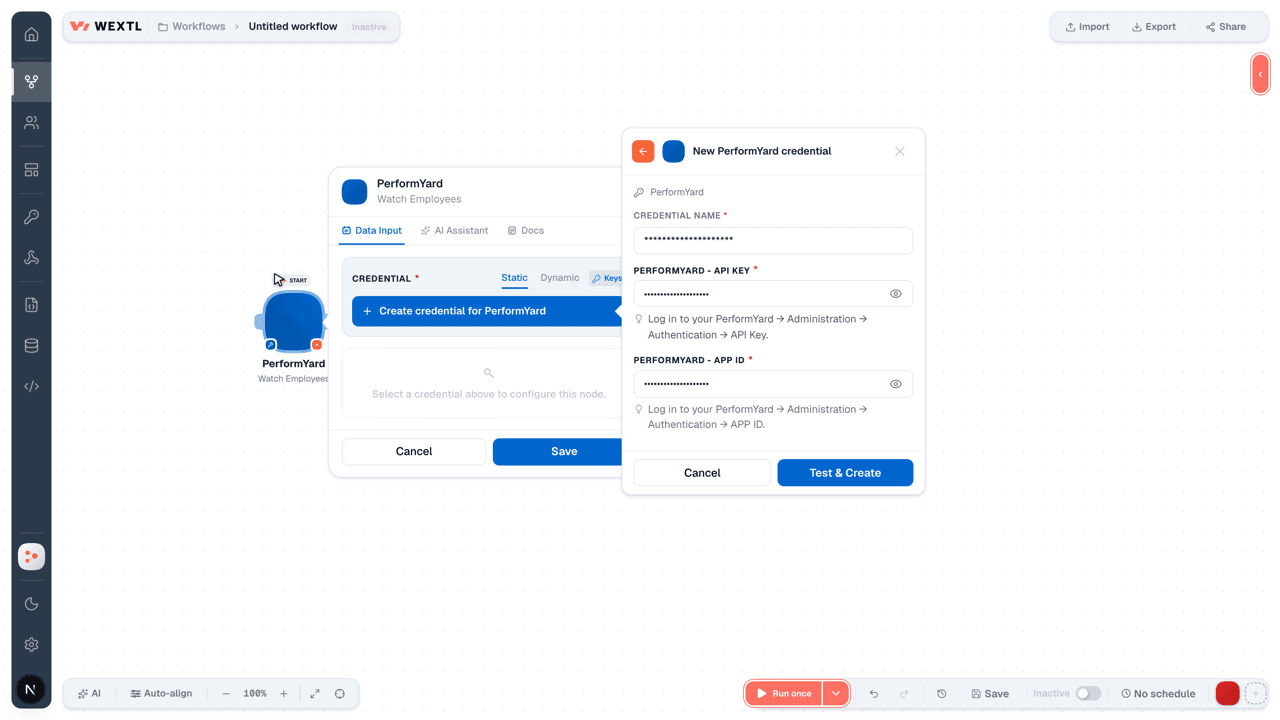
- Log in to your WEXTL account, add the PerformYard node module to your workflow, and click Create new credential.
- Optional: In the Credential name field, enter a name for the credential.
- Enter the authentication credentials you copied from your PerformYard account, or follow the on-screen instructions to create the credential.
- If prompted, authenticate your account and confirm access.
- If you want to make changes to your credential in the future, follow the steps in Manage credentials →

Notes
Credentials are org-scoped; share them with teammates from the Credentials picker on any of its nodes.For detailed information on connecting an application, see Connect an application →
PerformYard node modules
The list below is a reference of every PerformYard node module the integration supports. You will be able to pick any of them on the workflow canvas while building automations.
Browse every PerformYard node module below — each one opens to show its input parameters, outputs, and connection requirements.
Watch EmployeesTrigger
Output fields[3]
| Field | Type |
|---|---|
| ID | text |
| Name | text |
| text | |
| Phone | text |
| Job title | text |
| Manager | object |
| Name | text |
| text | |
| Contributors | array |
| Group | object |
| Name | text |
| Termination date | date |
| Permission level | text |
| Employee status | text |
| Custom fields | array |
| Hire date | date |
Watch GoalsTrigger
Output fields[3]
| Field | Type |
|---|---|
| Is top | boolean |
| Start date | date |
| Categories | array |
| Initial value | number |
| Transparency | text |
| Sharers | array |
| Target | number |
| Name | text |
| Description | text |
| Seen by | array |
| Value | number |
| Assignee | array |
| Last update | date |
| Units | text |
| Status | text |
| Deleted | boolean |
| End date | date |
| Outlook | object |
| Name | text |
| Color | text |
| Goal weight | number |
| Checklist | array |
1other output field
Get a GoalAction
Input fields[3]
| Field | Type |
|---|---|
Goal IDRequired | choice |
Output fields[3]
| Field | Type |
|---|---|
| Is top | boolean |
| Start date | date |
| Categories | array |
| Initial value | number |
| Transparency | text |
| Sharers | array |
| Target | number |
| Name | text |
| Description | text |
| Seen by | array |
| Value | number |
| Assignee | array |
| Last update | date |
| Units | text |
| Status | text |
| Deleted | boolean |
| End date | date |
| Outlook | object |
| Name | text |
| Color | text |
| Goal weight | number |
| Checklist | array |
1other output field
Get a ReportAction
Get an EmployeeAction
List Employee Data FieldsSearch
List EmployeesSearch
Input fields[3]
| Field | Type |
|---|---|
| Sort | text |
| Employee Status | choice |
| Permission Level | choice |
| Include All Data Fields | boolean |
| Limit | number |
Output fields[3]
| Field | Type |
|---|---|
| ID | text |
| Name | text |
| Phone | text |
| Job title | text |
| Manager | object |
| Name | text |
| Contributors | array |
| Group | object |
| Name | text |
| Termination date | date |
| Permission level | text |
| Employee status | text |
| Custom fields | array |
| Hire date | date |
List Goal CategoriesSearch
List Goal OutlooksSearch
List GoalsSearch
Input fields[3]
| Field | Type |
|---|---|
| Name | text |
| Category | text |
| Transparency | choice |
| Goal Status | choice |
| Sort | text |
| Outlook | text |
| Limit | number |
Output fields[3]
| Field | Type |
|---|---|
| Is top | boolean |
| Start date | date |
| Categories | array |
| Initial value | number |
| Transparency | text |
| Sharers | array |
| Target | number |
| Name | text |
| Description | text |
| Seen by | array |
| Value | number |
| Assignee | array |
| Last update | date |
| Units | text |
| Status | text |
| Deleted | boolean |
| End date | date |
| Outlook | object |
| Name | text |
| Color | text |
| Goal weight | number |
| Checklist | array |
1other output field
List ReportsSearch
List Review TemplatesSearch
List ReviewsSearch
Add an Employee to a Review CycleAction
Create a GoalAction
Input fields[3]
| Field | Type |
|---|---|
NameRequired | text |
AssignmentRequired | array |
| Assignment | text |
TransparencyRequired | text |
TargetRequired | number |
Start DateRequired | date |
| Units | text |
| Due Date | date |
| Is Top Level | boolean |
| Description | text |
| Categories | array |
| Category | text |
| Goal Weight | number |
| Alignment | text |
| Checklist Updates Goal Progress | boolean |
Output fields[3]
| Field | Type |
|---|---|
| Message | text |
| Ids | array |
Create a ReviewAction
Input fields[3]
| Field | Type |
|---|---|
Subject IDRequired | text |
Template IDRequired | choice |
Start DateRequired | text |
| Start Time | choice |
Output fields[3]
| Field | Type |
|---|---|
| Is top | boolean |
| Start date | date |
| Categories | array |
| Initial value | number |
| Transparency | text |
| Sharers | array |
| Target | number |
| Name | text |
| Description | text |
| Seen by | array |
| Value | number |
| Assignee | array |
| Last update | date |
| Units | text |
| Status | text |
| Deleted | boolean |
| End date | date |
| Outlook | object |
| Name | text |
| Color | text |
| Goal weight | number |
| Checklist | array |
1other output field
Create an EmployeeAction
Make an API Calluniversal
Update a GoalAction
Update an EmployeeAction
Update Goal ProgressAction
Templates
Look for PerformYard templates in the WEXTL template library.
Browse templates →Explore alternative apps
- BuddyPunch[2]Employee time clock and attendance tracking for hourly teams.
- CalamariHR leave, attendance, and timesheet management for growing teams.
- BrioHRHR management platform for employee data, leave, payroll-ready records, and people operations.
- Base.vnWorkplace suite for HR, requests, meetings, time off, and team operations.
- Breathe HRCloud HR software for employee records, leave, onboarding, and people management.


References
- WEXTL® PerformYard Source Code connector implementation.
- Our users use cases and automations.
- Official API Documentation for PerformYard.
- WEXTL® visual workflow builder data.
Last updated: Jul 24, 2026 18:12