


Requirements
Connecting Darwinbox takes an active account plus an API access token from your account settings — no other setup is required.[3]
Get your Darwinbox credentials
- SubdomaintextRequired
Your subdomain. For example, if your portal URL is 'company.darwinbox.in', enter 'company'.
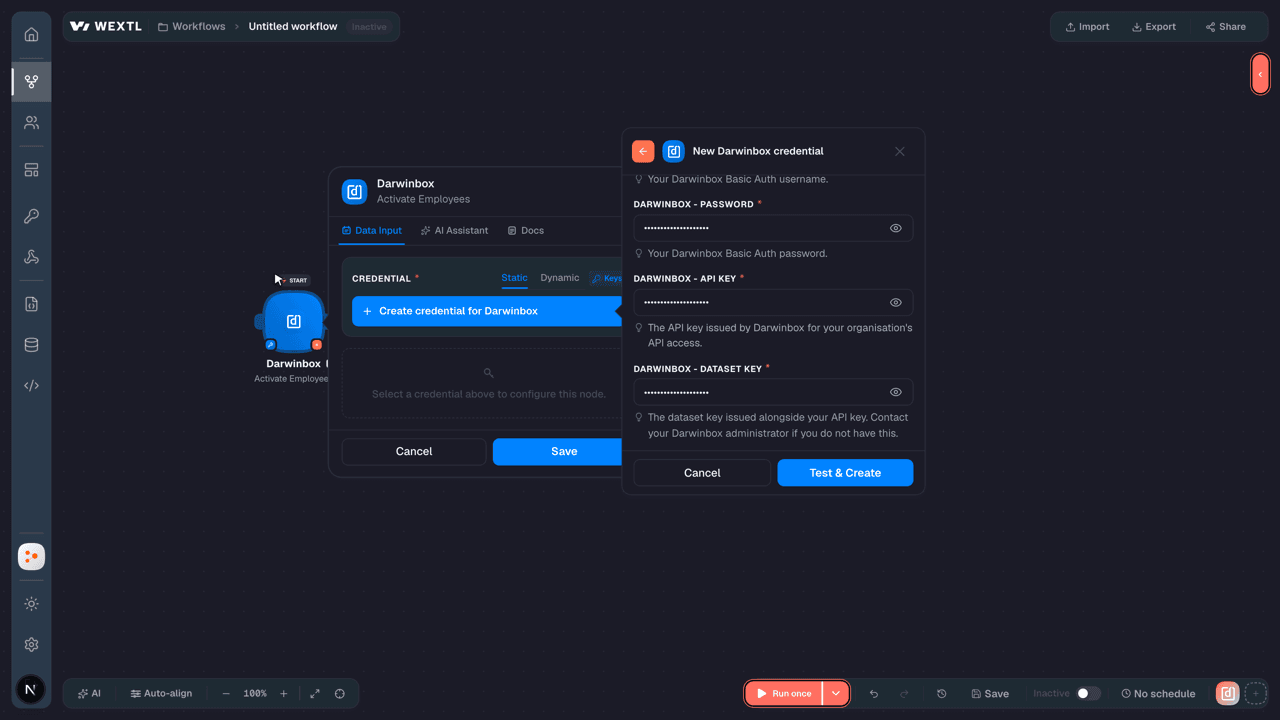
[1] - UsernametextRequired
Your Basic Auth username.
[1] - PasswordpasswordRequired
Your Basic Auth password.
[1] - API KeypasswordRequired
The API key issued by Darwinbox for your organisation's API access.
[1] - Dataset KeypasswordRequired
The dataset key issued alongside your API key. Contact your administrator if you do not have this.
[1]
Connect Darwinbox in WEXTL
- Log in to your WEXTL account, add the Darwinbox node module to your workflow, and click Create new credential.
- Optional: In the Credential name field, enter a name for the credential.
- Enter the authentication credentials you copied from your Darwinbox account, or follow the on-screen instructions to create the credential.
- If prompted, authenticate your account and confirm access.
- If you want to make changes to your credential in the future, follow the steps in Manage credentials →

Notes
Credentials are org-scoped; share them with teammates from the Credentials picker on any of its nodes.For detailed information on connecting an application, see Connect an application →
Darwinbox node modules
The list below is a reference of every Darwinbox node module the integration supports. You will be able to pick any of them on the workflow canvas while building automations.
Expand any Darwinbox node module below to see exactly what it takes in, what it returns, and what connection it needs.
Get a CTC BreakupAction
Get a Redemption BalanceAction
Get Attendance for a Date RangeAction
Get BGV DetailsAction
Get Bulk CandidatesSearch
| Field | Type |
|---|---|
| Created From | date |
| Created To | date |
| Updated From | date |
| Updated To | date |
| Candidate ID | array |
| Candidate ID | choice |
| Job ID | choice |
| Limit | number |
| Field | Type |
|---|---|
| Unique ID | text |
| Candidate ID | text |
| Firstname | text |
| Lastname | text |
| Phone | text |
| Job ID | text |
| Status | text |
| Source type | text |
| Source name | text |
| Tags | array |
| Created date | text |
| Application data | object |
| Biographical | object |
| Contact | object |
| Work experience | array |
| References | array |
| Professional references | array |
Get Daily AttendanceAction
Get Deleted EmployeesAction
Get Employees by Activation DateAction
| Field | Type |
|---|---|
| Date of Activation | date |
Get Employees by IDsAction
| Field | Type |
|---|---|
Employee IDsRequired | array |
| Employee ID | choice |
Get Employees by IDs and DateAction
| Field | Type |
|---|---|
| Employee IDs | array |
| Employee ID | choice |
| Last Modified Date | date |
Get Job DetailsAction
Get Monthly AttendanceAction
List BGV CandidatesSearch
| Field | Type |
|---|---|
BGV IDRequired | text |
| Application Form Updated From | date |
| Application Form Updated To | date |
| BGV Status | choice |
| Get All Approved List | choice |
| Limit | number |
| Field | Type |
|---|---|
| Unique ID | text |
| Candidate ID | text |
| Employee ID | text |
| Candidate name | text |
| Employee status | text |
| Bgv status | text |
| Pending with | text |
| Application form submitted on | text |
| Application form created on | text |
| Application form updated on | text |
List EmployeesSearch
| Field | Type |
|---|---|
| Limit | number |
| Field | Type |
|---|---|
| Employee ID | text |
| First name | text |
| Last name | text |
| Department name | text |
| Direct manager employee ID | text |
| Designation name | text |
| Office country | text |
| Date of joining | text |
| Date of exit | text |
| Employee type | text |
| Company email ID | text |
| Office mobile no | text |
| Middle name | text |
| L 2 manager employee ID | text |
| Grade | text |
| Band | text |
| Office area | text |
| Date of activation | text |
| Latest modified any attribute | text |
| Confirmation status | text |
List JobsSearch
| Field | Type |
|---|---|
| Updated From | date |
| Limit | number |
| Field | Type |
|---|---|
| Job ID | text |
| Job code | text |
| Group company | text |
| Parent department | text |
| Department | text |
| Division | text |
| Business unit | text |
| Location | array |
| Location city | array |
| Location country | text |
| Job title | text |
| Post on careers page | number |
| Post on refer page | number |
| Post on ijp page | number |
| Employee type | text |
| Job created timestamp | date |
| Job updated timestamp | date |
| Experience to | text |
| Experience from | text |
| Is remote | number |
Search Employees by DateAction
| Field | Type |
|---|---|
| Last Modified Date | date |
Activate EmployeesAction
Add a CandidateAction
| Field | Type |
|---|---|
Job IDRequired | choice |
First NameRequired | text |
Last NameRequired | text |
PhoneRequired | text |
EmailRequired | |
| Source | text |
| Referred By | text |
| Applicant Fields | object |
| Resume | url |
| Custom Field 1 | text |
| Custom Field 2 | text |
| Custom Field 3 | text |
| Custom Field 4 | text |
| Custom Field 5 | text |
| Custom Field 6 | text |
| Custom Field 7 | array |
| Custom Field 8 | text |
| Custom Field 9 | text |
| Field | Type |
|---|---|
| Status | number |
| Candidate ID | text |
| Message | text |
Add a Candidate TagAction
Add a PayslipAction
Add Extra PaymentsAction
Deactivate an EmployeeAction
Download a BGV FileAction
Download a Personal DocumentAction
Make an API Calluniversal
Perform a Leave ActionAction
Record Attendance PunchesAction
Redeem a TransactionAction
Reject a CandidateAction
Submit a BGV ReportAction
Templates
Look for Darwinbox templates in the WEXTL template library.
Browse templates →Explore alternative apps
- BuddyPunch[2]Employee time clock and attendance tracking for hourly teams.
- BrioHRHR management platform for employee data, leave, payroll-ready records, and people operations.
- Base.vnWorkplace suite for HR, requests, meetings, time off, and team operations.
- Breathe HRCloud HR software for employee records, leave, onboarding, and people management.
- CalamariHR leave, attendance, and timesheet management for growing teams.


References
- WEXTL® Darwinbox Source Code connector implementation.
- Our users use cases and automations.
- Official API Documentation for Darwinbox.
- WEXTL® visual workflow builder data.
Last updated: Jul 18, 2026 19:12