GymMaster icon

GymMaster Integration

Gym management platform for scheduling classes, managing memberships, and tracking member activity. Connect GymMaster availability and booking events to the tools that prepare your team for meetings. Start with Watch Available Class, then automatically run Get Answers or Get Class Attendees when schedules change.
3-day trialCancel anytimeUp to 10 minutes quick set up
  • GDPR
  • Data Encryption
  • 2FA
  • Local Data Region

Supported triggers and actions for GymMaster integration

Triggers can detect changes in GymMaster and run actions that can create, search or modify data inside GymMaster automatically [3] — exactly how you set them.

  • GymMaster icon
    Watch Available ClassTriggers when a new class becomes available for booking.
  • GymMaster icon
    Watch ChargesTriggers when a new charge is added to a member's account.
  • GymMaster icon
    Watch for Class SchedulesTriggers when a new class schedule is published or updated.
  • GymMaster icon
    Watch Member MeasurementsTriggers when a new body measurement is recorded for a member.
  • GymMaster icon
    Watch MembersTriggers when a new member is created or an existing member record is updated.
  • GymMaster icon
    Watch MembershipTriggers when a member's membership status changes (e.g. activated, cancelled).
  • GymMaster icon
    Watch MembershipsTriggers when a membership plan is created or modified.
  • GymMaster icon
    Watch Past BookingsTriggers when a booking is completed and moves to a member's past bookings.
  • GymMaster icon
    Watch ProductsTriggers when a product is added to or updated in the gym's catalog.
  • GymMaster icon
    Watch PromotionsTriggers when a new promotion or discount offer is created or activated.
  • GymMaster icon
    Watch Sales RepTriggers when a sales representative record is created or updated.
  • GymMaster icon
    Watch WorkoutsTriggers when a workout program is added or updated in the library.
  • GymMaster icon
    Get AnswersRetrieves a member's questionnaire answers by questionnaire ID.
  • GymMaster icon
    Get Class AttendeesRetrieves the list of members booked into a specific class session.
  • GymMaster icon
    Get Class SeatsRetrieves seat availability and capacity information for a class session.
  • GymMaster icon
    Get Member Account HistoryRetrieves the transaction and payment history for a member's account.
  • GymMaster icon
    Get Member Benefits BalanceRetrieves the remaining benefits balance for a member's membership.
  • GymMaster icon
    Get Member Communication PreferencesRetrieves a member's communication channel preferences (email, SMS, etc.).
  • GymMaster icon
    Get Member Daily VisitsRetrieves a member's daily visit history within a specified date range.
  • GymMaster icon
    Get Member Monthly VisitsRetrieves a member's aggregated visit counts grouped by month.

How to integrate GymMaster in automation workflow?

3 simple steps to make your GymMaster connected with other apps in automation workflows on WEXTL. Up to 10 minutes integration set up.

How GymMaster connects and integrates with WEXTL

Save and approve your credentials once — WEXTL® stores authorization information encrypted and reuses the authentication whenever GymMaster app is called in workflows. That allows your scheduling automations to run without your attention, per defined schedule [7]. Explore documentation [6] for a detailed list of fields that GymMaster supports.

The following table illustrates what fields GymMaster integration require during authorization flow inside our workflow builder [4].
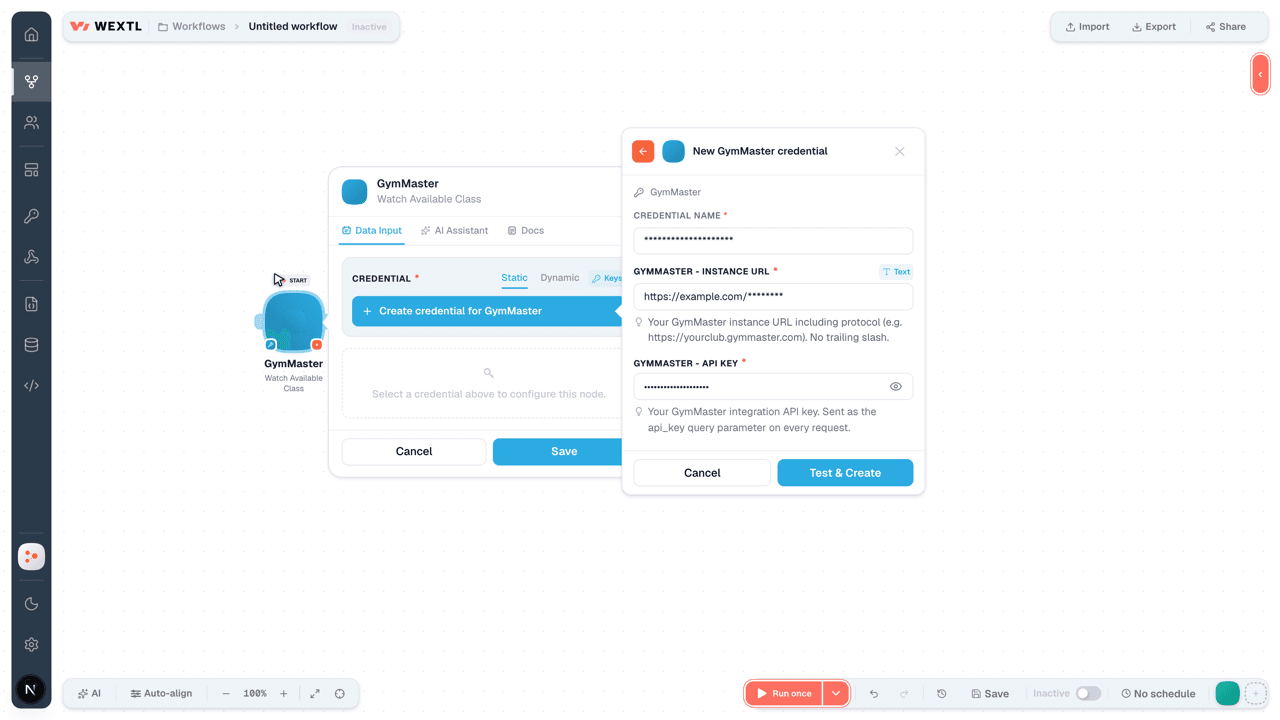
Video slide demonstrates how GymMaster is connected in WEXTL builder.

Video slide demonstrates how GymMaster is connected in WEXTL builder [4].

FieldTypeHelp
Instance URLRequired
text

Your instance URL including protocol (e.g. https://yourclub.gymmaster.com). No trailing slash.

API KeyRequired
password

Your integration API key. Sent as the api_key query parameter on every request.

Connect GymMaster to popular apps on WEXTL

Enter a name of the other app you want to sync with GymMaster below. Click on selected app to explore integration options with GymMaster. If the app you search for is not available in WEXTL yet, you can use HTTP node [10] instead to integrate it directly.

Example automation with GymMaster integration

Select Watch Member Measurements trigger from GymMaster - this will be a starting point in your automation. Whenever event happens in GymMaster, workflow will start [7] from Watch Member Measurements node.

Search for Get Member Account History, connect it as the next step of integration sequence. You can use filters between Watch Member Measurements and Get Member Account History, so only important data pass from Watch Member Measurements to the next step. WEXTL gives you full control over the process of GymMaster automation. All parts of workflow are visible on the canvas [4].

GymMaster on WEXTL has 73 modules for combining scheduling automations. Explore GymMaster documentation for more.
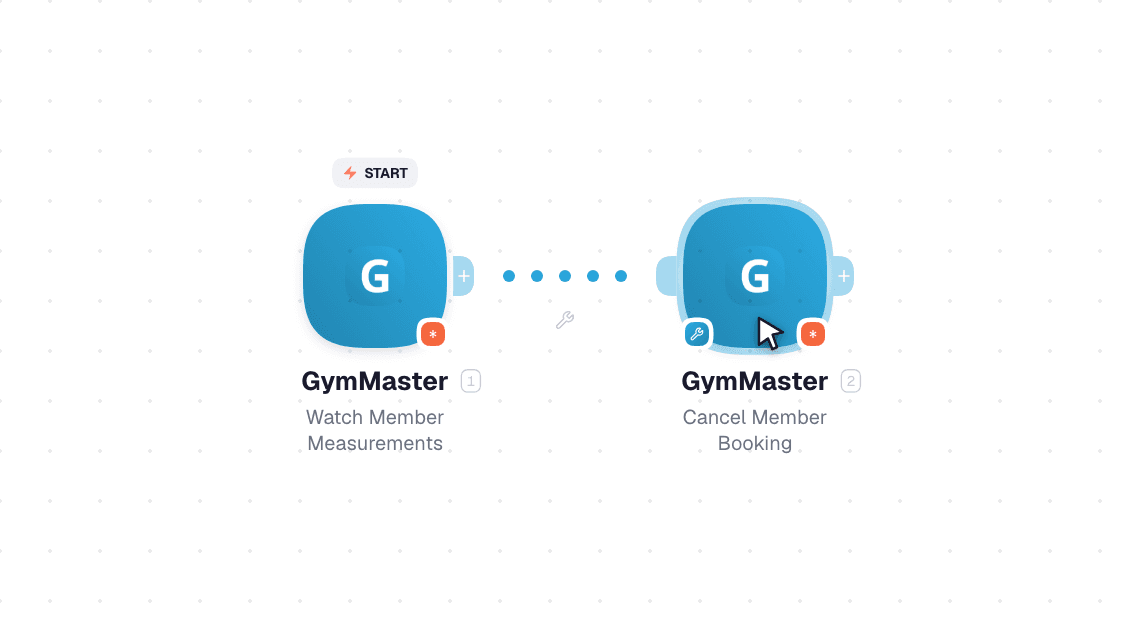
Video slide demonstrates how Watch Member Measurements and Get Member Account History nodes are used in GymMaster workflow.

Video slide demonstrates how Watch Member Measurements and Get Member Account History [6] nodes are used in GymMaster workflow.

Frequently asked questions

Common questions about automating GymMaster in your workflows.

Try GymMaster on WEXTL®

Claim your 3-day trial to build GymMaster integrations and access every WEXTL® feature.

Cancel anytime.

References

List of sources used to gather information about the GymMaster integration.

  1. GymMaster integration source code, module specs and credentials implementation.
  2. Internal GymMaster integration documentation, structured input and output parameters, scopes, and authentication methods.
  3. Official GymMaster vendor API documentation — used to verify field meanings, authentication flows, and anything our own specs don't fully capture.
  4. WEXTL® Visual Workflow Builder, anonymized data from our technical support team.
  5. WEXTL® Apps Library
  6. WEXTL® GymMaster App Documentation
  7. WEXTL® Workflow Scheduler
  8. WEXTL® HTTP node documentation