


Requirements
Before you set up the credential, make sure you have an active HiBob account and an API access token from your account settings ready.[3]
Get your HiBob credentials
- Service User IDtextRequired
- TokenpasswordRequired
Connect HiBob in WEXTL
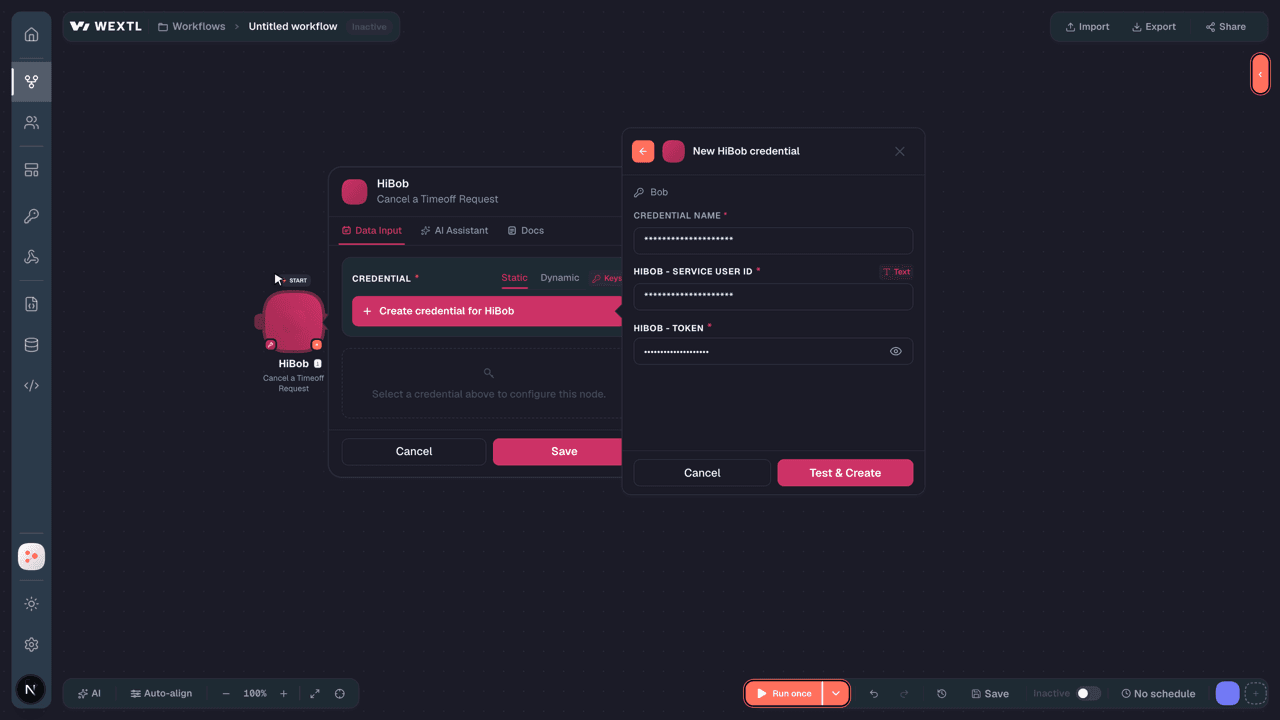
- Log in to your WEXTL account, add the HiBob node module to your workflow, and click Create new credential.Instant triggers use webhooks — click Create a webhook first when adding one, then create the credential.
- Optional: In the Credential name field, enter a name for the credential.
- Enter the authentication credentials you copied from your HiBob account, or follow the on-screen instructions to create the credential.
- If prompted, authenticate your account and confirm access.
- If you want to make changes to your credential in the future, follow the steps in Manage credentials →

Notes
Credentials are org-scoped; share them with teammates from the Credentials picker on any of its nodes.For detailed information on connecting an application, see Connect an application →
HiBob node modules
The list below is a reference of every HiBob node module the integration supports. You will be able to pick any of them on the workflow canvas while building automations.
Each HiBob node module below opens to reveal its input parameters, outputs, and connection requirements.
Watch EventsTrigger
Output fields[3]
| Field | Type |
|---|---|
| User ID | number |
| Email address | |
| Name | text |
| Date created | date |
Get a Time Off RequestAction
Input fields[3]
| Field | Type |
|---|---|
Employee IDRequired | choice |
Time Off Request IDRequired | text |
Output fields[3]
| Field | Type |
|---|---|
| Policy type display name | text |
| Attachment links | array |
| End date | text |
| Time zone offset | text |
| Approved by | text |
| Description | text |
| Type | text |
| Created on | date |
| Declined at | text |
| Approved | boolean |
| Has attachment | boolean |
| Request ID | number |
| Reason code | text |
| Duration unit | text |
| Decline reason | text |
| Total duration | number |
| Original request ID | text |
| Visibility | text |
| Employee ID | text |
| Declined by | text |
7other output fields
Get Actual PaymentsSearch
Get an EmployeeAction
Get Bank AccountsSearch
Get Employee DocumentsSearch
Get Employee TasksSearch
Input fields[3]
| Field | Type |
|---|---|
Employee IDRequired | choice |
| Task Status | choice |
| Limit | number |
Output fields[3]
| Field | Type |
|---|---|
| ID | number |
| Owner | object |
| ID | text |
| First name | text |
| Surname | text |
| text | |
| Display name | text |
| Title | text |
| Requested for | object |
| ID | text |
| First name | text |
| Surname | text |
| text | |
| Display name | text |
| Due | text |
| Link in bob | text |
| Set | text |
| Workflow | text |
| Ordinal in workflow | number |
| Description | text |
| Status | text |
| Completion date | text |
| Employee group ID | number |
| Company ID | number |
Get EmployeesSearch
Input fields[3]
| Field | Type |
|---|---|
| Field Path | choice |
| Filters | array |
| Field Path | text |
| Operator | choice |
| Values | array |
| Show Inactive | boolean |
| Limit | number |
Output fields[3]
| Field | Type |
|---|---|
| Full name | text |
| Display name | text |
| Creation date time | date |
| Work | object |
| Short start date | text |
| Start date | text |
| Manager | text |
| Tenure duration | text |
| Duration of employment | text |
| Reports to ID in company | text |
| Employee ID in company | text |
| Reports to | text |
| Tenure duration years | text |
| Department | text |
| Avatar URL | text |
| Second name | text |
| About | object |
| Food preferences | text |
| Superpowers | text |
| Hobbies | text |
| About | text |
| Avatar | text |
| Company ID | text |
| text | |
| Surname | text |
| Cover image URL | text |
| ID | text |
| First name | text |
Get Employment History for an EmployeeSearch
Input fields[3]
| Field | Type |
|---|---|
Employee IDRequired | choice |
| Limit | number |
Output fields[3]
| Field | Type |
|---|---|
| ID | number |
| Reason | text |
| Effective date | text |
| Personal working pattern type | text |
| Actual working pattern | object |
| Working pattern type | text |
| Days | object |
| Hours per day | number |
| Working pattern ID | number |
| Standard working pattern | text |
| Standard working pattern ID | text |
| Working pattern | text |
| Site working pattern | object |
| Working pattern type | text |
| Days | object |
| Hours per day | number |
| Working pattern ID | number |
| Hours in day not worked | number |
| Weekly hours | number |
| Fte | number |
| Calendar name | text |
| Calendar ID | number |
| Contract | text |
| Type | text |
| Salary pay type | text |
| End effective date | text |
| Active effective date | text |
| Is current | boolean |
5other output fields
Get Employment History for EmployeesSearch
Get Equities for an EmployeeSearch
Input fields[3]
| Field | Type |
|---|---|
Employee IDRequired | choice |
| Limit | number |
Output fields[3]
| Field | Type |
|---|---|
| ID | number |
| Reason | text |
| Effective date | text |
| Quantity | number |
| Equity type | text |
| Vesting commencement date | text |
| Consent number | text |
| Grant date | text |
| Option expiration | text |
| Exercise price | object |
| Value | number |
| Currency | text |
| Vesting term | text |
| Grant type | text |
| Vesting schedule | number |
| Grant number | number |
| Grant status | text |
Get Lifecycle History for EmployeesSearch
Get Payroll HistorySearch
Input fields[3]
| Field | Type |
|---|---|
| Department | text |
| Show Inactive | boolean |
| Limit | number |
Output fields[3]
| Field | Type |
|---|---|
| Full name | text |
| Display name | text |
| Creation date time | date |
| Work | object |
| Short start date | text |
| Start date | text |
| Manager | text |
| Tenure duration | text |
| Duration of employment | text |
| Reports to ID in company | text |
| Employee ID in company | text |
| Reports to | text |
| Tenure duration years | text |
| Department | text |
| Avatar URL | text |
| Second name | text |
| About | object |
| Food preferences | text |
| Superpowers | text |
| Hobbies | text |
| About | text |
| Avatar | text |
| Company ID | text |
| text | |
| Surname | text |
| Cover image URL | text |
| ID | text |
| First name | text |
| Payroll | object |
| Employment type | object |
Get PositionsSearch
Input fields[3]
| Field | Type |
|---|---|
FieldsRequired | array |
| Field ID | text |
FiltersRequired | array |
| Include Human Readable | boolean |
Output fields[3]
| Field | Type |
|---|---|
| /position/fte | object |
| Human readable | text |
| Value | number |
| /position/effective date | object |
| Human readable | text |
| Value | text |
| /position/end effective date | object |
| Human readable | text |
| Value | text |
| /position/employment type | object |
| Human readable | text |
| Value | text |
| /position/status | object |
| Human readable | text |
| Value | text |
| /position/actual start date | object |
| Human readable | text |
| Value | text |
| /position/reason | object |
| Human readable | text |
| Value | text |
| /position/position type | object |
| Human readable | text |
| Value | text |
| /position/filled by | object |
| Human readable | text |
| Value | text |
| /position/job | object |
| Human readable | text |
| Value | number |
| /position/job profile | object |
| Human readable | text |
| Value | number |
| /position/recruitment status | object |
| Human readable | text |
| Value | text |
| /position/name | object |
| Human readable | text |
| Value | text |
| /position/department | object |
| Human readable | text |
| Value | text |
| /position/site | object |
| Human readable | text |
| Value | number |
| /position/expected start date | object |
| Human readable | text |
| Value | text |
| /position/manager position ID | object |
| Human readable | text |
| Value | number |
| /position/manager position filled by | object |
| Human readable | text |
| Value | number |
| /position/has open requests | object |
| Human readable | text |
| Value | text |
| /position/modification date | object |
| Human readable | text |
| Value | text |
5other output fields
Get Salary History for an EmployeeSearch
Input fields[3]
| Field | Type |
|---|---|
Employee IDRequired | choice |
Output fields[3]
| Field | Type |
|---|---|
| Can be deleted | boolean |
| Work change type | text |
| Change | object |
| Reason | text |
| Changed by | text |
| Changed by ID | text |
| Pay frequency | text |
| Creation date | date |
| Is current | boolean |
| Modification date | date |
| ID | number |
| End effective date | text |
| Active effective date | text |
| Custom columns | object |
| Base | object |
| Value | number |
| Currency | text |
| Pay period | text |
| Effective date | text |
Get Salary History for EmployeesSearch
Get TasksSearch
Input fields[3]
| Field | Type |
|---|---|
| Field Path | choice |
| Filters | array |
| Field Path | text |
| Operator | choice |
| Values | array |
| Show Inactive | boolean |
| Limit | number |
Output fields[3]
| Field | Type |
|---|---|
| ID | number |
| Owner | object |
| ID | text |
| First name | text |
| Surname | text |
| text | |
| Display name | text |
| Title | text |
| Requested for | object |
| ID | text |
| First name | text |
| Surname | text |
| text | |
| Display name | text |
| Due | text |
| Link in bob | text |
| Set | text |
| Workflow | text |
| Ordinal in workflow | number |
| Description | text |
| Status | text |
| Completion date | text |
| Employee group ID | number |
| Company ID | number |
Get Timeoff RequestsSearch
Input fields[3]
| Field | Type |
|---|---|
SinceRequired | date |
| To | date |
| Include Pending | boolean |
Output fields[3]
| Field | Type |
|---|---|
| Change type | text |
| Employee ID | text |
| Employee display name | text |
| Employee email | text |
| Request ID | number |
| Original request ID | text |
| Previous request ID | text |
| Policy type display name | text |
| Type | text |
| Created on | date |
| Duration unit | text |
| Total duration | number |
| Total cost | number |
| Change reason | text |
| Visibility | text |
| Start date | text |
| End date | text |
| Time zone | text |
| Durations | array |
Get Training Records for an EmployeeSearch
Get Variable Payments for an EmployeeSearch
Input fields[3]
| Field | Type |
|---|---|
Employee IDRequired | choice |
| Limit | number |
Output fields[3]
| Field | Type |
|---|---|
| ID | number |
| Effective date | text |
| End effective date | text |
| Is current | boolean |
| Can be deleted | boolean |
| Amount | object |
| Value | number |
| Currency | text |
| Department percent | number |
| Individual percent | number |
| Payout type | text |
| Variable type | text |
| Payment period | text |
| Creation date | date |
| End date | text |
| Modification date | text |
| Percentage of annual salary | number |
| Company percent | number |
| Custom columns | object |
| Change | object |
| Reason | text |
| Changed by | text |
| Changed by ID | text |
Get Work History for an EmployeeSearch
Get Work History for EmployeesSearch
Cancel a PositionAction
Input fields[3]
| Field | Type |
|---|---|
Position IDRequired | text |
Cancel a Timeoff RequestAction
Input fields[3]
| Field | Type |
|---|---|
Employee IDRequired | choice |
Time Off Request IDRequired | text |
Create a Bank AccountAction
Input fields[3]
| Field | Type |
|---|---|
Employee IDRequired | choice |
Bank Account TypeRequired | choice |
Routing NumberRequired | text |
Account NumberRequired | text |
Bank NameRequired | text |
| Account Nickname | text |
| Branch Address | text |
| BIC or SWIFT | text |
| IBAN | text |
| Allocation | choice |
| Amount | number |
| Use For Bonus | boolean |
Create a PositionAction
Create a Salary Work EntryAction
Input fields[3]
| Field | Type |
|---|---|
Employee IDRequired | choice |
BaseRequired | object |
ValueRequired | number |
CurrencyRequired | text |
Pay PeriodRequired | choice |
Effective DateRequired | date |
| Work Change Type | text |
| Change | object |
| Reason | text |
| Changed By | text |
| Changed By ID | text |
| Pay Frequency | choice |
| Creation Date | date |
| Is Current | boolean |
| Modification Date | date |
| ID | number |
| End Effective Date | date |
| Active Effective Date | date |
| Custom Columns | array |
| Key | text |
| Value | text |
Create a Training RecordAction
Input fields[3]
| Field | Type |
|---|---|
Employee IDRequired | choice |
| Cost | object |
ValueRequired | number |
CurrencyRequired | text |
| ID | number |
| Name | text |
| Description | text |
| Status | text |
| Frequency | choice |
| Start Date | date |
| End Date | date |
| Document ID | number |
| Custom Columns | object |
| New Key | text |
Create a Variable PaymentAction
Input fields[3]
| Field | Type |
|---|---|
Employee IDRequired | choice |
Effective DateRequired | date |
AmountRequired | object |
ValueRequired | number |
CurrencyRequired | text |
Variable TypeRequired | text |
Payment PeriodRequired | choice |
| Company Percent | number |
| Department Percent | number |
| Individual Percent | number |
| Reason | text |
Create a Work EntryAction
Input fields[3]
| Field | Type |
|---|---|
Employee IDRequired | choice |
Effective DateRequired | date |
| Site | text |
| Site ID | number |
| Work Entry ID | number |
| Reason | text |
| Job Title | text |
| Department | text |
| Reports To | object |
Manager's Employee IDRequired | text |
| First Name | text |
| Surname | text |
| Display Name | text |
| Custom Columns | array |
| Key | text |
| Value | text |
Create an EmployeeAction
Input fields[3]
| Field | Type |
|---|---|
First NameRequired | text |
SurnameRequired | text |
EmailRequired | |
| Work | object |
SiteRequired | text |
Start DateRequired | date |
Output fields[3]
| Field | Type |
|---|---|
| Full name | text |
| Display name | text |
| Creation date time | date |
| Work | object |
| Short start date | text |
| Start date | text |
| Manager | text |
| Tenure duration | text |
| Duration of employment | text |
| Reports to ID in company | text |
| Employee ID in company | text |
| Reports to | text |
| Tenure duration years | text |
| Department | text |
| Avatar URL | text |
| Second name | text |
| About | object |
| Food preferences | text |
| Superpowers | text |
| Hobbies | text |
| About | text |
| Avatar | text |
| Company ID | text |
| text | |
| Surname | text |
| Cover image URL | text |
| ID | text |
| First name | text |
Create an Employee EntryAction
Input fields[3]
| Field | Type |
|---|---|
Employee IDRequired | choice |
Effective DateRequired | date |
| ID | number |
| Reason | text |
| Personal Working Pattern Type | text |
| Actual Working Pattern | choice |
| Standard Working Pattern | array |
| Key | text |
| Value | text |
| Standard Working Pattern ID | number |
| Working Pattern | array |
| Key | text |
| Value | text |
| Site Working Pattern | object |
| Working Pattern Type | text |
| Days | object |
| Hours Per Day | number |
| Working Pattern ID | number |
| Hours In Day Not Worked | number |
| Weekly Hours | number |
| FTE | number |
| Calendar Name | text |
| Calendar ID | number |
| Contract | text |
| Type | text |
| Salary Pay Type | text |
| End Effective Date | date |
| Active Effective Date | date |
6other input fields
Create Equity for an EmployeeAction
Input fields[3]
| Field | Type |
|---|---|
Employee IDRequired | choice |
Effective DateRequired | date |
QuantityRequired | number |
Equity TypeRequired | text |
| Exercise Price | object |
ValueRequired | number |
CurrencyRequired | text |
| ID | number |
| Reason | text |
| Vesting Commencement Date | date |
| Consent Number | text |
| Grant Date | date |
| Option Expiration | date |
| Vesting Term | text |
| Grant Type | choice |
| Vesting Schedule | number |
| Grant Number | number |
| Grant Status | choice |
Delete a Bank AccountAction
Input fields[3]
| Field | Type |
|---|---|
Employee IDRequired | choice |
Delete a Document from a Shared FolderAction
Delete a Salary EntryAction
Input fields[3]
| Field | Type |
|---|---|
Employee IDRequired | choice |
Delete a Training RecordAction
Input fields[3]
| Field | Type |
|---|---|
Employee IDRequired | choice |
Delete a Variable PaymentAction
Input fields[3]
| Field | Type |
|---|---|
Employee IDRequired | choice |
Delete a Work EntryAction
Input fields[3]
| Field | Type |
|---|---|
Employee IDRequired | choice |
Delete an Employment EntryAction
Input fields[3]
| Field | Type |
|---|---|
Employee IDRequired | choice |
Delete an Equity GrantAction
Input fields[3]
| Field | Type |
|---|---|
Employee IDRequired | choice |
Make an API Calluniversal
Mark a Task as CompleteAction
Submit a Time Off RequestAction
Input fields[3]
| Field | Type |
|---|---|
Employee IDRequired | choice |
Terminate an EmployeeAction
Input fields[3]
| Field | Type |
|---|---|
Employee IDRequired | choice |
Termination DateRequired | date |
| Termination Reason | text |
| Reason Type | text |
| Notice Period | object |
| Unit | choice |
| Length | number |
| Last Day of Work | date |
Update a PositionAction
Input fields[3]
| Field | Type |
|---|---|
Position IDRequired | choice |
ItemsRequired | array |
Update an EmployeeAction
Input fields[3]
| Field | Type |
|---|---|
Employee IDRequired | choice |
First NameRequired | text |
SurnameRequired | text |
EmailRequired |
Update an Employee Bank AccountAction
Input fields[3]
| Field | Type |
|---|---|
Employee IDRequired | choice |
| Bank Account Type | choice |
| Routing Number | text |
| Account Number | text |
| Bank Name | text |
| Account Nickname | text |
| Branch Address | text |
| BIC or SWIFT | text |
| IBAN | text |
| Allocation | choice |
| Amount | number |
| Use For Bonus | boolean |
| Custom Columns | array |
| Key | text |
| Value | text |
| Effective Date | date |
Update an Employee Employment EntryAction
Input fields[3]
| Field | Type |
|---|---|
Employee IDRequired | choice |
Effective DateRequired | date |
| ID | number |
| Reason | text |
| Personal Working Pattern Type | text |
| Actual Working Pattern | choice |
| Standard Working Pattern | array |
| Key | text |
| Value | text |
| Standard Working Pattern ID | number |
| Working Pattern | array |
| Key | text |
| Value | text |
| Site Working Pattern | object |
| Working Pattern Type | text |
| Days | object |
| Hours Per Day | number |
| Working Pattern ID | number |
| Hours In Day Not Worked | number |
| Weekly Hours | number |
| FTE | number |
| Calendar Name | text |
| Calendar ID | number |
| Contract | text |
| Type | text |
| Salary Pay Type | text |
| End Effective Date | date |
| Active Effective Date | date |
6other input fields
Update an Employee Equity GrantAction
Input fields[3]
| Field | Type |
|---|---|
Employee IDRequired | choice |
Effective DateRequired | date |
QuantityRequired | number |
Equity TypeRequired | text |
| Exercise Price | object |
ValueRequired | number |
CurrencyRequired | text |
| ID | number |
| Reason | text |
| Vesting Commencement Date | date |
| Consent Number | text |
| Grant Date | date |
| Option Expiration | date |
| Vesting Term | text |
| Grant Type | choice |
| Vesting Schedule | number |
| Grant Number | number |
| Grant Status | choice |
Update an Employee Work EntryAction
Input fields[3]
| Field | Type |
|---|---|
Employee IDRequired | choice |
Effective DateRequired | date |
| Site | text |
| Site ID | number |
| Reason | text |
| Job Title | text |
| Department | text |
| Reports To | object |
Manager's Employee IDRequired | text |
| First Name | text |
| Surname | text |
| Display Name | text |
| Custom Columns | array |
| Key | text |
| Value | text |
Upload a File from a URL to a Custom FolderAction
Templates
Look for HiBob templates in the WEXTL template library.
Browse templates →Explore alternative apps
- BambooHR[2]HRIS for employee records, time off, time tracking, benefits, hiring, and payroll-adjacent workflows.
- BrioHRHR management platform for employee data, leave, payroll-ready records, and people operations.
- actiTIMETime tracking and project work-assignment software for teams and leave management.
- AshbyAll-in-one recruiting ATS with analytics, scheduling, and candidate CRM.
- AffindaAI document parsing for resumes, invoices, and structured data extraction.


References
- WEXTL® HiBob Source Code connector implementation.
- Our users use cases and automations.
- Official API Documentation for HiBob.
- WEXTL® visual workflow builder data.
Last updated: Jul 24, 2026 18:10