HROne integration guide
VerifiedHow to connect HROne to WEXTL and use its 4 triggers and 69 actions in your workflows. About HROne: Cloud HR platform for employee records, attendance, leave, payroll, and recruitment workflows.
- 4 triggers
- 25 searches
- 44 actions
- Polling
- Auth: API key
AI-assisted documentation29 min read
This documentation is compiled from our integration source code, internal specs for HROne, its official API documentation and anonymized requests logs we collect from our support team[2].


Requirements
Get your HROne credentials
- Subscription KeypasswordRequired
Your API subscription key for the Developer API. Found in your developer portal under API credentials.[1]
- Log On User Codetext
The user code used to authenticate API requests (logOnUserCode field in request bodies).[1]
- Domain Codetext
Your organization domain code used in request bodies (domainCode field).[1]
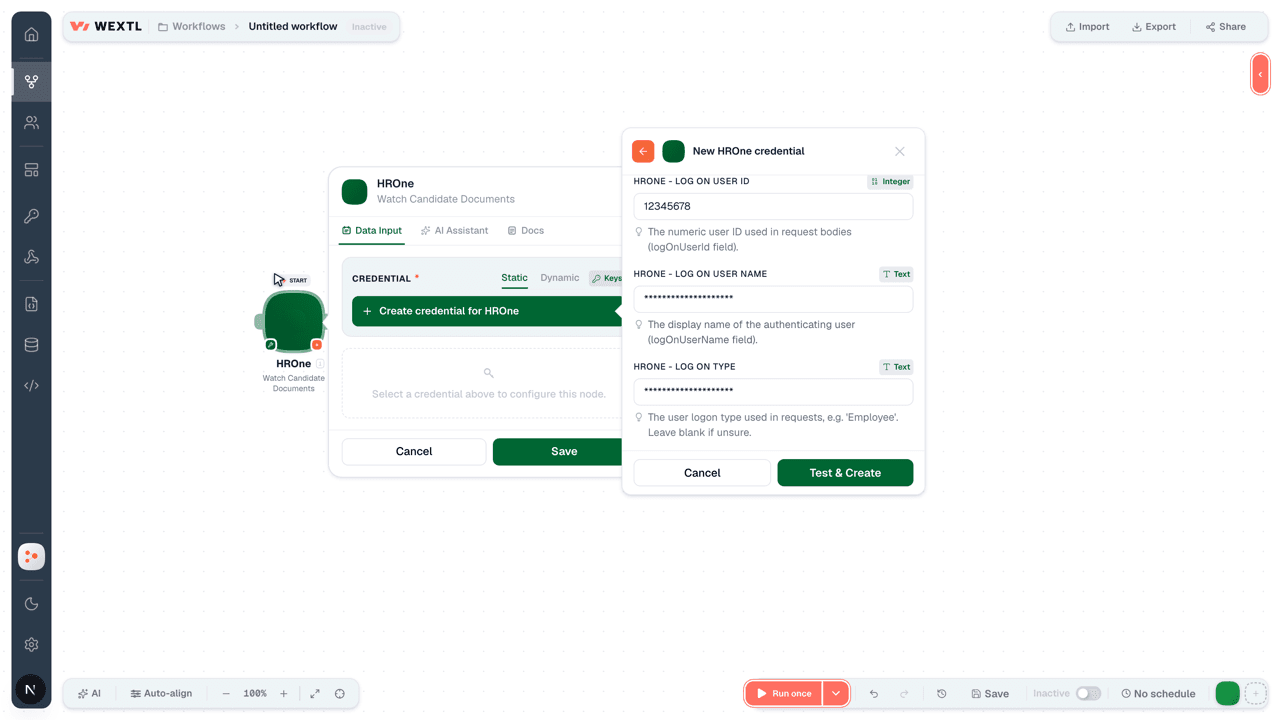
- Log On User IDinteger
The numeric user ID used in request bodies (logOnUserId field).[1]
- Log On User Nametext
The display name of the authenticating user (logOnUserName field).[1]
- Log On Typetext
The user logon type used in requests, e.g. 'Employee'. Leave blank if unsure.[1]
Connect HROne in WEXTL
- Log in to your WEXTL account, add the HROne node module to your workflow, and click Create new credential.
- Optional: In the Credential name field, enter a name for the credential.
- Enter the authentication credentials you copied from your HROne account, or follow the on-screen instructions to create the credential.
- If prompted, authenticate your account and confirm access.
- If you want to make changes to your credential in the future, follow the steps in Manage credentials →
HROne triggers and actions on WEXTL
The list below is a reference of every HROne node module the integration supports. You will be able to pick any of them on the workflow canvas while building automations.
Each HROne node module below opens to reveal its input parameters, outputs, and connection requirements.
Watch Candidate Documents
TriggerScheduled check for fresh candidate documents.
| Field | Type |
|---|---|
| Candidate name | text |
| Document type | text |
| Uploaded file name | text |
| Uploaded file path | text |
| Mobile no | text |
| Candidate email | |
| Created date | date |
| Updated date | date |
Watch Employee Information
TriggerScheduled check for newly added employee records.
| Field | Type |
|---|---|
| Log on user code | text |
| Domain code | text |
| Log on user ID | number |
| Log on user name | text |
| Current user log on type | text |
| Employee code | text |
| Employee name | text |
| Date of joining | text |
| Gender | text |
| Mobile number | text |
| Company name | text |
| Business unit | text |
| Employment status | text |
| Date of leaving | text |
| Employee email ID | text |
| Department | text |
12other output fields
Watch Leave Request Details
TriggerScheduled poll for newly created leave requests.
| Field | Type |
|---|---|
| Request ID | number |
| Leave code | text |
| Leave number of days | number |
| Leave from date | text |
| Leave to date | text |
| Remarks | text |
| Request status | text |
| Created by | text |
| Created date | text |
| Pending on | text |
| Approver code | text |
| Approved by | text |
| Approved date | text |
| Approver remarks | text |
| Employee details | object |
| Employee ID | number |
| Employee code | text |
| Salutation | number |
| Salutation name | text |
| Employee photo | text |
| Employee name | text |
| Business unit | text |
| Department | text |
| Sub department | text |
| Grade | text |
| Employee leave request details | array |
Watch Reward Points
TriggerScheduled reward point events across a date range.
| Field | Type |
|---|---|
To DateRequired | date |
From DateRequired | date |
| Field | Type |
|---|---|
| Unique ID | number |
| Date | text |
| From | text |
| From mobile no | text |
| From official email | text |
| From employee code | text |
| Given to | text |
| Given to mobile no | text |
| Given to official email | text |
| Given to employee code | text |
| Point | number |
| Amount | number |
Bulk Mark Attendance Status
SearchBatch attendance marking for a list of employees.
| Field | Type |
|---|---|
Attendance RecordsRequired | array |
| Limit | number |
| Field | Type |
|---|---|
| Message | text |
| Validation type | text |
| Message code | text |
| Shift manual error details | array |
| Employee code | text |
Get 360 Feedback
ActionRetrieves 360 feedback entries.
No fields documented.
Get 360 Feedback Details
ActionSingle 360 feedback record, read with encrypted keys.
| Field | Type |
|---|---|
| Encrypted Request ID | text |
| Encrypted Domain Code | text |
| Encrypted Email ID | text |
Get a Bank Branch Alias
ActionBank branch alias with its ID and text.
| Field | Type |
|---|---|
| ID | text |
| Text | text |
Get a Calendar by Month
SearchMonthly attendance view for a single employee.
| Field | Type |
|---|---|
Attendance YearRequired | number |
Attendance MonthRequired | number |
Employee CodeRequired | text |
| Limit | number |
| Field | Type |
|---|---|
| Log on user code | text |
| Domain code | text |
| Log on user ID | number |
| Log on user name | text |
| Current user log on type | text |
| Employee ID | number |
| Attendance date | text |
| Updated first half status | text |
| Updated second half status | text |
| Shift start time | text |
| Shift end time | text |
| Shift code | text |
| Shift ID | number |
| Time in | text |
| Timeout | text |
| Present status | text |
15other output fields
Get a Candidate Detail Report
ActionCandidate report by status and date range.
| Field | Type |
|---|---|
| Company | array |
| Business Unit | array |
| Department | array |
| Sub Department | array |
| Grade | array |
| Designation | array |
| Level | array |
| Branch | array |
| Sub Branch | array |
| Region | array |
| Employee Status | array |
| Employee Type | array |
| Candidate Status | array |
| Created Date Range | object |
| From Date | date |
| To Date | date |
| Updated Date Range | object |
| From Date | date |
| To Date | date |
| Field | Type |
|---|---|
| Message | text |
| Validation type | text |
| Message code | text |
Get a Current CTC Salary Structure
ActionCurrent CTC structure filtered by pay group.
| Field | Type |
|---|---|
CTC Break UpRequired | array |
| CTC Break Up Value | text |
Pay GroupRequired | array |
| Pay Group Value | text |
| Company | array |
| Company Value | text |
| Business Unit | array |
| Business Unit Value | text |
| Department | array |
| Department Value | text |
| Sub Department | array |
| Sub Department Value | text |
| Grade | array |
| Grade Value | text |
| Designation | array |
| Designation Value | text |
| Level | array |
| Level Value | text |
| Branch | array |
| Branch Value | text |
| Sub Branch | array |
| Sub Branch Value | text |
| Region | array |
| Region Value | text |
| Employee Status | array |
| Employee Status Value | text |
| Employee Type | array |
| Employee Type Value | text |
| Date Of Joining Month Year | object |
| Month | number |
| Year | number |
| Employee Code | array |
| Employee Code Value | text |
Get a Leave Balance Report
ActionLeave balances per employee and leave type.
| Field | Type |
|---|---|
| Company | array |
| Business Unit | array |
| Department | array |
| Sub Department | array |
| Grade | array |
| Designation | array |
| Level | array |
| Branch | array |
| Sub Branch | array |
| Region | array |
| Employee Status | array |
| Employee Type | array |
| Leave Type | array |
Get a Third Party Token
ActionRetrieves an integration token.
No fields documented.
Get an Attendance by Date Range
SearchAttendance rows across a date range.
| Field | Type |
|---|---|
From DateRequired | date |
To DateRequired | date |
| Limit | number |
| Field | Type |
|---|---|
| Log on user code | text |
| Domain code | text |
| Log on user ID | number |
| Log on user name | text |
| Current user log on type | text |
| Employee ID | number |
| Attendance date | text |
| Updated first half status | text |
| Updated second half status | text |
| Shift start time | text |
| Shift end time | text |
| Shift code | text |
| Shift ID | number |
| Time in | text |
| Timeout | text |
| Present status | text |
17other output fields
Get an Attendance Calendar
SearchDay by day attendance for a single employee.
| Field | Type |
|---|---|
From DateRequired | date |
To DateRequired | date |
Employee CodeRequired | text |
| Limit | number |
| Field | Type |
|---|---|
| Log on user code | text |
| Domain code | text |
| Log on user ID | number |
| Log on user name | text |
| Current user log on type | text |
| Employee ID | number |
| Attendance date | text |
| Updated first half status | text |
| Updated second half status | text |
| Shift start time | text |
| Shift end time | text |
| Shift code | text |
| Shift ID | number |
| Time in | text |
| Timeout | text |
| Present status | text |
17other output fields
Get an Employee Info
SearchEmployee info lookup with dates and name filters.
| Field | Type |
|---|---|
| Company | text |
| Business Unit | text |
| Department | text |
| Sub Department | text |
| Grade | text |
| Designation | text |
| Level | text |
| Branch | text |
| Sub Branch | text |
| Region | text |
| Employee Code | text |
| Employee Name | text |
| Mobile Number | text |
| Employee Status | text |
| Employee Type | text |
| From Date of Joining | date |
8other input fields
Get Background Verification Details
ActionBackground verification record for an invite or request.
| Field | Type |
|---|---|
| Invite ID | number |
| ID | text |
| Activity Category | text |
| Activity Type | text |
| Actor Type | text |
| Actor ID | text |
| Actor Alias | text |
| Community ID | number |
| Parent Community ID | number |
| Individual ID | number |
| Request ID | number |
| Employee ID | number |
| Callback Status | text |
| Callback Remark | text |
| Remark | text |
| Field | Type |
|---|---|
| Message | text |
| Validation type | text |
| Message code | text |
Get Document Types
SearchDocument type IDs and names for upcoming employees.
| Field | Type |
|---|---|
| Limit | number |
| Field | Type |
|---|---|
| Document ID | number |
| Document name | text |
Get Dynamic Fields
SearchCustom field definitions for upcoming employees.
| Field | Type |
|---|---|
| Limit | number |
| Field | Type |
|---|---|
| Db column ID | number |
| Display name | text |
| Is mandatory | boolean |
| Db column type | text |
Get Employee Insurance Details
ActionInsurance records for covered employees.
| Field | Type |
|---|---|
| Employee Code | text |
| From Date | date |
| To Date | date |
| Limit | number |
| Field | Type |
|---|---|
| Employee code | text |
| Employee ID | number |
| Full name | text |
| Last name | text |
| Insured name | text |
| text | |
| Date of birth | text |
| Date of joining | text |
| Date of leaving | text |
| Designation | text |
| Grade | text |
| Gender | text |
| Employee salary | number |
| Location | text |
| Contact | text |
| Insured dependents | array |
Get Leave Request Details
SearchLeave requests with status, dates and approver.
| Field | Type |
|---|---|
Request StatusRequired | array |
| Company | array |
| Business Unit | array |
| Department | array |
| Sub Department | array |
| Grade | array |
| Designation | array |
| Level | array |
| Branch | array |
| Sub Branch | array |
| Region | array |
| Employee Status | array |
| Employee Type | array |
| Request ID | text |
| Approve Date | object |
| From Date | text |
| To Date | text |
| Request Date | object |
| From Date | text |
| To Date | text |
20other input fields
| Field | Type |
|---|---|
| Request ID | number |
| Leave code | text |
| Leave number of days | number |
| Leave from date | text |
| Leave to date | text |
| Remarks | text |
| Request status | text |
| Created by | text |
| Created date | text |
| Pending on | text |
| Approver code | text |
| Approved by | text |
| Approved date | text |
| Approver remarks | text |
| Employee details | object |
| Employee ID | number |
| Employee code | text |
| Salutation | number |
| Salutation name | text |
| Employee photo | text |
| Employee name | text |
| Business unit | text |
| Department | text |
| Sub department | text |
| Grade | text |
| Employee leave request details | array |
Get Pay Components
SearchPayroll pay component definitions.
| Field | Type |
|---|---|
| Limit | number |
| Field | Type |
|---|---|
| Head code | text |
| State insurance gross part | boolean |
| Arrear applicable | boolean |
| Part of cost to company | boolean |
| Part of state insurance rate | boolean |
| Part of gross | boolean |
| Part of professional tax | boolean |
| Present dependent | boolean |
| Show on pay slip | boolean |
| Pay type | text |
| Pay with salary | boolean |
| Provident fund gross part | boolean |
| Prorate on join and leave | boolean |
| Rounding | number |
| Show on salary register | boolean |
| Taxable | text |
35other output fields
Get Pay Groups
SearchPay groups and their template IDs.
| Field | Type |
|---|---|
| Limit | number |
| Field | Type |
|---|---|
| ID | number |
| Name | text |
| Description | text |
| Salary template ID | number |
| Tax template ID | number |
| Reimbursement template ID | number |
| Appointment template ID | number |
| Revision template ID | number |
| Contract template ID | number |
| Part of flexible plan | boolean |
| Part of pf limit gross | boolean |
| Part of pf limit paycodes | text |
| Components | number |
| Organization | text |
| Branch | text |
| Is active | boolean |
Get Reward Points
SearchReward point events within a date range.
| Field | Type |
|---|---|
From DateRequired | date |
To DateRequired | date |
| Limit | number |
| Field | Type |
|---|---|
| Unique ID | number |
| Date | text |
| From | text |
| From mobile no | text |
| From official email | text |
| From employee code | text |
| Given to | text |
| Given to mobile no | text |
| Given to official email | text |
| Given to employee code | text |
| Point | number |
| Amount | number |
Redeem Reward Points
SearchMarks reward point events as redeemed.
| Field | Type |
|---|---|
Redeem ListRequired | array |
| XML Redeem Details | text |
| Field | Type |
|---|---|
| Message | text |
| Validation type | text |
| Message code | text |
Search Attendance Calendars
SearchAttendance calendar entries with employee details.
| Field | Type |
|---|---|
From DateRequired | date |
To DateRequired | date |
| Employee Code | text |
| Limit | number |
| Field | Type |
|---|---|
| Employee ID | text |
| Employee name | text |
| Employee status | text |
| Department | text |
| Designation | text |
| Employee category | text |
| Division | text |
| Organizational unit | text |
| Sub organizational unit | text |
| Date of joining | text |
| Date of reliving | text |
| Reporting manager employee ID | text |
| Reporting manager employee name | text |
| Calendar date | text |
| Attendance date | text |
| Shift code | text |
10other output fields
Search Candidate Documents
SearchCandidate documents with type and file name.
| Field | Type |
|---|---|
| Candidate Name | text |
| Mobile No | text |
| Candidate Email | |
| From Updated Date | date |
| To Updated Date | date |
| From Created Date | date |
| To Created Date | date |
| Limit | number |
| Field | Type |
|---|---|
| Candidate name | text |
| Document type | text |
| Uploaded file name | text |
| Uploaded file path | text |
| Mobile no | text |
| Candidate email | |
| Created date | date |
| Updated date | date |
Search Employee Info
SearchEmployee information rows with joining details.
| Field | Type |
|---|---|
| Company | text |
| Business Unit | text |
| Department | text |
| Sub Department | text |
| Grade | text |
| Designation | text |
| Level | text |
| Branch | text |
| Sub Branch | text |
| Region | text |
| Employee Code | text |
| Employee Name | text |
| Mobile Number | text |
| Employee Status | text |
| Employee Type | text |
| From Date of Joining | date |
8other input fields
| Field | Type |
|---|---|
| Log on user code | text |
| Domain code | text |
| Log on user ID | number |
| Log on user name | text |
| Current user log on type | text |
| Employee code | text |
| Employee name | text |
| Date of joining | text |
| Gender | text |
| Mobile number | text |
| Company name | text |
| Business unit | text |
| Employment status | text |
| Date of leaving | text |
| Employee email ID | text |
| Department | text |
12other output fields
Search Employees
SearchEmployee search over name, code and unit filters.
| Field | Type |
|---|---|
| Company | text |
| Business Unit | text |
| Department | text |
| Sub Department | text |
| Grade | text |
| Designation | text |
| Level | text |
| Branch | text |
| Sub Branch | text |
| Region | text |
| Employee Code | text |
| Employee Name | text |
| Mobile Number | text |
| Employee Status | text |
| Employee Type | text |
| From Date of Joining | date |
8other input fields
Add a Candidate
ActionCandidate record for the recruitment module.
| Field | Type |
|---|---|
Candidate DetailsRequired | object |
| Candidate ID | text |
| Salutation | text |
| First Name | text |
| Middle Name | text |
| Last Name | text |
| Date of Birth | text |
| Gender | text |
| Nationality | text |
| Personal Email | |
| Mobile No | text |
| Candidate Dynamic Details | array |
| Field | Type |
|---|---|
| Message | text |
| Validation type | text |
| Message code | text |
Add a Salary Structure
ActionPay group, effective dates and component amounts of a salary.
| Field | Type |
|---|---|
Employee IDRequired | choice |
Pay GroupRequired | number |
Salary Effective DateRequired | date |
Arrear Effective DateRequired | date |
Cost To CompanyRequired | number |
Net Take Home Before TaxRequired | number |
Gross AmountRequired | number |
Other BenefitsRequired | number |
ContributionRequired | number |
Recurring DeductionsRequired | number |
Salary Component DetailsRequired | array |
Employee Provident Fund AmountRequired | number |
Employee Voluntary Provident Fund AmountRequired | number |
Account 1Required | number |
Account 10Required | number |
Employee State Insurance AmountRequired | number |
30other input fields
| Field | Type |
|---|---|
| Message | text |
| Validation type | text |
| Message code | text |
Add an Employee
ActionAdds a new employee with basic, employment and position details.
| Field | Type |
|---|---|
Basic InformationRequired | object |
| Salutation | text |
First NameRequired | text |
| Middle Name | text |
Last NameRequired | text |
| Employee Code | text |
| Date of Birth | date |
| Gender | text |
| Nationality | text |
| Official Email | |
| Mobile No | text |
Employment InformationRequired | object |
Date of JoiningRequired | date |
| Employee Type | text |
| Employment Status | text |
| Date of Confirmation | date |
| Other Status Remarks | text |
| Other Status Date | date |
| Employee Other Status | text |
| Date of Leaving | date |
| Date of Resignation | date |
| Date of Settlement | date |
| Position Information | object |
| Company | text |
| Business Unit | text |
| Department | text |
| Sub Department | text |
| Designation | text |
| Region | text |
| Branch | text |
| Sub Branch | text |
| Grade | text |
| Level | text |
| Field | Type |
|---|---|
| Message | text |
| Validation type | text |
| Message code | text |
Add an Employee Variable Salary
ActionVariable salary rows with pay code and amount.
| Field | Type |
|---|---|
| Request Source | text |
| Salary Date | date |
Employee Variable SalaryRequired | array |
| Employee Variable Salary XML | text |
| Field | Type |
|---|---|
| Message | text |
| Validation type | text |
| Message code | text |
Approve a Leave Request
ActionApproves or rejects a leave request, with remarks.
| Field | Type |
|---|---|
| Employee ID | choice |
| Request ID | text |
| Status (Approved/Rejected) | boolean |
| Action Status | number |
| Approver Remarks | text |
| Transaction ID | text |
| Field | Type |
|---|---|
| Message | text |
| Validation type | text |
| Message code | text |
Create a Bank Detail Report
ActionBank account report for selected employees.
| Field | Type |
|---|---|
| Company | array |
| Business Unit | array |
| Department | array |
| Sub Department | array |
| Grade | array |
| Designation | array |
| Level | array |
| Branch | array |
| Sub Branch | array |
| Region | array |
| Employee Status | array |
| Employee Type | array |
| Payment Mode | array |
| Bank Account Type | array |
| Employee Codes | array |
| Updated Date Range | object |
| From Date | date |
| To Date | date |
1other input field
Create a Clearance Task Report
ActionClearance task report by status and employee.
| Field | Type |
|---|---|
| Company | array |
| Business Unit | array |
| Department | array |
| Sub Department | array |
| Grade | array |
| Designation | array |
| Level | array |
| Branch | array |
| Sub Branch | array |
| Region | array |
| Employee Status | array |
| Employee Type | array |
| Task Completion Time | text |
| Task Status | array |
| Employee Codes | array |
| Updated Date Range | object |
| From Date | date |
| To Date | date |
Create a Confirmation Status Report
ActionWho is confirmed, filtered by status and employee.
| Field | Type |
|---|---|
| Company | array |
| Business Unit | array |
| Department | array |
| Sub Department | array |
| Grade | array |
| Designation | array |
| Level | array |
| Branch | array |
| Sub Branch | array |
| Region | array |
| Employee Status | array |
| Employee Type | array |
| Confirmation Status | array |
| Employee Codes | array |
| Updated Date Range | object |
| From Date | date |
| To Date | date |
| Created Date Range | object |
| From Date | date |
| To Date | date |
Create a Job Opening Report
ActionRecruitment report of job openings with status filters.
| Field | Type |
|---|---|
| Job Title | array |
| Job Status | array |
| Assign to Recruiter Status | array |
| Job Approval Status | array |
| Job Closed | array |
| Urgent Opening | array |
| Requested On | object |
| From Date | date |
| To Date | date |
| Approve Date | object |
| From Date | date |
| To Date | date |
Create a Leave Balance Summary Report
ActionLeave balance summary across a span of months.
| Field | Type |
|---|---|
| Company | array |
| Business Unit | array |
| Department | array |
| Sub Department | array |
| Grade | array |
| Designation | array |
| Level | array |
| Branch | array |
| Sub Branch | array |
| Region | array |
| Employee Status | array |
| Employee Type | array |
| Updated On | object |
| From Date | date |
| To Date | date |
Leave PeriodRequired | object |
| From Month | date |
| From Year | date |
| To Month | date |
| To Year | number |
| Leave Type | text |
Create a Leave Request
ActionLeave request with dates, day status and reason.
| Field | Type |
|---|---|
Employee IDRequired | choice |
Leave IDRequired | choice |
From DateRequired | date |
To DateRequired | date |
From Date StatusRequired | text |
To Date StatusRequired | text |
SourceRequired | text |
Employee CodeRequired | text |
Leave CodeRequired | text |
| Reason | text |
| Request Mode | text |
| File Path | text |
| File Name | text |
| Is Leave Visible Publicly | boolean |
| Apply Request Source | text |
| Field | Type |
|---|---|
| Message | text |
| Validation type | text |
| Message code | text |
Create a Leave Request Report
ActionLeave request report by status and period.
| Field | Type |
|---|---|
| Company | array |
| Business Unit | array |
| Department | array |
| Sub Department | array |
| Grade | array |
| Designation | array |
| Level | array |
| Branch | array |
| Sub Branch | array |
| Region | array |
| Employee Status | array |
| Employee Type | array |
| Request ID | text |
Request StatusRequired | array |
| Approve Date | object |
| From Date | date |
| To Date | date |
| Request Date | object |
| From Date | date |
| To Date | date |
1other input field
Create a Restricted Holiday Report
ActionRestricted holiday requests for a chosen month.
| Field | Type |
|---|---|
| Company | array |
| Business Unit | array |
| Department | array |
| Sub Department | array |
| Grade | array |
| Designation | array |
| Level | array |
| Branch | array |
| Sub Branch | array |
| Region | array |
| Employee Status | array |
| Employee Type | array |
Attendance Month/YearRequired | object |
| Month | date |
| Year | date |
Request StatusRequired | array |
| Employee Codes | array |
Create a Salary Register Report
ActionPayroll salary register with date filters.
| Field | Type |
|---|---|
| Company | array |
| Business Unit | array |
| Department | array |
| Sub Department | array |
| Grade | array |
| Designation | array |
| Level | array |
| Branch | array |
| Sub Branch | array |
| Region | array |
| Employee Status | array |
| Employee Type | array |
| Salary Date Filter | object |
| From Date | date |
| To Date | date |
| Salary Disbursed Date | object |
| From Date | date |
| To Date | date |
| Employee Codes | array |
| Field | Type |
|---|---|
| User ID | number |
| Email address | |
| Name | text |
Create a Short Leave Report
ActionShort leave requests across a chosen month.
| Field | Type |
|---|---|
| Company | array |
| Business Unit | array |
| Department | array |
| Sub Department | array |
| Grade | array |
| Designation | array |
| Level | array |
| Branch | array |
| Sub Branch | array |
| Region | array |
| Employee Status | array |
| Employee Type | array |
Attendance Month/YearRequired | object |
| Month | date |
| Year | date |
Request StatusRequired | array |
| Employee Codes | array |
Create an Attendance Punch Request
ActionRequest to record an attendance punch with its location and photo.
| Field | Type |
|---|---|
Employee CodeRequired | text |
Punch TimeRequired | text |
| Latitude | text |
| Longitude | text |
| Geo Accuracy | text |
| Geo Location | text |
| Remarks | text |
| Photo One Name | text |
| Photo One Path | text |
| Photo Two Name | text |
| Photo Two Path | text |
| Field | Type |
|---|---|
| Message | text |
| Validation type | text |
| Message code | text |
Create an Attendance Report
ActionAttendance report filtered by status, month and unit.
| Field | Type |
|---|---|
| Company | array |
| Business Unit | array |
| Department | array |
| Sub Department | array |
| Grade | array |
| Designation | array |
| Level | array |
| Branch | array |
| Sub Branch | array |
| Region | array |
| Employee Status | array |
| Employee Type | array |
Request StatusRequired | array |
| Calendar Month | object |
| From Date | date |
| To Date | date |
| Approve Date | object |
| From Date | date |
| To Date | date |
| Request Date | object |
| From Date | date |
| To Date | date |
Create an Education Detail Report
ActionEducation records report for chosen employees.
| Field | Type |
|---|---|
| Company | array |
| Business Unit | array |
| Department | array |
| Sub Department | array |
| Grade | array |
| Designation | array |
| Level | array |
| Branch | array |
| Sub Branch | array |
| Region | array |
| Employee Status | array |
| Employee Type | array |
| Employee Codes | array |
| User Type | text |
Create an Employee CTC Report
ActionStarts a CTC report for a single person.
| Field | Type |
|---|---|
Employee CodeRequired | text |
| Mobile Number | text |
| Salary Month | date |
| Salary Year | date |
| Field | Type |
|---|---|
| Message | text |
Create an Employee Detail Report
ActionFull employee detail report with date filters.
| Field | Type |
|---|---|
| Company | array |
| Business Unit | array |
| Department | array |
| Sub Department | array |
| Grade | array |
| Designation | array |
| Level | array |
| Branch | array |
| Sub Branch | array |
| Region | array |
| Employee Status | array |
| Employee Type | array |
| User Type | array |
| Employee Codes | array |
| Updated Date Range | object |
| From Date | date |
| To Date | date |
| Created Date Range | object |
| From Date | date |
| To Date | date |
Create an On Duty Request
ActionOn duty entries with in and out times.
| Field | Type |
|---|---|
Employee CodeRequired | text |
Request ListRequired | array |
| Field | Type |
|---|---|
| Message | text |
| Validation type | text |
| Message code | text |
| Error message model | array |
Create an On Duty Request Report
ActionOn duty request report by status and date.
| Field | Type |
|---|---|
| Company | array |
| Business Unit | array |
| Department | array |
| Sub Department | array |
| Grade | array |
| Designation | array |
| Level | array |
| Branch | array |
| Sub Branch | array |
| Region | array |
| Employee Status | array |
| Employee Type | array |
Request StatusRequired | array |
| Approve Date | object |
| From Date | date |
| To Date | date |
| Request Date | object |
| From Date | date |
| To Date | date |
| On Duty Period | object |
| From Date | date |
| To Date | date |
Create an Overtime Request
ActionMonthly overtime hours for an employee.
| Field | Type |
|---|---|
Employee CodeRequired | text |
| Attendance Year | number |
| Attendance Month | number |
| Overtime Weekly Off Hours | text |
| Overtime Holiday Hours | text |
| Overtime National Holiday Hours | text |
| Overtime Working Hours | text |
| Field | Type |
|---|---|
| Message | text |
| Validation type | text |
| Message code | text |
Create an Upcoming Employee
ActionPre-joining employee with basic and position details.
| Field | Type |
|---|---|
Basic InformationRequired | object |
| Salutation | text |
| First Name | text |
| Middle Name | text |
| Last Name | text |
| Employee Code | text |
| Date of Birth | date |
| Gender | text |
| Nationality | text |
| Official Email | |
| Mobile Number | text |
Employment InformationRequired | object |
| Date of Joining | date |
| Employee Type | text |
| Employment Status | text |
Position InformationRequired | object |
| Company | text |
| Business Unit | text |
| Department | text |
| Sub Department | text |
| Designation | text |
| Region | text |
| Branch | text |
| Sub Branch | text |
| Grade | text |
| Level | text |
| Field | Type |
|---|---|
| Message | text |
| Validation type | text |
| Message code | text |
Create an Upcoming Employee Joining Status Report
ActionJoining status of future joiners, filtered by status and date.
| Field | Type |
|---|---|
| Company | array |
| Business Unit | array |
| Department | array |
| Sub Department | array |
| Grade | array |
| Designation | array |
| Level | array |
| Branch | array |
| Sub Branch | array |
| Region | array |
| Employee Status | array |
| Employee Type | array |
| Expected Date of Joining | object |
| From Date | date |
| To Date | date |
| Joining Status | array |
| Created Date Range | object |
| From Date | date |
| To Date | date |
| Updated Date Range | object |
| From Date | date |
| To Date | date |
1other input field
Generate an Employee Statutory Detail Report
ActionStatutory data held on each employee, in report form.
| Field | Type |
|---|---|
| Company | array |
| Business Unit | array |
| Department | array |
| Sub Department | array |
| Grade | array |
| Designation | array |
| Level | array |
| Branch | array |
| Sub Branch | array |
| Region | array |
| Employee Status | array |
| Employee Type | array |
| Employee Codes | array |
| Updated Date Range | object |
| From Date | date |
| To Date | date |
| Created Date Range | object |
| From Date | date |
| To Date | date |
Insert an Upcoming Employee
ActionUpcoming employee added to HRone.
| Field | Type |
|---|---|
Basic InformationRequired | object |
| Salutation | text |
| First Name | text |
| Middle Name | text |
| Last Name | text |
| Employee Code | text |
| Date of Birth | date |
| Gender | text |
| Nationality | text |
| Official Email | |
| Mobile No | text |
Employment InformationRequired | object |
| Date of Joining | date |
| Employee Type | text |
| Employment Status | text |
| Position Information | object |
| Company | text |
| Business Unit | text |
| Department | text |
| Sub Department | text |
| Designation | text |
| Region | text |
| Branch | text |
| Sub Branch | text |
| Grade | text |
| Level | text |
| Field | Type |
|---|---|
| Message | text |
| Validation type | text |
| Message code | text |
Insert Partner Consent
ActionStores partner consent against a mobile number.
| Field | Type |
|---|---|
| Employee ID | choice |
Mobile NumberRequired | text |
Partner ConsentRequired | text |
| Remarks | text |
| Consent Type | text |
| Consent Expiry Days | number |
| Partner Type | text |
| Field | Type |
|---|---|
| Employee code | text |
| Email ID | text |
Log a CFirst Integration
ActionCFirst result saved to HRone.
| Field | Type |
|---|---|
ReportRequired | object |
| Profile | object |
| Attachments | array |
| Field | Type |
|---|---|
| Message | text |
| Validation type | text |
| Message code | text |
Log a SignDesk Integration
ActionSignDesk status saved against a document.
| Field | Type |
|---|---|
StatusRequired | text |
Document IDRequired | choice |
Initiated AtRequired | text |
Docket IDRequired | text |
| Custom Parameter | object |
Unique NoRequired | text |
API KeyRequired | secret |
Domain CodeRequired | text |
| File Content | text |
| Field | Type |
|---|---|
| Message | text |
| Validation type | text |
| Message code | text |
Log a SpringVerify Integration
ActionSpringVerify result attached to a candidate.
| Field | Type |
|---|---|
Candidate IDRequired | choice |
| Status | text |
| Report | text |
| Meta Data | object |
| Validate Key | text |
| Unique No | text |
| Domain Code | text |
| Field | Type |
|---|---|
| Message | text |
| Validation type | text |
| Message code | text |
Log a Testlify Integration
ActionTestlify assessment record stored in HRone.
| Field | Type |
|---|---|
Assessment DataRequired | object |
| Status | text |
| Org Name | text |
| Last Name | text |
| Company ID | text |
| First Name | text |
| Invited At | text |
| Assessment | text |
| Invite Link | url |
| Reseller ID | text |
| Candidate Type | text |
| Event | text |
| Success | boolean |
| Metadata | object |
| Unique No | text |
| Field | Type |
|---|---|
| Message | text |
| Validation type | text |
| Message code | text |
Log an Assessment
ActionStores a candidate assessment outcome.
| Field | Type |
|---|---|
Assessment DataRequired | object |
| Status | text |
| Org Name | text |
| Last Name | text |
| Company ID | text |
| First Name | text |
| Invited At | text |
| Assessment | text |
| Invite Link | url |
| Reseller ID | text |
| Candidate Type | text |
| Event | text |
| Success | boolean |
| Metadata | object |
| Unique No | text |
| API Key | text |
| Domain Code | text |
| Field | Type |
|---|---|
| Message | text |
| Validation type | text |
| Message code | text |
Make an API Call
universalDirect HROne REST API access for uncovered endpoints.
| Field | Type |
|---|---|
URLRequired | text |
MethodRequired | choice |
| Headers | array |
| Header | object |
| Query String | array |
| Parameter | object |
| Body | text |
| Field | Type |
|---|---|
| Body | text |
| Headers | object |
| Status code | number |
Mark an Attendance
ActionTriggers attendance marking in HRone.
No fields documented.
Mark an Attendance Status
ActionDay status of an employee, half by half.
| Field | Type |
|---|---|
Employee CodeRequired | text |
Attendance Status DetailsRequired | array |
| XML Attendance Status | text |
| Field | Type |
|---|---|
| User ID | number |
Set an Employee Log On
ActionSwitches log on access for an employee.
| Field | Type |
|---|---|
Employee CodeRequired | text |
Enable Employee Log OnRequired | choice |
| Field | Type |
|---|---|
| Message | text |
| Validation type | text |
| Message code | text |
Submit 360 Feedback
ActionSends a 360 review response.
| Field | Type |
|---|---|
| Request ID | text |
360 Request IDRequired | text |
360 Detail IDRequired | text |
| Action ID | text |
| Remarks | text |
| Average Rating | number |
| Overwrite Average Rating | number |
| XML Section | text |
| XML Question | text |
| XML Question Details | text |
| XML Answer | text |
| XML Skills | text |
| Feedback Answer | array |
Update an Employee
ActionUpdates basic and employment fields of an employee.
| Field | Type |
|---|---|
Basic InformationRequired | object |
| Salutation | text |
| First Name | text |
| Middle Name | text |
| Last Name | text |
| Employee Code | text |
| Date of Birth | date |
| Gender | text |
| Nationality | text |
| Official Email | |
| Mobile No | text |
Employment InformationRequired | object |
| Date of Joining | date |
| Employee Type | text |
| Employment Status | text |
| Date of Confirmation | date |
| Other Status Remarks | text |
| Other Status Date | date |
| Employee Other Status | text |
| Date of Leaving | date |
| Date of Resignation | date |
| Date of Settlement | date |
Position InformationRequired | object |
| Company | text |
| Business Unit | text |
| Department | text |
| Sub Department | text |
| Designation | text |
| Region | text |
| Branch | text |
| Sub Branch | text |
| Grade | text |
| Level | text |
| Field | Type |
|---|---|
| Message | text |
| Validation type | text |
| Message code | text |
Update an Employee Statutory Detail
ActionProvident fund, tax and gratuity settings per employee.
| Field | Type |
|---|---|
Employee IDRequired | choice |
Provident Fund ApplicableRequired | boolean |
Employee State Insurance ApplicableRequired | boolean |
Professional Tax ApplicableRequired | boolean |
Bonus ApplicableRequired | boolean |
Gratuity ApplicableRequired | boolean |
Labor Welfare Fund ApplicableRequired | boolean |
Pension ApplicableRequired | boolean |
Voluntary Provident Fund ApplicableRequired | boolean |
National Pension Scheme ApplicableRequired | boolean |
| National Pension Schemed Percent | number |
| Voluntary Provident Fund Amount | number |
| Voluntary Provident Fund Percentage | number |
| Prorate Voluntary Provident Fund | boolean |
| Minimum Voluntary Provident Fund | number |
| Voluntary Provident Fund Effective Date | date |
37other input fields
| Field | Type |
|---|---|
| Message | text |
| Validation type | text |
| Message code | text |
Update an Upcoming Employee Document
ActionDocument entries of a future joiner.
| Field | Type |
|---|---|
User IDRequired | choice |
TypeRequired | text |
| Employee ID | number |
DocumentsRequired | array |
| Field | Type |
|---|---|
| Message | text |
| Validation type | text |
| Message code | text |
Update Upcoming Employee Dynamic Fields
ActionCustom field values of an upcoming employee.
| Field | Type |
|---|---|
| Employee ID | choice |
| Employee Code | text |
| Employee Type | text |
| Column Details | array |
| Field | Type |
|---|---|
| Message | text |
| Validation type | text |
| Message code | text |
Templates
Look for HROne templates in the WEXTL template library.
Browse templates →Other HR integrations on WEXTL
 BrioHR[2]HR management platform for employee data, leave, payroll-ready records, and people operations.
 Breathe HRCloud HR software for employee records, leave, onboarding, and people management.
 ClockItEmployee time tracking and attendance management platform with clock-in/out, leave management, and scheduling.
 CalamariHR leave, attendance, and timesheet management for growing teams.
 DarwinboxEnterprise HR platform to recruit, onboard and manage payroll and performance.
References
- WEXTL® HROne Source Code connector implementation.
- Our users use cases and automations.
- Official API Documentation for HROne.
- WEXTL® visual workflow builder data.
Last updated: Aug 27, 2026 07:21
How we write our apps documentation
How we compile these docs: sources, the role of AI, and how we verify.