iCIMS integration guide
VerifiedHow to connect iCIMS to WEXTL and use its 2 triggers and 20 actions in your workflows. About iCIMS: Talent acquisition platform for recruiting workflows, candidate profiles, and job posts.
- 2 triggers
- 8 searches
- 12 actions
- Polling
- Auth: API key
AI-assisted documentation6 min read
This documentation is compiled from our integration source code, internal specs for iCIMS, its official API documentation and anonymized requests logs we collect from our support team[2].


Requirements
Get your iCIMS credentials
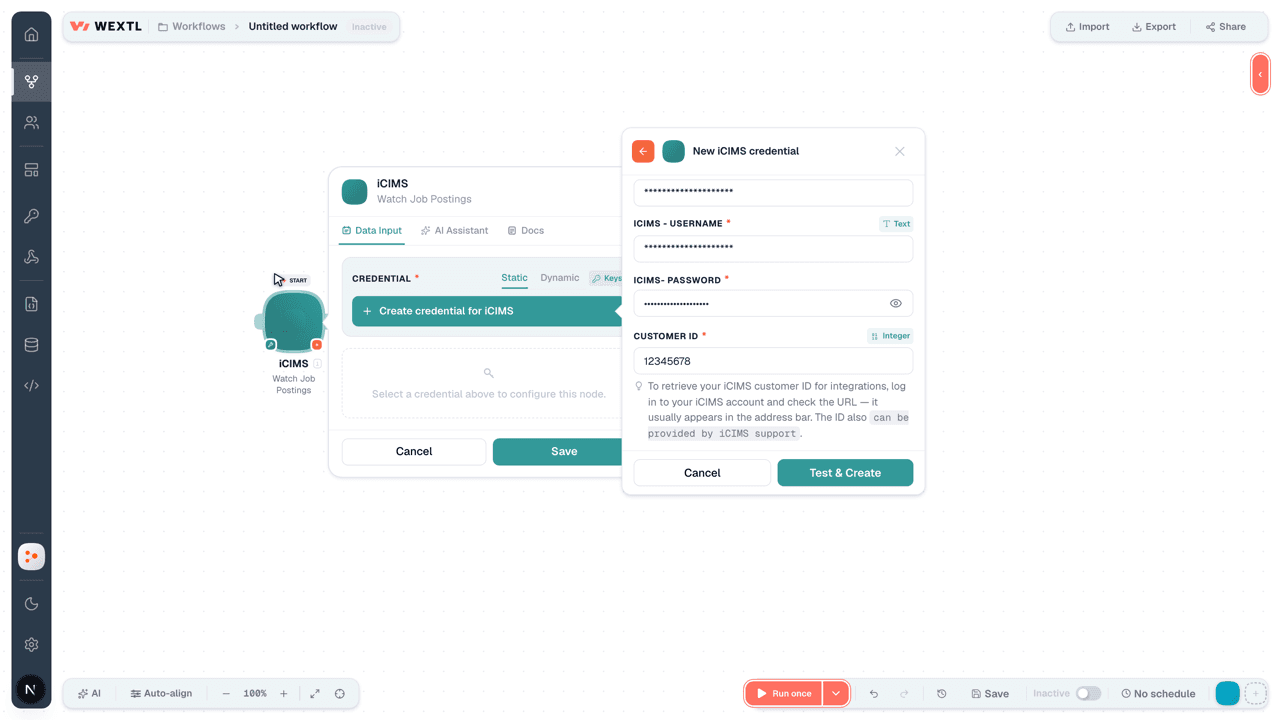
- UsernametextRequired
- iCIMS- PasswordpasswordRequired
- Customer IDintegerRequired
To retrieve your customer ID for integrations, log in to your account and check the URL. It usually appears in the address bar. The ID also
can be provided by iCIMS support.[1]
Connect iCIMS in WEXTL
- Log in to your WEXTL account, add the iCIMS node module to your workflow, and click Create new credential.
- Optional: In the Credential name field, enter a name for the credential.
- Enter the authentication credentials you copied from your iCIMS account, or follow the on-screen instructions to create the credential.
- If prompted, authenticate your account and confirm access.
- If you want to make changes to your credential in the future, follow the steps in Manage credentials →
iCIMS triggers and actions on WEXTL
The list below is a reference of every iCIMS node module the integration supports. You will be able to pick any of them on the workflow canvas while building automations.
Browse every iCIMS node module below. Each one opens to show its input parameters, outputs, and connection requirements.
Watch Job Postings
TriggerEmits each newly created portal post of a job.
| Field | Type |
|---|---|
| Portal URL | url |
| Self | text |
| ID | number |
| Updated date | date |
Watch Jobs
TriggerEmits portal jobs that are new or were updated.
| Field | Type |
|---|---|
| Portal URL | url |
| Self | text |
| ID | number |
| Updated date | date |
Get a Job Post
ActionOne portal post with its link, start date and status.
| Field | Type |
|---|---|
Job IDRequired | choice |
| Field | Type |
|---|---|
| Jobpostid | number |
| Portalurl | url |
| Links | array |
| Startdate | date |
| Status | text |
Get a New Hire Category Profile
ActionFolder, title and links of a hire category.
| Field | Type |
|---|---|
Profile IDRequired | choice |
| Field | Type |
|---|---|
| Folder | object |
| ID | text |
| Value | text |
| Formattedvalue | text |
| Title | text |
| Links | array |
| Externaltitle | text |
Get a Person Profile
ActionContact details and folder of one person.
| Field | Type |
|---|---|
Profile IDRequired | choice |
| Field | Type |
|---|---|
| Firstname | text |
| Lastname | text |
| Folder | object |
| ID | text |
| Value | text |
| text | |
| Phones | array |
| Addresses | array |
Get a Recruiting Workflow
ActionThe profiles, status and source of a workflow.
| Field | Type |
|---|---|
Recruiting Workflow IDRequired | number |
| Field | Type |
|---|---|
| ID | number |
| Baseprofile | object |
| ID | number |
| Value | text |
| Profile | text |
| Associatedprofile | object |
| ID | number |
| Value | text |
| Profile | text |
| Status | object |
| ID | text |
| Value | text |
| Source | text |
| Sourcename | text |
Get a Recruiting Workflow Submittal Log
SearchLog entries recorded for an applicant workflow.
| Field | Type |
|---|---|
Recruiting Workflow IDRequired | number |
| Limit | number |
| Field | Type |
|---|---|
| Updated by | object |
| Profile | text |
| ID | number |
| Value | text |
| Updated date | date |
| Status | object |
| ID | text |
| Formattedvalue | text |
| Value | text |
Get a System ID Using an External ID
ActionFinds the iCIMS system ID for an external ID.
| Field | Type |
|---|---|
Profile TypeRequired | choice |
ValueRequired | number |
| Field | Type |
|---|---|
| ID | number |
Get Job Postings
SearchPortal posts of a single job with dates and status.
| Field | Type |
|---|---|
Job IDRequired | choice |
| Limit | number |
| Field | Type |
|---|---|
| Jobpostid | number |
| Portalurl | url |
| Startdate | date |
| Status | text |
Get Jobs
SearchPortal jobs with their IDs and update dates.
| Field | Type |
|---|---|
| Limit | number |
| Field | Type |
|---|---|
| Portal URL | url |
| Self | text |
| ID | number |
| Updated date | date |
Create a Job Profile
ActionOpens a job with its title, owner and optional location.
| Field | Type |
|---|---|
| Has Folder? | boolean |
Job TitleRequired | text |
Job OwnerRequired | number |
| Job Location | number |
| Hiring Manager | number |
| Field 17236 | text |
Create a New Hire Category Profile
ActionNew hire category with an overview and an owner.
| Field | Type |
|---|---|
| Has Folder? | boolean |
TitleRequired | text |
OverviewRequired | text |
OwnerRequired | number |
| External Title | text |
Create a Person Profile
ActionNew person record with contact details and addresses.
| Field | Type |
|---|---|
| Has Folder? | boolean |
| Last Name | text |
| First Name | text |
| Addresses | array |
| Phones | array |
Create a Recruiting Workflow Entry
ActionRecruiting workflow entry noting its source and status.
| Field | Type |
|---|---|
Base ProfileRequired | number |
Associated ProfileRequired | number |
SourceRequired | text |
StatusRequired | object |
| ID | text |
| Value | text |
Create an Onboard Workflow Entry
ActionAdds an onboard workflow entry that links two profiles.
| Field | Type |
|---|---|
Base ProfileRequired | number |
Associated ProfileRequired | number |
StatusRequired | object |
| ID | text |
Delete a Recruiting Workflow Entry
ActionDeletes an applicant workflow record from iCIMS.
| Field | Type |
|---|---|
Workflow IDRequired | choice |
Make an API Call
universalYour own iCIMS REST API request.
| Field | Type |
|---|---|
URLRequired | text |
MethodRequired | choice |
| Headers | array |
| Header | object |
| Query String | array |
| Parameter | object |
| Body | text |
| Field | Type |
|---|---|
| Body | text |
| Headers | object |
| Status code | number |
Post a Job to a Portal
ActionPublishes a job to a portal for a date range.
| Field | Type |
|---|---|
Job IDRequired | choice |
User IDRequired | number |
Portal URLRequired | url |
Start DateRequired | date |
End DateRequired | date |
Unpost a Job
ActionPulls a posted job from a portal.
| Field | Type |
|---|---|
Job IDRequired | choice |
User IDRequired | number |
Portal URLRequired | url |
Update a New Hire Category Profile
ActionEdits fields of a hire category.
| Field | Type |
|---|---|
Profile IDRequired | choice |
| Has Folder? | boolean |
| Title | text |
| Overview | text |
| Owner | number |
| External Title | text |
Update a Person Profile
ActionEdits the contact details of a person.
| Field | Type |
|---|---|
Profile IDRequired | choice |
| Has Folder? | boolean |
| Last Name | text |
| First Name | text |
| Addresses | array |
| Phones | array |
Update a Recruiting Workflow Entry
ActionEdits the links and status of a workflow entry.
| Field | Type |
|---|---|
Workflow IDRequired | choice |
| Base Profile | number |
| Associated Profile | number |
| Source | text |
| Status | object |
| ID | text |
| Value | text |
Templates
Look for iCIMS templates in the WEXTL template library.
Browse templates →Other HR integrations on WEXTL
 Combo HR[2]HR and workforce platform for hospitality teams covering staff, contracts, and scheduling data.
 DayforceGlobal HCM platform for HR, payroll, time tracking, and workforce management.
 Charlie HRHR admin for team members, leave, salaries, and company records.
 DarwinboxEnterprise HR platform to recruit, onboard and manage payroll and performance.
 ClockItEmployee time tracking and attendance management platform with clock-in/out, leave management, and scheduling.
References
- WEXTL® iCIMS Source Code connector implementation.
- Our users use cases and automations.
- Official API Documentation for iCIMS.
- WEXTL® visual workflow builder data.
Last updated: Aug 10, 2026 05:50
How we write our apps documentation
How we compile these docs: sources, the role of AI, and how we verify.