


Requirements
To use Liveforce on WEXTL you need an active account and OAuth client credentials, granted by signing in with your account.[3]
Get your Liveforce credentials
You’ll be redirected to sign in and approve access — your password is never shared with WEXTL.
- Client IDtextRequired
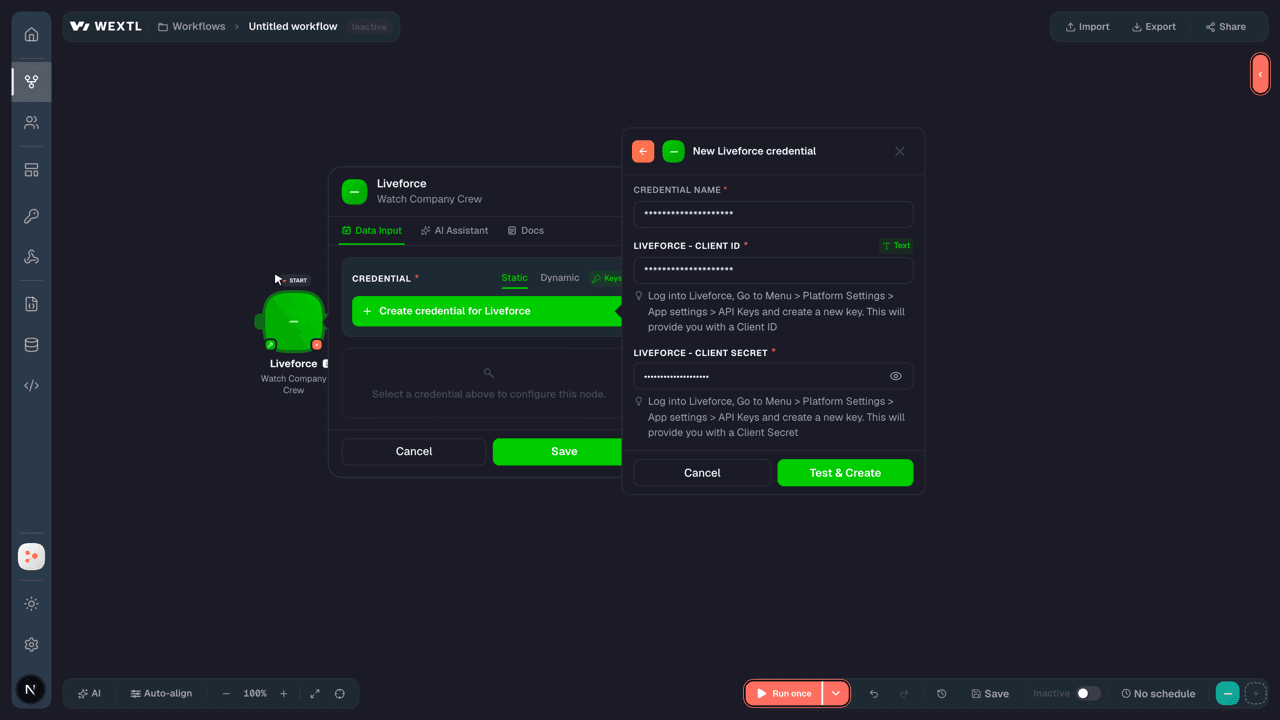
Log into Liveforce, Go to Menu > Platform Settings > App settings > API Keys and create a new key. This will provide you with a Client ID
[1] - Client SecretpasswordRequired
Log into Liveforce, Go to Menu > Platform Settings > App settings > API Keys and create a new key. This will provide you with a Client Secret
[1]
Connect Liveforce in WEXTL
- Log in to your WEXTL account, add the Liveforce node module to your workflow, and click Create new credential.
- Optional: In the Credential name field, enter a name for the credential.
- Enter the authentication credentials you copied from your Liveforce account, or follow the on-screen instructions to create the credential.
- If prompted, authenticate your account and confirm access.
- If you want to make changes to your credential in the future, follow the steps in Manage credentials →

Notes
Credentials are org-scoped; share them with teammates from the Credentials picker on any of its nodes.For detailed information on connecting an application, see Connect an application →
Liveforce node modules
The list below is a reference of every Liveforce node module the integration supports. You will be able to pick any of them on the workflow canvas while building automations.
Open any Liveforce node module below to inspect its input parameters, outputs, and connection requirements.
Watch Company CrewTrigger
| Field | Type |
|---|---|
| Crew ID | number |
| Status | text |
| Title | text |
| First name | text |
| Phone | text |
| Address | text |
| Address 2 | text |
| City | text |
| Post code | text |
| Updated at | date |
Watch Company CrewTrigger
| Field | Type |
|---|---|
| Crew ID | text |
| Title | text |
| First name | text |
| Last name | text |
| Birth day | date |
| Phone | text |
| Avatar | text |
| Gender | text |
| Status | text |
| Status updated at | date |
| Biography | text |
| Experience | text |
| Work capacity | text |
| Employment type | text |
| Cv | text |
| Travel ability | text |
| Disability | text |
| Linked ID URL | text |
| Twitter URL | text |
Watch Company Crew Extended DataTrigger
| Field | Type |
|---|---|
| Crew ID | text |
| Title | text |
| First name | text |
| Last name | text |
| Birth day | date |
| Phone | text |
| Avatar | text |
| Gender | text |
| Status | text |
| Status updated at | date |
| Biography | text |
| Experience | text |
| Work capacity | text |
| Employment type | text |
| Cv | text |
| Travel ability | text |
| Disability | text |
| Linked ID URL | text |
| Twitter URL | text |
Watch Company Crew JobsTrigger
| Field | Type |
|---|---|
| ID | text |
| Job ID | text |
| Role ID | text |
| Crew ID | text |
| Status | text |
| Start | date |
| End | date |
| Salary | number |
| Total | number |
| Expenses | number |
| Subsistence | number |
| Break period | number |
| Break period paid | boolean |
| Fee type | text |
| Board | object |
| ID | text |
| Name | text |
| Color | text |
| Activity | object |
| Application | text |
| Checked in at | date |
| Checked out at | date |
| Check in sent at | date |
| Confirm attendance sent at | date |
| Has confirmed attendance | boolean |
| Confirmed attendance at | boolean |
| Marked as absent by admin at | text |
| Is checked in | boolean |
| Is reserved | boolean |
Watch Company Crew Payment DataTrigger
| Field | Type |
|---|---|
| Crew ID | number |
| Status | text |
| Title | text |
| First name | text |
| Phone | text |
| Bank number | text |
| Sort code | text |
| Tax code | text |
| Address | text |
| Address 2 | text |
| City | text |
| Post code | text |
| Updated at | date |
| Country specific data | object |
| Name | text |
| Code | text |
| Values | array |
Watch Company JobsTrigger
| Field | Type |
|---|---|
| ID | text |
| Title | text |
| Description | text |
| Address | text |
| Date | date |
| Location short name | text |
| Color | text |
| Multi day job ID | text |
| Group ID | text |
| Board | object |
| ID | text |
| Name | text |
| Color | text |
| Roles | array |
| Labels | array |
| Notes | array |
Watch Multi-Day JobsTrigger
| Field | Type |
|---|---|
| ID | text |
| Start date | date |
| End date | date |
| Jobs count | number |
| Jobs ids | array |
| Board | object |
| ID | text |
| Name | text |
| Color | text |
Watch Recently Updated Company CrewTrigger
| Field | Type |
|---|---|
| Crew ID | number |
| Unique ID | text |
| Updated at | date |
Get a Company Crew MemberAction
| Field | Type |
|---|---|
Crew Member IDRequired | choice |
| Field | Type |
|---|---|
| Crew ID | text |
| Title | text |
| First name | text |
| Last name | text |
| Birth day | date |
| Phone | text |
| Avatar | text |
| Gender | text |
| Status | text |
| Status updated at | date |
| Biography | text |
| Experience | text |
| Work capacity | text |
| Employment type | text |
| Cv | text |
| Travel ability | text |
| Disability | text |
| Linked ID URL | text |
| Twitter URL | text |
Get a CrewAction
| Field | Type |
|---|---|
Crew IDRequired | choice |
| Field | Type |
|---|---|
| Crew ID | text |
| Title | text |
| First name | text |
| Last name | text |
| Birth day | date |
| Phone | text |
| Avatar | text |
| Gender | text |
| Status | text |
| Status updated at | date |
| Biography | text |
| Experience | text |
| Work capacity | text |
| Employment type | text |
| Cv | text |
| Travel ability | text |
| Disability | text |
| Linked ID URL | text |
| Twitter URL | text |
Get a Specific Payment ReportAction
| Field | Type |
|---|---|
Payment Report IDRequired | choice |
| Field | Type |
|---|---|
| Created at | date |
| Created by admin | object |
| Avatar | text |
| First name | text |
| ID | number |
| Last name | text |
| From date | date |
| Has employee | boolean |
| Has expenses | boolean |
| Has self employed | boolean |
| ID | number |
| Paid at | date |
| Paid by admin | object |
| Avatar | text |
| First name | text |
| ID | number |
| Last name | text |
| Title | text |
| To date | date |
| Total | text |
Get Publish StatusAction
List Company CrewSearch
List Company Crew Extended DataSearch
| Field | Type |
|---|---|
| Limit | number |
| Field | Type |
|---|---|
| Crew ID | text |
| Title | text |
| First name | text |
| Last name | text |
| Birth day | date |
| Phone | text |
| Avatar | text |
| Gender | text |
| Status | text |
| Status updated at | date |
| Biography | text |
| Experience | text |
| Work capacity | text |
| Employment type | text |
| Cv | text |
| Travel ability | text |
| Disability | text |
| Linked ID URL | text |
| Twitter URL | text |
List Company Crew JobsSearch
| Field | Type |
|---|---|
| Crew Job IDs | choice |
| Crew Job Status | choice |
| From Range | date |
| To Range | date |
| Limit | number |
| Field | Type |
|---|---|
| ID | text |
| Job ID | text |
| Role ID | text |
| Crew ID | text |
| Status | text |
| Start | date |
| End | date |
| Salary | number |
| Total | number |
| Expenses | number |
| Subsistence | number |
| Break period | number |
| Break period paid | boolean |
| Fee type | text |
| Board | object |
| ID | text |
| Name | text |
| Color | text |
| Activity | object |
| Application | text |
| Checked in at | date |
| Checked out at | date |
| Check in sent at | date |
| Confirm attendance sent at | date |
| Has confirmed attendance | boolean |
| Confirmed attendance at | boolean |
| Marked as absent by admin at | text |
| Is checked in | boolean |
| Is reserved | boolean |
List Company Crew Payment DataSearch
List Company JobsSearch
List Crew MembersSearch
| Field | Type |
|---|---|
| Status | choice |
| Employment Type | choice |
| Search | text |
| Updated After | date |
| Limit | number |
| Field | Type |
|---|---|
| Crew ID | text |
| Title | text |
| First name | text |
| Last name | text |
| Birth day | date |
| Phone | text |
| Avatar | text |
| Gender | text |
| Status | text |
| Status updated at | date |
| Biography | text |
| Experience | text |
| Work capacity | text |
| Employment type | text |
| Cv | text |
| Travel ability | text |
| Disability | text |
| Linked ID URL | text |
| Twitter URL | text |
List Multi-Day JobsSearch
List Payment ReportsSearch
| Field | Type |
|---|---|
| Sort | text |
| Order | text |
| Created | date |
| Date To | date |
| Date From | date |
| Status | text |
| Title | text |
| Limit | number |
| Field | Type |
|---|---|
| Created at | date |
| Created by admin | object |
| Avatar | text |
| First name | text |
| ID | number |
| Last name | text |
| From date | date |
| Has employee | boolean |
| Has expenses | boolean |
| Has self employed | boolean |
| ID | number |
| Paid at | date |
| Paid by admin | object |
| Avatar | text |
| First name | text |
| ID | number |
| Last name | text |
| Title | text |
| To date | date |
| Total | text |
List Recently Updated CrewSearch
Create a CrewAction
Create JobsAction
Make an API Calluniversal
Make an API Calluniversal
Publish a Job BoardAction
Update a CrewAction
Update a Crew Profile and Data TypesAction
Update a JobAction
Templates
Look for Liveforce templates in the WEXTL template library.
Browse templates →Explore alternative apps
- Aladtec[2]Workforce scheduling and timekeeping for public safety and healthcare teams.
- BeameryTalent lifecycle CRM for recruiting, talent pooling, campaigns, and workforce planning.
- Breezy HRApplicant tracking and recruiting platform for posting jobs, sourcing candidates, and hiring.
- AchieversEmployee recognition and engagement platform for celebrations, rewards, and newsfeeds.
- BullhornRecruiting ATS and CRM for staffing agencies and talent teams.


References
- WEXTL® Liveforce Source Code connector implementation.
- Our users use cases and automations.
- Official API Documentation for Liveforce.
- WEXTL® visual workflow builder data.
Last updated: Jul 24, 2026 18:12