


Requirements
Connecting Microsoft To-Do takes an active account plus OAuth client credentials, granted by signing in with your account — no other setup is required.[3]
Get your Microsoft To-Do credentials
Microsoft To-Do - Secondary
You’ll be redirected to sign in and approve access — your password is never shared with WEXTL.
- Microsoft - TenantselectRequired
Go to
[1]https://entra.microsoft.comand copy your tennat ID or select any of the following` - Microsoft - Client IDtextRequired
Go to the Microsoft Entra admin center → Entra ID → App registrations and select New registration. → enter a description and expiration → Add, then immediately copy your Client ID
[1] - Microsoft - Client SecretpasswordRequired
Copy you client Secret from the previously created app
[1]
Microsoft To-Do - Primary
You’ll be redirected to sign in and approve access — your password is never shared with WEXTL.
- Microsoft - TenantselectRequired
Go to
[1]https://entra.microsoft.comand copy your tennat ID or select any of the following` - Microsoft - Client IDtextRequired
Register your application in the Microsoft Entra admin center, then copy the Application (client) ID from the app's Overview page
[1] - Microsoft - Client SecretpasswordRequired
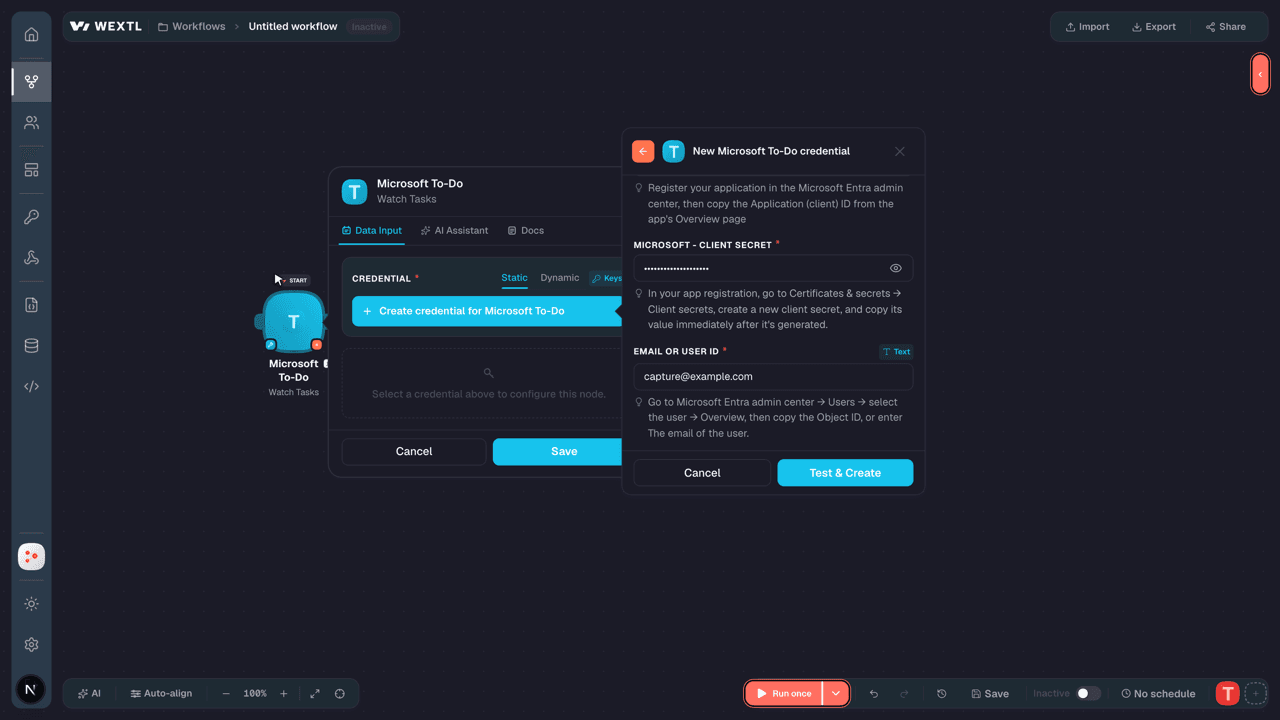
In your app registration, go to Certificates & secrets → Client secrets, create a new client secret, and copy its value immediately after it's generated.
[1] - Email or User IDtextRequired
Go to Microsoft Entra admin center → Users → select the user → Overview, then copy the Object ID, or enter The email of the user.
[1]
Connect Microsoft To-Do in WEXTL
- Log in to your WEXTL account, add the Microsoft To-Do node module to your workflow, and click Create new credential.
- Optional: In the Credential name field, enter a name for the credential.
- Enter the authentication credentials you copied from your Microsoft To-Do account, or follow the on-screen instructions to create the credential.
- If prompted, authenticate your account and confirm access.
- If you want to make changes to your credential in the future, follow the steps in Manage credentials →

Notes
Credentials are org-scoped; share them with teammates from the Credentials picker on any of its nodes.For detailed information on connecting an application, see Connect an application →
Microsoft To-Do node modules
The list below is a reference of every Microsoft To-Do node module the integration supports. You will be able to pick any of them on the workflow canvas while building automations.
Expand any Microsoft To-Do node module below to see exactly what it takes in, what it returns, and what connection it needs.
Watch TasksTrigger
| Field | Type |
|---|---|
| @odata etag | text |
| Importance | text |
| Is reminder on | boolean |
| Status | text |
| Title | text |
| Created date time | date |
| Last modified date time | date |
| Categories | array |
| ID | text |
| Body | object |
| Content | text |
| Content type | text |
| Linked resources | array |
List Checklist ItemsSearch
List Linked ResourcesSearch
List Task AttachmentsSearch
List Task ListsSearch
List TasksSearch
Retrieve a Checklist ItemAction
Retrieve a Linked ResourcesAction
Retrieve a Todo TaskAction
Retrieve a Todo Task FileAction
Retrieve a Todo Task ListAction
Attach a Todo Task FileAction
Create a Checklist ItemAction
Create a Linked ResourcesAction
Create a Todo TaskAction
| Field | Type |
|---|---|
Todo Task List IDRequired | choice |
TitleRequired | text |
BodyRequired | object |
ContentRequired | text |
Content TypeRequired | choice |
| Categories | array |
| Category | text |
| Completed Date Time | object |
Date TimeRequired | date |
Time ZoneRequired | time |
| Due Date Time | object |
Date TimeRequired | date |
Time ZoneRequired | time |
| Importance | choice |
| Is Reminder On | boolean |
| Recurrence | text |
| Reminder Date Time | object |
Date TimeRequired | date |
Time ZoneRequired | time |
| Start Date Time | object |
Date TimeRequired | date |
Time ZoneRequired | time |
| Status | choice |
| Field | Type |
|---|---|
| @odata etag | text |
| Importance | text |
| Is reminder on | boolean |
| Status | text |
| Title | text |
| Created date time | date |
| Last modified date time | date |
| Categories | array |
| ID | text |
| Body | object |
| Content | text |
| Content type | text |
| Linked resources | array |
Create a Todo Task ListAction
Delete a Checklist ItemAction
| Field | Type |
|---|---|
Todo Task List IDRequired | choice |
Delete a Linked ResourcesAction
| Field | Type |
|---|---|
Todo Task List IDRequired | choice |
Delete a Todo TaskAction
| Field | Type |
|---|---|
Todo Task List IDRequired | choice |
Delete a Todo Task FileAction
| Field | Type |
|---|---|
Todo Task List IDRequired | choice |
Delete a Todo Task ListAction
| Field | Type |
|---|---|
Todo Task List IDRequired | choice |
Make an API Calluniversal
Update a Checklist ItemAction
Update a Linked ResourcesAction
Update a Todo TaskAction
| Field | Type |
|---|---|
Todo Task List IDRequired | choice |
| Title | text |
| Body | object |
| Content | text |
| Content Type | choice |
| Categories | array |
| Category | text |
| Completed Date Time | object |
| Date Time | date |
| Time Zone | time |
| Due Date Time | object |
| Date Time | date |
| Time Zone | time |
| Importance | choice |
| Is Reminder On | boolean |
| Recurrence | text |
| Reminder Date Time | object |
| Date Time | date |
| Time Zone | time |
| Start Date Time | object |
| Date Time | date |
| Time Zone | time |
| Status | choice |
| Field | Type |
|---|---|
| @odata etag | text |
| Importance | text |
| Is reminder on | boolean |
| Status | text |
| Title | text |
| Created date time | date |
| Last modified date time | date |
| Categories | array |
| ID | text |
| Body | object |
| Content | text |
| Content type | text |
| Linked resources | array |
Templates
Look for Microsoft To-Do templates in the WEXTL template library.
Browse templates →Explore alternative apps
- Buildern[2]Construction project management for budgets, clients, and job progress.
- Asset PandaFlexible asset tracking and workflow management for equipment, inventory, and audits.
- BigChangeField service management platform for scheduling jobs, technicians, and customer work orders.
- BasecampProject management and team communication for companies and their clients.
- AgencyZoomSales and onboarding platform for insurance agencies, with producer leaderboards and goal tracking.


References
- WEXTL® Microsoft To-Do Source Code connector implementation.
- Our users use cases and automations.
- Official API Documentation for Microsoft To-Do.
- WEXTL® visual workflow builder data.
Last updated: Jul 24, 2026 18:12