


Requirements
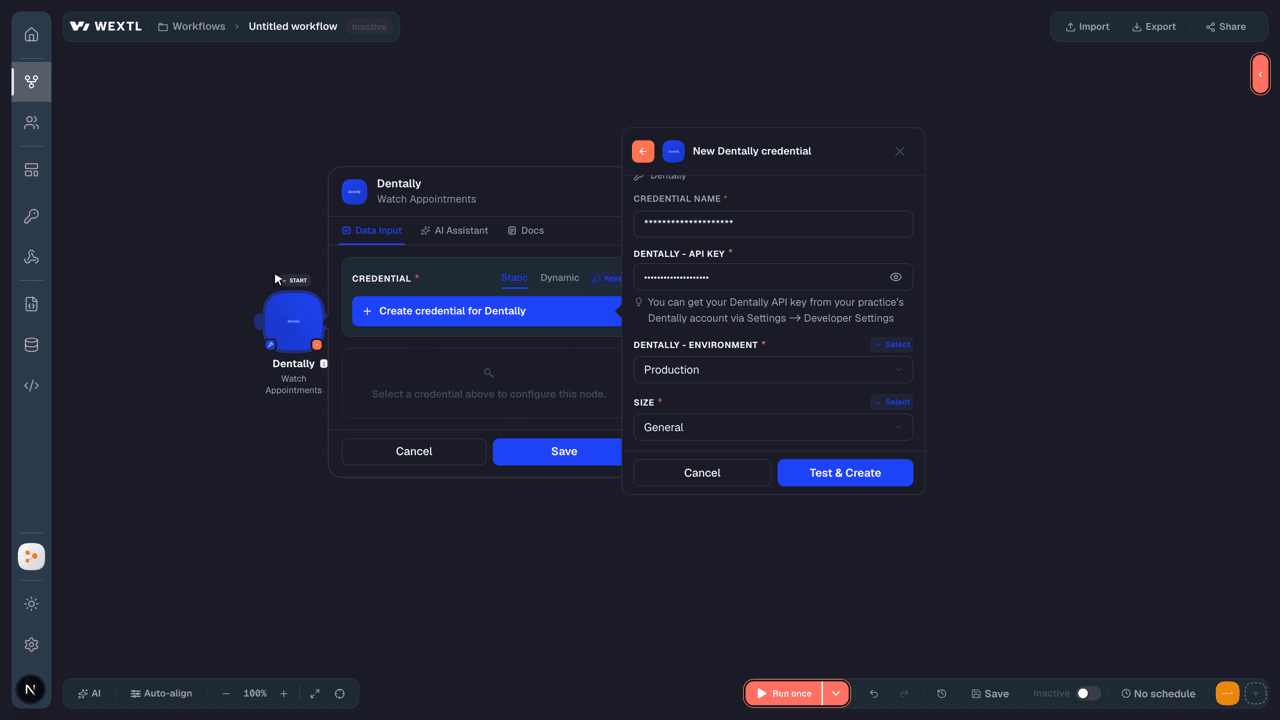
To use Dentally on WEXTL you need an active account and an API access token from your account settings.[3]
Get your Dentally credentials
- API KeypasswordRequired
You can get your API key from your practice’s account via Settings -> Developer Settings
[1] - EnvironmentselectRequired
Connect Dentally in WEXTL
- Log in to your WEXTL account, add the Dentally node module to your workflow, and click Create new credential.Instant triggers use webhooks — click Create a webhook first when adding one, then create the credential.
- Optional: In the Credential name field, enter a name for the credential.
- Enter the authentication credentials you copied from your Dentally account, or follow the on-screen instructions to create the credential.
- If prompted, authenticate your account and confirm access.
- If you want to make changes to your credential in the future, follow the steps in Manage credentials →

Notes
Credentials are org-scoped; share them with teammates from the Credentials picker on any of its nodes.For detailed information on connecting an application, see Connect an application →
Dentally node modules
The list below is a reference of every Dentally node module the integration supports. You will be able to pick any of them on the workflow canvas while building automations.
Open any Dentally node module below to inspect its input parameters, outputs, and connection requirements.
Watch AppointmentsTrigger
| Field | Type |
|---|---|
| ID | number |
| Appointment cancellation reason ID | text |
| Arrived at | date |
| Cancelled at | date |
| Completed at | date |
| Confirmed at | date |
| Did not attend at | date |
| Duration | number |
| Finish time | date |
| In surgery at | text |
| Metadata | object |
| Notes | text |
| Patient name | text |
| Patient ID | number |
| Room ID | text |
| Patient image URL | text |
| Payment plan ID | number |
| Pending at | date |
| Practitioner ID | number |
| Reason | text |
Watch EventsTrigger
| Field | Type |
|---|---|
| User ID | number |
| Email address | |
| Name | text |
| Date created | date |
Watch Invoice ItemsTrigger
| Field | Type |
|---|---|
| ID | text |
| Item price | text |
| Name | text |
| Nhs charge | boolean |
| Quantity | number |
| Total price | text |
| Created at | date |
| Updated at | date |
| Invoice ID | number |
| Practitioner ID | number |
| Sundry ID | text |
| Treatment plan ID | number |
| Treatment plan item ID | number |
| User ID | text |
Watch InvoicesTrigger
| Field | Type |
|---|---|
| ID | number |
| Amount | text |
| Amount outstanding | text |
| Dated on | date |
| Due on | date |
| Footnote | text |
| Nhs amount | text |
| Paid | boolean |
| Paid on | date |
| Payment terms | text |
| Reference | text |
| Sent at | text |
| Status | text |
| Created at | date |
| Updated at | date |
| Account ID | number |
| Patient ID | number |
| Site ID | text |
| User ID | number |
Watch PaymentsTrigger
| Field | Type |
|---|---|
| ID | number |
| Account ID | number |
| Amount | text |
| Amount unexplained | text |
| Dated on | date |
| Deleted | boolean |
| Fully explained | boolean |
| Method | text |
| Patient ID | number |
| Payment plan ID | number |
| Practitioner ID | number |
| Reference | text |
| Site ID | text |
| Status | text |
| Transaction number | text |
| User ID | number |
| Explanations | array |
Watch RoomsTrigger
| Field | Type |
|---|---|
| ID | text |
| Calendar position | text |
| Colour | text |
| Name | text |
| Created at | date |
| Updated at | date |
| Import ID | text |
| Practice ID | number |
| Site ID | text |
Watch Session AppointmentsTrigger
| Field | Type |
|---|---|
| ID | number |
| Appointment cancellation reason ID | text |
| Arrived at | date |
| Cancelled at | date |
| Completed at | date |
| Confirmed at | date |
| Did not attend at | date |
| Duration | number |
| Finish time | date |
| In surgery at | text |
| Metadata | object |
| Notes | text |
| Patient name | text |
| Patient ID | number |
| Room ID | text |
| Patient image URL | text |
| Payment plan ID | number |
| Pending at | date |
| Practitioner ID | number |
| Reason | text |
Watch Treatment AppointmentsTrigger
| Field | Type |
|---|---|
| ID | number |
| Bookable | boolean |
| Completed | boolean |
| Completed at | text |
| Notes | text |
| Position | number |
| Created at | date |
| Updated at | date |
| Appointment ID | text |
| Patient ID | number |
| Treatment plan ID | number |
Watch Treatment PlansTrigger
| Field | Type |
|---|---|
| ID | number |
| Completed | boolean |
| Completed at | date |
| Created at | date |
| End date | date |
| Last completed at | date |
| Nhs completed uda value | text |
| Nhs uda value | text |
| Nickname | text |
| Patient ID | number |
| Practitioner ID | number |
| Private treatment value | text |
| Start date | date |
| Updated at | date |
Watch TreatmentsTrigger
| Field | Type |
|---|---|
| ID | number |
| Active | boolean |
| Code | text |
| Created at | date |
| Description | text |
| Nhs treatment cat | text |
| Nomenclature | text |
| Notes | text |
| Owner | text |
| Patient description | text |
| Patient nomenclature | text |
| Region | text |
| Treatment category ID | number |
| Uda band | number |
| Updated at | date |
Watch UsersTrigger
| Field | Type |
|---|---|
| ID | number |
| Allowed sites | array |
| Created at | date |
| text | |
| First name | text |
| Image URL | text |
| Last login | date |
| Last name | text |
| Middle name | text |
| Mobile phone | text |
| Permission level | number |
| Practice ID | text |
| Role | text |
| Site ID | text |
| Title | text |
| Updated at | date |
Watch Waiting ListsTrigger
| Field | Type |
|---|---|
| ID | text |
| Active | boolean |
| Appointment reasons | array |
| Default appointment duration | number |
| Default appointment reason | text |
| Default notes | text |
| Default status | text |
| Default treatment duration | number |
| Default treatment reason | text |
| Name | text |
| Target appointment days | text |
| Target treatment days | text |
| Created at | date |
| Updated at | date |
| Site ID | text |
Get a PaymentAction
| Field | Type |
|---|---|
Payment IDRequired | choice |
| Field | Type |
|---|---|
| ID | number |
| Account ID | number |
| Amount | text |
| Amount unexplained | text |
| Dated on | date |
| Deleted | boolean |
| Fully explained | boolean |
| Method | text |
| Patient ID | number |
| Payment plan ID | number |
| Practitioner ID | number |
| Reference | text |
| Site ID | text |
| Status | text |
| Transaction number | text |
| User ID | number |
| Explanations | array |
Get a RoomAction
Get a SiteAction
| Field | Type |
|---|---|
Site IDRequired | choice |
| Field | Type |
|---|---|
| ID | text |
| Active | boolean |
| Address line 1 | text |
| Address line 2 | text |
| Default payment plan ID | number |
| Logo URL | text |
| Name | text |
| Nickname | text |
| Phone number | text |
| Postcode | text |
| Practice ID | text |
| Town | text |
| Website | text |
| Opening hours | object |
| Monday | object |
| Tuesday | object |
| Wednesday | object |
| Thursday | object |
| Friday | object |
Get a TreatmentAction
| Field | Type |
|---|---|
Treatment IDRequired | choice |
| Field | Type |
|---|---|
| ID | number |
| Active | boolean |
| Code | text |
| Created at | date |
| Description | text |
| Nhs treatment cat | text |
| Nomenclature | text |
| Notes | text |
| Owner | text |
| Patient description | text |
| Patient nomenclature | text |
| Region | text |
| Treatment category ID | number |
| Uda band | number |
| Updated at | date |
Get a Treatment AppointmentAction
Get a Treatment PlanAction
| Field | Type |
|---|---|
Treatment Plan IDRequired | choice |
| Field | Type |
|---|---|
| ID | number |
| Completed | boolean |
| Completed at | date |
| Created at | date |
| End date | date |
| Last completed at | date |
| Nhs completed uda value | text |
| Nhs uda value | text |
| Nickname | text |
| Patient ID | number |
| Practitioner ID | number |
| Private treatment value | text |
| Start date | date |
| Updated at | date |
Get a UserAction
Get a Waiting ListAction
| Field | Type |
|---|---|
Waiting List IDRequired | choice |
| Field | Type |
|---|---|
| ID | text |
| Active | boolean |
| Appointment reasons | array |
| Default appointment duration | number |
| Default appointment reason | text |
| Default notes | text |
| Default status | text |
| Default treatment duration | number |
| Default treatment reason | text |
| Name | text |
| Target appointment days | text |
| Target treatment days | text |
| Created at | date |
| Updated at | date |
| Site ID | text |
Get an AppointmentAction
| Field | Type |
|---|---|
Appointment IDRequired | choice |
| Field | Type |
|---|---|
| ID | number |
| Appointment cancellation reason ID | text |
| Arrived at | date |
| Cancelled at | date |
| Completed at | date |
| Confirmed at | date |
| Did not attend at | date |
| Duration | number |
| Finish time | date |
| In surgery at | text |
| Metadata | object |
| Notes | text |
| Patient name | text |
| Patient ID | number |
| Room ID | text |
| Patient image URL | text |
| Payment plan ID | number |
| Pending at | date |
| Practitioner ID | number |
| Reason | text |
Get an InvoiceAction
| Field | Type |
|---|---|
Invoice IDRequired | choice |
| Field | Type |
|---|---|
| ID | number |
| Amount | text |
| Amount outstanding | text |
| Dated on | date |
| Due on | date |
| Footnote | text |
| Nhs amount | text |
| Paid | boolean |
| Paid on | date |
| Payment terms | text |
| Reference | text |
| Sent at | text |
| Status | text |
| Created at | date |
| Updated at | date |
| Account ID | number |
| Patient ID | number |
| Site ID | text |
| User ID | number |
| Invoice items | array |
List AppointmentsSearch
| Field | Type |
|---|---|
| On a Date | date |
| Before a Date | date |
| After a Date | date |
| Updated After | date |
| Practitioner ID | choice |
| Patient ID | choice |
| Room ID | choice |
| Site ID | choice |
| State | choice |
| Cancelled | boolean |
| Sort By | text |
| Sort Direction | choice |
| Limit | number |
| Field | Type |
|---|---|
| ID | number |
| Appointment cancellation reason ID | text |
| Arrived at | date |
| Cancelled at | date |
| Completed at | date |
| Confirmed at | date |
| Did not attend at | date |
| Duration | number |
| Finish time | date |
| In surgery at | text |
| Metadata | object |
| Notes | text |
| Patient name | text |
| Patient ID | number |
| Room ID | text |
| Patient image URL | text |
| Payment plan ID | number |
| Pending at | date |
| Practitioner ID | number |
| Reason | text |
List Invoice ItemsSearch
| Field | Type |
|---|---|
| Invoice ID | choice |
| Updated After | date |
| Limit | number |
| Field | Type |
|---|---|
| ID | text |
| Item price | text |
| Name | text |
| Nhs charge | boolean |
| Quantity | number |
| Total price | text |
| Created at | date |
| Updated at | date |
| Invoice ID | number |
| Practitioner ID | number |
| Sundry ID | text |
| Treatment plan ID | number |
| Treatment plan item ID | number |
| User ID | text |
List InvoicesSearch
| Field | Type |
|---|---|
| Site ID | choice |
| Account ID | choice |
| Patient ID | choice |
| Dated On After | date |
| Dated On Before | date |
| Updated After | date |
| Sort By | text |
| Sort Direction | choice |
| Limit | number |
| Field | Type |
|---|---|
| ID | number |
| Amount | text |
| Amount outstanding | text |
| Dated on | date |
| Due on | date |
| Footnote | text |
| Nhs amount | text |
| Paid | boolean |
| Paid on | date |
| Payment terms | text |
| Reference | text |
| Sent at | text |
| Status | text |
| Created at | date |
| Updated at | date |
| Account ID | number |
| Patient ID | number |
| Site ID | text |
| User ID | number |
List PaymentsSearch
| Field | Type |
|---|---|
| Account ID | choice |
| Patient ID | choice |
| Payment Plan ID | choice |
| Practitioner ID | choice |
| Site ID | choice |
| Dated After | date |
| Dated Before | date |
| Sort By | text |
| Sort Direction | choice |
| Limit | number |
| Field | Type |
|---|---|
| ID | number |
| Account ID | number |
| Amount | text |
| Amount unexplained | text |
| Dated on | date |
| Deleted | boolean |
| Fully explained | boolean |
| Method | text |
| Patient ID | number |
| Payment plan ID | number |
| Practitioner ID | number |
| Reference | text |
| Site ID | text |
| Status | text |
| Transaction number | text |
| User ID | number |
| Explanations | array |
List RoomsSearch
List Session AppointmentsSearch
| Field | Type |
|---|---|
| Practitioner ID | choice |
| Room ID | choice |
| On a Date | date |
| Before a Date | date |
| After a Date | date |
| Sort By | text |
| Sort Direction | choice |
| Limit | number |
| Field | Type |
|---|---|
| ID | number |
| Appointment cancellation reason ID | text |
| Arrived at | date |
| Cancelled at | date |
| Completed at | date |
| Confirmed at | date |
| Did not attend at | date |
| Duration | number |
| Finish time | date |
| In surgery at | text |
| Metadata | object |
| Notes | text |
| Patient name | text |
| Patient ID | number |
| Room ID | text |
| Patient image URL | text |
| Payment plan ID | number |
| Pending at | date |
| Practitioner ID | number |
| Reason | text |
List SitesSearch
| Field | Type |
|---|---|
| Sort By | text |
| Sort Direction | choice |
| Limit | number |
| Field | Type |
|---|---|
| ID | text |
| Active | boolean |
| Address line 1 | text |
| Address line 2 | text |
| Default payment plan ID | number |
| Logo URL | text |
| Name | text |
| Nickname | text |
| Phone number | text |
| Postcode | text |
| Practice ID | text |
| Town | text |
| Website | text |
| Opening hours | object |
| Monday | object |
| Tuesday | object |
| Wednesday | object |
| Thursday | object |
| Friday | object |
List Treatment AppointmentsSearch
| Field | Type |
|---|---|
| Patient ID | choice |
| Treatment Plan ID | choice |
| Updated After | date |
| Updated Before | date |
| Created After | date |
| Created Before | date |
| Sort By | choice |
| Sort Direction | choice |
| Limit | number |
| Field | Type |
|---|---|
| ID | number |
| Bookable | boolean |
| Completed | boolean |
| Completed at | text |
| Notes | text |
| Position | number |
| Created at | date |
| Updated at | date |
| Appointment ID | text |
| Patient ID | number |
| Treatment plan ID | number |
List Treatment PlansSearch
| Field | Type |
|---|---|
| Patient ID | choice |
| Practitioner ID | choice |
| Completed | boolean |
| Created After | date |
| Created Before | date |
| IDs | choice |
| Start Date | date |
| Updated Since | date |
| Sort By | choice |
| Sort Direction | choice |
| Limit | number |
| Field | Type |
|---|---|
| ID | number |
| Completed | boolean |
| Completed at | date |
| Created at | date |
| End date | date |
| Last completed at | date |
| Nhs completed uda value | text |
| Nhs uda value | text |
| Nickname | text |
| Patient ID | number |
| Practitioner ID | number |
| Private treatment value | text |
| Start date | date |
| Updated at | date |
List TreatmentsSearch
| Field | Type |
|---|---|
| Active | choice |
| Query | text |
| Treatment Category ID | choice |
| Sort By | choice |
| Sort Direction | choice |
| Limit | number |
| Field | Type |
|---|---|
| ID | number |
| Active | boolean |
| Code | text |
| Created at | date |
| Description | text |
| Nhs treatment cat | text |
| Nomenclature | text |
| Notes | text |
| Owner | text |
| Patient description | text |
| Patient nomenclature | text |
| Region | text |
| Treatment category ID | number |
| Uda band | number |
| Updated at | date |
List UsersSearch
| Field | Type |
|---|---|
| Created After | date |
| Updated After | date |
| Sort By | text |
| Sort Direction | choice |
| Limit | number |
| Field | Type |
|---|---|
| ID | number |
| Allowed sites | array |
| Created at | date |
| text | |
| First name | text |
| Image URL | text |
| Last login | date |
| Last name | text |
| Middle name | text |
| Mobile phone | text |
| Permission level | number |
| Practice ID | text |
| Role | text |
| Site ID | text |
| Title | text |
| Updated at | date |
List Waiting ListsSearch
| Field | Type |
|---|---|
| Site ID | choice |
| Sort By | text |
| Sort Direction | choice |
| Limit | number |
| Field | Type |
|---|---|
| ID | text |
| Active | boolean |
| Appointment reasons | array |
| Default appointment duration | number |
| Default appointment reason | text |
| Default notes | text |
| Default status | text |
| Default treatment duration | number |
| Default treatment reason | text |
| Name | text |
| Target appointment days | text |
| Target treatment days | text |
| Created at | date |
| Updated at | date |
| Site ID | text |
Create a PaymentAction
| Field | Type |
|---|---|
Account IDRequired | choice |
AmountRequired | text |
Dated OnRequired | date |
MethodRequired | choice |
Patient IDRequired | choice |
Payment Plan IDRequired | choice |
| Practitioner ID | choice |
| Site ID | choice |
| Transaction Number | text |
| Field | Type |
|---|---|
| ID | number |
| Account ID | number |
| Amount | text |
| Amount unexplained | text |
| Dated on | date |
| Deleted | boolean |
| Fully explained | boolean |
| Method | text |
| Patient ID | number |
| Payment plan ID | number |
| Practitioner ID | number |
| Reference | text |
| Site ID | text |
| Status | text |
| Transaction number | text |
| User ID | number |
| Explanations | array |
Create an AppointmentAction
| Field | Type |
|---|---|
Start TimeRequired | date |
Finish TimeRequired | date |
Practitioner IDRequired | choice |
ReasonRequired | choice |
| Patient ID | choice |
| State | choice |
| Notes | text |
| Metadata | array |
KeyRequired | text |
| Value | text |
| Force Changes | boolean |
| Field | Type |
|---|---|
| ID | number |
| Appointment cancellation reason ID | text |
| Arrived at | date |
| Cancelled at | date |
| Completed at | date |
| Confirmed at | date |
| Did not attend at | date |
| Duration | number |
| Finish time | date |
| In surgery at | text |
| Metadata | object |
| Notes | text |
| Patient name | text |
| Patient ID | number |
| Room ID | text |
| Patient image URL | text |
| Payment plan ID | number |
| Pending at | date |
| Practitioner ID | number |
| Reason | text |
Delete a PaymentAction
| Field | Type |
|---|---|
Payment IDRequired | choice |
Delete an AppointmentAction
| Field | Type |
|---|---|
Appointment IDRequired | choice |
Make an API Calluniversal
Update a SiteAction
| Field | Type |
|---|---|
Site IDRequired | choice |
| Name | text |
| Nickname | text |
| Address Line 1 | text |
| Address Line 2 | text |
| Postcode | text |
| Town | text |
| Phone Number | text |
| Email Address | |
| Website | url |
| Default Payment Plan ID | choice |
| Field | Type |
|---|---|
| ID | text |
| Active | boolean |
| Address line 1 | text |
| Address line 2 | text |
| Default payment plan ID | number |
| Logo URL | text |
| Name | text |
| Nickname | text |
| Phone number | text |
| Postcode | text |
| Practice ID | text |
| Town | text |
| Website | text |
| Opening hours | object |
| Monday | object |
| Tuesday | object |
| Wednesday | object |
| Thursday | object |
| Friday | object |
Update a UserAction
| Field | Type |
|---|---|
User IDRequired | choice |
| First Name | text |
| Middle Name | text |
| Last Name | text |
| Mobile Phone | text |
| Role | choice |
| Permission Level | number |
| Field | Type |
|---|---|
| ID | number |
| Allowed sites | array |
| Created at | date |
| text | |
| First name | text |
| Image URL | text |
| Last login | date |
| Last name | text |
| Middle name | text |
| Mobile phone | text |
| Permission level | number |
| Practice ID | text |
| Role | text |
| Site ID | text |
| Title | text |
| Updated at | date |
Update an AppointmentAction
| Field | Type |
|---|---|
Appointment IDRequired | choice |
| Start Time | date |
| Finish Time | date |
| Practitioner ID | choice |
| Reason | choice |
| Patient ID | choice |
| State | choice |
| Notes | text |
| Metadata | array |
KeyRequired | text |
| Value | text |
| Force Changes | boolean |
| Field | Type |
|---|---|
| ID | number |
| Appointment cancellation reason ID | text |
| Arrived at | date |
| Cancelled at | date |
| Completed at | date |
| Confirmed at | date |
| Did not attend at | date |
| Duration | number |
| Finish time | date |
| In surgery at | text |
| Metadata | object |
| Notes | text |
| Patient name | text |
| Patient ID | number |
| Room ID | text |
| Patient image URL | text |
| Payment plan ID | number |
| Pending at | date |
| Practitioner ID | number |
| Reason | text |
Templates
Look for Dentally templates in the WEXTL template library.
Browse templates →Explore alternative apps
- EasyPractice[2]Practice management software for clinics to schedule appointments, manage clients, and send invoices.
- ChatwootOpen-source customer engagement platform for shared inboxes, live chat, and support workflows.
- Classe365Student information and school management system for admissions, academics, and administration.
- ClinikoPractice management for healthcare providers — appointments, notes, and billing.
- AlfaDocsPractice management for dental clinics — patients, appointments, and records.


References
- WEXTL® Dentally Source Code connector implementation.
- Our users use cases and automations.
- Official API Documentation for Dentally.
- WEXTL® visual workflow builder data.
Last updated: Jul 23, 2026 22:39