


Requirements
To use Chatling on WEXTL you need an active account and an API access token from your account settings.[3]
Get your Chatling credentials
- API KeypasswordRequired
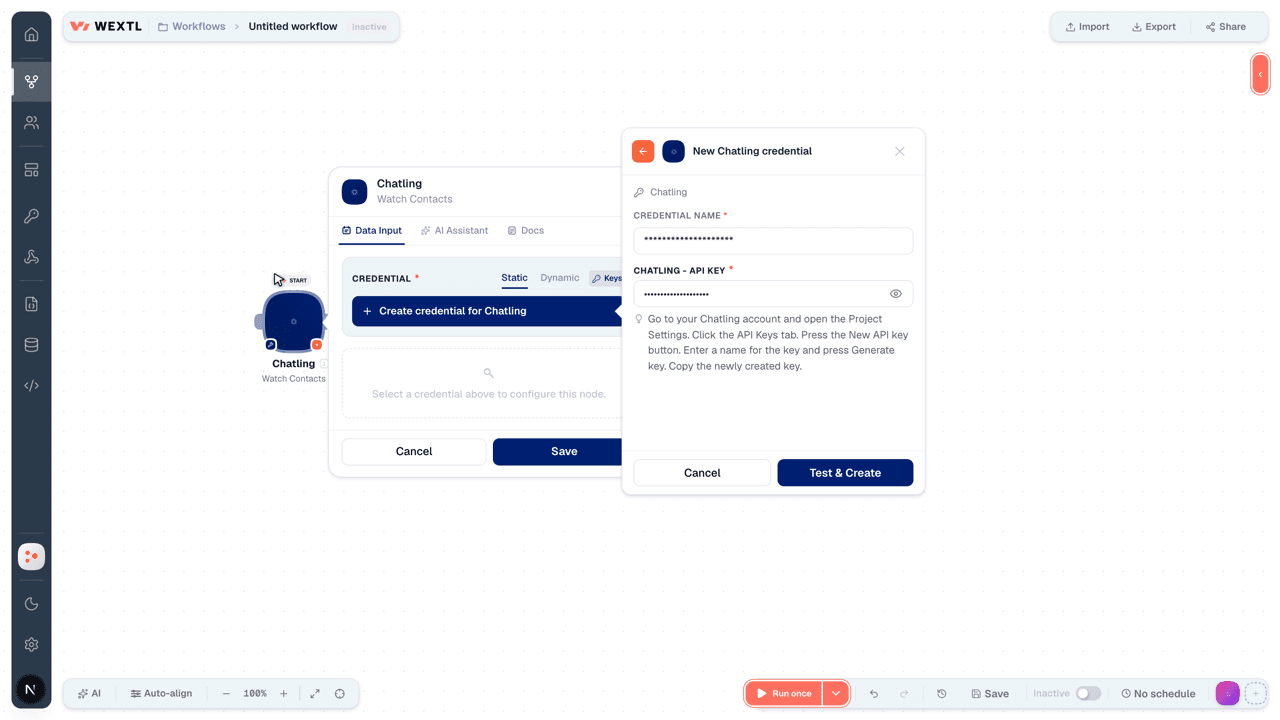
Go to your account and open the Project Settings. Click the API Keys tab. Press the New API key button. Enter a name for the key and press Generate key. Copy the newly created key.
[1]
Connect Chatling in WEXTL
- Log in to your WEXTL account, add the Chatling node module to your workflow, and click Create new credential.
- Optional: In the Credential name field, enter a name for the credential.
- Enter the authentication credentials you copied from your Chatling account, or follow the on-screen instructions to create the credential.
- If prompted, authenticate your account and confirm access.
- If you want to make changes to your credential in the future, follow the steps in Manage credentials →

Notes
Credentials are org-scoped; share them with teammates from the Credentials picker on any of its nodes.For detailed information on connecting an application, see Connect an application →
Chatling node modules
The list below is a reference of every Chatling node module the integration supports. You will be able to pick any of them on the workflow canvas while building automations.
Open any Chatling node module below to inspect its input parameters, outputs, and connection requirements.
Watch ContactsTrigger
| Field | Type |
|---|---|
| ID | text |
| Name | text |
| text | |
| Job Title | text |
| Phone | text |
| Website | text |
| Company | text |
| Created at | date |
Watch Conversation MessagesTrigger
| Field | Type |
|---|---|
| Text | text |
| Role | text |
| Is Ai Kb Response | boolean |
| Data | object |
| Helpful Value | text |
| Sources | array |
| Created at | date |
Get a ContactAction
Get a ConversationAction
List ContactsSearch
List Conversation MessagesSearch
List ConversationsSearch
Delete a ContactAction
| Field | Type |
|---|---|
Chatbot IDRequired | choice |
Templates
Look for Chatling templates in the WEXTL template library.
Browse templates →Explore alternative apps
- Charla[2]AI chatbot and live-chat platform for contacts, articles, and conversations.
- BoldDeskCustomer support help desk platform for managing tickets, live chat, contacts, and approval workflows.
- AlfaDocsPractice management for dental clinics — patients, appointments, and records.
- Denser AIAI chatbots trained on your documents, websites, and knowledge base content.
- DeskproAI-powered help desk for tickets, knowledge base, and customer support workflows.


References
- WEXTL® Chatling Source Code connector implementation.
- Our users use cases and automations.
- Official API Documentation for Chatling.
- WEXTL® visual workflow builder data.
Last updated: Jul 23, 2026 22:39