MyCase integration guide
VerifiedHow to connect MyCase to WEXTL and use its 1 trigger and 31 actions in your workflows. About MyCase: Legal practice management for cases, clients, billing, leads, and law firm workflows.
- 1 trigger
- 13 searches
- 18 actions
- Instant (webhooks)
- Auth: OAuth
AI-assisted documentation16 min read
This documentation is compiled from our integration source code, internal specs for MyCase, its official API documentation and anonymized requests logs we collect from our support team[2].


Requirements
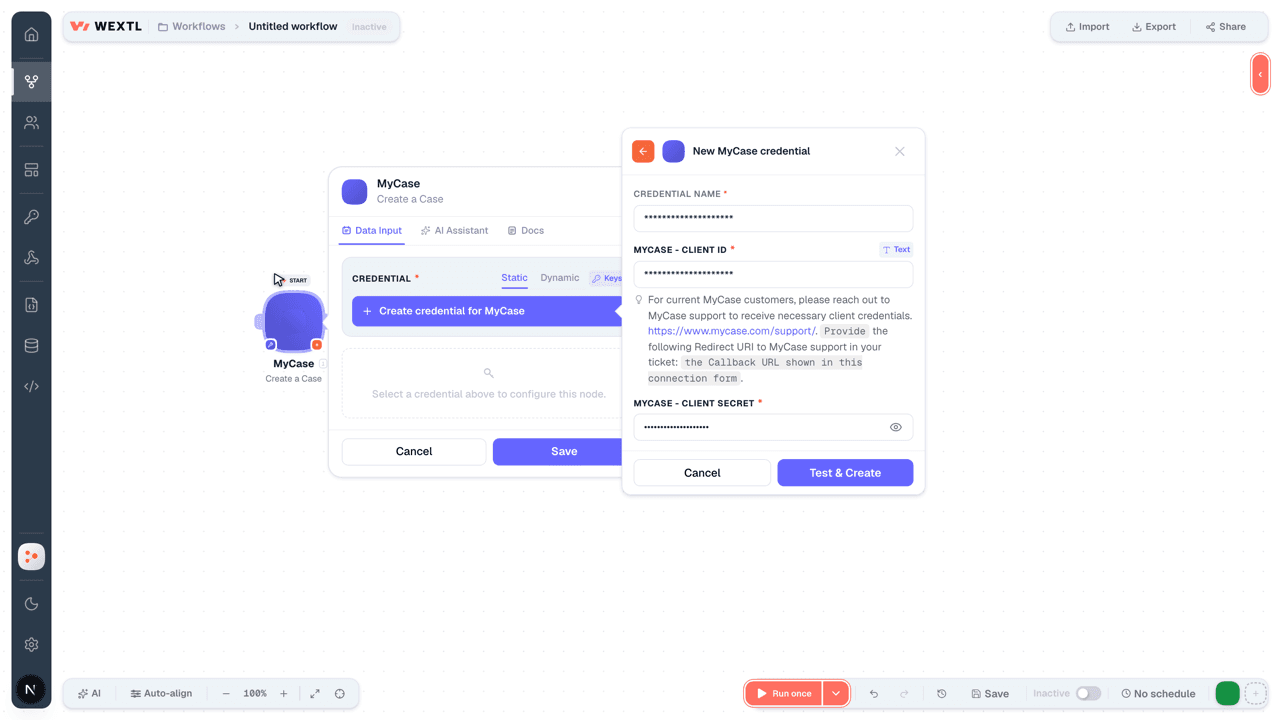
Get your MyCase credentials
You’ll be redirected to sign in and approve access. Your password is never shared with WEXTL.
- Client IDtextRequired
For current MyCase customers, please reach out to MyCase support to receive necessary client credentials. https://www.mycase.com/support/.
Providethe following Redirect URI to MyCase support in your ticket:the Callback URL shown in this connection form.[1] - Client SecretpasswordRequired
Connect MyCase in WEXTL
- Log in to your WEXTL account, add the MyCase node module to your workflow, and click Create new credential.Instant triggers use webhooks. Click Create a webhook first when adding one, then create the credential.
- Optional: In the Credential name field, enter a name for the credential.
- Enter the authentication credentials you copied from your MyCase account, or follow the on-screen instructions to create the credential.
- If prompted, authenticate your account and confirm access.
- If you want to make changes to your credential in the future, follow the steps in Manage credentials →
MyCase triggers and actions on WEXTL
The list below is a reference of every MyCase node module the integration supports. You will be able to pick any of them on the workflow canvas while building automations.
Open any MyCase node module below to inspect its input parameters, outputs, and connection requirements.
Watch Events
TriggerRuns on webhook events from MyCase without polling.
No fields documented.
Get a Case
ActionCore fields of one case, including its stage.
| Field | Type |
|---|---|
Case IDRequired | choice |
| Client Fields | array |
| Custom Field Fields | array |
| Field | Type |
|---|---|
| ID | number |
| Name | text |
| Case Number | text |
| Description | text |
| Opened Date | text |
| Closed Date | text |
| Sol Date | text |
| Practice Area | text |
| Case Stage | text |
| Status | text |
| Outstanding Balance | number |
| Billing Contact | object |
| ID | number |
| Billing Type | text |
| Contacts | text |
| Clients | array |
| Companies | array |
| Staff | array |
| Custom Field Values | array |
| Office | object |
| ID | number |
| Name | text |
| Fax Phone | text |
| Main Phone | text |
| Address | object |
| Updated At | text |
| Created At | text |
| Updated At | date |
1other output field
Get a Client
ActionContact details of a single client.
| Field | Type |
|---|---|
Client IDRequired | choice |
| Field | Type |
|---|---|
| ID | number |
| text | |
| First Name | text |
| Middle Initial | text |
| Middle Name | text |
| Last Name | text |
| Address | object |
| Address 1 | text |
| Address 2 | text |
| City | text |
| State | text |
| Zip Code | text |
| Country | text |
| Cell Phone Number | text |
| Work Phone Number | text |
| Home Phone Number | text |
| Fax Phone Number | text |
| Contact Group | text |
| People Group | object |
| ID | number |
| Notes | text |
| Birthdate | text |
| Archived | boolean |
| Cases | array |
| Custom Field Values | array |
| Updated At | date |
| Created At | date |
Get a Lead
ActionLead profile with birthdate and license data.
| Field | Type |
|---|---|
Lead IDRequired | choice |
| Field | Type |
|---|---|
| ID | number |
| text | |
| First Name | text |
| Middle Initial | text |
| Last Name | text |
| Address | object |
| Address 1 | text |
| Address 2 | text |
| City | text |
| State | text |
| Zip Code | text |
| Country | text |
| Cell Phone Number | text |
| Work Phone Number | text |
| Home Phone Number | text |
| Lead Details | text |
| Birthdate | text |
| Drivers License Number | text |
| Drivers License State | text |
| Status | text |
| Approved | boolean |
| Referral Source | text |
| Referral Source Reference | object |
| ID | number |
| Referred By | object |
| ID | number |
| Custom Field Values | array |
| Updated At | date |
1other output field
Get a Note
ActionContent and links of a single note.
| Field | Type |
|---|---|
Note IDRequired | number |
| Field | Type |
|---|---|
| ID | number |
| Subject | text |
| Note | text |
| Archived | boolean |
| Date | text |
| Client | object |
| ID | number |
| Company | object |
| ID | number |
| Case | object |
| ID | number |
| Created By | object |
| ID | number |
| Updated By | object |
| ID | number |
| Created At | date |
| Updated At | date |
Get an Expense
ActionDetails of a single logged expense.
| Field | Type |
|---|---|
Expense IDRequired | choice |
| Field | Type |
|---|---|
| ID | number |
| Activity Name | text |
| Description | text |
| Billable | boolean |
| Entry Date | text |
| Cost | text |
| Units | text |
| Case | object |
| ID | number |
| Staff | object |
| ID | number |
| Invoices | array |
| Custom Field Values | array |
| Created At | date |
| Updated At | date |
List Cases
SearchCases, optionally narrowed by status or update time.
| Field | Type |
|---|---|
| Filter by Status | choice |
| Filter by Updated After | date |
| Field Client | array |
| Field Custom Field | array |
| Limit | number |
| Field | Type |
|---|---|
| ID | number |
| Name | text |
| Case Number | text |
| Description | text |
| Opened Date | text |
| Closed Date | text |
| Sol Date | text |
| Practice Area | text |
| Case Stage | text |
| Status | text |
| Outstanding Balance | number |
| Billing Contact | object |
| ID | number |
| Billing Type | text |
| Contacts | text |
| Clients | array |
| Companies | array |
| Staff | array |
| Custom Field Values | array |
| Office | object |
| ID | number |
| Name | text |
| Fax Phone | text |
| Main Phone | text |
| Address | object |
| Updated At | text |
| Created At | text |
| Updated At | date |
1other output field
List Cases for a Client
SearchCases tied to one client, with stage and status.
| Field | Type |
|---|---|
Client IDRequired | choice |
| Limit | number |
| Field | Type |
|---|---|
| ID | number |
| Name | text |
| Case Number | text |
| Description | text |
| Opened Date | text |
| Closed Date | text |
| Sol Date | text |
| Practice Area | text |
| Case Stage | text |
| Status | text |
| Outstanding Balance | number |
| Billing Contact | object |
| ID | number |
| Billing Type | text |
| Contacts | text |
| Clients | array |
| Companies | array |
| Staff | array |
| Custom Field Values | array |
| Office | object |
| ID | number |
| Name | text |
| Fax Phone | text |
| Main Phone | text |
| Address | object |
| Updated At | text |
| Created At | text |
| Updated At | date |
1other output field
List Clients
SearchClient records matching contact or recency filters.
| Field | Type |
|---|---|
| Filter by Cell Phone Number | text |
| Filter by Email | |
| Filter by First Name | text |
| Filter by Home Phone Number | text |
| Filter by Last Name | text |
| Filter by Updated After | date |
| Filter by Work Phone Number | text |
| Limit | number |
| Field | Type |
|---|---|
| ID | number |
| text | |
| First Name | text |
| Middle Initial | text |
| Middle Name | text |
| Last Name | text |
| Address | object |
| Address 1 | text |
| Address 2 | text |
| City | text |
| State | text |
| Zip Code | text |
| Country | text |
| Cell Phone Number | text |
| Work Phone Number | text |
| Home Phone Number | text |
| Fax Phone Number | text |
| Contact Group | text |
| People Group | object |
| ID | number |
| Notes | text |
| Birthdate | text |
| Archived | boolean |
| Cases | array |
| Custom Field Values | array |
| Updated At | date |
| Created At | date |
List Expenses
SearchLogged expenses, optionally limited by update time.
| Field | Type |
|---|---|
| Updated After Filter | date |
| Limit | number |
| Field | Type |
|---|---|
| ID | number |
| Activity Name | text |
| Description | text |
| Billable | boolean |
| Entry Date | text |
| Cost | text |
| Units | text |
| Case | object |
| ID | number |
| Staff | object |
| ID | number |
| Invoices | array |
| Custom Field Values | array |
| Created At | date |
| Updated At | date |
List Invoices
SearchInvoices with amounts, due dates and online-payment setting.
| Field | Type |
|---|---|
| Updated After | text |
| Only Allowed Online Payments | boolean |
| Limit | number |
| Field | Type |
|---|---|
| ID | number |
| Invoice Date | text |
| Invoice Number | text |
| Due Date | text |
| Total Amount | number |
| Paid Amount | number |
| Case | object |
| ID | number |
| Bank Account | object |
| Name | text |
| Account Type | text |
| View Url | text |
| Allow Online Payments | boolean |
| Status | text |
| Created At | date |
| Updated At | date |
List Leads
SearchLead records narrowed by contact details and recency.
| Field | Type |
|---|---|
| First Name Filter | text |
| Last Name Filter | text |
| Email Filter | |
| Cell Phone Number Filter | text |
| Home Phone Number Filter | text |
| Work Phone Number Filter | text |
| Updated After Filter | date |
| Limit | number |
| Field | Type |
|---|---|
| ID | number |
| text | |
| First Name | text |
| Middle Initial | text |
| Last Name | text |
| Address | object |
| Address 1 | text |
| Address 2 | text |
| City | text |
| State | text |
| Zip Code | text |
| Country | text |
| Cell Phone Number | text |
| Work Phone Number | text |
| Home Phone Number | text |
| Lead Details | text |
| Birthdate | text |
| Drivers License Number | text |
| Drivers License State | text |
| Status | text |
| Approved | boolean |
| Referral Source | text |
| Referral Source Reference | object |
| ID | number |
| Referred By | object |
| ID | number |
| Custom Field Values | array |
| Updated At | date |
1other output field
List Notes for a Case
SearchNotes written against one case.
| Field | Type |
|---|---|
Case IDRequired | choice |
| Limit | number |
| Field | Type |
|---|---|
| ID | number |
| Subject | text |
| Note | text |
| Archived | boolean |
| Date | text |
| Client | object |
| ID | number |
| Company | object |
| ID | number |
| Case | object |
| ID | number |
| Created By | object |
| ID | number |
| Updated By | object |
| ID | number |
| Created At | date |
| Updated At | date |
List Notes for a Client
SearchNotes saved for a particular client.
| Field | Type |
|---|---|
Client IDRequired | choice |
| Limit | number |
| Field | Type |
|---|---|
| ID | number |
| Subject | text |
| Note | text |
| Archived | boolean |
| Date | text |
| Client | object |
| ID | number |
| Company | object |
| ID | number |
| Case | object |
| ID | number |
| Created By | object |
| ID | number |
| Updated By | object |
| ID | number |
| Created At | date |
| Updated At | date |
Create a Case
ActionNew case with stage, practice area, dates and contacts.
| Field | Type |
|---|---|
NameRequired | text |
| Custom Field Values | array |
| Case Number | text |
| Opened Date | date |
| Case Stage | text |
| Practice Area | text |
| Description | text |
| SOL Date | date |
| Status | choice |
| Outstanding Balance | number |
| Billing Contact | object |
| ID | number |
| Clients | array |
| Companies | array |
| Staff | array |
| Field | Type |
|---|---|
| ID | number |
| Name | text |
| Case Number | text |
| Description | text |
| Opened Date | text |
| Closed Date | text |
| Sol Date | text |
| Practice Area | text |
| Case Stage | text |
| Status | text |
| Outstanding Balance | number |
| Billing Contact | object |
| ID | number |
| Billing Type | text |
| Contacts | text |
| Clients | array |
| Companies | array |
| Staff | array |
| Custom Field Values | array |
| Office | object |
| ID | number |
| Name | text |
| Fax Phone | text |
| Main Phone | text |
| Address | object |
| Updated At | text |
| Created At | text |
| Updated At | date |
1other output field
Create a Client
ActionNew client record with contact details and linked cases.
| Field | Type |
|---|---|
First NameRequired | text |
Last NameRequired | text |
| Custom Field Values | array |
| Middle Name | text |
| Address | object |
| Address Line 1 | text |
| Address Line 2 | text |
| City | text |
| State | text |
| Zip Code | text |
| Country | text |
| Cell Phone Number | text |
| Work Phone Number | text |
| Home Phone Number | text |
| Fax Phone Number | text |
| Birthdate | date |
| Notes | text |
| People Group | object |
| ID | choice |
| Cases | array |
| Field | Type |
|---|---|
| ID | number |
| text | |
| First Name | text |
| Middle Initial | text |
| Middle Name | text |
| Last Name | text |
| Address | object |
| Address 1 | text |
| Address 2 | text |
| City | text |
| State | text |
| Zip Code | text |
| Country | text |
| Cell Phone Number | text |
| Work Phone Number | text |
| Home Phone Number | text |
| Fax Phone Number | text |
| Contact Group | text |
| People Group | object |
| ID | number |
| Notes | text |
| Birthdate | text |
| Archived | boolean |
| Cases | array |
| Custom Field Values | array |
| Updated At | date |
| Created At | date |
Create a Lead
ActionNew lead with contact details and referral information.
| Field | Type |
|---|---|
First NameRequired | text |
Last NameRequired | text |
| Custom Field Values | array |
| Middle Initial | text |
| Address | object |
| Address 1 | text |
| Address 2 | text |
| City | text |
| State | text |
| Zip Code | text |
| Country | text |
| Cell Phone Number | text |
| Work Phone Number | text |
| Home Phone Number | text |
| Lead Details | text |
| Birthdate | date |
| Driver License Number | text |
| Driver License State | text |
| Referral Source Reference | object |
| ID | choice |
| Referred By | object |
| ID | number |
| Field | Type |
|---|---|
| ID | number |
| text | |
| First Name | text |
| Middle Initial | text |
| Last Name | text |
| Address | object |
| Address 1 | text |
| Address 2 | text |
| City | text |
| State | text |
| Zip Code | text |
| Country | text |
| Cell Phone Number | text |
| Work Phone Number | text |
| Home Phone Number | text |
| Lead Details | text |
| Birthdate | text |
| Drivers License Number | text |
| Drivers License State | text |
| Status | text |
| Approved | boolean |
| Referral Source | text |
| Referral Source Reference | object |
| ID | number |
| Referred By | object |
| ID | number |
| Custom Field Values | array |
| Updated At | date |
1other output field
Create a Note for a Case
ActionNote with subject and date added to a case.
| Field | Type |
|---|---|
Case IDRequired | choice |
SubjectRequired | text |
NoteRequired | text |
DateRequired | date |
| Field | Type |
|---|---|
| ID | number |
| Subject | text |
| Note | text |
| Archived | boolean |
| Date | text |
| Client | object |
| ID | number |
| Company | object |
| ID | number |
| Case | object |
| ID | number |
| Created By | object |
| ID | number |
| Updated By | object |
| ID | number |
| Created At | date |
| Updated At | date |
Create a Note for a Client
ActionDated note saved against one client.
| Field | Type |
|---|---|
Client IDRequired | choice |
SubjectRequired | text |
NoteRequired | text |
DateRequired | date |
| Field | Type |
|---|---|
| ID | number |
| Subject | text |
| Note | text |
| Archived | boolean |
| Date | text |
| Client | object |
| ID | number |
| Company | object |
| ID | number |
| Case | object |
| ID | number |
| Created By | object |
| ID | number |
| Updated By | object |
| ID | number |
| Created At | date |
| Updated At | date |
Create a Note for a Company
ActionSubject and body saved against a company.
| Field | Type |
|---|---|
Company IDRequired | choice |
SubjectRequired | text |
NoteRequired | text |
DateRequired | date |
| Field | Type |
|---|---|
| ID | number |
| Subject | text |
| Note | text |
| Archived | boolean |
| Date | text |
| Client | object |
| ID | number |
| Company | object |
| ID | number |
| Case | object |
| ID | number |
| Created By | object |
| ID | number |
| Updated By | object |
| ID | number |
| Created At | date |
| Updated At | date |
Create an Expense
ActionBillable or non-billable expense entry on a case.
| Field | Type |
|---|---|
Activity NameRequired | text |
BillableRequired | boolean |
Entry DateRequired | date |
CostRequired | number |
UnitsRequired | number |
CaseRequired | object |
IDRequired | choice |
| Staff | object |
| ID | choice |
| Description | text |
| Field | Type |
|---|---|
| ID | number |
| Activity Name | text |
| Description | text |
| Billable | boolean |
| Entry Date | text |
| Cost | text |
| Units | text |
| Case | object |
| ID | number |
| Staff | object |
| ID | number |
| Invoices | array |
| Custom Field Values | array |
| Created At | date |
| Updated At | date |
Delete a Case
ActionRemoves one case from MyCase.
| Field | Type |
|---|---|
Case IDRequired | choice |
Delete a Client
ActionDeletes a client entry stored in MyCase.
| Field | Type |
|---|---|
Client IDRequired | choice |
Delete a Note
ActionRemoves a saved note from its record.
| Field | Type |
|---|---|
Note IDRequired | number |
Delete an Expense
ActionDeletes one logged cost entry.
| Field | Type |
|---|---|
Expense IDRequired | choice |
Delete an Invoice
ActionRemoves one bill from MyCase.
| Field | Type |
|---|---|
Invoice IDRequired | choice |
Make an API Call
universalDirect MyCase REST API access for uncovered endpoints.
| Field | Type |
|---|---|
URLRequired | text |
MethodRequired | choice |
| Headers | array |
| Header | object |
| Query String | array |
| Parameter | object |
| Body | text |
| Field | Type |
|---|---|
| Body | text |
| Headers | object |
| Status code | number |
Record a Payment on an Invoice
ActionPayment entry with amount, date and optional source.
| Field | Type |
|---|---|
AmountRequired | number |
DateRequired | date |
| Notes | text |
| Field | Type |
|---|---|
| ID | number |
| Amount | number |
| Notes | text |
| Date | text |
| Invoice | object |
| ID | number |
| Status | text |
| Transaction Type | text |
| Case | object |
| ID | number |
| Account Name | text |
| Attorney | object |
| ID | number |
| Client | object |
| ID | number |
| Invoice Number | text |
| Created At | date |
| Updated At | date |
Update a Case
ActionEdits name, stage, status and other case details.
| Field | Type |
|---|---|
| Case ID | choice |
NameRequired | text |
| Custom Field Values | array |
| Case Number | text |
| Opened Date | date |
| Case Stage | text |
| Practice Area | text |
| Description | text |
| SOL Date | date |
| Status | choice |
| Outstanding Balance | number |
| Billing Contact | object |
| ID | number |
| Clients | array |
| Companies | array |
| Staff | array |
Update a Client
ActionEdits name, contact details and links of a client.
| Field | Type |
|---|---|
| Client ID | choice |
First NameRequired | text |
Last NameRequired | text |
| Custom Field Values | array |
| Middle Name | text |
| Address | object |
| Address Line 1 | text |
| Address Line 2 | text |
| City | text |
| State | text |
| Zip Code | text |
| Country | text |
| Cell Phone Number | text |
| Work Phone Number | text |
| Home Phone Number | text |
| Fax Phone Number | text |
| Birthdate | date |
| Notes | text |
| People Group | object |
| ID | choice |
| Cases | array |
Update a Lead
ActionEdits name, notes and referral source of a lead.
| Field | Type |
|---|---|
Lead IDRequired | choice |
First NameRequired | text |
Last NameRequired | text |
| Custom Field Values | array |
| Middle Initial | text |
| Address | object |
| Address 1 | text |
| Address 2 | text |
| City | text |
| State | text |
| Zip Code | text |
| Country | text |
| Cell Phone Number | text |
| Work Phone Number | text |
| Home Phone Number | text |
| Lead Details | text |
| Birthdate | date |
| Driver License Number | text |
| Driver License State | text |
| Referral Source Reference | object |
| ID | choice |
| Referred By | object |
| ID | number |
Update a Note
ActionRewords or redates a saved note.
| Field | Type |
|---|---|
| Note ID | number |
SubjectRequired | text |
NoteRequired | text |
DateRequired | date |
Templates
Look for MyCase templates in the WEXTL template library.
Browse templates →Other support integrations on WEXTL
 Clio Manage[2]Manage matters, contacts, tasks, billing, documents, and calendars in Clio Manage legal practice management.
 Clio GrowManage contacts, matters, inbox leads, lead sources, and locations in Clio Grow client intake.
 DaySmart VetCloud veterinary practice management for scheduling, records, and client communication.
 HaloPSA and service desk for MSPs to manage tickets, clients, projects, quotes, and assets.
 CharmHealthCloud EHR for patients, appointments, encounters, and clinical records.
References
- WEXTL® MyCase Source Code connector implementation.
- Our users use cases and automations.
- Official API Documentation for MyCase.
- WEXTL® visual workflow builder data.
Last updated: Oct 5, 2026 02:48
How we write our apps documentation
How we compile these docs: sources, the role of AI, and how we verify.