


Requirements
To use Mojo Helpdesk on WEXTL you need an active account and an API access token from your account settings.[3]
Get your Mojo Helpdesk credentials
- Access KeypasswordRequired
Your API access key. Find it in your account profile settings.
[1]
Connect Mojo Helpdesk in WEXTL
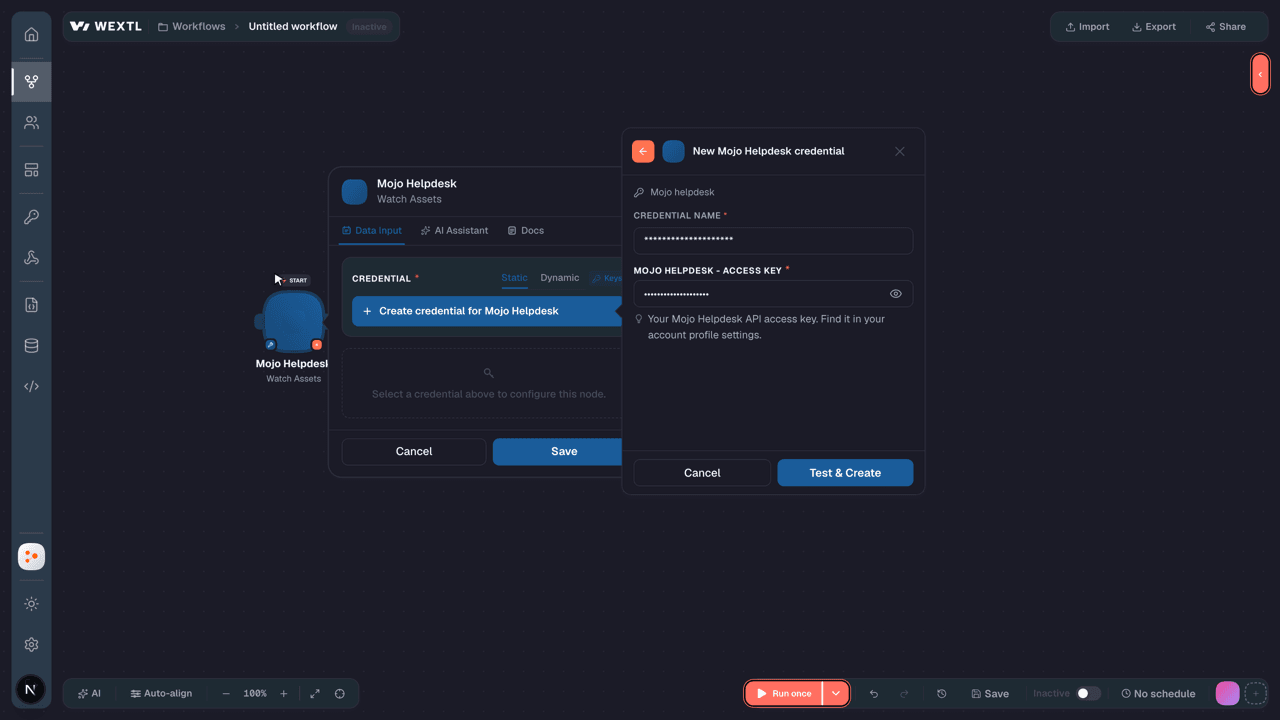
- Log in to your WEXTL account, add the Mojo Helpdesk node module to your workflow, and click Create new credential.
- Optional: In the Credential name field, enter a name for the credential.
- Enter the authentication credentials you copied from your Mojo Helpdesk account, or follow the on-screen instructions to create the credential.
- If prompted, authenticate your account and confirm access.
- If you want to make changes to your credential in the future, follow the steps in Manage credentials →

Notes
Credentials are org-scoped; share them with teammates from the Credentials picker on any of its nodes.For detailed information on connecting an application, see Connect an application →
Mojo Helpdesk node modules
The list below is a reference of every Mojo Helpdesk node module the integration supports. You will be able to pick any of them on the workflow canvas while building automations.
Open any Mojo Helpdesk node module below to inspect its input parameters, outputs, and connection requirements.
Watch AssetsTrigger
Output fields[3]
| Field | Type |
|---|---|
| ID | number |
| Asset tag | text |
| Serial number | text |
| Display name | text |
| Description | text |
| Asset type ID | number |
| Location ID | number |
| Department ID | number |
| Managed by ID | number |
| Used by ID | number |
| Asset status ID | number |
| Notes | text |
| Purchased on | text |
| Cost | number |
| Purchase order number | text |
| Vendor | text |
| Warranty info | text |
| Visibility | text |
| Created at | date |
1other output field
Watch CommentsTrigger
Output fields[3]
| Field | Type |
|---|---|
| ID | number |
| Body | text |
| User ID | number |
| Ticket ID | number |
| Is private | boolean |
| Time spent | number |
| Created on | date |
| Updated on | date |
Watch DepartmentsTrigger
Output fields[3]
| Field | Type |
|---|---|
| ID | number |
| Name | text |
| Description | text |
| Parent ID | text |
| Position | number |
Watch GroupsTrigger
Output fields[3]
| Field | Type |
|---|---|
| ID | number |
| Name | text |
| Primary contact ID | number |
| Billing contact ID | number |
| Support level ID | number |
| Support status ID | number |
| Support start date | text |
| Support end date | text |
| Support info URL | url |
| Address | text |
| Address 2 | text |
| City | text |
| State | text |
| Zip | text |
| Country | text |
| Website URL | url |
| Notes | text |
Watch LocationsTrigger
Output fields[3]
| Field | Type |
|---|---|
| ID | number |
| Name | text |
| Description | text |
| Parent ID | text |
| Position | number |
Watch Staff NotesTrigger
Output fields[3]
| Field | Type |
|---|---|
| ID | number |
| Body | text |
| User ID | number |
| Ticket ID | number |
| Time spent | number |
| Created on | date |
| Updated on | date |
Watch TasksTrigger
Output fields[3]
| Field | Type |
|---|---|
| ID | number |
| Title | text |
| Notes | text |
| Is completed | boolean |
| Ticket ID | number |
| Assigned to ID | number |
| Account ID | number |
| Due on | text |
| Created on | date |
| Updated on | date |
| Position | number |
Watch TicketsTrigger
Output fields[3]
| Field | Type |
|---|---|
| ID | number |
| Title | text |
| Description | text |
| Status ID | number |
| Ticket queue ID | number |
| Ticket form ID | number |
| Ticket type ID | number |
| Priority ID | number |
| User ID | number |
| Assigned to ID | number |
| Company ID | number |
| Created on | date |
| Updated on | date |
| Created from | number |
| Tag ids | array |
Watch UsersTrigger
Output fields[3]
| Field | Type |
|---|---|
| ID | number |
| First name | text |
| Last name | text |
| Full name | text |
| Work phone | text |
| Cell phone | text |
| Home phone | text |
| User notes | text |
| Company ID | number |
| Role ID | number |
| Is active | boolean |
| Can access company tickets | boolean |
| Created on | date |
| Updated on | date |
| Picture URL | url |
Get a DepartmentAction
Get a LocationAction
Get a TagAction
Get a TicketAction
Get a UserAction
Input fields[3]
| Field | Type |
|---|---|
UserRequired | choice |
Output fields[3]
| Field | Type |
|---|---|
| ID | number |
| First name | text |
| Last name | text |
| Full name | text |
| Work phone | text |
| Cell phone | text |
| Home phone | text |
| User notes | text |
| Company ID | number |
| Role ID | number |
| Is active | boolean |
| Can access company tickets | boolean |
| Created on | date |
| Updated on | date |
| Picture URL | url |
Get a User by EmailAction
Input fields[3]
| Field | Type |
|---|---|
EmailRequired |
Output fields[3]
| Field | Type |
|---|---|
| ID | number |
| First name | text |
| Last name | text |
| Full name | text |
| Work phone | text |
| Cell phone | text |
| Home phone | text |
| User notes | text |
| Company ID | number |
| Role ID | number |
| Is active | boolean |
| Can access company tickets | boolean |
| Created on | date |
| Updated on | date |
| Picture URL | url |
Get an AssetAction
Input fields[3]
| Field | Type |
|---|---|
AssetRequired | choice |
Output fields[3]
| Field | Type |
|---|---|
| ID | number |
| Asset tag | text |
| Serial number | text |
| Display name | text |
| Description | text |
| Asset type ID | number |
| Location ID | number |
| Department ID | number |
| Managed by ID | number |
| Used by ID | number |
| Asset status ID | number |
| Notes | text |
| Purchased on | text |
| Cost | number |
| Purchase order number | text |
| Vendor | text |
| Warranty info | text |
| Visibility | text |
| Created at | date |
1other output field
List AssetsSearch
Input fields[3]
| Field | Type |
|---|---|
| Limit | number |
Output fields[3]
| Field | Type |
|---|---|
| ID | number |
| Asset tag | text |
| Serial number | text |
| Display name | text |
| Description | text |
| Asset type ID | number |
| Location ID | number |
| Department ID | number |
| Managed by ID | number |
| Used by ID | number |
| Asset status ID | number |
| Notes | text |
| Purchased on | text |
| Cost | number |
| Purchase order number | text |
| Vendor | text |
| Warranty info | text |
| Visibility | text |
| Created at | date |
1other output field
List AttachmentsSearch
List CommentsSearch
List DepartmentsSearch
List GroupsSearch
Input fields[3]
| Field | Type |
|---|---|
| Limit | number |
Output fields[3]
| Field | Type |
|---|---|
| ID | number |
| Name | text |
| Primary contact ID | number |
| Billing contact ID | number |
| Support level ID | number |
| Support status ID | number |
| Support start date | text |
| Support end date | text |
| Support info URL | url |
| Address | text |
| Address 2 | text |
| City | text |
| State | text |
| Zip | text |
| Country | text |
| Website URL | url |
| Notes | text |
List LocationsSearch
List Staff NotesSearch
List TagsSearch
List TasksSearch
List Ticket QueuesSearch
List TicketsSearch
Input fields[3]
| Field | Type |
|---|---|
| Sort By | choice |
| Sort Order | choice |
| Limit | number |
Output fields[3]
| Field | Type |
|---|---|
| ID | number |
| Title | text |
| Description | text |
| Status ID | number |
| Ticket queue ID | number |
| Ticket form ID | number |
| Ticket type ID | number |
| Priority ID | number |
| User ID | number |
| Assigned to ID | number |
| Company ID | number |
| Created on | date |
| Updated on | date |
| Created from | number |
| Tag ids | array |
List UsersSearch
Search TicketsSearch
Input fields[3]
| Field | Type |
|---|---|
| Query | text |
| Sort Field | choice |
| Sort Direction | choice |
| Limit | number |
Output fields[3]
| Field | Type |
|---|---|
| ID | number |
| Title | text |
| Description | text |
| Status ID | number |
| Ticket queue ID | number |
| Ticket form ID | number |
| Ticket type ID | number |
| Priority ID | number |
| User ID | number |
| Assigned to ID | number |
| Company ID | number |
| Created on | date |
| Updated on | date |
| Created from | number |
| Tag ids | array |
Create a CommentAction
Create a DepartmentAction
Create a GroupAction
Input fields[3]
| Field | Type |
|---|---|
NameRequired | text |
| Primary Contact | choice |
| Billing Contact | choice |
| Support Level ID | number |
| Support Status | choice |
| Support Start Date | date |
| Support End Date | date |
| Support Info URL | url |
| Address | text |
| Address 2 | text |
| City | text |
| State | text |
| ZIP / Postal Code | text |
| Country | text |
| Website URL | url |
| Notes | text |
Output fields[3]
| Field | Type |
|---|---|
| ID | number |
| Name | text |
| Primary contact ID | number |
| Billing contact ID | number |
| Support level ID | number |
| Support status ID | number |
| Support start date | text |
| Support end date | text |
| Support info URL | url |
| Address | text |
| Address 2 | text |
| City | text |
| State | text |
| Zip | text |
| Country | text |
| Website URL | url |
| Notes | text |
Create a LocationAction
Create a Staff NoteAction
Create a TagAction
Create a TaskAction
Create a TicketAction
Input fields[3]
| Field | Type |
|---|---|
TitleRequired | text |
Ticket QueueRequired | choice |
| Description | text |
| Priority | choice |
| Status | choice |
| Ticket Type | choice |
| Ticket Form | choice |
| Assigned To | choice |
| User | choice |
| CC (Emails) | text |
| Asset | choice |
| Asset Tag | text |
| Due On | date |
| Scheduled On | date |
| User Info | object |
EmailRequired |
Output fields[3]
| Field | Type |
|---|---|
| ID | number |
| Title | text |
| Description | text |
| Status ID | number |
| Ticket queue ID | number |
| Ticket form ID | number |
| Ticket type ID | number |
| Priority ID | number |
| User ID | number |
| Assigned to ID | number |
| Company ID | number |
| Created on | date |
| Updated on | date |
| Created from | number |
Create a Ticket QueueAction
Create a UserAction
Input fields[3]
| Field | Type |
|---|---|
EmailRequired | |
| First Name | text |
| Last Name | text |
| Work Phone | text |
| Cell Phone | text |
| Home Phone | text |
| User Notes | text |
| Group | choice |
| Password | secret |
| Is Active | boolean |
| Role | choice |
| Send Welcome Email | choice |
Output fields[3]
| Field | Type |
|---|---|
| ID | number |
| First name | text |
| Last name | text |
| Full name | text |
| Work phone | text |
| Cell phone | text |
| Home phone | text |
| User notes | text |
| Company ID | number |
| Role ID | number |
| Is active | boolean |
| Can access company tickets | boolean |
| Created on | date |
| Updated on | date |
| Picture URL | url |
Create an AssetAction
Input fields[3]
| Field | Type |
|---|---|
Display NameRequired | text |
| Description | text |
| Asset Tag | text |
| Serial Number | text |
| Legacy Reference Number | text |
| Asset Type ID | number |
| Asset Status | choice |
| Location | choice |
| Department | choice |
| Managed By | choice |
| Used By | choice |
| Notes | text |
| Cost | number |
| Purchase Order Number | text |
| Vendor | text |
| Warranty Info | text |
| Purchased On | date |
| Replaced On | date |
| End of Contract On | date |
4other input fields
Output fields[3]
| Field | Type |
|---|---|
| ID | number |
| Asset tag | text |
| Serial number | text |
| Display name | text |
| Description | text |
| Asset type ID | number |
| Location ID | number |
| Department ID | number |
| Managed by ID | number |
| Used by ID | number |
| Asset status ID | number |
| Notes | text |
| Purchased on | text |
| Cost | number |
| Purchase order number | text |
| Vendor | text |
| Warranty info | text |
| Visibility | text |
| Created at | date |
1other output field
Delete a DepartmentAction
Input fields[3]
| Field | Type |
|---|---|
DepartmentRequired | choice |
Delete a GroupAction
Input fields[3]
| Field | Type |
|---|---|
GroupRequired | choice |
Delete a LocationAction
Input fields[3]
| Field | Type |
|---|---|
LocationRequired | choice |
Delete a TagAction
Input fields[3]
| Field | Type |
|---|---|
TagRequired | choice |
Delete a TaskAction
Input fields[3]
| Field | Type |
|---|---|
TicketRequired | choice |
Delete a TicketAction
Input fields[3]
| Field | Type |
|---|---|
TicketRequired | choice |
Delete a Ticket QueueAction
Input fields[3]
| Field | Type |
|---|---|
Ticket QueueRequired | choice |
Delete a UserAction
Input fields[3]
| Field | Type |
|---|---|
UserRequired | choice |
Delete an AssetAction
Input fields[3]
| Field | Type |
|---|---|
AssetRequired | choice |
Delete an AttachmentAction
Input fields[3]
| Field | Type |
|---|---|
TicketRequired | choice |
Download an AttachmentAction
Make an API Calluniversal
Update a DepartmentAction
Update a GroupAction
Input fields[3]
| Field | Type |
|---|---|
GroupRequired | choice |
| Name | text |
| Primary Contact | choice |
| Billing Contact | choice |
| Support Level ID | number |
| Support Status | choice |
| Support Start Date | date |
| Support End Date | date |
| Support Info URL | url |
| Address | text |
| Address 2 | text |
| City | text |
| State | text |
| ZIP / Postal Code | text |
| Country | text |
| Website URL | url |
| Notes | text |
Output fields[3]
| Field | Type |
|---|---|
| ID | number |
| Name | text |
| Primary contact ID | number |
| Billing contact ID | number |
| Support level ID | number |
| Support status ID | number |
| Support start date | text |
| Support end date | text |
| Support info URL | url |
| Address | text |
| Address 2 | text |
| City | text |
| State | text |
| Zip | text |
| Country | text |
| Website URL | url |
| Notes | text |
Update a LocationAction
Update a TagAction
Update a TaskAction
Update a TicketAction
Input fields[3]
| Field | Type |
|---|---|
TicketRequired | choice |
| Title | text |
| Ticket Queue | choice |
| Description | text |
| Priority | choice |
| Status | choice |
| Ticket Type | choice |
| Ticket Form | choice |
| Assigned To | choice |
| User | choice |
| CC (Emails) | text |
| Asset | choice |
| Asset Tag | text |
| Due On | date |
| Scheduled On | date |
Output fields[3]
| Field | Type |
|---|---|
| ID | number |
| Title | text |
| Description | text |
| Status ID | number |
| Ticket queue ID | number |
| Ticket form ID | number |
| Ticket type ID | number |
| Priority ID | number |
| User ID | number |
| Assigned to ID | number |
| Company ID | number |
| Created on | date |
| Updated on | date |
| Created from | number |
Update a Ticket QueueAction
Update a UserAction
Input fields[3]
| Field | Type |
|---|---|
UserRequired | choice |
| First Name | text |
| Last Name | text |
| Work Phone | text |
| Cell Phone | text |
| Home Phone | text |
| User Notes | text |
| Group | choice |
| Password | secret |
| Is Active | boolean |
| Role | choice |
Output fields[3]
| Field | Type |
|---|---|
| ID | number |
| First name | text |
| Last name | text |
| Full name | text |
| Work phone | text |
| Cell phone | text |
| Home phone | text |
| User notes | text |
| Company ID | number |
| Role ID | number |
| Is active | boolean |
| Can access company tickets | boolean |
| Created on | date |
| Updated on | date |
| Picture URL | url |
Update an AssetAction
Input fields[3]
| Field | Type |
|---|---|
AssetRequired | choice |
Display NameRequired | text |
| Description | text |
| Asset Tag | text |
| Serial Number | text |
| Legacy Reference Number | text |
| Asset Type ID | choice |
| Asset Status | choice |
| Location | choice |
| Department | choice |
| Managed By | choice |
| Used By | choice |
| Notes | text |
| Cost | number |
| Purchase Order Number | text |
| Vendor | text |
| Warranty Info | text |
| Purchased On | date |
| Replaced On | date |
5other input fields
Output fields[3]
| Field | Type |
|---|---|
| ID | number |
| Asset tag | text |
| Serial number | text |
| Display name | text |
| Description | text |
| Asset type ID | number |
| Location ID | number |
| Department ID | number |
| Managed by ID | number |
| Used by ID | number |
| Asset status ID | number |
| Notes | text |
| Purchased on | text |
| Cost | number |
| Purchase order number | text |
| Vendor | text |
| Warranty info | text |
| Visibility | text |
| Created at | date |
1other output field
Templates
Look for Mojo Helpdesk templates in the WEXTL template library.
Browse templates →Explore alternative apps
- Deskpro[2]AI-powered help desk for tickets, knowledge base, and customer support workflows.
- BoldDeskCustomer support help desk platform for managing tickets, live chat, contacts, and approval workflows.
- CapacityAI-powered support automation platform that deflects tickets by answering questions, routing requests, and managing knowledge across teams.
- ChatlingAI customer-service agent for chatbot contacts and conversations.
- Classe365Student information and school management system for admissions, academics, and administration.


References
- WEXTL® Mojo Helpdesk Source Code connector implementation.
- Our users use cases and automations.
- Official API Documentation for Mojo Helpdesk.
- WEXTL® visual workflow builder data.
Last updated: Jul 18, 2026 19:12