Movidesk integration guide
VerifiedHow to connect Movidesk to WEXTL and use its 5 triggers and 33 actions in your workflows. About Movidesk: Customer support help desk for tickets, live chat, billing, and call-center workflows.
- 5 triggers
- 11 searches
- 22 actions
- Polling
- Auth: API key
AI-assisted documentation16 min read
This documentation is compiled from our integration source code, internal specs for Movidesk, its official API documentation and anonymized requests logs we collect from our support team[2].


Requirements
Get your Movidesk credentials
- API TokenpasswordRequired
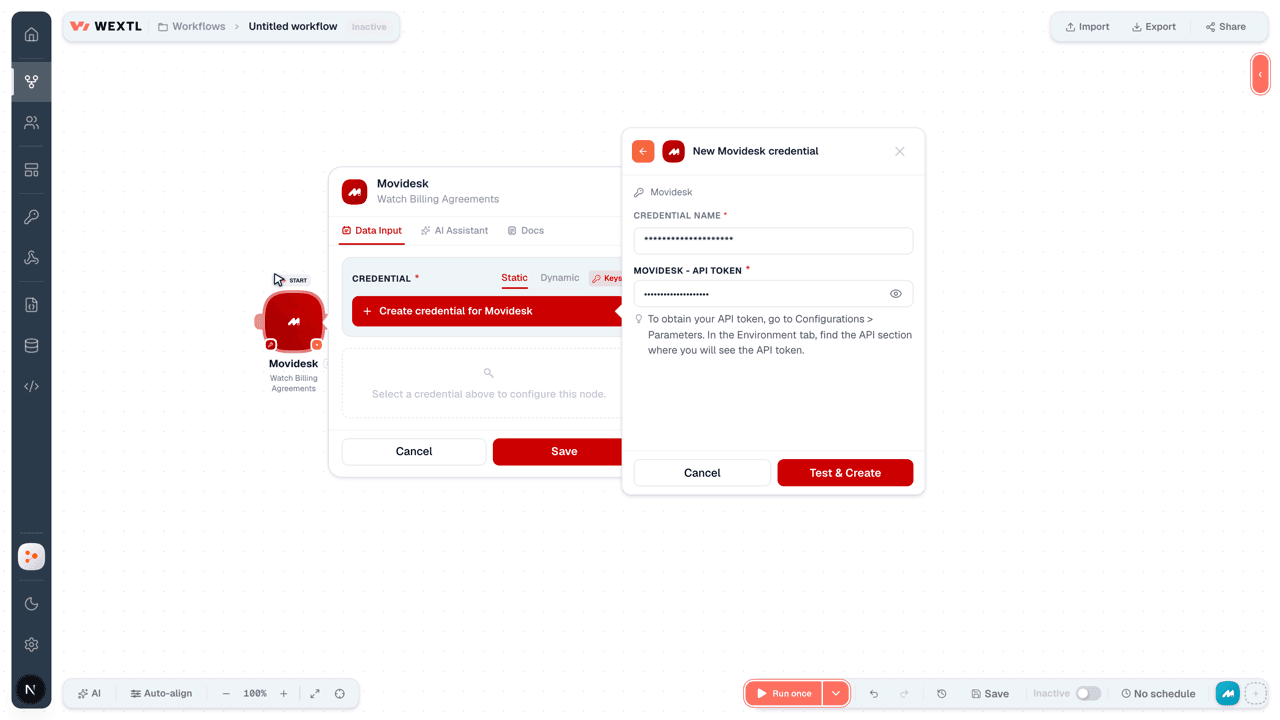
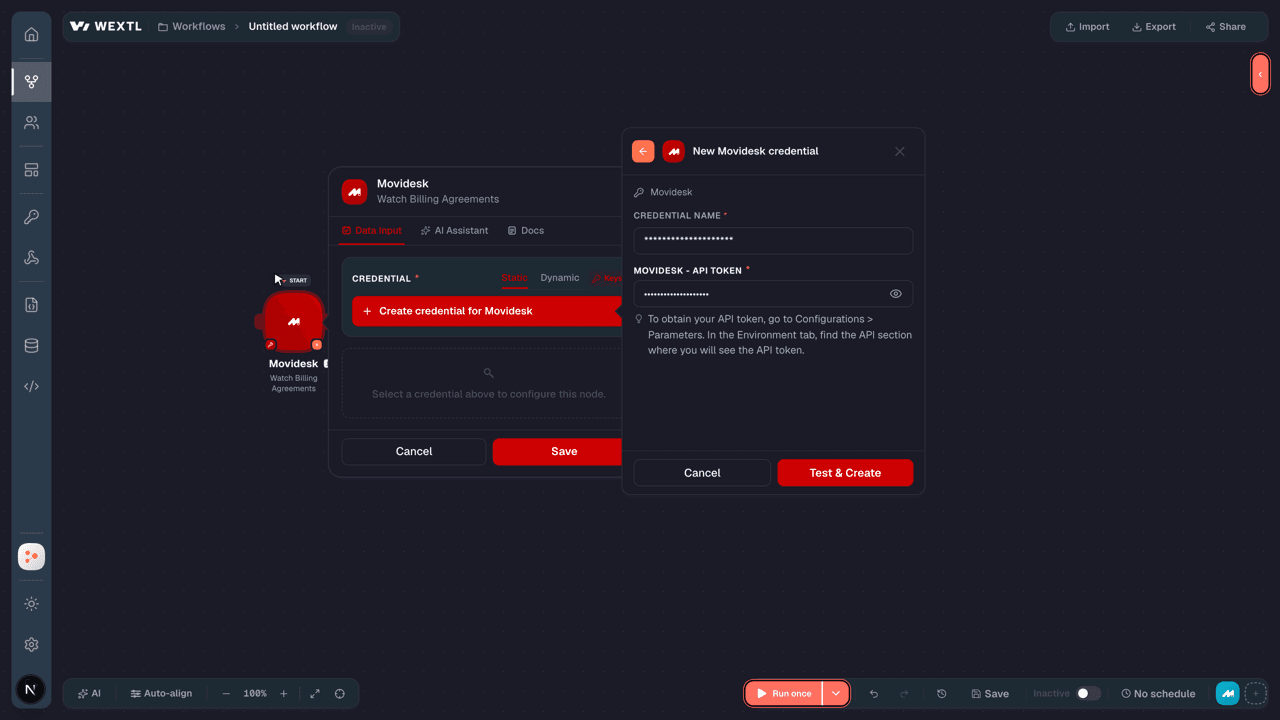
To obtain your API token, go to Configurations > Parameters. In the Environment tab, find the API section where you will see the API token.[1]
Connect Movidesk in WEXTL
- Log in to your WEXTL account, add the Movidesk node module to your workflow, and click Create new credential.
- Optional: In the Credential name field, enter a name for the credential.
- Enter the authentication credentials you copied from your Movidesk account, or follow the on-screen instructions to create the credential.
- If prompted, authenticate your account and confirm access.
- If you want to make changes to your credential in the future, follow the steps in Manage credentials →
Movidesk triggers and actions on WEXTL
The list below is a reference of every Movidesk node module the integration supports. You will be able to pick any of them on the workflow canvas while building automations.
Browse every Movidesk node module below. Each one opens to show its input parameters, outputs, and connection requirements.
Watch Billing Agreements
TriggerScheduled check that runs once per new billing agreement.
| Field | Type |
|---|---|
| ID | number |
| Name | text |
| Is active | boolean |
| Renewal day | number |
| Contracted hours | number |
| Accumulate unused hours | boolean |
| Consumption deadline | number |
| Differentiate hours franchise | boolean |
| Differentiate hours consumption | boolean |
| Base amount | number |
| Email subject | text |
| Email description | text |
| Email account | text |
| Email send day | number |
| Email destinations | array |
| Created on | text |
| Disabled date | text |
| Type activities | array |
| Time type consumption | array |
| Clients | array |
Watch Persons
TriggerScheduled check on people, by created or updated.
| Field | Type |
|---|---|
| ID | text |
| Code reference additional | text |
| Is active | boolean |
| Person type | number |
| Profile type | number |
| Access profile | text |
| Business name | text |
| Corporate name | text |
| Cpf cnpj | text |
| User name | text |
| Password | text |
| Role | text |
| Boss ID | text |
| Boss name | text |
| Classification | text |
| Culture ID | text |
| Time zone ID | text |
| Created date | date |
| Created by | text |
| Changed date | date |
10other output fields
Watch Services
TriggerScheduled check that emits each new catalog service.
| Field | Type |
|---|---|
| ID | number |
| Name | text |
| Description | text |
| Parent service ID | number |
| Service for ticket type | number |
| Is visible | number |
| Allow selection | number |
| Allow finish ticket | boolean |
| Is active | boolean |
| Automation macro | text |
| Default category | text |
| Default urgency | text |
| Allow all categories | boolean |
| Categories | array |
Watch Survey Responses
TriggerRuns the workflow for each survey response found.
| Field | Type |
|---|---|
| ID | text |
| Question ID | text |
| Type | number |
| Client ID | text |
| Ticket ID | number |
| Response date | date |
| Commentary | text |
| Value | number |
Watch Tickets
TriggerScheduled check that emits tickets for a chosen event.
| Field | Type |
|---|---|
| ID | text |
| Type | number |
| Subject | text |
| Category | text |
| Urgency | text |
| Status | text |
| Base status | text |
| Justification | text |
| Origin | number |
| Created date | date |
| Is deleted | boolean |
| Origin email account | text |
| Owner | object |
| ID | text |
| Person type | number |
| Profile type | number |
| Business name | text |
| text | |
| Phone | text |
| Owner team | text |
| Created by | object |
| ID | text |
| Person type | number |
| Profile type | number |
| Business name | text |
| text | |
| Phone | text |
| Service full | array |
| Service first level ID | number |
| Service first level | text |
| Service second level | text |
| Service third level | text |
43other output fields
Get a Billing Agreement
ActionTerms and email settings of one billing agreement.
| Field | Type |
|---|---|
Billing Agreement NameRequired | choice |
| Field | Type |
|---|---|
| ID | number |
| Name | text |
| Is active | boolean |
| Renewal day | number |
| Contracted hours | number |
| Accumulate unused hours | boolean |
| Consumption deadline | number |
| Differentiate hours franchise | boolean |
| Differentiate hours consumption | boolean |
| Base amount | number |
| Email subject | text |
| Email description | text |
| Email account | text |
| Email send day | number |
| Email destinations | array |
| Created on | text |
| Disabled date | text |
| Type activities | array |
| Time type consumption | array |
| Clients | array |
Get a Person
ActionProfile details of one person.
| Field | Type |
|---|---|
Person IDRequired | choice |
| Field | Type |
|---|---|
| ID | text |
| Code reference additional | text |
| Is active | boolean |
| Person type | number |
| Profile type | number |
| Access profile | text |
| Business name | text |
| Corporate name | text |
| Cpf cnpj | text |
| User name | text |
| Password | text |
| Role | text |
| Boss ID | text |
| Boss name | text |
| Classification | text |
| Culture ID | text |
| Time zone ID | text |
| Created date | date |
| Created by | text |
| Changed date | date |
10other output fields
Get a Service
ActionSettings and categories of one catalog service.
| Field | Type |
|---|---|
Service IDRequired | choice |
| Field | Type |
|---|---|
| ID | number |
| Name | text |
| Description | text |
| Parent service ID | number |
| Service for ticket type | number |
| Is visible | number |
| Allow selection | number |
| Allow finish ticket | boolean |
| Is active | boolean |
| Automation macro | text |
| Default category | text |
| Default urgency | text |
| Allow all categories | boolean |
| Categories | array |
Get a Ticket
ActionCore fields of a single ticket.
| Field | Type |
|---|---|
Ticket IDRequired | choice |
| Field | Type |
|---|---|
| ID | text |
| Type | number |
| Subject | text |
| Category | text |
| Urgency | text |
| Status | text |
| Base status | text |
| Justification | text |
| Origin | number |
| Created date | date |
| Is deleted | boolean |
| Origin email account | text |
| Owner | object |
| ID | text |
| Person type | number |
| Profile type | number |
| Business name | text |
| text | |
| Phone | text |
| Owner team | text |
| Created by | object |
| ID | text |
| Person type | number |
| Profile type | number |
| Business name | text |
| text | |
| Phone | text |
| Service full | array |
| Service first level ID | number |
| Service first level | text |
| Service second level | text |
| Service third level | text |
43other output fields
List Billing Agreement Balances
SearchPeriod-by-period hour consumption of an agreement.
| Field | Type |
|---|---|
Billing Agreement NameRequired | choice |
| Limit | number |
| Field | Type |
|---|---|
| ID | number |
| Name | text |
| Base amount | number |
| Exceeded hour amount | number |
| Working time agreement ID | number |
| Renewal day | number |
| Contracted hours | number |
| Differentiate hours franchise | boolean |
| Differentiate hours consumption | boolean |
| Period | date |
| Consumed hours | number |
| Discount | text |
| Discount type | text |
| Time appointments | array |
| Type activities | array |
| Expenses | array |
| Clients | array |
List Billing Agreements
SearchBilling agreements, searchable with an OData query.
| Field | Type |
|---|---|
| Expand | text |
| Filter | text |
| Order By | text |
| Limit | number |
| Field | Type |
|---|---|
| ID | number |
| Name | text |
| Is active | boolean |
| Renewal day | number |
| Contracted hours | number |
| Accumulate unused hours | boolean |
| Consumption deadline | number |
| Differentiate hours franchise | boolean |
| Differentiate hours consumption | boolean |
| Base amount | number |
| Email subject | text |
| Email description | text |
| Email account | text |
| Email send day | number |
| Email destinations | array |
| Created on | text |
| Disabled date | text |
| Type activities | array |
| Time type consumption | array |
| Clients | array |
List Persons
SearchPeople searchable with an OData query.
| Field | Type |
|---|---|
| Expand | text |
| Filter | text |
| Order By | text |
| Limit | number |
| Field | Type |
|---|---|
| ID | text |
| Code reference additional | text |
| Is active | boolean |
| Person type | number |
| Profile type | number |
| Access profile | text |
| Business name | text |
| Corporate name | text |
| Cpf cnpj | text |
| User name | text |
| Password | text |
| Role | text |
| Boss ID | text |
| Boss name | text |
| Classification | text |
| Culture ID | text |
| Time zone ID | text |
| Created date | date |
| Created by | text |
| Changed date | date |
10other output fields
List Services
SearchCatalog services, filterable and sortable with OData.
| Field | Type |
|---|---|
| Filter | text |
| Order By | text |
| Limit | number |
| Field | Type |
|---|---|
| ID | number |
| Name | text |
| Description | text |
| Parent service ID | number |
| Service for ticket type | number |
| Is visible | number |
| Allow selection | number |
| Allow finish ticket | boolean |
| Is active | boolean |
| Automation macro | text |
| Default category | text |
| Default urgency | text |
| Allow all categories | boolean |
| Categories | array |
List Survey Questions
SearchSurvey questions with their languages and active flag.
| Field | Type |
|---|---|
| Question Type | choice |
| Limit | number |
| Field | Type |
|---|---|
| ID | text |
| Languages | array |
| Is active | boolean |
| Type | number |
List Survey Responses
SearchSurvey answers filtered by type, client, ticket or date.
| Field | Type |
|---|---|
| Type | choice |
| Client ID | text |
| Ticket ID | choice |
| Response Date Greater Than | date |
| Response Date Less Than | date |
| Limit | number |
| Field | Type |
|---|---|
| ID | text |
| Question ID | text |
| Type | number |
| Client ID | text |
| Ticket ID | number |
| Response date | date |
| Commentary | text |
| Value | number |
List Tickets
SearchTickets searched with an OData query.
| Field | Type |
|---|---|
| Expand | text |
| Filter | text |
| Order By | text |
| Limit | number |
| Field | Type |
|---|---|
| ID | text |
| Type | number |
| Subject | text |
| Category | text |
| Urgency | text |
| Status | text |
| Base status | text |
| Justification | text |
| Origin | number |
| Created date | date |
| Is deleted | boolean |
| Origin email account | text |
| Owner | object |
| ID | text |
| Person type | number |
| Profile type | number |
| Business name | text |
| text | |
| Phone | text |
| Owner team | text |
| Created by | object |
| ID | text |
| Person type | number |
| Profile type | number |
| Business name | text |
| text | |
| Phone | text |
| Service full | array |
| Service first level ID | number |
| Service first level | text |
| Service second level | text |
| Service third level | text |
43other output fields
Add a File Attachment to a Ticket
ActionUploads files onto a note of a ticket.
| Field | Type |
|---|---|
Ticket IDRequired | choice |
Action IDRequired | number |
File AttachmentsRequired | text |
| Field | Type |
|---|---|
| File name | text |
| Path | text |
| Error | text |
Associate a Person with an Organization
ActionConnects a person to the organizations they belong to.
| Field | Type |
|---|---|
Person IDRequired | choice |
| Is Active | boolean |
| Person Type | choice |
| Profile Type | choice |
| Username | text |
| Password | text |
| Code Reference Additional | text |
| Access Profile | text |
| Corporate Name | text |
| Business Name | text |
| Role | text |
| Boss ID | text |
| Classification | text |
| Culture ID | text |
| Time Zone ID | text |
| Authenticate On | text |
| Observations | text |
| Addresses | array |
| Contacts | array |
| Emails | array |
3other input fields
Create a Billing Agreement
ActionNew billing agreement with hour rates and customers.
| Field | Type |
|---|---|
NameRequired | text |
Renewal DayRequired | number |
Type ActivitiesRequired | array |
ClientsRequired | array |
| Email Subject | text |
| Email Description | text |
| Email Account | text |
| Email Send Day | number |
| Email Destinations | array |
| Is Active | boolean |
| Differentiate Hours Franchise | boolean |
| Differentiate Hours Consumption | boolean |
| Accumulate Unused Hours | boolean |
| Contracted Hours | number |
| Consumption Deadline | number |
| Base Amount | number |
| Time Type Consumption | array |
| Field | Type |
|---|---|
| ID | number |
| Name | text |
| Is active | boolean |
| Renewal day | number |
| Contracted hours | number |
| Accumulate unused hours | boolean |
| Consumption deadline | number |
| Differentiate hours franchise | boolean |
| Differentiate hours consumption | boolean |
| Base amount | number |
| Email subject | text |
| Email description | text |
| Email account | text |
| Email send day | number |
| Email destinations | array |
| Created on | text |
| Disabled date | text |
| Type activities | array |
| Time type consumption | array |
| Clients | array |
Create a Person
ActionNew person with a type, profile and contact entries.
| Field | Type |
|---|---|
Is ActiveRequired | boolean |
Person TypeRequired | choice |
Profile TypeRequired | choice |
UsernameRequired | text |
PasswordRequired | text |
| Code Reference Additional | text |
| ID | text |
| Access Profile | text |
| Corporate Name | text |
| Business Name | text |
| Role | text |
| Boss ID | text |
| Classification | text |
| Culture ID | text |
| Time Zone ID | text |
| Authenticate On | text |
| Observations | text |
| Addresses | array |
| Contacts | array |
| Emails | array |
3other input fields
| Field | Type |
|---|---|
| ID | text |
| Code reference additional | text |
| Is active | boolean |
| Person type | number |
| Profile type | number |
| Access profile | text |
| Business name | text |
| Corporate name | text |
| Cpf cnpj | text |
| User name | text |
| Password | text |
| Role | text |
| Boss ID | text |
| Boss name | text |
| Classification | text |
| Culture ID | text |
| Time zone ID | text |
| Created date | date |
| Created by | text |
| Changed date | date |
10other output fields
Create a Service
ActionCatalog service with visibility and ticket rules.
| Field | Type |
|---|---|
Service NameRequired | text |
Service For Ticket TypeRequired | choice |
Is VisibleRequired | choice |
Allow SelectionRequired | choice |
Allow Finish TicketRequired | boolean |
Is ActiveRequired | boolean |
Allow All CategoriesRequired | boolean |
| Categories | array |
| Category | text |
| Service Description | text |
| Parent Service ID | choice |
| Automation Macro | text |
| Default Category | text |
| Default Urgency | text |
| Field | Type |
|---|---|
| ID | text |
Create a Ticket
ActionNew support ticket with subject, category and requesters.
| Field | Type |
|---|---|
Ticket TypeRequired | choice |
| Ticket Subject | text |
| Ticket Category | text |
| Ticket Priority | text |
| Ticket Status | text |
| Ticket Status Reason | text |
| Assigned Agent | object |
| Person ID | choice |
| Assigned Agent Team | text |
| Ticket Creator | object |
| Person ID | choice |
| Service ID | choice |
| CC Email Addresses | text |
| Requesters | array |
| Ticket Notes | array |
| Field | Type |
|---|---|
| ID | text |
| Type | number |
| Subject | text |
| Category | text |
| Urgency | text |
| Status | text |
| Base status | text |
| Justification | text |
| Origin | number |
| Created date | date |
| Is deleted | boolean |
| Origin email account | text |
| Owner | object |
| ID | text |
| Person type | number |
| Profile type | number |
| Business name | text |
| text | |
| Phone | text |
| Owner team | text |
| Created by | object |
| ID | text |
| Person type | number |
| Profile type | number |
| Business name | text |
| text | |
| Phone | text |
| Service full | array |
| Service first level ID | number |
| Service first level | text |
| Service second level | text |
| Service third level | text |
43other output fields
Create an Abandoned Call Notification
ActionMarks an earlier reported call as abandoned.
| Field | Type |
|---|---|
IDRequired | text |
Canceled DateRequired | date |
Delete a Billing Agreement
ActionDeletes an hour-based contract record in Movidesk.
| Field | Type |
|---|---|
Billing Agreement NameRequired | choice |
Delete a Person
ActionRemoves an agent, customer, company or department.
| Field | Type |
|---|---|
Person IDRequired | choice |
Delete a Service
ActionRemoves a catalog service entry.
| Field | Type |
|---|---|
Service IDRequired | choice |
Make an API Call
universalCustom Movidesk REST API request.
| Field | Type |
|---|---|
URLRequired | text |
MethodRequired | choice |
| Headers | array |
| Header | object |
| Query String | array |
| Parameter | object |
| Body | text |
| Field | Type |
|---|---|
| Body | text |
| Headers | object |
| Status code | number |
Notify Abandoned Call
ActionSingle-request report of a queued call the caller abandoned.
| Field | Type |
|---|---|
Queue IDRequired | number |
Client NumberRequired | text |
Call IDRequired | text |
Branch LineRequired | text |
| Call Date | date |
| Canceled Date | date |
Notify Call End
ActionEnds a call and attaches the recording link.
| Field | Type |
|---|---|
Call IDRequired | text |
LinkRequired | url |
Completed DateRequired | date |
Notify Call Ended
ActionCloses out a reported call with its end time.
| Field | Type |
|---|---|
IDRequired | text |
LinkRequired | url |
Completed DateRequired | date |
Notify Call Transfer to Agent
ActionMarks a call as handed to an agent extension.
| Field | Type |
|---|---|
IDRequired | text |
Branch LineRequired | text |
Transfer DateRequired | date |
Notify Call Transferred to an Agent
ActionSingle-request report of a call received and transferred.
| Field | Type |
|---|---|
Queue IDRequired | number |
Client NumberRequired | text |
Call IDRequired | text |
Branch LineRequired | text |
| Call Date | date |
| Transfer Date | date |
Notify Incoming Call
ActionReports a new call arriving in a queue.
| Field | Type |
|---|---|
Queue IDRequired | number |
Client NumberRequired | text |
IDRequired | text |
Call DateRequired | date |
Notify Missed Calls
ActionReports a missed call, with its voice message link.
| Field | Type |
|---|---|
IDRequired | text |
LinkRequired | url |
Completed DateRequired | date |
Update a Billing Agreement
ActionChanges renewal day, rates, customers or report email.
| Field | Type |
|---|---|
Billing Agreement NameRequired | choice |
| Renewal Day | number |
| Type Activities | array |
| Clients | array |
| Email Subject | text |
| Email Description | text |
| Email Account | text |
| Email Send Day | number |
| Email Destinations | array |
| Is Active | boolean |
| Differentiate Hours Franchise | boolean |
| Differentiate Hours Consumption | boolean |
| Accumulate Unused Hours | boolean |
| Contracted Hours | number |
| Consumption Deadline | number |
| Base Amount | number |
| Time Type Consumption | array |
Update a Person
ActionChanges status, role and contact details of a person.
| Field | Type |
|---|---|
Person IDRequired | choice |
| Is Active | boolean |
| Person Type | choice |
| Profile Type | choice |
| Username | text |
| Password | text |
| Code Reference Additional | text |
| Access Profile | text |
| Corporate Name | text |
| Business Name | text |
| Role | text |
| Boss ID | text |
| Classification | text |
| Culture ID | text |
| Time Zone ID | text |
| Authenticate On | text |
| Observations | text |
| Addresses | array |
| Contacts | array |
| Emails | array |
3other input fields
Update a Service
ActionChanges visibility, defaults and macro of a catalog service.
| Field | Type |
|---|---|
Service IDRequired | choice |
| Service Name | text |
| Service For Ticket Type | choice |
| Is Visible | choice |
| Allow Selection | choice |
| Allow Finish Ticket | boolean |
| Is Active | boolean |
| Allow All Categories | boolean |
| Categories | array |
| Category | text |
| Service Description | text |
| Parent Service ID | choice |
| Automation Macro | text |
| Default Category | text |
| Default Urgency | text |
Update a Ticket
ActionChanges status, priority, category, owner or notes of a ticket.
| Field | Type |
|---|---|
Ticket IDRequired | choice |
| Ticket Type | choice |
| Ticket Subject | text |
| Ticket Category | text |
| Ticket Priority | text |
| Ticket Status | text |
| Ticket Status Reason | text |
| Assigned Agent | object |
| Person ID | choice |
| Assigned Agent Team | text |
| Ticket Creator | object |
| Person ID | choice |
| Service ID | choice |
| CC Email Addresses | text |
| Requesters | array |
| Ticket Notes | array |
Templates
Look for Movidesk templates in the WEXTL template library.
Browse templates →Other support integrations on WEXTL
 BoldDesk[2]Customer support help desk platform for managing tickets, live chat, contacts, and approval workflows.
 GorgiasE-commerce help desk for tickets, customers, voice calls, and support automation.
 DeskproAI-powered help desk for tickets, knowledge base, and customer support workflows.
 ClinikoPractice management for healthcare providers, with appointments, notes and billing.
 eDeskE-commerce help desk for unifying marketplace messages, tickets, and order support workflows.
References
- WEXTL® Movidesk Source Code connector implementation.
- Our users use cases and automations.
- Official API Documentation for Movidesk.
- WEXTL® visual workflow builder data.
Last updated: Aug 14, 2026 16:27
How we write our apps documentation
How we compile these docs: sources, the role of AI, and how we verify.